Cycling through all six. Tap any point to stop.
Measured on six things
Convert EPUB eBooks to PDF, DOCX, HTML, images & more on ...
Growth
44Real problem (EPUB conversion), but Calibre does it free with batch support, and the site names no segment it serves better. Corrupted-file recovery and preview are nice, not a wedge.
Screenshots
1 / 3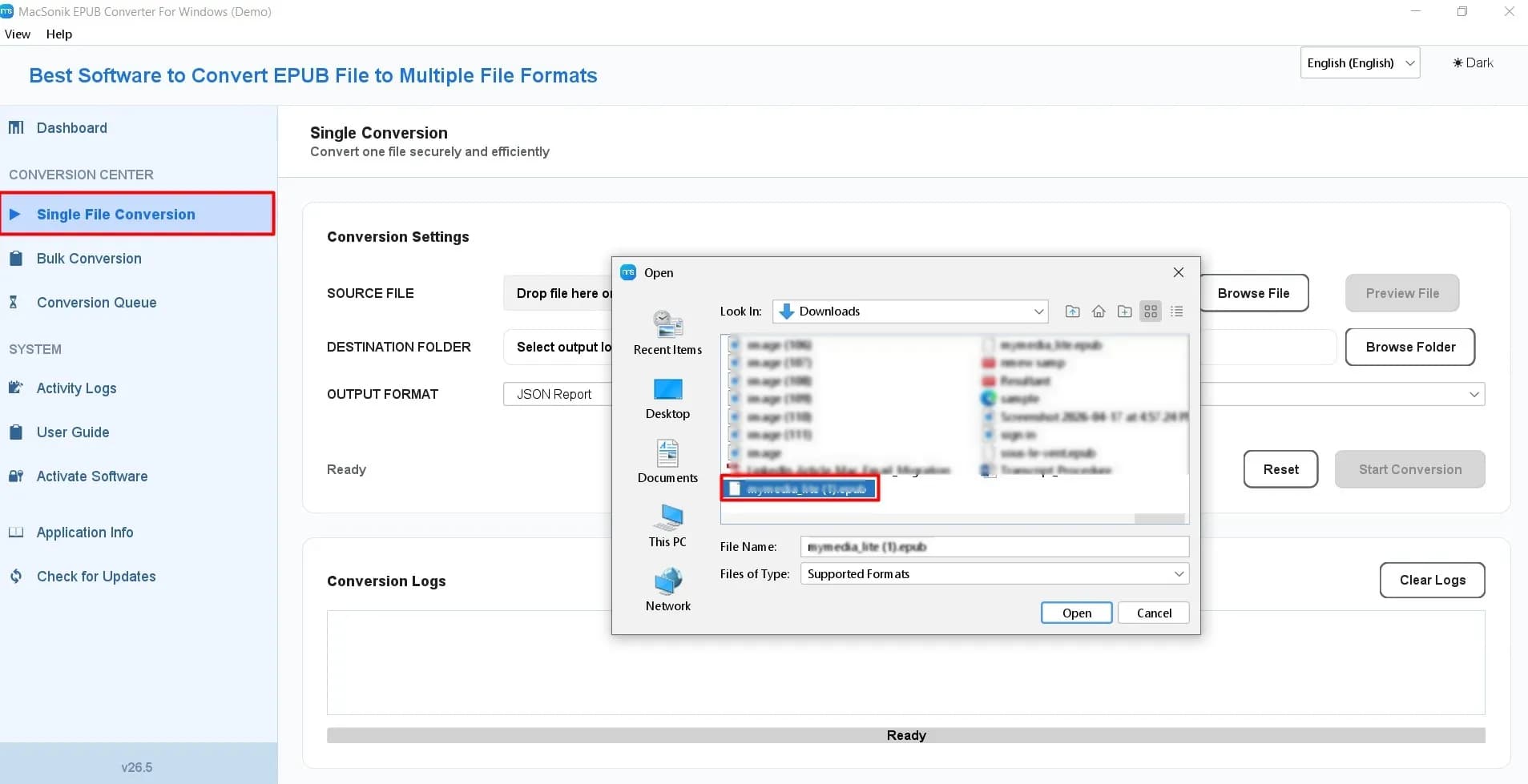
About this app
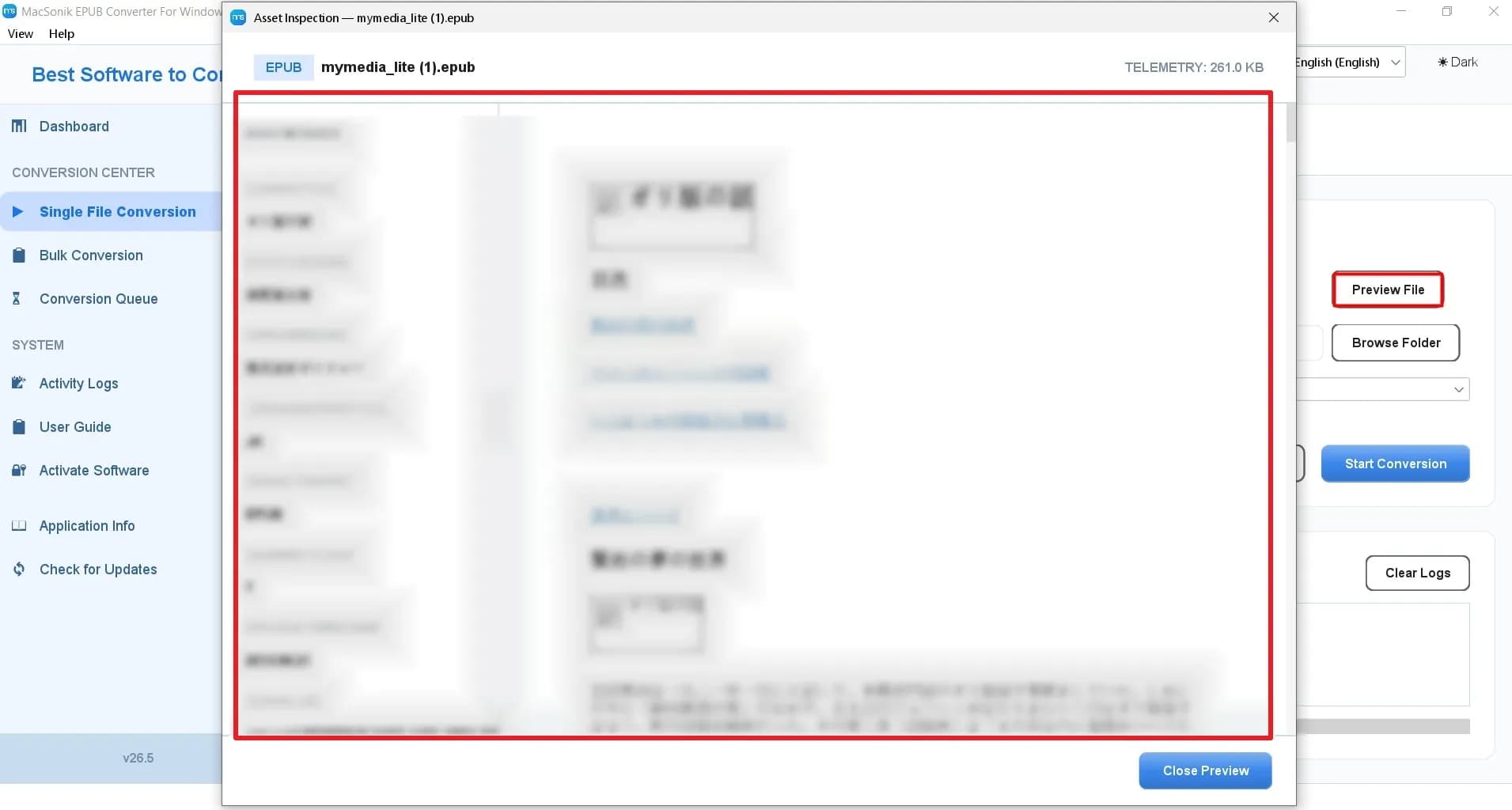
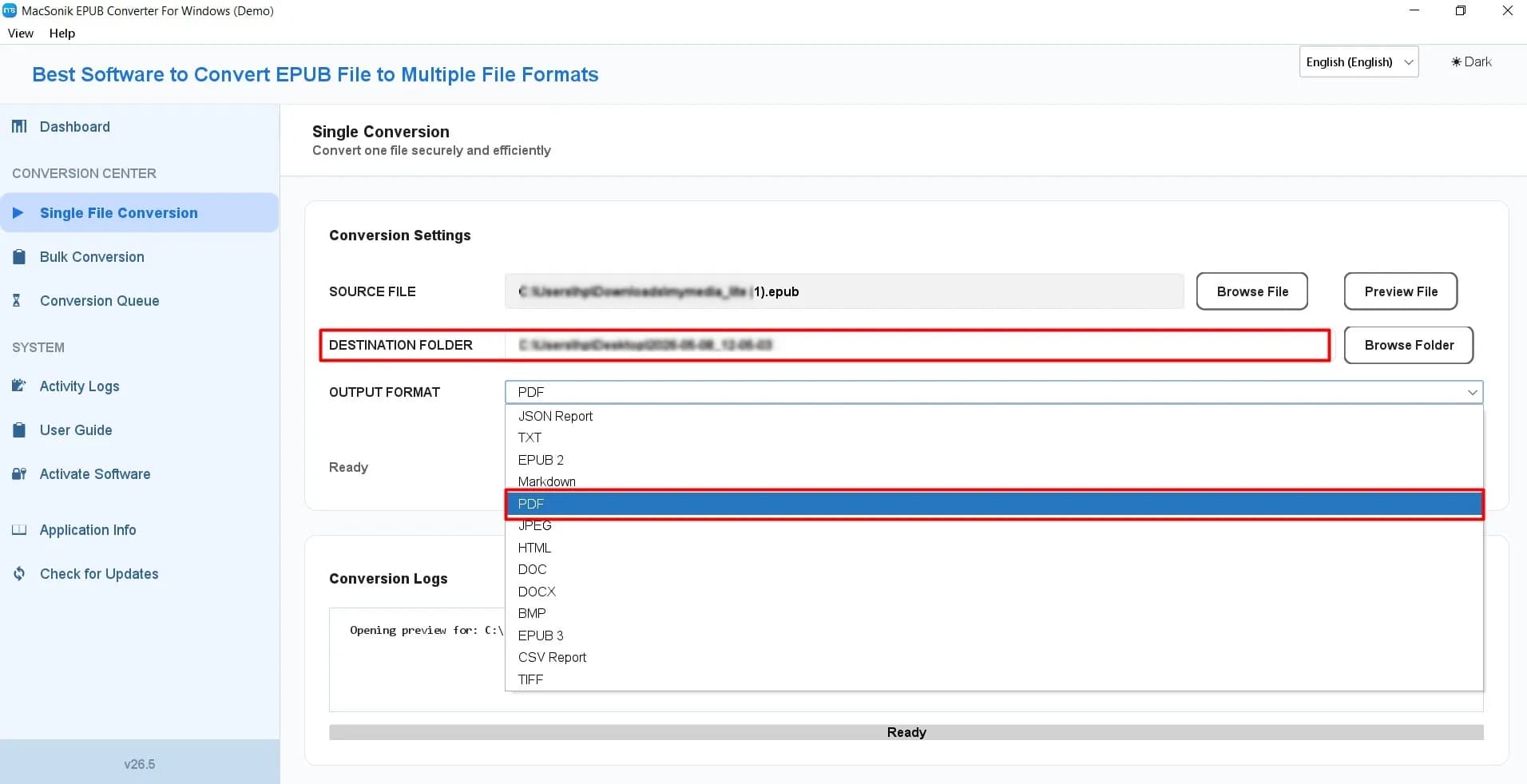
MacSonik EPUB Converter is a dedicated desktop utility for macOS and Windows that transforms EPUB eBook files into a wide range of document and image formats, including PDF, DOCX, DOC, TXT, HTML, Markdown, JPEG, PNG, BMP, and TIFF. It also supports re-exporting to EPUB 2 and EPUB 3, plus CSV and JSON reports. Built for both individual readers and enterprise publishing workflows, it emphasizes preserving original formatting, embedded images, and metadata such as title, author, and publication details during conversion. Standout capabilities include batch conversion of multiple files or entire folders, a preview pane to verify content before converting, automatic handling of partially corrupted EPUB files to recover accessible content, live log processing with an exportable trace archive, custom destination paths, multi-language interface support, and light/dark themes. A free demo lets you test the tool (limited to the first two pages per file), while the premium edition removes wate...
Key features
- 1Batch conversion of multiple EPUB files or entire folders to PDF, DOCX, TXT, HTML, Markdown, JPEG, PNG, BMP, TIFF.
- 2Preview pane to verify EPUB content before converting, plus live conversion logs with exportable trace archive.
- 3Automatic recovery of partially corrupted EPUB files, preserving accessible content and metadata.
Target customer profile
Drawn from the product itself, not from a survey.
Demographic
Publishing companies and digital content creators
Pain points
Manual EPUB conversions cause formatting loss and slow bulk workflows.
Primary needs
Batch EPUB to PDF/DOCX/image conversion with intact formatting and metadata.
Demographic
Educational institutions and e-learning platforms
Pain points
Managing diverse eBook formats for study materials is time-consuming.
Primary needs
Accessible multi-format conversion for distribution and compatibility.
Demographic
Corporate professionals and IT administrators
Pain points
Handling large EPUB volumes securely without workflow interruptions.
Primary needs
Secure bulk conversion, live logs, custom save paths, and cross-platform support.
Demographic
Individual Mac and Windows users
Pain points
Need a simple way to read EPUBs in familiar formats like PDF or Word.
Primary needs
Beginner-friendly interface, preview option, and reliable output quality.
Scout Review
Written by AI from measured evidence, scored out of 100.
MacSonik EPUB Converter is a competent desktop utility wrapped in a dated marketing site. The app itself has a clean sidebar workflow, preview, batch conversion, corrupted-file recovery, and live logs — real features for real workflows. The site is fast (91 mobile Lighthouse) and technically secure (12/12 headers), but it's visually stuck in template-land with competing CTAs, clashing tables, and typos in the hero copy. Accessibility has six concrete WCAG failures despite the product selling 'accessible' conversion. And the growth story is the weakest link: Calibre is free and does most of this, so the pitch has to be sharper than 'enterprise-grade' with no compliance paperwork to back it up.
Measure by measure
Usability
58Docs offer clear step-by-step single and bulk conversion guides, and Mac/Windows toggle sits above downloads. But pricing is buried far from CTAs and the long feature grid makes finding answers a scroll marathon.
Design
46Dated homepage with three competing CTAs, clashing dark-blue table headers, and visible copy typos ('`1high accuracy'). The desktop app UI is cleaner with logical sidebar grouping, but marketing site craft lags category peers.
Speed
78Lighthouse mobile 91/100 (LCP 1.8s, TBT 43ms) and desktop 94/100 — genuinely snappy. CLS 0.161 is above the 0.1 'good' threshold, so there's some layout shift, but overall load performance is strong.
Security
74Full security header stack verified: HTTPS enforced, HSTS, CSP, frame protection, Referrer-Policy, Permissions-Policy, SPF and DMARC — 12/12 checklist. No SOC 2, ISO, or pen-test claims published, which caps it below the top band.
Accessibility
58Lighthouse a11y 82/100 with real failures: insufficient color contrast, non-sequential headings, missing alt attributes, unnamed links, small touch targets, no main landmark. Multi-language UI support is a genuine plus.
Growth
44Real problem (EPUB conversion), but Calibre does it free with batch support, and the site names no segment it serves better. Corrupted-file recovery and preview are nice, not a wedge.
Improvement areas
- No published security compliance (SOC 2, ISO, pen-test) despite 'enterprise-grade' positioning.
- Six Lighthouse accessibility failures: alt text, main landmark, heading order, contrast, link names, touch targets.
- Pricing and free-vs-paid split buried far below CTAs; hero has three competing buttons.
Design & Usability
The marketing site reads like a 2018 template that got one coat of paint: three CTAs of different weights in the hero, saturated dark-blue table headers fighting the lighter page, and typos like '`1high accuracy' and 'Archiveoption' left in production copy. The desktop app itself is better — sidebar navigation with a clear active state, source/output/start grouped together, log panel below. Usability is carried by the docs, which actually walk through single and bulk conversion step by step and list live chat plus a phone number. The homepage, though, buries the free-vs-paid split far below the fold and stacks ten near-identical feature blocks that make finding a specific answer a chore.
Speed & Security
Speed is the standout: Lighthouse mobile 91/100 with LCP 1.8s and TBT 43ms, desktop 94/100. The one blemish is CLS 0.161, above the 0.1 'good' threshold, so expect some layout shift on load. Security is solid on the technical side — HTTPS enforced, HSTS, CSP, frame protection, Referrer-Policy, Permissions-Policy, SPF and DMARC, a clean 12/12 on the header checklist. What's missing is the paperwork: no SOC 2, ISO 27001, pen-test summary, or bug bounty published anywhere, which is a gap for a product whose own copy leans on 'enterprise-grade' and 'advanced data security features for sensitive files'.
Accessibility & Growth
Accessibility lands at 82/100 on Lighthouse but with six concrete failures: insufficient color contrast, non-sequential heading order, images without alt attributes, links without discernible names, undersized touch targets, and no main landmark. Multi-language UI support (English, Spanish, Chinese, Japanese and more) is a genuine strength for global audiences. Growth is the harder question. EPUB conversion is a real need, but the alternatives list is brutal: Calibre does it free with batch processing, Zamzar does it in a browser with no install, and Acrobat Pro owns the PDF workflow. MacSonik's differentiators — corrupted-file recovery, preview pane, live logs, custom save paths — are conveniences, not a wedge. Nothing in the material explains why a publisher picks this over free Calibre.
Conclusion
If you're a publisher or IT admin who needs batch EPUB conversion with corrupted-file recovery and a preview pane, this does the job and the docs will get you through it. If you're an individual user converting a handful of books, Calibre is free and does the same thing. The gap MacSonik needs to close is credibility: publish a security page, fix the six accessibility failures, clean up the hero copy, and put pricing where people can actually see it. The bones are fine — the presentation is what's holding the score down.
Suggestions for improvement
- Publish a security/compliance page (SOC 2 status, data handling, pen-test summary) to back the 'enterprise-grade' claim.
- Fix the six Lighthouse a11y failures: alt text, main landmark, heading order, contrast, link names, touch targets.
- Consolidate the hero to one primary CTA and move pricing/licence summary above the fold.
- Proofread production copy — '`1high accuracy' and 'Archiveoption' are live on the homepage.
Alternatives comparison
Named competitors, point by point. Nobody paid to appear here or to be left out.
 MacSonik EPUB Converter | Calibre |  Zamzar |  Adobe Acrobat Pro | |
|---|---|---|---|---|
| Price | Paid premium; free demo limited to first 2 pages per file | Free, open-source | Freemium; paid tiers for larger files | Subscription (~$19.99/mo) |
| Platform | Desktop (macOS, Windows) | Desktop (macOS, Windows, Linux) | Web browser (no install) | Desktop + web + mobile |
| Batch conversion | Yes — multiple files and entire folders | Yes | Limited on free tier; paid supports batch | Yes (Action Wizard) |
| Corrupted-file recovery | Yes — recovers accessible content from damaged EPUBs | Not a documented feature | No | Partial PDF repair, not EPUB-specific |
| Preview before conversion | Yes — built-in preview pane | Yes — built-in eBook viewer | No | Yes (PDF preview) |
| Multi-language UI | Yes — English, Spanish, Chinese, Japanese, more | Yes — many languages | Yes — multiple languages | Yes — multiple languages |
Calibre
Free, open-source eBook manager and converter supporting EPUB to PDF, DOCX, and many other formats with batch processing.
Zamzar
Online file conversion service that handles EPUB to PDF, DOCX, TXT, and images without installing software.
Adobe Acrobat Pro
Professional PDF tool with export and conversion capabilities, often used for document workflows involving EPUB-derived PDFs.
Comparing options? See MacSonik EPUB Converter alternatives, scored side by side
More Productivity apps
View all Productivity
Puzzly – B2B Lead Generation & Sales Intelligence Platform
92Puzzly is an all-in-one B2B lead generation platform that...

Qamarero
92An all-in-one hospitality software for restaurants and ba...

EmbedMyReviews
92White-label reputation management software for agencies s...

StoryPad
92Privacy-first open source journal app with a continuous t...

Notion
92All-in-one AI workspace for docs, projects, and knowledge...

The Stack Newsletter
92A weekly newsletter delivering curated tech jobs, intervi...

Vibe Coding Agent Skills
92A free, open-source platform offering 110 AI agent skills...

QRBliss
91Branded QR codes with AI Brand Sync, 15 free dynamic code...

Gerty
91Private, local AI assistant for Mac that runs offline

Strukchad Property Management
91Property management for Kenyan letting agents: rent invoices raised every month, M-Pesa rent prompts to tenants, arrears tracking and landlord statements.

CC Switch
91Open-source desktop app for switching AI coding providers...

PitchWhip
90AI cold call scripts & direct dials from LinkedIn


A platform dedicated to providing unbiased reviews of newly launched applications, analyzing everything from their features to their full potential.
info@scoutforge.net© 2026 Scoutforge. All rights reserved.
