Cycling through all six. Tap any point to stop.
Measured on six things
Convert complex JSON files to PDF, DOC, CSV, and 8+ forma...
Design
44Dated marketing page with a generic blue {/} mockup instead of real UI, a 15-item hero bullet wall, and the product renamed four different ways across one page. System requirements table is the cleanest element.
Screenshots
1 / 2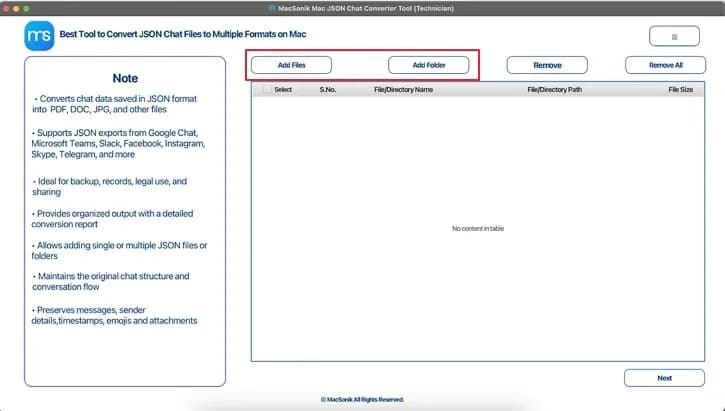
About this app
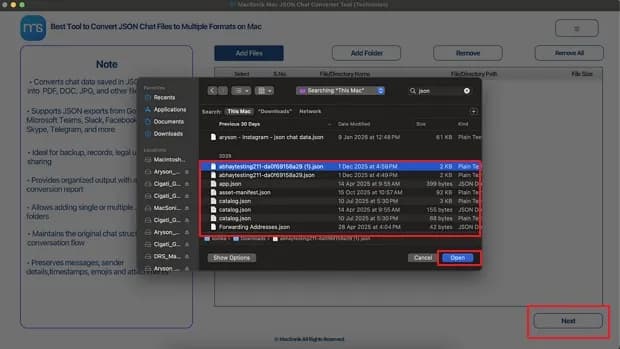
MacSonik JSON File Converter is a desktop utility that transforms raw and nested JSON files into human-readable formats like PDF, DOCX, CSV, JPG, PNG, HTML, EPUB, RTF, and SVG. It's built for professionals who deal with JSON data from chat platforms (WhatsApp, Telegram, Messenger, etc.), APIs, or databases and need clean, structured outputs without manual coding. The tool preserves complex hierarchies, metadata, and attachments, supports bulk processing, and runs entirely offline for data privacy. It offers a preview mode, CSV conversion logs, custom output naming, and works on Windows, macOS, and Linux. With a free demo limited to 20 key values, the full version unlocks unlimited conversions via a one-time license. It's a niche but reliable solution for legal, compliance, and analytical use cases where JSON readability matters.
Key features
- 1Offline bulk conversion of raw and nested JSON to PDF, DOCX, CSV, JPG, PNG, HTML, EPUB, RTF, and SVG
- 2Preserves nested structure, metadata, timestamps, senders, emojis, and attachments through conversion
- 3Supports JSON exports from WhatsApp, Telegram, Messenger, Skype, Teams, Slack, and Instagram
- 4CSV conversion logs, custom output naming, and Table/Plain Text preview modes
Target customer profile
Drawn from the product itself, not from a survey.
Demographic
Legal and compliance professionals
Pain points
Raw JSON chat logs are unreadable in court; manual conversion risks data loss
Primary needs
Court-ready PDFs/DOCs with preserved metadata, timestamps, and sender info
Demographic
Data analysts and IT teams
Pain points
Nested JSON is hard to analyze in spreadsheets; bulk conversion is time-consuming
Primary needs
Flatten JSON to CSV/Excel, bulk processing, and structured tabular output
Demographic
Non-technical users handling chat exports
Pain points
JSON files from WhatsApp/Telegram are unreadable; no coding skills to parse them
Primary needs
Simple one-click conversion to PDF or DOC with readable text and attachments
Scout Review
Written by AI from measured evidence, scored out of 100.
MacSonik JSON File Converter is a competent niche utility wrapped in dated, inconsistent marketing. The core proposition — offline, bulk, structure-preserving JSON conversion to PDF/DOC/CSV for legal and compliance users — is real and specific. The site is fast and the security headers are clean, but the design is stuck in 2019, the product has four names, the demo caps at 20 key values, and there's no compliance paperwork for the buyers it targets. It's a tool that does a hard job well and a marketing page that does its job poorly.
Measure by measure
Usability
58Clear 10-step guide and a straightforward Add Files → format → Convert flow, but the free demo caps at 20 key values and licensing details hide at the page bottom. Functional, not frictionless.
Design
44Dated marketing page with a generic blue {/} mockup instead of real UI, a 15-item hero bullet wall, and the product renamed four different ways across one page. System requirements table is the cleanest element.
Speed
88Lighthouse mobile 96/100 (LCP 1.8s, TBT 95ms, CLS 0.073) and desktop 92/100. Genuinely fast, lightweight marketing site with no measured lag complaints.
Security
74Full 12/12 header checklist: HTTPS, HSTS, CSP, frame protection, SPF and DMARC all present. Offline-only processing is a real privacy plus, but no SOC 2, ISO, or pen-test claims found.
Accessibility
58Lighthouse 86/100 with real failures: low contrast, broken heading order, unnamed links, small touch targets, no main landmark. No WCAG statement or a11y page found on the site.
Growth
56Real, specific problem (unreadable JSON chat logs for legal/compliance) with a genuine offline-bulk-conversion wedge. But the niche is narrow and the online converters are free.
Improvement areas
- Inconsistent product naming across the site (four variants on one page)
- Free demo capped at 20 key values — too small to test nested or bulk files
- No SOC 2, ISO, or pen-test disclosure for the legal/compliance buyers targeted
- Accessibility failures: contrast, heading order, unnamed links, touch targets, no main landmark
Design & Usability
The site looks like it was designed in 2019 and never revisited: a hero that's 80% bullet list, a mockup that's a blue box with a {/} glyph, and the product renamed four times on one page. The system requirements table is the one polished element. Usability is better than the marketing suggests — the 10-step guide is clear, the Add Files → format → Convert flow is logical, and the empty-state cues are obvious. But the free demo capping at 20 key values is a stingy trial, and licensing details are buried at the page bottom. It works; it just doesn't sell itself well.
Speed & Security
Speed is the standout: Lighthouse mobile 96/100 with a 1.8s LCP and 95ms TBT, desktop 92/100. The marketing site is genuinely snappy. Security is solid on the infrastructure side — 12/12 header checks including HSTS, CSP, and DMARC — and the offline-only conversion model is a real privacy advantage for legal users handling sensitive chat logs. What's missing is the paperwork: no SOC 2, ISO 27001, or pen-test disclosure anywhere in the collected content, which matters for the compliance buyers this tool targets.
Accessibility & Growth
Accessibility lands at 58: Lighthouse 86/100 but with five real failures — insufficient contrast, non-sequential headings, unnamed links, small touch targets, and no main landmark — plus no WCAG statement on the site. Growth is the interesting question. The problem is real and specific: raw JSON chat logs are unreadable in court, and a tool that preserves metadata, timestamps, and attachments while running fully offline has a genuine wedge for legal and compliance teams. But the niche is narrow, the free online converters cover the CSV half, and nothing in the material shows a network effect or expanding category. It can win a slice; it won't win a market.
Conclusion
If you handle WhatsApp or Telegram JSON exports for legal, compliance, or audit work and need court-ready PDFs with metadata intact, this is a legitimate option — the offline processing and nested-structure preservation are the real deal. If you just need CSV, use the free online converters. The one-time license model is fair for a niche tool; just budget for the demo being a teaser, not a trial, and verify output fidelity on your own files before committing.
Suggestions for improvement
- Pick one product name and use it everywhere — four variants on one page reads as a rebrand in progress.
- Replace the blue {/} hero mockup with a real screenshot of the conversion interface.
- Raise the free demo cap above 20 key values so buyers can actually test nested and bulk files.
- Publish a security/compliance page (SOC 2 status, data handling) — legal buyers will ask.
Alternatives comparison
Named competitors, point by point. Nobody paid to appear here or to be left out.
 MacSonik JSON File Converter |  JSON to CSV Converter |  Altova MapForce | Chat Viewer by System Helpers | |
|---|---|---|---|---|
| Offline / local processing (no cloud upload) | Yes — fully offline desktop app | No — browser-based, files processed online | Yes — desktop enterprise tool | Yes — local chat viewer |
| Output formats supported | PDF, DOCX, CSV, JPG, PNG, HTML, EPUB, RTF, SVG | CSV (and limited variants) | JSON, XML, CSV, DB, many enterprise formats | Limited — chat viewing, few export formats |
| Bulk / large file processing | Yes — bulk and large nested JSON | Limited — single file at a time | Yes — enterprise batch mapping | No — no bulk JSON handling |
| Preserves nested structure and metadata | Yes — hierarchy, timestamps, senders, attachments | Flattens — nested structure lost | Yes — full mapping control | Partial — chat context only |
| Pricing model | One-time license; free demo (20 key values) | Free | Enterprise license — expensive | Free / low-cost |
| Ease of use for non-technical users | Guided 10-step flow, no coding needed | Simple paste-and-convert | Steep learning curve | Simple viewer, limited scope |
JSON to CSV Converter
Online tool that converts JSON to CSV quickly, but lacks offline privacy and advanced format support.
Altova MapForce
Enterprise data mapping tool with JSON conversion, but complex and expensive for simple tasks.
Chat Viewer by System Helpers
Dedicated chat export viewer for WhatsApp/Telegram, but limited output formats and no bulk JSON handling.
Comparing options? See MacSonik JSON File Converter alternatives, scored side by side
More Productivity apps
View all Productivity
StoryPad
92Privacy-first open source journal app with a continuous t...

Puzzly – B2B Lead Generation & Sales Intelligence Platform
92Puzzly is an all-in-one B2B lead generation platform that...

Qamarero
92An all-in-one hospitality software for restaurants and ba...

Notion
92All-in-one AI workspace for docs, projects, and knowledge...

The Stack Newsletter
92A weekly newsletter delivering curated tech jobs, intervi...

EmbedMyReviews
92White-label reputation management software for agencies s...

Vibe Coding Agent Skills
92A free, open-source platform offering 110 AI agent skills...

QRBliss
91Branded QR codes with AI Brand Sync, 15 free dynamic code...

Gerty
91Private, local AI assistant for Mac that runs offline

Strukchad Property Management
91Property management for Kenyan letting agents: rent invoices raised every month, M-Pesa rent prompts to tenants, arrears tracking and landlord statements.

CC Switch
91Open-source desktop app for switching AI coding providers...

PitchWhip
90AI cold call scripts & direct dials from LinkedIn


A platform dedicated to providing unbiased reviews of newly launched applications, analyzing everything from their features to their full potential.
info@scoutforge.net© 2026 Scoutforge. All rights reserved.
