Cycling through all six. Tap any point to stop.
Measured on six things
Convert Maildir to PST, PDF, MBOX, and more on Mac with e...
Design
44Dated visual system: three competing CTAs (Download, Purchase, Microsoft Store badge) with no clear primary, overlapping support widgets, and inconsistent typography across a dozen stacked sections. The app's own 3-step flow is clearer than the marketing page.
Screenshots
1 / 2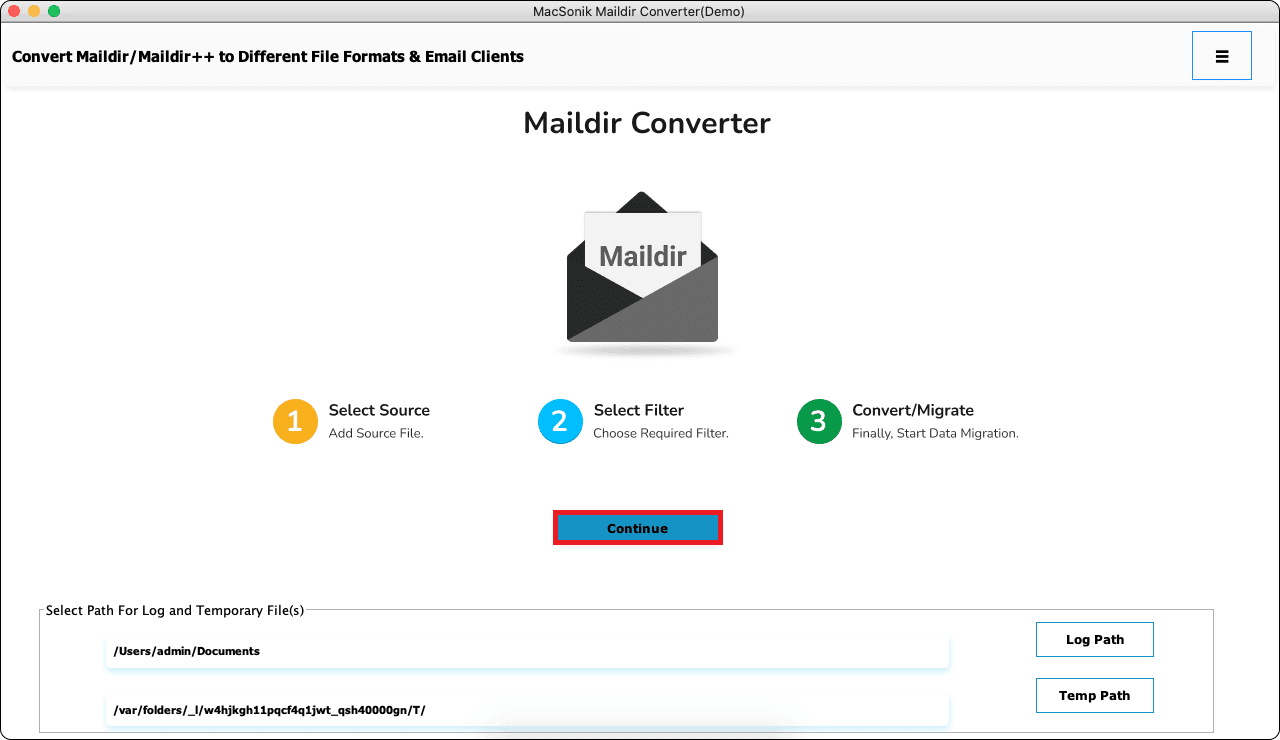
About this app
MacSonik Maildir Converter is a dedicated tool for Mac users who need to convert Maildir or Maildir++ files to various formats like PST, PDF, EML, MBOX, HTML, MSG, and more. It also allows direct export to webmail services such as Gmail, Office 365, Yahoo Mail, Hotmail, and Thunderbird. The tool supports bulk conversion with attachments, preserves folder hierarchy, and ensures no data loss. Key features include a date range filter, email preview, and compatibility with all Mac OS versions. Whether you need to backup emails as PDF, migrate to Outlook, or view Maildir files in Gmail, this tool provides a straightforward solution. The free demo version converts up to 50 emails per file, while the full version offers unlimited conversion. With a user-friendly interface and 24/7 technical support, it's a reliable choice for Mac users dealing with Maildir files.
Key features
- 1Bulk Maildir/Maildir++ conversion to PST, PDF, EML, MBOX, HTML, MSG on Mac.
- 2Direct export to Gmail, Office365, Yahoo, Hotmail, AOL and Thumberbird.
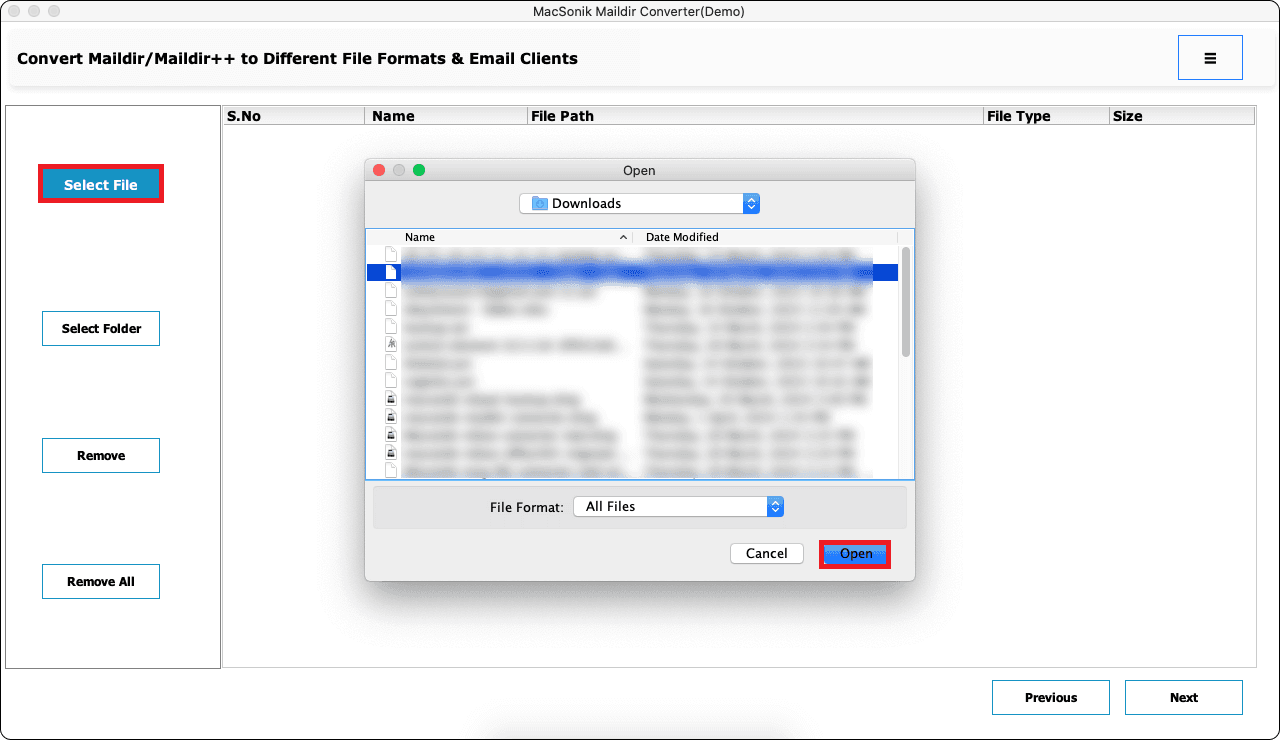
- 3Date-range filter, email preview, duplicate removal and custom folder naming.
Target customer profile
Drawn from the product itself, not from a survey.
Demographic
Mac users who need to backup or migrate Maildir emails
Pain points
Difficulty converting Maildir to readable formats on Mac
Primary needs
Reliable conversion tool with data integrity
Demographic
IT professionals managing email migrations
Pain points
Complex migration from Maildir to cloud services like Gmail or Office 365
Primary needs
Bulk conversion and direct export to webmail
Demographic
Small business owners using Maildir-based email servers
Pain points
Need to archive emails as PDF for compliance or record-keeping
Primary needs
Easy backup solution with attachments preserved
Scout Review
Written by AI from measured evidence, scored out of 100.
MacSonik Maildir Converter is a competent, narrowly-scoped utility with a genuinely fast site, solid security headers and a thorough step-by-step guide. The marketing page undersells it: dated visual system, three competing CTAs, overlapping support widgets and buried free-vs-full pricing. Accessability is the real weak point at 66/100 with missing alt text and contrast failures. Growth is capped by a crowded category — SysTools and MailsDaddy ship the same conversion matrix — but the webmail export and date filter are real, if copyable, edges.
Measure by measure
Usability
62The 13-step guide is genuinely thorough and covers PST, PDF, Yahoo and Office365 paths. Free-vs-full limit (50 emails) is buried below the fold, and dense small body text slows scanning, but the section nav helps.
Design
44Dated visual system: three competing CTAs (Download, Purchase, Microsoft Store badge) with no clear primary, overlapping support widgets, and inconsistent typography across a dozen stacked sections. The app's own 3-step flow is clearer than the marketing page.
Speed
78Lighthouse mobile 93/100 (LCP 2.3s, CLS 0, TBT 41ms) and desktop 85/100. Fast, stable layout, no lag complaints in collected evidence.
Security
76Full header suite verified: HTTPS enforced, HSTS, CSP, frame protection, Referrer-Policy, Permissions-Policy, SPF and DMARC all present (12/12). No SOC 2, ISO or bug-bounty claims found.
Accessibility
46Lighthouse 66/100 with missing alt text, insufficient contrast, non-sequential headings, unnamed links and ARIA role violations. No accessibility statement or WCAG mention found.
Growth
58Real, specific problem (Mac Maildir conversion) with concrete differentiators — direct webmail export, date filter, duplicate removal. But the category is crowded with SysTools and MailsDaddy shipping the same feature set.
Improvement areas
- Accessibility: 66/100 Lighthouse with missing alt text, contrast and ARIA failures.
- Design: three competing CTAs, overlapping support widgets, inconsistent typography.
- Compliance: no SOC 2, ISO, pen-test or bug-bounty disclosure despite handling email credentials.
Design & Usability
The app screenshots show a clean numbered 3-step flow — pick file, preview, convert — which is exactly what this kind of utility needs. The marketing site does its best to bury that: three competing CTAs, a floating 'Queries' bubble parked on the hero art, and a dozen stacked sections of similar-weight text. Usability is stronger than design suggests: the 13-step guide is thorough and covers PST, PDF, Yahoo and Office365 paths, and the section nav lets you jump straight to specs or screenshots. The free-vs-full split (50 emails per file) is only explained below the fold, which is a real friction point for a first-time visitor trying to decide whether to download.
Speed & Security
Speed is the standout: Lighthouse mobile 93/100 with LCP 2.3s, CLS 0 and TBT 41ms, desktop 85/100. For a page this text-heavy that's a genuinely good result and there are no lag complaints in the collected evidence. Security is also solid on the technical side — HTTPS enforced, HSTS, CSP, frame protection, Referrer-Policy, Permissions-Policy, SPF and DMARC all verified (12/12 on the header checklist). What's missing is the compliance layer: no SOC 2, no ISO, no pen-test disclosure, no bug bounty. For a tool that handles email archives and credentials for webmail export, that's a gap worth naming even if it's normal for the category.
Accessibility & Growth
Accessibility is the weak spot: Lighthouse 66/100 with missing alt text, insufficient color contrast, non-sequential headings, unnamed links and ARIA role violations. No accessibility statement or WCAG mention anywhere on the site. Growth is a judgement call: the problem is real and specific (Mac users with Maildir files and no native way to convert them), and the product has concrete edges — direct export to Gmail/Office365/Yahoo/Hotmail/Thunderbird, date-range filter, duplicate removal, preview. But the category is crowded with SysTools and MailsDaddy shipping near-identical feature sets, and nothing in the positioning names a segment those two don't already serve. Six years of domain age and a single YouTube channel is context, not momentum.
Conclusion
If you're a Mac user sitting on a Maildir archive and you need it in PST, PDF or Gmail by Friday, this tool will probably do the job and the 50-email demo lets you check before paying. If you're comparing against SysTools or MailsDaddy, the feature matrix is close enough that price and support response time should decide it. The site needs a design pass and an accessibility pass before it earns a recommendation on presentation alone — the product underneath is better than the page selling it.
Suggestions for improvement
- Pick one primary CTA (Download) and demote Purchase and the Microsoft Store badge to secondary styling.
- Move the free-vs-full comparison (50 emails per file) into the hero so visitors know the limit before scrolling.
- Add alt text to every image and fix color contrast — Lighthouse accessability is 66/100 and the failures are basic.
- Publish a security/compliance page (SOC 2 status, data handling, bug bounty) to match the strong header posture.
Alternatives comparison
Named competitors, point by point. Nobody paid to appear here or to be left out.
 MacSonik Maildir Converter |  Maildir to PST Converter |  MailsDaddy Maildir Converter | |
|---|---|---|---|
| Output formats supported | PST, PDF, EML, MBOX, HTML, MSG, CSV and more | PST (primary), with EML/MSG/MBOX options | PST, EML, MSG and more |
| Direct webmail export | Gmail, Office 365, Yahoo, Hotmail, Thumberbird, AOL | Not a primary feature; PST-focused | Limited; conversion-focused |
| Free demo limit | 50 emails per file | Limited demo (per-file cap) | Limited demo (per-file cap) |
| Date-range filter | Yes — From/To date filter | Yes | Yes |
| Platform support | Mac (all versions) and Windows | Windows | Windows |
Maildir to PST Converter
A tool by SysTools that converts Maildir files to PST format for Outlook.
MailsDaddy Maildir Converter
Software to convert Maildir to PST, EML, MSG, and more with batch mode.
Comparing options? See MacSonik Maildir Converter alternatives, scored side by side
More Productivity apps
View all Productivity
Puzzly – B2B Lead Generation & Sales Intelligence Platform
92Puzzly is an all-in-one B2B lead generation platform that...

Qamarero
92An all-in-one hospitality software for restaurants and ba...

EmbedMyReviews
92White-label reputation management software for agencies s...

StoryPad
92Privacy-first open source journal app with a continuous t...

Notion
92All-in-one AI workspace for docs, projects, and knowledge...

The Stack Newsletter
92A weekly newsletter delivering curated tech jobs, intervi...

Vibe Coding Agent Skills
92A free, open-source platform offering 110 AI agent skills...

QRBliss
91Branded QR codes with AI Brand Sync, 15 free dynamic code...

Gerty
91Private, local AI assistant for Mac that runs offline

Strukchad Property Management
91Property management for Kenyan letting agents: rent invoices raised every month, M-Pesa rent prompts to tenants, arrears tracking and landlord statements.

CC Switch
91Open-source desktop app for switching AI coding providers...

PitchWhip
90AI cold call scripts & direct dials from LinkedIn


A platform dedicated to providing unbiased reviews of newly launched applications, analyzing everything from their features to their full potential.
info@scoutforge.net© 2026 Scoutforge. All rights reserved.
