Cycling through all six. Tap any point to stop.
Measured on six things
Convert Outlook MSG files to 12+ formats & email clients ...
Design
58Coherent blue palette and a clean hero hierarchy, but eight equal-weight bullets bury the CTA, ten identical feature cards flatten the middle, and the app screenshot shows raw system paths.
Screenshots
1 / 1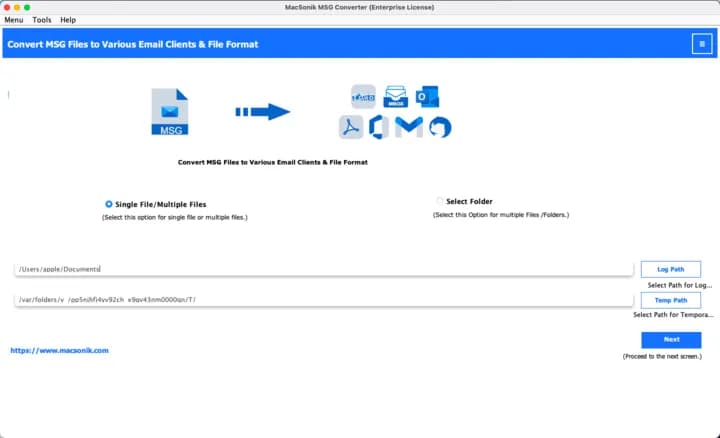
About this app
MacSonik MSG Converter Tool is a professional-grade utility that converts Outlook MSG files into 12+ file formats and multiple email clients. It supports bulk conversion of emails, contacts, calendars, tasks, notes, and attachments with 100% data integrity. The tool offers features like duplicate removal, date range filters, attachment management, and selective conversion. Compatible with macOS and Windows, it provides a free trial version and 24/7 technical support. Ideal for IT administrators, business consultants, and organizations migrating from Outlook to other platforms.
Key features
- 1Bulk MSG conversion to 12+ formats (PST, EML, MBOX, EMLX, PDF, DOC, CSV, XLSX, OFT) and email clients (Gmail, 365, Thunderbird, Yahoo, IMAP).
- 2Duplicate removal, date-range filters, attachment include/exclude, separate attachment saving, and PST splitting for large exports.
- 3Preview before conversion, folder hierarchy preservation, custom folder naming, and free trial on both macOS and Windows.
Target customer profile
Drawn from the product itself, not from a survey.
Demographic
IT Administrators in mid-to-large enterprises
Pain points
Managing large-scale email migrations from Outlook MSG to Office 365 or other systems without data loss.
Primary needs
Bulk conversion with folder hierarchy preservation, duplicate removal, and reliable support.
Demographic
Business consultants and professionals switching from Windows to Mac
Pain points
Accessing old MSG files on Mac and converting them to Mac-compatible formats like MBOX or PDF.
Primary needs
Simple, fast conversion with preview and attachment handling on macOS.
Demographic
Operations managers overseeing organizational email platform transitions
Pain points
Migrating thousands of MSG files to new email clients with minimal downtime and no data loss.
Primary needs
Bulk migration to email clients (e.g., Gmail, Thunderbird) with date filters and custom folder naming.
Scout Review
Written by AI from measured evidence, scored out of 100.
MacSonik MSG Converter is a competent, narrowly-scoped utility for a real problem: getting Outlook MSG files off Windows and into MBOX, PDF, PST, or a live mailbox on a Mac. The marketing site is fast (Lighthouse 95 mobile) and technically well-secured (12/12 header checklist, SPF, DMARC), the Software Guide is a real numbered walkthrough, and support is reachable via live chat and phone. The weaknesses are presentation and differentiation: the homepage buries its CTA under eight equal-weight bullets, the app screenshot looks unfinished, accessibility fails on contrast and heading order, and there's no published compliance audit. Against Aid4Mail and SysTools it competes on feature parity rather than a moat. A solid pick if you need MSG conversion today; not a category-defining one.
Measure by measure
Usability
63Numbered step-by-step guide for PST/PDF/Gmail conversions, clear Mac/Windows switch, free trial, and live chat + phone support. Dense small body text and buried FAQ keep it from good.
Design
58Coherent blue palette and a clean hero hierarchy, but eight equal-weight bullets bury the CTA, ten identical feature cards flatten the middle, and the app screenshot shows raw system paths.
Speed
88Lighthouse mobile 95/100 (LCP 1.9s, CLS 0.051, TBT 146ms) and desktop 89/100. Genuinely fast marketing site with no lag complaints in the collected evidence.
Security
76Full 12/12 header checklist: HTTPS enforced, HSTS, CSP, frame protection, Referrer-Policy, Permissions-Policy, plus SPF and DMARC. No published SOC 2/ISO/pen-test claim found.
Accessibility
58Lighthouse 87/100, but fails on contrast, heading order, unnamed links, small touch targets, and a missing main landmark. No WCAG statement found; Mac/Windows coverage is solid.
Growth
58Real, specific problem (bulk MSG migration for Outlook→Mac/365 moves) with concrete differentiators — dedup, date filters, PST splitting. But Aid4Mail and SysTools cover the same ground.
Improvement areas
- Homepage hero buries the primary CTA under eight equal-weight bullets; feature cards repeat identical layouts.
- Accessibility fails on contrast, heading order, unnamed links, touch targets, and missing main landmark; no WCAG statement.
- No published SOC 2 / ISO / pen-test documentation to back the 'SECURE CONVERSION' claim for enterprise buyers.
- No structural differentiator vs. Aid4Mail and SysTools — competes on feature parity and support rather than a moat.
Design & Usability
The homepage does the fundamentals: consistent blue accent, clear H1→subhead→rating→CTA stack, Mac/Windows selector right by the buttons, and a free trial next to Purchase Now. The Software Guide is a genuine numbered walkthrough for MSG→PST, PDF, and Gmail, and there's live chat plus a phone number for support. What drags it down is density: eight equal-weight hero bullets push the primary CTA down, ten identical feature cards flatten the middle, and the app screenshot shows raw system paths and an empty window. Body text in feature and requirements sections is small and hard to scan, and the FAQ sits at the bottom where first-timers won't find it.
Speed & Security
Speed is the standout: Lighthouse mobile 95/100 with LCP 1.9s, CLS 0.051, TBT 146ms, and desktop 89/100 — a genuinely snappy marketing site with no lag complaints in the collected evidence. Security is strong on the technical side: HTTPS enforced, HSTS, CSP, frame protection, X-Content-Type-Options, Referrer-Policy, Permissions-Policy all present (12/12 checklist), plus SPF and DMARC on the domain. What's missing is the paperwork layer — no SOC 2, ISO 27001, or pen-test claim surfaced in the collected site content, so enterprise buyers evaluating a tool that handles their entire mailbox will want to ask directly before signing off.
Accessibility & Growth
Lighthouse accessibility lands at 87/100, but the failing audits are the ones that actually bite: insufficient color contrast, non-sequential heading order, links without discernible names, touch targets too small, and no main landmark. There's no WCAG conformance statement on the site, and platform coverage is limited to macOS and Windows. On growth, the idea is real — bulk MSG migration for Outlook-to-Mac and Outlook-to-365 moves is a genuine, painful, deadline-driven problem, and the differentiators (duplicate removal, date filters, PST splitting, attachment handling, folder hierarchy preservation) are concrete rather than marketing fluff. The limit is the category: Aid4Mail and SysTools MSG Converter offer overlapping conversion and dedup features, so there's no structural wedge here — just execution and price.
Conclusion
If you're an IT admin staring down a folder of MSG files and a migration deadline, this tool does the job the site promises — bulk conversion, dedup, date filters, attachment control, folder hierarchy preserved. The free trial lets you verify data integrity on a sample before you pay, which is the right way to buy a converter. What you're not getting is a compliance paper trail (no SOC 2/ISO surfaced) or a reason to pick this over Aid4Mail or SysTools beyond price and support responsiveness. Test the trial against your actual mailbox structure, confirm the output opens cleanly in your target client, and ask support directly about data handling if you're moving regulated email. Do that and it's a reasonable buy; skip the trial and you're gambling on a marketing page.
Suggestions for improvement
- Collapse the eight hero bullets into three or four and let the Free Download button sit higher in the column.
- Replace the app screenshot showing raw system paths with a clean, populated conversion view.
- Fix the failing a11y audits: contrast ratios, heading order, link names, touch target size, main landmark.
- Publish a security/compliance page (data handling, any audits) to back the 'SECURE CONVERSION' claim.
Alternatives comparison
Named competitors, point by point. Nobody paid to appear here or to be left out.
 MacSonik MSG Converter Tool |  Aid4Mail |  SysTools MSG Converter | |
|---|---|---|---|
| Bulk MSG conversion to multiple formats | Yes — 12+ formats incl. PST, EML, MBOX, EMLX, PDF, CSV, XLSX | Yes — MSG, PST, EML, MBOX and many more | Yes — PST, EML, MBOX, PDF and more |
| Duplicate email removal | Yes — by sender, date, subject | Yes — deduplication supported | Not highlighted on product page |
| Date range / selective filtering | Yes — start/end date filters | Yes — filtering supported | Yes — selective conversion |
| Platform support | macOS and Windows | Windows | Windows and Mac |
| Free trial | Yes — Free Download offered | Yes — trial available | Yes — trial available |
Aid4Mail
Aid4Mail is a versatile email conversion tool that supports MSG, PST, EML, MBOX, and many other formats. It offers batch conversion, filtering, and deduplication features, and is available for Windows.
SysTools MSG Converter
SysTools MSG Converter is a professional tool to convert MSG files to PST, EML, MBOX, PDF, and more. It supports batch conversion, maintains data integrity, and is compatible with Windows and Mac.
Comparing options? See MacSonik MSG Converter Tool alternatives, scored side by side
More Productivity apps
View all Productivity
Puzzly – B2B Lead Generation & Sales Intelligence Platform
92Puzzly is an all-in-one B2B lead generation platform that...

Qamarero
92An all-in-one hospitality software for restaurants and ba...

EmbedMyReviews
92White-label reputation management software for agencies s...

StoryPad
92Privacy-first open source journal app with a continuous t...

Notion
92All-in-one AI workspace for docs, projects, and knowledge...

The Stack Newsletter
92A weekly newsletter delivering curated tech jobs, intervi...

Vibe Coding Agent Skills
92A free, open-source platform offering 110 AI agent skills...

QRBliss
91Branded QR codes with AI Brand Sync, 15 free dynamic code...

Gerty
91Private, local AI assistant for Mac that runs offline

Strukchad Property Management
91Property management for Kenyan letting agents: rent invoices raised every month, M-Pesa rent prompts to tenants, arrears tracking and landlord statements.

CC Switch
91Open-source desktop app for switching AI coding providers...

PitchWhip
90AI cold call scripts & direct dials from LinkedIn


A platform dedicated to providing unbiased reviews of newly launched applications, analyzing everything from their features to their full potential.
info@scoutforge.net© 2026 Scoutforge. All rights reserved.
