Cycling through all six. Tap any point to stop.
Measured on six things
Convert OneNote files to PDF, DOC, HTML, and more on Mac/...
Design
46Coherent blue palette and a genuinely scannable Free vs Full table, but the page reads dated: typo-riddled copy ('License Tyes', 'Orginal'), unreadable trust badges, and keyword-stuffed feature cards.
Screenshots
1 / 2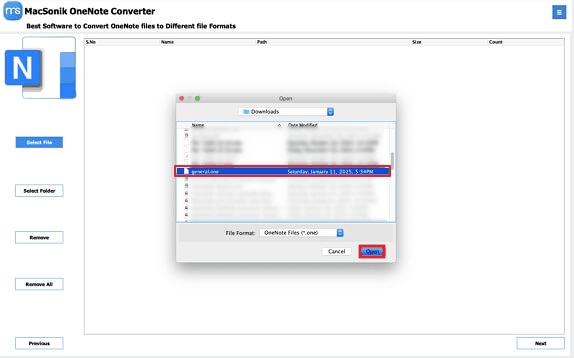
About this app
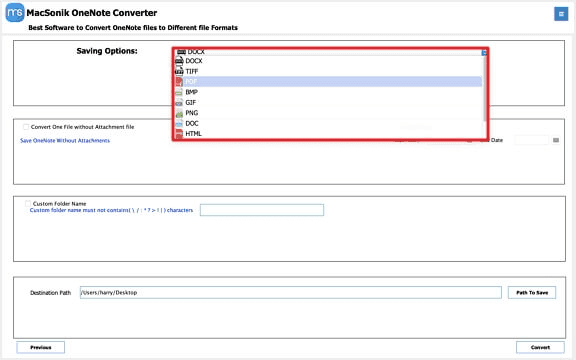
MacSonik OneNote Converter is a dedicated desktop utility that makes extracting content from Microsoft OneNote notebooks straightforward. I've seen plenty of users get stuck when they try to move OneNote data into a more universal format—this tool solves that by offering batch conversion to PDF, DOCX, DOC, HTML, XLS, as well as image formats like PNG, JPEG, GIF, TIFF, and BMP. It's built for both Mac and Windows, which is a rarity in this niche. Standout features include date-range filtering, the ability to export with or without attachments, and custom naming/location for output files. The interface is clean and wizard-driven, so even non-technical users can get through a conversion without headaches. It also preserves the original folder hierarchy, which is a big deal when you're dealing with hundreds of notebooks. The free trial lets you convert the first 50 items per folder (with a watermark), and the full license removes that limit. System requirements are modest—4GB RAM recomm...
Key features
- 1Batch convert OneNote notebooks to PDF, DOCX, DOC, HTML, XLS, PNG, JPEG, GIF, TIFF and BMP
- 2Date-range filtering to export only selected time periods with full accuracy
- 3Export with or without attachments; preserve original folder hierarchy and custom output paths
- 4Cross-platform: native Mac (Apple Silicon + Intel) and Windows support, rare in this niche
Target customer profile
Drawn from the product itself, not from a survey.
Demographic
Office professionals migrating from OneNote to Google Workspace or PDF workflows
Pain points
Manual copy-paste loses formatting and embedded files; no native batch export option
Primary needs
Bulk convert notebooks to PDF/DOCX while preserving layout and attachments
Demographic
Students and academics archiving lecture notes and research in universal formats
Pain points
OneNote files are locked to the Microsoft ecosystem; sharing with non-OneNote users is clunky
Primary needs
Export selective date ranges to HTML or PDF for sharing and long-term storage
Demographic
IT administrators and data migration teams handling large OneNote repositories
Pain points
No native way to extract OneNote data at scale; manual methods are error-prone and slow
Primary needs
Batch processing with custom output paths and folder hierarchy retention
Scout Review
Written by AI from measured evidence, scored out of 100.
MacSonik OneNote Converter is a competent, narrowly-scoped desktop utility with a fast, secure site and a genuinely useful feature set — batch conversion, date filters, attachment toggles, hierarchy retention, and Mac support that most competitors skip. The measured signals back the good parts: 99/100 mobile Lighthouse, 12/12 on security headers, a clear 8-step guide. The weak parts are all on the marketing surface: typo-riddled copy, unreadable trust badges, competing CTAs, hidden FAQs, and a setup guide that tells you to disable your firewall and antivirus. None of that breaks the product; all of it makes a careful buyer hesitate.
Measure by measure
Usability
58Wizard-driven flow with a real 8-step guide and an explicit 50-item free trial, but two competing download buttons, collapsed FAQs hiding the Mac/antivirus answers, and a chat widget sitting on the contact email.
Design
46Coherent blue palette and a genuinely scannable Free vs Full table, but the page reads dated: typo-riddled copy ('License Tyes', 'Orginal'), unreadable trust badges, and keyword-stuffed feature cards.
Speed
88Lighthouse mobile 99/100 with LCP 932ms, CLS 0.031 and TBT 92ms; desktop 91/100. Genuinely fast, lightweight marketing site with no lag complaints in the collected evidence.
Security
74Full header stack (HSTS, CSP, frame protection, Referrer/Permissions-Policy), SPF and DMARC, 12/12 on the probe. No SOC 2/ISO/pen-test claims, and the setup guide tells you to turn off your firewall and antivirus.
Accessibility
68Lighthouse 90/100, but four real failures: low-contrast text, non-sequential headings, unnamed links, and no main landmark. No WCAG statement and English-only.
Growth
58Real, specific pain — OneNote has no native batch export — with a demonstrable wedge (date filters, attachments toggle, hierarchy retention, Mac support). Niche ceiling, but a defensible one.
Improvement areas
- Copy quality: multiple typos and broken table cells undermine credibility on a data-handling tool
- Setup guide asks users to disable firewall and antivirus — replace with signed installers and allowlisting
- No published security certifications (SOC 2, ISO) or bug-bounty program despite handling personal notebooks
- Accessibility gaps: low-contrast text, non-sequential headings, unnamed links, no main landmark
Design & Usability
The landing page has a clear spine — hero, feature grid, Free vs Full table, FAQ — and the comparison table is the best thing on it: green checks, dark header, paywall limits stated plainly. But the craft undercuts it. 'License Tyes,' 'Maintain Orginal Folder hierarchy,' and 'Check First 50 Emails' in a table about file conversion are the kind of errors that make a buyer wonder what else got rushed. Trust badges are too small to read, so the social proof does nothing. Usability is better than design: the software guide walks through eight concrete steps, the free trial limit is explicit, and support has a phone number and two emails. The friction is on the page, not in the product — two download buttons with no stated difference, FAQs collapsed over the exact questions (Mac support, antivirus blocking) a hesitant buyer needs answered.
Speed & Security
Speed is the standout. Lighthouse mobile 99/100 with a 932ms LCP, 0.031 CLS and 92ms TBT; desktop 91/100. This is a lean, static-feeling marketing site that loads instantly, and nothing in the collected evidence suggests users experience lag. Security is solid on the transport layer — HTTPS enforced, HSTS, CSP, frame protection, X-Content-Type-Options, Referrer-Policy and Permissions-Policy all present, plus SPF and DMARC, for a clean 12/12 on the header probe. What's missing is the trust layer above it: no SOC 2, ISO, pen-test or bug-bounty disclosure anywhere. And the setup instructions ask users to disable their firewall and temporarily turn off antivirus — a real friction point that reads badly for a tool handling personal notebooks.
Accessibility & Growth
Accessibility lands at a decent 90/100 on Lighthouse, but the four failing audits are the ones that matter in practice: insufficient contrast on text, headings out of sequence, links with no discernible name, and no main landmark. There's no WCAG statement and the site is English-only. Growth is the interesting question. The problem is real and specific — OneNote genuinely has no native batch export, and the built-in PDF export is per-notebook and manual. Against free online converters, MacSonik's wedge is concrete: batch processing, date-range filtering, with/without attachments, folder hierarchy retention, and native Mac support, which is rare in this niche. The ceiling is the category: it's a paid utility solving a migration problem most users hit once. Domain age (2020) and the claimed 5M+ downloads suggest a durable business, not a rocket.
Conclusion
If you're sitting on a pile of OneNote notebooks and need them out in PDF, DOCX or HTML with attachments intact, this does the job and the free 50-item trial lets you prove it before paying. Go in knowing what you're buying: a focused conversion tool, not a migration platform. Skip it if you only need one notebook exported once — Microsoft's built-in export is free. Buy it if you have hundreds of notebooks, need date filtering, or work on a Mac where the alternatives are thin.
Suggestions for improvement
- Fix the copy errors: 'License Tyes', 'Maintain Orginal Folder hierarchy', and 'Check First 50 Emails' in the comparison table.
- Enlarge and increase contrast on the SourceForge/Trustpilot/G2 trust badges — right now they're invisible social proof.
- Collapse the two download buttons into one, or label them clearly (trial vs full) so users know which to click.
- Rewrite the setup guide to avoid telling users to disable firewall/antivirus; use signed installers and allowlisting instead.
Alternatives comparison
Named competitors, point by point. Nobody paid to appear here or to be left out.
 MacSonik OneNote Converter |  Microsoft OneNote (built-in export) |  OneNote to PDF Converter (online tools) | |
|---|---|---|---|
| Batch conversion of multiple notebooks at once | Yes — batch convert single or multiple notebooks with no size limit | No — per-notebook manual export only | Limited — file size caps on free tier |
| Output format flexibility | PDF, DOCX, DOC, HTML, XLS, PNG, JPEG, GIF, TIFF, BMP | PDF and .one package only | PDF (and a few common formats) |
| Attachment handling | Toggle export with or without attachments | Attachments included, no toggle | Not supported |
| Date-range filtering | Yes — set start/end date to export a window | No | No |
| Folder hierarchy preservation | Yes — original folder structure retained | Partial — section structure kept in PDF export | No — flat output |
| Platform support | Mac (Intel + Apple Silicon) and Windows | Mac, Windows, iOS, Android, web | Browser-based, any OS |
| Pricing model | Paid license; free trial converts first 50 items per folder (watermarked) | Free with Microsoft account | Free with size limits; paid tiers for larger files |
| Data privacy (local vs cloud processing) | Local desktop processing — files stay on your machine | Cloud-synced via Microsoft account | Uploads files to a third-party server |
Microsoft OneNote (built-in export)
Native 'Export' feature allows saving notebooks as PDF, but limited to per-notebook manual export with no batch or format flexibility.
OneNote to PDF Converter (online tools)
Free web-based converters exist but often have file size limits, privacy concerns, and no support for attachments or date-range filtering.
Comparing options? See MacSonik OneNote Converter alternatives, scored side by side
More Productivity apps
View all Productivity
StoryPad
92Privacy-first open source journal app with a continuous t...

Puzzly – B2B Lead Generation & Sales Intelligence Platform
92Puzzly is an all-in-one B2B lead generation platform that...

Qamarero
92An all-in-one hospitality software for restaurants and ba...

Notion
92All-in-one AI workspace for docs, projects, and knowledge...

The Stack Newsletter
92A weekly newsletter delivering curated tech jobs, intervi...

EmbedMyReviews
92White-label reputation management software for agencies s...

Vibe Coding Agent Skills
92A free, open-source platform offering 110 AI agent skills...

QRBliss
91Branded QR codes with AI Brand Sync, 15 free dynamic code...

Gerty
91Private, local AI assistant for Mac that runs offline

Strukchad Property Management
91Property management for Kenyan letting agents: rent invoices raised every month, M-Pesa rent prompts to tenants, arrears tracking and landlord statements.

CC Switch
91Open-source desktop app for switching AI coding providers...

PitchWhip
90AI cold call scripts & direct dials from LinkedIn


A platform dedicated to providing unbiased reviews of newly launched applications, analyzing everything from their features to their full potential.
info@scoutforge.net© 2026 Scoutforge. All rights reserved.
