Cycling through all six. Tap any point to stop.
Measured on six things
Convert Pegasus Mail to PST, PDF, MBOX, EML, and more wit...
Growth
54A real, narrow problem — legacy Pegasus Mail migration — with concrete differentiators (no install needed, bulk, M365/IMAP). But it's a shrinking niche and the pitch doesn't name a segment it wins better than Aid4Mail or SysTools.
Screenshots
1 / 3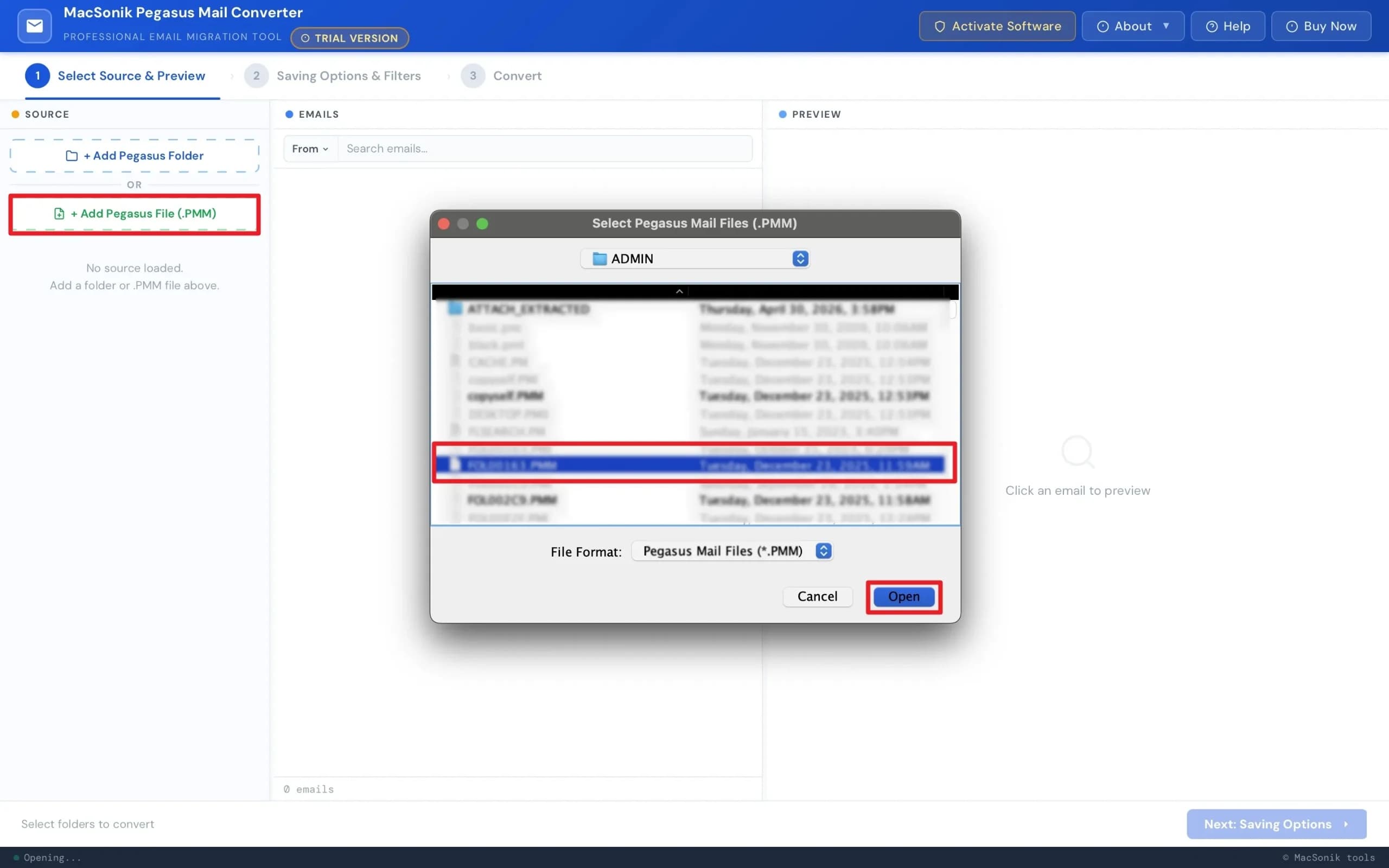
About this app
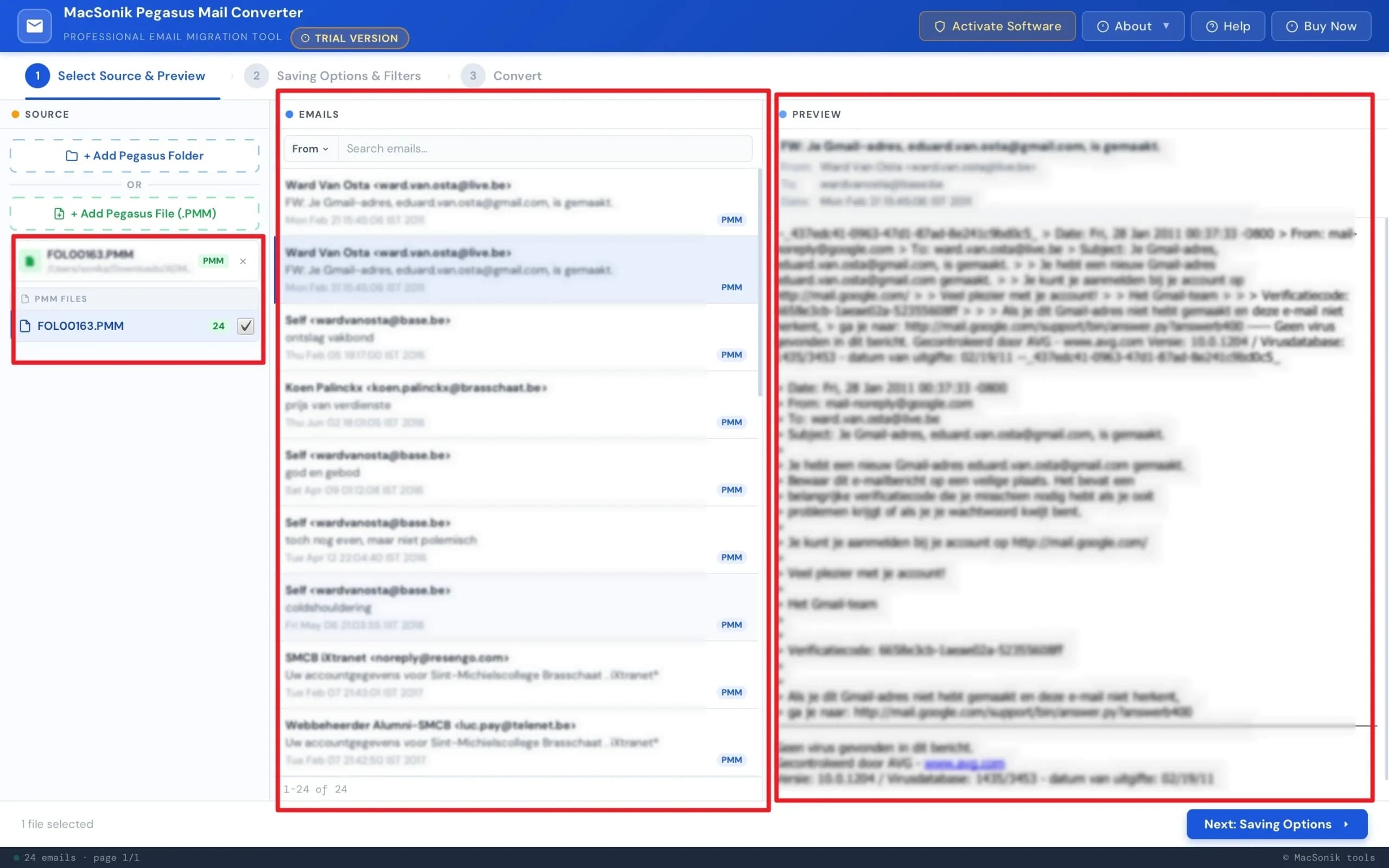
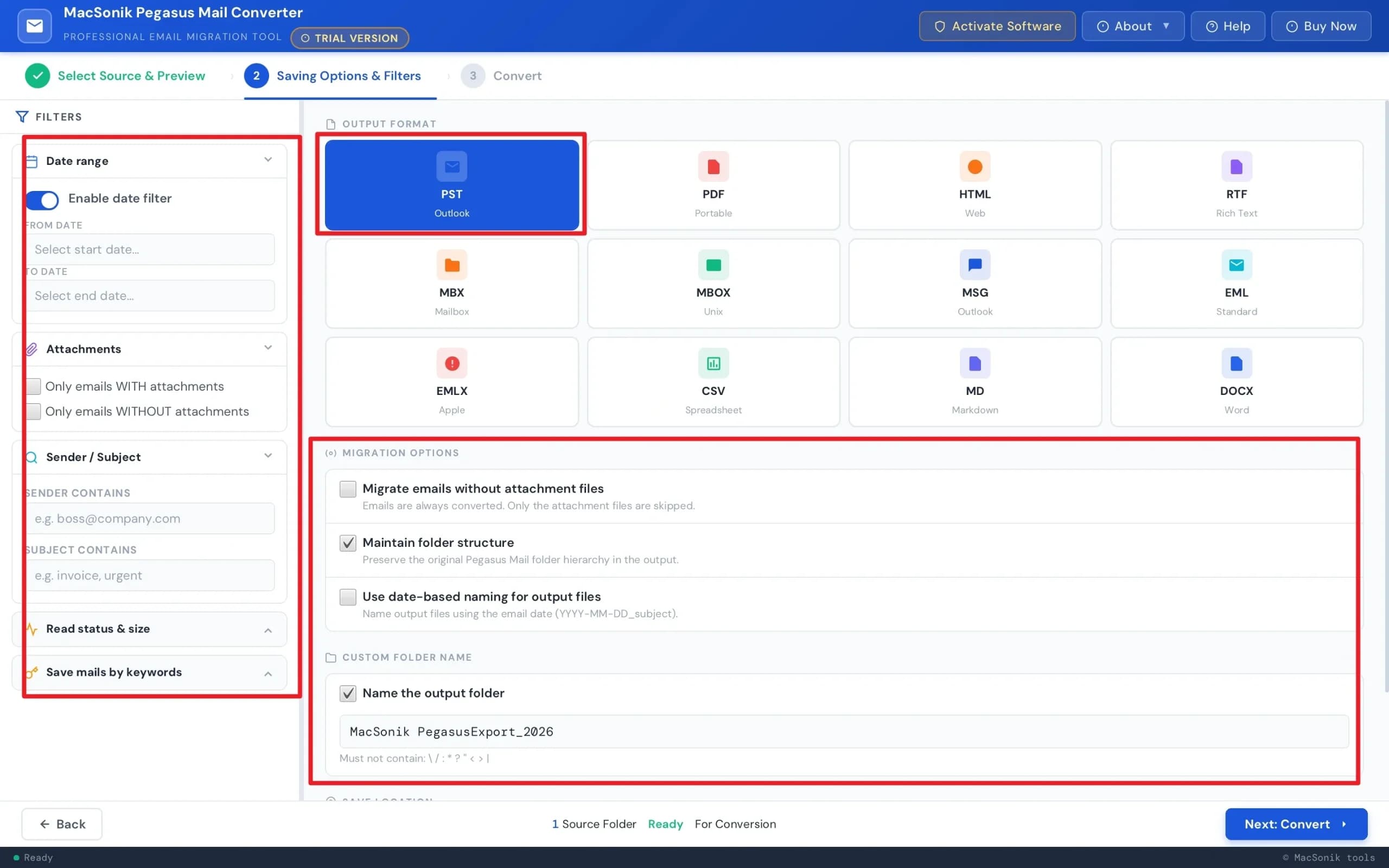
MacSonik Pegasus Mail Converter is a specialized tool designed to migrate legacy Pegasus Mail data (PMM, CNM, PNM, etc.) into modern formats and platforms. It supports exporting to PST, PDF, MBOX, EML, MSG, CSV, DOCX, and directly to Microsoft 365 or IMAP servers. The software is built for enterprise-scale migrations, offering bulk conversion, advanced filters (date range, sender, subject, read status, size), and keyword-based extraction. It preserves folder hierarchy, attachments, and metadata without requiring Pegasus Mail to be installed. With a user-friendly interface and real-time logs, it caters to IT administrators, compliance teams, and SMBs. The demo version allows 50 emails per folder for evaluation.
Key features
- 1Converts Pegasus Mail (PMM, CNM, PNM, etc.) to PST, PDF, MBOX, EML, MSG, CSV, DOCX without Pegasus installed
- 2Direct migration to Microsoft 365 and IMAP servers with folder hierarchy and metadata preserved
- 3Advanced filters: date range, sender/subject, read status, size, and keyword-based extraction
- 4Bulk conversion with pre-conversion preview and real-time logs; 50 emails/folder demo limit
Target customer profile
Drawn from the product itself, not from a survey.
Demographic
IT Administrators & System Engineers
Pain points
Managing large-scale email migrations from legacy systems with minimal downtime.
Primary needs
Reliable bulk conversion, data integrity, and direct migration to cloud platforms.
Demographic
Legal & Compliance Teams
Pain points
Extracting specific emails for audits and eDiscovery without manual effort.
Primary needs
Advanced filters (date, sender, subject), keyword search, and audit-ready output.
Demographic
Small & Mid-Sized Businesses (SMBs)
Pain points
Modernizing email systems without heavy IT investment or complexity.
Primary needs
Affordable, easy-to-use tool with flexible output formats and no Pegasus installation.
Scout Review
Written by AI from measured evidence, scored out of 100.
MacSonik Pegasus Mail Converter is a focused, fast-loading tool for a narrow but real job: pulling data out of legacy Pegasus Mail and into PST, MBOX, PDF, or straight to Microsoft 365 and IMAP. The site is competent and the technical security hygiene is genuinely good. Where it stumbles is polish and proof — inconsistent naming, a mismatched comparison table, accessibility failures on its own pages, and no published compliance certifications for a product aimed at compliance teams. It's a solid specialist tool that hasn't yet dressed itself like one.
Measure by measure
Usability
60Docs offer a 9-step guide and live chat/phone support, and the 50-email demo limit is disclosed upfront. But three competing CTAs of equal weight and thin guide sections muddy the path to value.
Design
57Conventional but functional landing page with a clear three-step workflow and consistent icon set. Undermined by inconsistent product naming, a mismatched comparison table, and unbalanced benefit cards.
Speed
88Lighthouse mobile 98/100 with LCP 1.8s, CLS 0.046, TBT 42ms — genuinely snappy. Desktop drops to 76/100, the one soft spot on an otherwise fast site.
Security
76Full security header stack (HSTS, CSP, frame protection, Referrer-Policy, Permissions-Policy) and SPF/DMARC, 12/12 on the probe. No published SOC 2, ISO, or pen-test claims to push it higher.
Accessibility
58Lighthouse 85/100 but with real failures: low contrast, skipped heading levels, missing alt text, unnamed links, no main landmark. No WCAG statement or multi-language support found.
Growth
54A real, narrow problem — legacy Pegasus Mail migration — with concrete differentiators (no install needed, bulk, M365/IMAP). But it's a shrinking niche and the pitch doesn't name a segment it wins better than Aid4Mail or SysTools.
Improvement areas
- Inconsistent product naming and a mismatched comparison table hurt brand credibility
- Accessibility failures on own site: missing alt text, heading order, contrast, unnamed links
- No published SOC 2/ISO/pen-test compliance signals for a compliance-focused product
- Three competing CTAs of equal weight obscure the primary download action
Design & Usability
The site is competent and scannable: a conventional hero, a clear three-step workflow indicator, and a platform toggle right above the download buttons. The problems are consistency, not competence — the product can't decide if it's a 'Converter' or an 'Exporter Tool', the comparison table looks imported from another design system, and the benefit cards float their icons miles above the headings. Usability is decent: the 50-email demo cap is disclosed before download, docs walk through nine steps, and there's live chat plus a phone number. But three CTAs of equal weight (Free Download, Purchase Now, Microsoft Store) split the primary action, and the guide's steps are thin on actual detail.
Speed & Security
Speed is the standout. Lighthouse mobile scores 98/100 with LCP 1.8s, CLS 0.046 and TBT 42ms — the page is genuinely snappy. Desktop lags at 76/100, the only blemish. Security is solid on the technical side: HTTPS enforced with HSTS, CSP, frame protection, Referrer-Policy and Permissions-Policy all present, plus SPF and DMARC, for a clean 12/12 on the header probe. What's missing is the paperwork enterprises actually ask for — no SOC 2, ISO 27001, pen-test summary, or bug bounty is claimed anywhere, which is a gap for a tool handling legal and compliance email.
Accessibility & Growth
Accessibility is the weak link: Lighthouse scores 85/100 but the failing audits are real — insufficient color contrast, non-sequential headings, missing alt attributes, links without discernible names, and no main landmark. No WCAG statement or multi-language support appears on the site. Growth is a judgement call: the problem (migrating legacy Pegasus Mail to modern formats and cloud) is real and the differentiators are concrete — no Pegasus install required, bulk conversion, advanced filters, direct M365/IMAP migration. But Pegasus Mail is a shrinking niche, and against Aid4Mail, MailStore Home, and SysTools the site never articulates why it wins a specific segment. The domain dates to 2020 and only YouTube is listed as a social channel — context, not the score.
Conclusion
If you're an IT admin staring down a Pegasus Mail decommission, this is a credible option worth a demo run — the 50-email cap lets you test fidelity before paying. Just don't expect the enterprise-grade compliance paperwork the marketing implies. Compare it against Aid4Mail and SysTools on output fidelity and price before committing, and check whether the filters cover your audit requirements.
Suggestions for improvement
- Pick one product name — 'Converter' or 'Exporter Tool' — and use it everywhere, including headings and metadata.
- Fix the accessibility failures: add alt text, repair heading order, boost contrast, and name your links.
- Publish a security/compliance page with SOC 2 or ISO status, or at least a data-handling and privacy summary.
- Clarify the primary CTA — one dominant download button, with purchase and store links clearly secondary.
Alternatives comparison
Named competitors, point by point. Nobody paid to appear here or to be left out.
 MacSonik Pegasus Mail Converter |  Aid4Mail |  MailStore Home |  SysTools Pegasus Mail Converter | |
|---|---|---|---|---|
| Pegasus Mail input support | Yes — PMM, CNM, PNM, PML, PMF, PMC, PMI | Yes — Pegasus Mail among many formats | Yes — imports from Pegasus Mail | Yes — dedicated Pegasus converter |
| Output formats | PST, PDF, HTML, MBOX, EML, EMLX, MSG, CSV, DOCX | Broad multi-format export | Standard archive formats | PST, EML, MSG and others |
| Direct cloud/IMAP migration | Yes — Microsoft 365 and IMAP | Yes — supports cloud targets | Limited — archive-focused | File formats primarily |
| Free tier / demo | Demo: 50 emails per folder | Trial available | Free for personal use | Demo version available |
| Advanced filters (date/sender/subject/size) | Yes — date, sender, subject, read status, size, keywords | Yes — batch filtering | Basic filtering | Yes — filtering options |
Aid4Mail
Aid4Mail is a email conversion and migration tool that supports Pegasus Mail and many other formats, offering batch conversion and filtering options.
MailStore Home
MailStore Home is a free email archiving solution that can import from various email clients, including Pegasus Mail, and export to standard formats.
SysTools Pegasus Mail Converter
SysTools offers a Pegasus Mail converter to export emails to PST, EML, MSG, and other formats with batch conversion and filtering.
Comparing options? See MacSonik Pegasus Mail Converter alternatives, scored side by side
More Productivity apps
View all Productivity
Puzzly – B2B Lead Generation & Sales Intelligence Platform
92Puzzly is an all-in-one B2B lead generation platform that...

Qamarero
92An all-in-one hospitality software for restaurants and ba...

EmbedMyReviews
92White-label reputation management software for agencies s...

StoryPad
92Privacy-first open source journal app with a continuous t...

Notion
92All-in-one AI workspace for docs, projects, and knowledge...

The Stack Newsletter
92A weekly newsletter delivering curated tech jobs, intervi...

Vibe Coding Agent Skills
92A free, open-source platform offering 110 AI agent skills...

QRBliss
91Branded QR codes with AI Brand Sync, 15 free dynamic code...

Gerty
91Private, local AI assistant for Mac that runs offline

Strukchad Property Management
91Property management for Kenyan letting agents: rent invoices raised every month, M-Pesa rent prompts to tenants, arrears tracking and landlord statements.

CC Switch
91Open-source desktop app for switching AI coding providers...

PitchWhip
90AI cold call scripts & direct dials from LinkedIn


A platform dedicated to providing unbiased reviews of newly launched applications, analyzing everything from their features to their full potential.
info@scoutforge.net© 2026 Scoutforge. All rights reserved.
