Cycling through all six. Tap any point to stop.
Measured on six things
Compress large Outlook PST files safely with batch proces...
Design
46Dated landing page: ten text-dense feature cards, generic mismatched icons, inconsistent link styling, and copy errors like 'License Tyes'. The Free vs Full comparison table is the one clean element.
Screenshots
1 / 1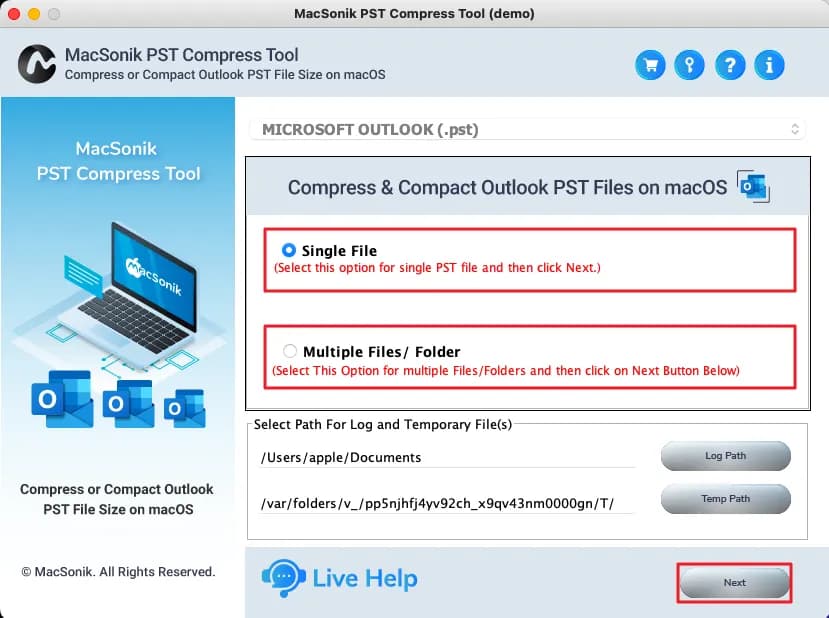
About this app
MacSonik PST Compress Tool is a dedicated utility for macOS that tackles the common problem of oversized Outlook PST files. It allows users to compress single or multiple PST files simultaneously, saving time and reducing storage footprint without risking data loss. The tool goes beyond simple compression by offering selective filtering by date range, duplicate email removal, splitting of resultant files, and the ability to save attachments separately. With a user-friendly interface and support for all PST types (ANSI and Unicode), it caters to both technical and non-technical users. The software is compatible with macOS 11 Big Sur and later, including Apple Silicon processors. A free trial version lets you compress up to 50 emails per folder, while the full version unlocks unlimited compression and advanced features like batch processing and splitting. Whether you're a home user or an IT administrator, MacSonik PST Compress Tool provides a reliable, secure, and efficient way to man...
Key features
- 1Batch compression of multiple Outlook PST files simultaneously, with ANSI and Unicode support.
- 2Duplicate email removal filtered by To, From, Subject, Bcc, or Body fields.
- 3Split compressed PST files, exclude attachments, and save attachments to a separate folder.
- 4Date-range filtering to selectively compress emails within a specific timeframe.
- 5Free trial compresses up to 50 emails per folder before purchase.
Target customer profile
Drawn from the product itself, not from a survey.
Demographic
Home users with large Outlook PST files on Mac
Pain points
PST files become too large to manage, slow down Outlook, and consume disk space.
Primary needs
Simple, safe compression without data loss; ability to exclude attachments or remove duplicates.
Demographic
IT administrators managing multiple Outlook mailboxes
Pain points
Manual compression is time-consuming; need to process multiple PST files quickly and reliably.
Primary needs
Batch compression, splitting of large PSTs, and preservation of folder structure.
Demographic
Small business owners handling email archives
Pain points
Limited storage space, difficulty in archiving old emails, and risk of corruption during compression.
Primary needs
Secure compression, duplicate removal, and the option to save compressed files to a preferred location.
Scout Review
Written by AI from measured evidence, scored out of 100.
MacSonik PST Compress Tool is a competent, narrowly-scoped macOS utility for a real problem: oversized Outlook PST files. The site is dated and text-heavy, with copy errors that undercut trust on a data-handling tool, but the underlying product is well-documented (10-step guide, live chat, phone support) and the trial limit is stated up front. Technically it punches above its weight: Lighthouse mobile 82 and desktop 93, and a clean 12/12 security-header sweep with SPF and DMARC. Accessibility is decent (90/100) but has four concrete failures. Growth is the honest constraint — the Mac-only PST niche is real but shrinking. Against Stellar and SysTools, the Mac-native angle is the actual reason to pick it.
Measure by measure
Usability
63Clear 10-step software guide, live chat and phone support, and a spelled-out 50-email trial limit set expectations well. The homepage repeats the same download/buy CTAs three times, adding scroll without clarity.
Design
46Dated landing page: ten text-dense feature cards, generic mismatched icons, inconsistent link styling, and copy errors like 'License Tyes'. The Free vs Full comparison table is the one clean element.
Speed
68Lighthouse mobile 82/100 (LCP 937ms, TBT 20ms) and desktop 93/100 — genuinely fast. But CLS 0.37 is nearly four times the 'good' threshold, so the page visibly jumps as it loads on mobile.
Security
74Full security-header sweep passes 12/12 — HTTPS, HSTS, CSP, frame protection, SPF, DMARC all present. No published SOC 2, ISO, pen-test, or bug-bounty page found, which is normal for this vendor tier.
Accessibility
70Lighthouse a11y 90/100, but four real failures: insufficient color contrast, non-sequential heading order, links without discernible names, and no main landmark. No WCAG statement or accessibility page found.
Growth
58Real, specific problem — oversized PST files on macOS — with a genuine wedge over Windows-first rivals Stellar and SysTools. Differentiators are solid but the category is niche and shrinking as cloud email eats on-prem archives.
Improvement areas
- Dated, text-heavy homepage with copy errors ('License Tyes', 'OS 13 Ventura') that undercut trust.
- Four Lighthouse accessibility failures: contrast, heading order, link names, missing main landmark.
- CLS 0.37 causes visible layout shift on mobile load.
- No published SOC 2, ISO, pen-test, or bug-bounty page to back the security claims.
Design & Usability
The design is the weak link. The homepage stacks a nine-item checkmark hero, ten text-dense feature cards with generic icons, and inconsistent link styling into a wall of grey copy. Copy errors like 'License Tyes' and 'OS 13 Ventura' undercut trust on a tool that touches your email archive. Usability is better: a real 10-step software guide, live chat, a phone number, and a clearly stated 50-email trial limit. The main friction is the homepage repeating the same download and buy CTAs in the hero, comparison table, and FAQ — more scroll, less clarity. The Free vs Full comparison table is the cleanest, most useful element on the page and should be the template for the rest.
Speed & Security
Speed is a genuine strength: Lighthouse mobile 82/100 with LCP 937ms and TBT 20ms, desktop 93/100. The one blemish is CLS 0.37 — nearly four times the 'good' threshold — so the page visibly shifts on mobile load. Security is the strongest dimension: the HTTP probe passes 12/12 with HTTPS enforced, HSTS, CSP, frame protection, X-Content-Type-Options, Referrer-Policy, Permissions-Policy, plus SPF and DMARC on the domain. That is better hygiene than most indie utilities ship. What's missing is the compliance layer — no SOC 2, ISO, pen-test summary, or bug-bounty page was found, which is normal for this vendor tier but caps the score below the excellent band.
Accessibility & Growth
Accessibility lands at 70: Lighthouse scores 90/100, but four real failures remain — insufficient color contrast, non-sequential heading order, links without discernible names, and no main landmark. No WCAG statement or accessibility page was found. Growth is a judgement on the idea, not traction. The problem is real and specific: oversized Outlook PST files on macOS, a segment Windows-first competitors Stellar Compress PST and SysTools PST Compress structurally under-serve. The differentiators are concrete — batch compression, duplicate removal by To/From/Subject/Bcc/Body, attachment exclusion, splitting, ANSI+Unicode support. The honest limit is category size: on-prem PST archives are a shrinking niche as cloud email eats the use case, so the wedge is real but the ceiling is low.
Conclusion
If you're on macOS and sitting on a bloated PST archive, this is a reasonable pick — the trial lets you compress 50 emails per folder before you pay, and the guide is clear enough to follow without a support ticket. If you're on Windows, Stellar and SysTools are the obvious defaults and this tool isn't for you. The bigger question is whether the category has a future: cloud email keeps eating the on-prem PST use case, and a Mac-only compressor is a narrowing bet. Buy it for the job in front of you, not for a decade of relevance.
Suggestions for improvement
- Fix the copy errors on the pricing and system-requirements sections ('License Tyes', 'OS 13 Ventura') — they cost trust on a data tool.
- Consolidate the three repeated download/buy CTAs on the homepage into one clear primary action.
- Address the four Lighthouse a11y failures: contrast, heading order, link names, and a main landmark.
- Reduce CLS from 0.37 by reserving space for images and above-the-fold elements.
Alternatives comparison
Named competitors, point by point. Nobody paid to appear here or to be left out.
 MacSonik PST Compress Tool |  Stellar Compress PST |  SysTools PST Compress | |
|---|---|---|---|
| Native macOS support | Yes — macOS 11 Big Sur and later, Apple Silicon | Windows-based | Windows-based |
| Batch compression of multiple PST files | Yes | Yes | Yes |
| Duplicate email removal | Yes — by To, From, Subject, Bcc, Body | Yes | Yes |
| Split large PST files | Yes | Yes | Yes |
| Free trial available | Yes — 50 emails per folder | Yes — trial version offered | Yes — trial version offered |
Stellar Compress PST
A Windows-based tool to compress large PST files, with options to split and remove duplicates.
SysTools PST Compress
Software to compress and split PST files, supports batch processing and duplicate removal.
Comparing options? See MacSonik PST Compress Tool alternatives, scored side by side
More Productivity apps
View all Productivity
Puzzly – B2B Lead Generation & Sales Intelligence Platform
92Puzzly is an all-in-one B2B lead generation platform that...

Qamarero
92An all-in-one hospitality software for restaurants and ba...

EmbedMyReviews
92White-label reputation management software for agencies s...

StoryPad
92Privacy-first open source journal app with a continuous t...

Notion
92All-in-one AI workspace for docs, projects, and knowledge...

The Stack Newsletter
92A weekly newsletter delivering curated tech jobs, intervi...

Vibe Coding Agent Skills
92A free, open-source platform offering 110 AI agent skills...

QRBliss
91Branded QR codes with AI Brand Sync, 15 free dynamic code...

Gerty
91Private, local AI assistant for Mac that runs offline

Strukchad Property Management
91Property management for Kenyan letting agents: rent invoices raised every month, M-Pesa rent prompts to tenants, arrears tracking and landlord statements.

CC Switch
91Open-source desktop app for switching AI coding providers...

PitchWhip
90AI cold call scripts & direct dials from LinkedIn


A platform dedicated to providing unbiased reviews of newly launched applications, analyzing everything from their features to their full potential.
info@scoutforge.net© 2026 Scoutforge. All rights reserved.
