Cycling through all six. Tap any point to stop.
Measured on six things
Split large VCF files or merge multiple vCards on your Ma...
Design
44Dated, template-built homepage with overlapping nav layers, a red Live Chat tab and floating query bubble fighting the hero. The app's own three-pane UI is clean and task-appropriate, but the marketing site reads early-2010s.
Screenshots
1 / 3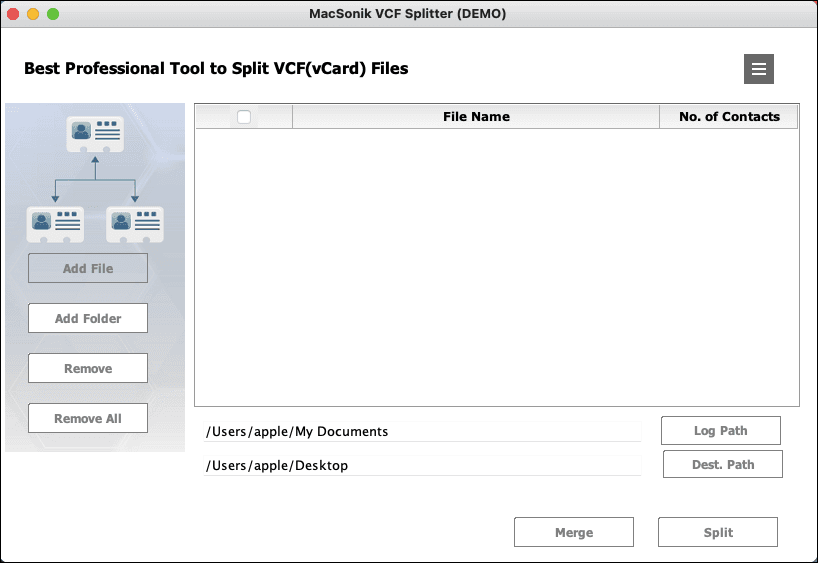
About this app
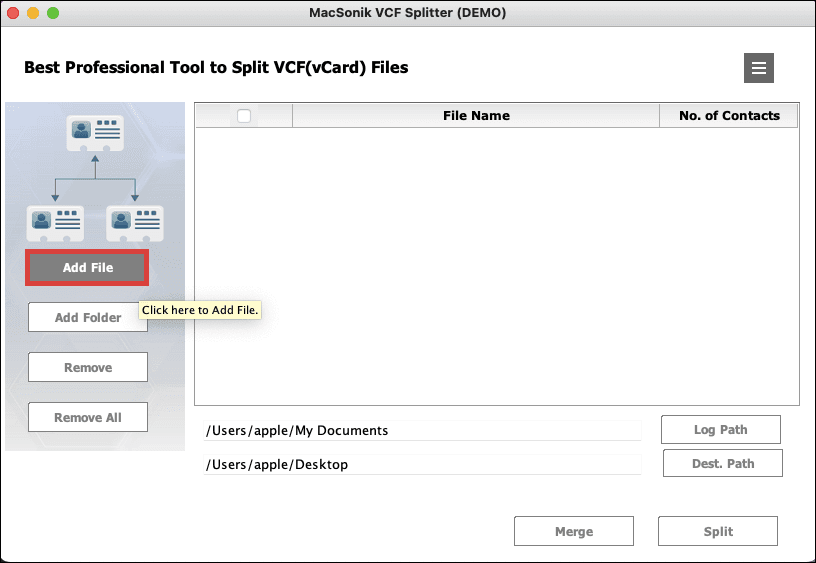
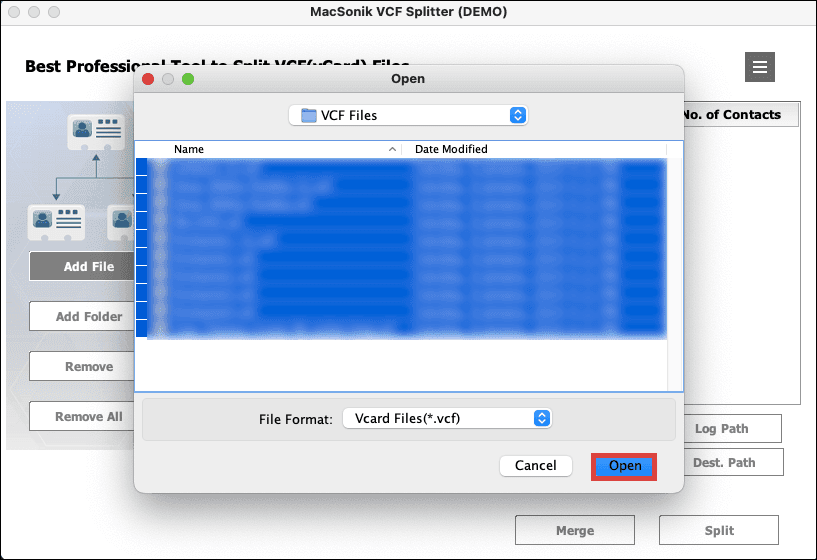
MacSonik VCF Splitter & Merger is a dedicated Mac utility that solves a surprisingly common headache: managing unwieldy vCard (VCF) files. Whether you've exported a massive contacts list from iCloud, Skype, or another platform, this tool lets you split oversized VCFs into individual contact files or merge multiple VCFs into a single, tidy file. The interface is straightforward—add files or folders, preview contacts, choose split or merge, and hit go. It preserves contact hierarchy and data integrity, so names, phone numbers, emails, and addresses stay intact. It supports vCard versions 2.1, 3.0, and 4.0, and works across all modern macOS versions, including Apple Silicon. The free demo lets you test with two VCF files (saving up to five contacts per file), while the full version removes limits. Standout features include batch processing, selective split/merge, and a saving log. It's not a migration tool—you can't import VCFs directly to Gmail—but for local file management, it's a re...
Key features
- 1Split oversized VCF/vCard files into individual contact files while preserving field hierarchy.
- 2Merge multiple VCF files into a single unified file, including batch folder processing.
- 3Supports vCard versions 2.1, 3.0 and 4.0, with preview, selective split/merge and a saving log.
Target customer profile
Drawn from the product itself, not from a survey.
Demographic
Mac users with large contact databases (e.g., from iCloud, Skype exports)
Pain points
Oversized VCF files are hard to open, edit, or import into other apps
Primary needs
Split large VCFs into smaller, manageable files without losing data
Demographic
IT administrators or support staff managing multiple contact lists
Pain points
Scattered VCF files from different sources create duplication and confusion
Primary needs
Merge multiple VCFs into one unified file for easier distribution and backup
Demographic
Small business owners or freelancers using vCards for client management
Pain points
Need to organize contacts by project or client but lack a simple tool
Primary needs
Selectively split or merge VCF files based on specific contacts or folders
Scout Review
Written by AI from measured evidence, scored out of 100.
MacSonik VCF Splitter & Merger is a competent single-purpose Mac utility wrapped in a dated marketing site. The app does what it says: split oversized VCFs into individual contacts, merge multiple VCFs into one, preserve hierarchy across vCard 2.1/3.0/4.0, batch process folders, and log the results. The guide is thorough and the security headers are genuinely clean. What holds it back is presentation and reach: the homepage is a stack of competing navigation layers and dense justified paragraphs, accessibility fails eight Lighthouse audits including a blocked pinch-zoom, and the demo's two-file/five-contact cap is too tight to build confidence. Against its listed alternatives it has a real edge — it's the only one that both splits and merges natively on Mac — but the audience is narrow and the site doesn't sell it well.
Measure by measure
Usability
58Clear Add File/Add Folder → Split/Merge flow with a numbered step-by-step guide and obvious above-fold CTAs. Undermined by a demo capped at 2 files and 5 contacts, and dense paragraphs that make the page a chore to scan.
Design
44Dated, template-built homepage with overlapping nav layers, a red Live Chat tab and floating query bubble fighting the hero. The app's own three-pane UI is clean and task-appropriate, but the marketing site reads early-2010s.
Speed
57Lighthouse mobile 72/100 with a 4.3s LCP and 449ms TBT — the hero and stacked chat widgets are dragging first paint. Desktop is a healthier 89/100. Functional, not snappy.
Security
76Full 12/12 header checklist: HTTPS enforced, HSTS, CSP, frame protection, Referrer-Policy, Permissions-Policy, plus SPF and DMARC. No published SOC 2, ISO or pen-test, which is normal for a small Mac utility.
Accessibility
46Lighthouse 71/100 with eight failing audits: low contrast, skipped heading levels, missing alt text, color-only links, unnamed links, blocked user scaling, small touch targets and no main landmark. No a11y statement on site.
Growth
54Real, specific problem (oversized VCFs from iCloud/Skype exports) with a genuine wedge: native Mac split AND merge in one tool, where the online alternative can't merge at all. Narrow segment caps the ceiling.
Improvement areas
- Demo limited to 2 VCF files and 5 contacts per file — too tight to validate on real data.
- Eight Lighthouse accessibility failures including blocked user scaling and missing alt text.
- Dated homepage with four competing navigation layers and inconsistent typography.
Design & Usability
The marketing site and the app are two different products wearing the same logo. The homepage is a dated template: a red Live Chat tab, a floating query bubble, Guide/FAQ side tabs and a blue anchor nav bar all competing above the fold, with typography that changes personality between the hero, the feature cards and the FAQ. The app itself is the better half — a simple three-pane layout (action column, file table, path fields) that matches the single job it does, even if the greyed-out buttons read as disabled rather than 'add a file first'. Usability is competent: the Add File/Add Folder → Split/Merge flow is discoverable, the guide page walks through every step with numbered screenshots, and the CTAs are obvious. The demo cap of two files and five contacts per file is the weak link — enough to confirm it works, not enough to trust it with a real contact list.
Speed & Security
Speed is mid-pack. Lighthouse mobile scores 72/100 with a 4.3s LCP and 449ms TBT — the stacked chat widgets and hero art are the likely culprits — while desktop lands a respectable 89/100. Nothing here will make you wait, but nothing is tuned either. Security is the quiet overachiever: the HTTP probe returned a clean 12/12 on headers (HTTPS enforced, HSTS, CSP, frame protection, X-Content-Type-Options, Referrer-Policy, Permissions-Policy) plus SPF and DMARC records. There's no SOC 2, ISO or bug bounty published, which is entirely normal for a small Mac utility, but the baseline hygiene is better than most indie tools at this stage. For a local file utility that never touches a server with your contacts, that's the right shape of security posture.
Accessibility & Growth
Accessibility is the weak spot. Lighthouse scores 71/100 with eight failing audits: insufficient color contrast, non-sequential headings, images without alt text, links distinguishable only by color, links without discernible names, touch targets too small, no main landmark — and a viewport meta that blocks user scaling, which is an active accessibility harm rather than a passive omission. There's no accessibility statement or WCAG mention anywhere on the site. Growth is a more interesting question: the problem is real and specific (oversized VCFs from iCloud and Skype exports are genuinely painful to open, edit or import), and the wedge is concrete — a native Mac app that both splits and merges, where the online VCF Splitter alternative can't merge at all and Contacts Optimizer doesn't split. The limit is the segment: Mac users with large contact databases is a narrow, largely one-time-use audience, and the category has no network effects or data advantage to compound. It's a good small business, not a growth story.
Conclusion
If you're a Mac user sitting on a 200MB VCF export that won't open anywhere, this tool will solve your problem in about four clicks, and the 30-day money-back guarantee lowers the risk of finding out. If you're on Windows, or you need to push contacts into Gmail, or you want a modern web app, look elsewhere — this is deliberately a local Mac file utility and it says so. The honest verdict: buy it for the task, not for the experience. The app is better than the website advertising it, which is a strange thing to write about a product whose website is the first thing you see.
Suggestions for improvement
- Raise the demo cap to at least 10 files and 50 contacts per file so buyers can test on a real contact list before paying.
- Consolidate the homepage navigation: pick one of the Live Chat tab, floating query bubble, side tabs or anchor bar — not all four.
- Fix the eight Lighthouse accessibility failures, starting with the viewport meta that blocks user scaling and the missing alt text.
- Publish a short security/privacy page stating that VCF processing is local-only and no contact data leaves the machine.
Alternatives comparison
Named competitors, point by point. Nobody paid to appear here or to be left out.
 MacSonik VCF Splitter & Merger | VCF Splitter |  Able2Extract Professional | Contacts Optimizer | |
|---|---|---|---|---|
| Splits VCF files into individual contacts | Yes — batch and selective split with hierarchy preserved | Yes — core function, but may have file size limits | Yes — as part of a broader conversion suite | No — focused on dedupe/merge, not splitting |
| Merges multiple VCF files into one | Yes — batch merge with saving log | No — split only | Yes — among many other conversion features | Yes — core strength, with deduplication |
| Native Mac desktop app | Yes — macOS incl. Apple Silicon | No — browser-based online tool | Yes — cross-platform desktop | Yes — desktop app |
| Free trial / demo available | Yes — 2 files, 5 contacts per file | Yes — free online with possible size caps | Yes — trial version available | Yes — trial available |
| Dedicated contact deduplication | No — split/merge only | No | Limited — not the focus | Yes — core feature |
VCF Splitter
A lightweight online tool that splits VCF files into individual contacts, but lacks merge functionality and may have file size limits.
Able2Extract Professional
A versatile file converter that includes VCF splitting and merging among many other features, but it's pricier and more complex.
Contacts Optimizer
Focuses on deduplicating and merging contacts across platforms, but doesn't specialize in splitting VCF files.
Comparing options? See MacSonik VCF Splitter & Merger alternatives, scored side by side
More Productivity apps
View all Productivity
Puzzly – B2B Lead Generation & Sales Intelligence Platform
92Puzzly is an all-in-one B2B lead generation platform that...

Qamarero
92An all-in-one hospitality software for restaurants and ba...

EmbedMyReviews
92White-label reputation management software for agencies s...

StoryPad
92Privacy-first open source journal app with a continuous t...

Notion
92All-in-one AI workspace for docs, projects, and knowledge...

The Stack Newsletter
92A weekly newsletter delivering curated tech jobs, intervi...

Vibe Coding Agent Skills
92A free, open-source platform offering 110 AI agent skills...

QRBliss
91Branded QR codes with AI Brand Sync, 15 free dynamic code...

Gerty
91Private, local AI assistant for Mac that runs offline

Strukchad Property Management
91Property management for Kenyan letting agents: rent invoices raised every month, M-Pesa rent prompts to tenants, arrears tracking and landlord statements.

CC Switch
91Open-source desktop app for switching AI coding providers...

PitchWhip
90AI cold call scripts & direct dials from LinkedIn


A platform dedicated to providing unbiased reviews of newly launched applications, analyzing everything from their features to their full potential.
info@scoutforge.net© 2026 Scoutforge. All rights reserved.
