Cycling through all six. Tap any point to stop.
Measured on six things
Focused Mac utilities for everyday friction
Security
52HTTPS enforced with CSP, SPF and DMARC in place, but missing HSTS, frame protection, and several standard headers. No published audits or security page.
Screenshots
1 / 2

About this app
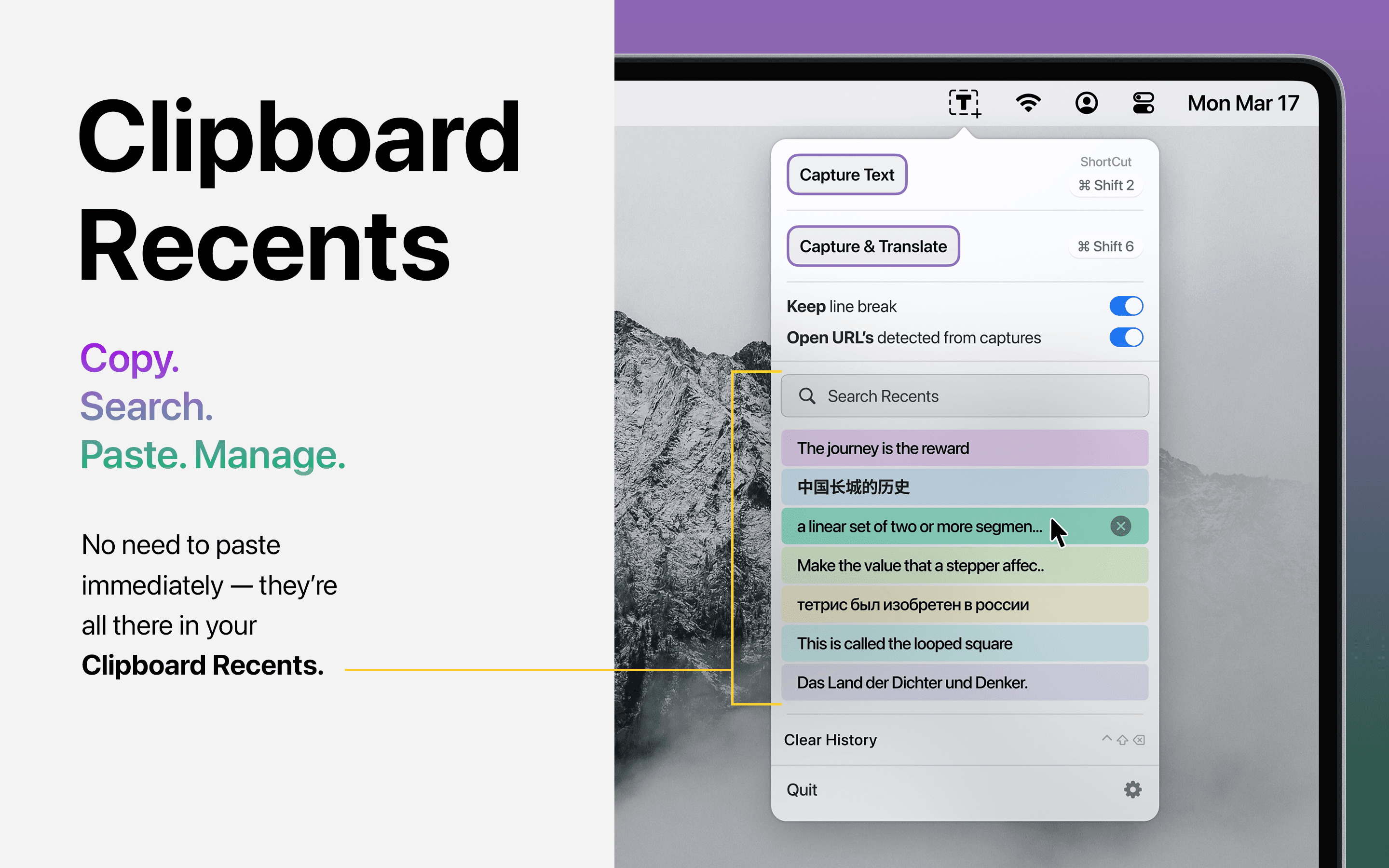
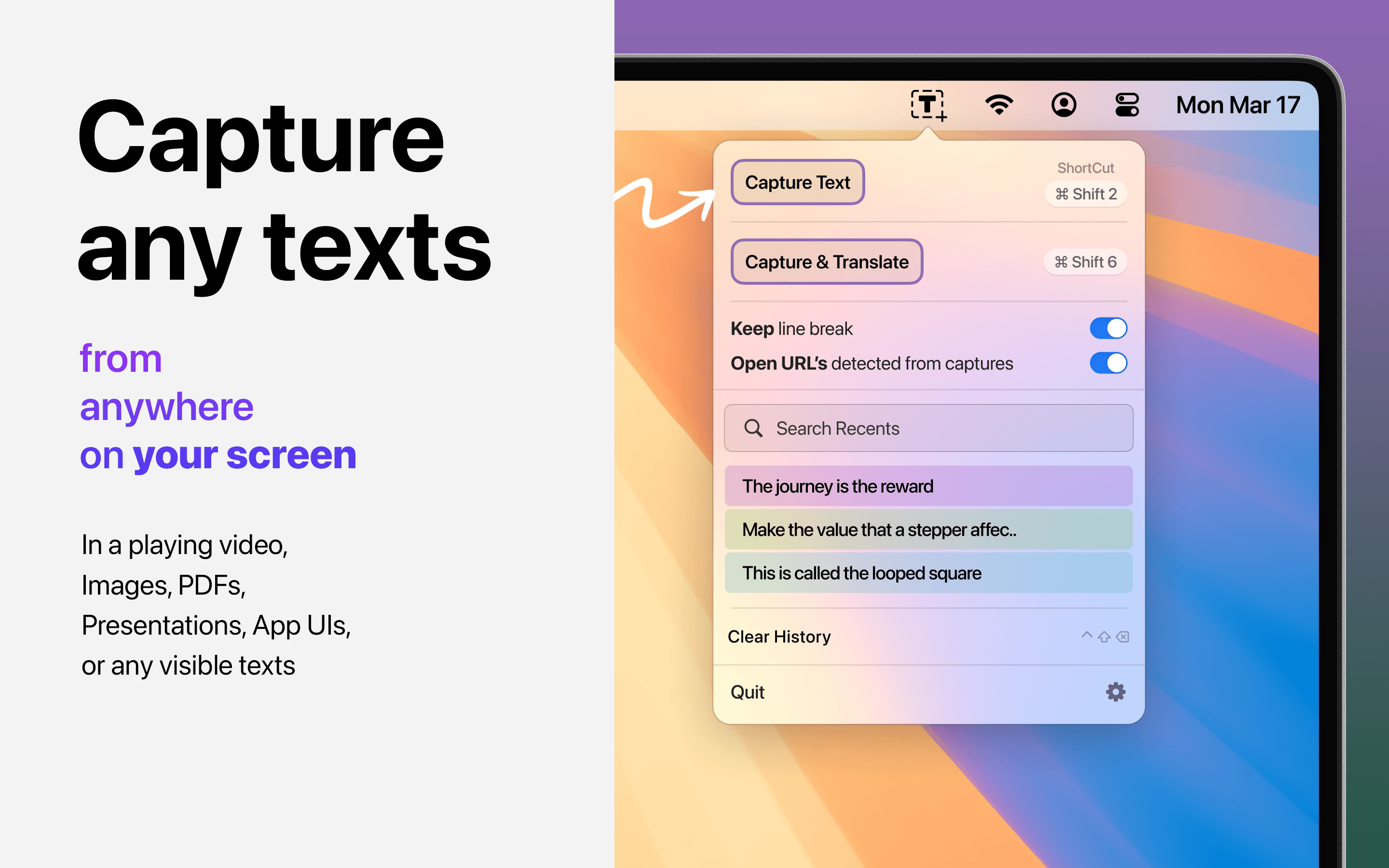
MacThru is a growing collection of focused utility apps for Mac and iPhone, designed to remove everyday friction with privacy-conscious, native tools. The portfolio includes Textly for capturing text from videos and images, Easily for quick access to audio, display, and desktop controls, Cine 5.1 for enhanced Netflix and Prime Video playback in Safari, Tejora for per-app brightness and display resolution management, and Volora for independent volume control per app. Each app solves a small set of related problems, staying out of the way with menu-bar access and keyboard shortcuts. Built with intent, MacThru apps prioritize local workflows and avoid third-party tracking, making them ideal for users who value simplicity and privacy.
Key features
- 1Portfolio of five focused Mac utilities: Textly, Easily, Cine 5.1, Tejora, and Volora
- 2Privacy-conscious, local-first workflows with no third-party tracking on core tools
- 3Menu-bar access and keyboard shortcuts for quick, low-friction control
Target customer profile
Drawn from the product itself, not from a survey.
Demographic
Mac power users and professionals
Pain points
Repeatedly switching settings, inability to copy text from videos, managing multiple audio outputs
Primary needs
Efficient control over Mac settings, quick text capture, per-app customization
Demographic
Remote workers and online learners
Pain points
Difficulty capturing text from online lectures and PDFs, inconsistent audio levels during calls
Primary needs
Reliable text extraction, clear audio management, seamless video playback
Demographic
Content creators and media consumers
Pain points
Limited Netflix quality in Safari, no per-app volume control, brightness inconsistencies
Primary needs
Enhanced streaming experience, independent app volumes, consistent display brightness
Scout Review
Written by AI from measured evidence, scored out of 100.
MacThru is a portfolio of five focused Mac utilities — Textly (text capture), Easily (quick controls), Cine 5.1 (Safari streaming), Tejora (per-app brightness), and Volora (per-app volume) — wrapped in a clean, fast marketing site. The site itself is excellent on speed (98 mobile / 100 desktop) and solid on design, with tight copy and consistent product cards. Where it falls short is the path from interest to use: no pricing, no trial, no demo, no docs surfaced anywhere in the fetched content. Security is half-configured (CSP, SPF, DMARC yes; HSTS, frame protection, referrer policy no), and accessibility has real, fixable failures at 78/100. The idea is sound and the target customer is specific, but each app competes with an established incumbent, and the site gives no concrete reason to pick MacThru's version over the free one. A promising portfolio that needs to show its work.
Measure by measure
Usability
58Homepage clearly presents five apps with one-line value props, but no pricing, trial, demo, or docs surfaced. Onboarding path from site to app is unclear.
Design
68Clean, modern marketing site with consistent product cards and clear typography. The actual Mac app UIs aren't showcased in depth, so design judgment rests mostly on the website.
Speed
88Lighthouse mobile 98/100 (LCP 1.4s, CLS 0, TBT 0ms) and desktop 100/100. Genuinely fast, lightweight site with no measurable layout shift.
Security
52HTTPS enforced with CSP, SPF and DMARC in place, but missing HSTS, frame protection, and several standard headers. No published audits or security page.
Accessibility
58Lighthouse a11y 78/100 with real failures: ARIA role mismatches, contrast issues, non-sequential headings, small touch targets. No a11y statement or WCAG claim.
Growth
58Real, specific problems (per-app volume, per-app brightness, text capture) with a clear Mac power-user target. Differentiated by portfolio breadth, but each app faces a strong dedicated incumbent.
Improvement areas
- No pricing page, free trial, or live demo surfaced anywhere on the site
- Missing security headers (HSTS, frame protection, referrer policy) despite privacy positioning
- Accessibility failures at 78/100: contrast, heading order, ARIA roles, touch targets
Design & Usability
MacThru's site is a clean, modern storefront for a five-app portfolio. Typography and spacing are disciplined, product cards are consistent, and the copy is tight — 'one clear job at a time' is a genuinely good positioning line. But the site is marketing, not product: the actual Mac app interfaces barely appear, so design credit is mostly for the landing page. Usability is where it thins out. You get five apps, five one-liners, and five 'Explore' links — and then nothing. No pricing page, no free trial, no live demo, no docs or help center surfaced in the fetched content. For a portfolio where each app competes against a known incumbent, the absence of any trial or demo path is a real friction point. The site tells you what each app does but gives you no way to try before you commit.
Speed & Security
Speed is MacThru's standout dimension. Lighthouse mobile performance lands at 98/100 with an LCP of 1.4s, CLS of 0, TBT of 0ms and FCP of 1.1s; desktop scores a perfect 100/100. That's a genuinely lightweight, well-built marketing site — no heavy SPA bloat, no layout shift, no jank. Security is more mixed. HTTPS is enforced, CSP is present, and both SPF and DMARC are configured, which puts it ahead of many indie sites. But the probe found no HSTS, no frame protection, no X-Content-Type-Options, no Referrer-Policy and no Permissions-Policy — a 6/12 checklist. There's no security page, no SOC 2 or ISO claim, and no bug bounty. For a product whose entire pitch is 'privacy-conscious, local workflows,' the missing headers are a small but real gap between the claim and the plumbing.
Accessibility & Growth
Accessibility scores 78/100 on the Lighthouse audit, with concrete failures: ARIA attributes that don't match their roles, ARIA roles missing required children, insufficient color contrast, non-sequential heading order, and touch targets that are too small or too tightly spaced. There's no accessibility statement and no WCAG conformance claim, and no multi-language support indicated. On growth, the idea holds up better than the traction suggests. The problems are real and specific — capturing text from videos, per-app volume, per-app brightness, 5.1 audio in Safari — and the target (Mac power users who repeatedly fight their settings) is clearly named. The portfolio approach is a genuine differentiator: one vendor for five small annoyances. The limit is that each app faces a strong dedicated incumbent (TextSniper, MonitorControl, Background Music), and nothing in the material explains why a user picks MacThru's version over the free or beloved one. The wedge is breadth and privacy; whether that's enough to win each head-to-head is unproven.
Conclusion
MacThru's strongest asset is its speed and its clarity of positioning — 'small utilities, one clear job at a time' is a sharp frame, and the site executes it well. The weakest is the gap between marketing and product: a visitor learns what each app does but has no way to try it, no pricing to weigh, and no docs to check. For a portfolio competing against free, beloved incumbents, that's the wrong first impression. The fixes are unglamorous but high-leverage: publish pricing, add a trial or demo, ship a help center, tighten the security headers, and fix the contrast and heading-order issues. Do that and MacThru stops looking like a nice storefront and starts looking like a vendor you'd actually buy from.
Suggestions for improvement
- Add a pricing page and a free trial or live demo for at least one flagship app (Textly or Volora)
- Publish a help center or docs section so users can evaluate setup and compatibility before buying
- Complete the security header set: HSTS, X-Frame-Options, X-Content-Type-Options, Referrer-Policy, Permissions-Policy
- Fix the Lighthouse a11y failures: color contrast, sequential heading order, ARIA role/child mismatches, and touch target sizing
Alternatives comparison
Named competitors, point by point. Nobody paid to appear here or to be left out.
| Primary function | Portfolio of five Mac utilities covering text capture, controls, streaming, brightness, and volume | OCR tool to capture text from anywhere on screen | Control external display brightness and volume natively | Per-app volume control for macOS |
|---|---|---|---|---|
| Pricing model | Not published on the site; no pricing page surfaced | Paid one-time purchase | Free and open source | Free and open source |
| Privacy / local processing | Claims local workflows and no third-party tracking for core tools | On-device OCR processing | Open source, runs locally | Open source, runs locally |
| Platform coverage | Mac and iPhone | Mac | Mac | Mac |
| Free trial or demo | None surfaced on the site | Trial available | Free to use | Free to use |
TextSniper
OCR tool for Mac to capture text from anywhere on screen
MonitorControl
Control external display brightness and volume natively
Background Music
Per-app volume control for macOS
Comparing options? See MacThru alternatives, scored side by side
More Productivity apps
View all Productivity
StoryPad
92Privacy-first open source journal app with a continuous t...

Puzzly – B2B Lead Generation & Sales Intelligence Platform
92Puzzly is an all-in-one B2B lead generation platform that...

Qamarero
92An all-in-one hospitality software for restaurants and ba...

Notion
92All-in-one AI workspace for docs, projects, and knowledge...

EmbedMyReviews
92White-label reputation management software for agencies s...

The Stack Newsletter
92A weekly newsletter delivering curated tech jobs, intervi...

Vibe Coding Agent Skills
92A free, open-source platform offering 110 AI agent skills...

CC Switch
91Open-source desktop app for switching AI coding providers...

username.md
90One verified handle for your online identity, readable by...

What the GIF
89Frame-perfect video-to-GIF maker that runs entirely in yo...

AuditCloser
89White-label website audits that close deals for digital a...

NudgeWin
89Automated quote follow-up for trades and service businesses.
A platform dedicated to providing unbiased reviews of newly launched applications, analyzing everything from their features to their full potential.
info@scoutforge.net© 2026 Scoutforge. All rights reserved.