

A platform dedicated to providing unbiased reviews of newly launched applications, analyzing everything from their features to their full potential.
info@scoutforge.net© 2026 Scoutforge. All rights reserved.
A platform dedicated to providing unbiased reviews of newly launched applications, analyzing everything from their features to their full potential.
info@scoutforge.net© 2026 Scoutforge. All rights reserved.
A platform dedicated to providing unbiased reviews of newly launched applications, analyzing everything from their features to their full potential.
info@scoutforge.net© 2026 Scoutforge. All rights reserved.
Cycling through all six. Tap any point to stop.
Measured on six things
Break free from doomscrolling with gentle friction and a ...
HTTP probe shows HTTPS not enforced, no HSTS, CSP, or frame protection. Only SPF present (1/12 checklist). No security page or compliance claims. Privacy-focused design but data handling transparency limited.
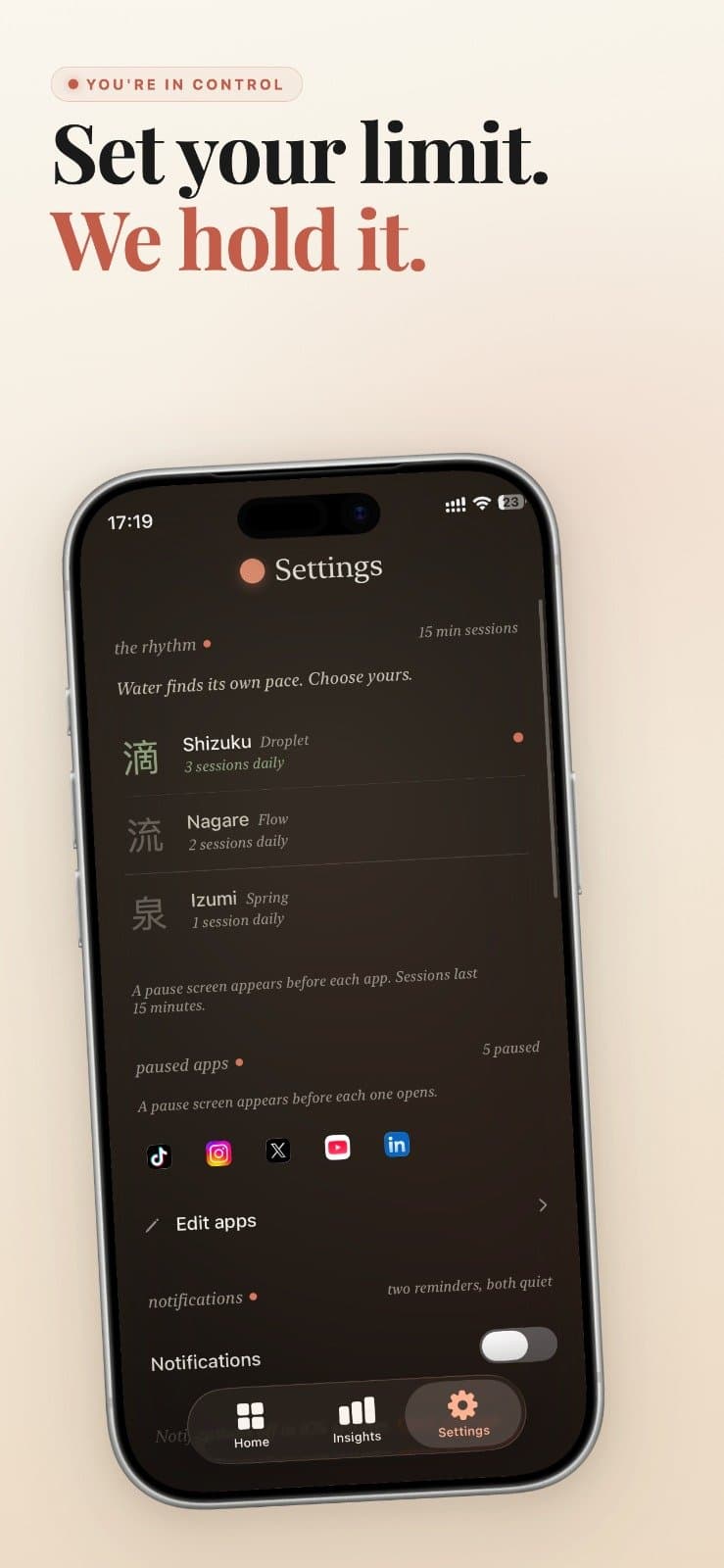
Mado is an iOS app that helps you reclaim your time from distracting apps like Instagram, TikTok, and X. Instead of punishing you with strict blocks or shaming you with data, it adds a "quiet window" between you and the app. When you try to open a guarded app, Mado presents a calm screen with two choices: close it or use it for a 15-minute session. Each day, you have a limited number of sessions (based on your chosen "rhythm") that you can't talk your way past. This real cap is what makes Mado effective. It also features Deep Focus blocks for extended concentration, and a schedule feature (Toki) to automate when the pause is active. Mado provides insights into your usage and progress, with a calming garden that grows as you stick to your rhythm. With no account, no ads, and privacy-focused design, Mado is a thoughtful tool for mindful digital living.
Drawn from the product itself, not from a survey.
Demographic
Professionals and students aged 18-35 who spend significant time on social media.
Pain points
Feeling that mindless scrolling eats into work, study, or personal time, leading to guilt and decreased productivity.
Primary needs
A simple, non-punitive way to limit social media use without losing access entirely, and to regain focus.
Demographic
Individuals interested in digital wellbeing and mindfulness, often following minimalism or self-improvement trends.
Pain points
Anxiety from constant connectivity and the "always-on" pressure, wanting more intentional use of technology.
Primary needs
Tools that encourage reflection and deliberate choices, with a gentle, Zen-like aesthetic that aligns with their values.
Demographic
Tech-savvy users who have tried traditional app blockers or screen time limits but find them too easy to bypass.
Pain points
Frustration with built-in tools like Screen Time that offer "Ignore Limit" options, making it hard to maintain self-control.
Primary needs
A reliable, hard-to-bypass solution that enforces limits firmly but without harshness, and offers customization.
Written by AI from measured evidence, scored out of 100.
Mado is a thoughtfully designed iOS app that tackles social media distraction with a unique 'quiet window' approach. Instead of punishing or shaming, it offers a calm pause with a hard cap on daily sessions, which is genuinely innovative. The design is elegant, with a cohesive Japanese-inspired theme and a growing bonsai garden as a reward. Usability is solid, with a 7-day trial and no-account setup. However, security is a concern with missing HTTPS enforcement and basic headers. Accessibility is decent but could improve contrast and localization. Growth potential is real but unproven, with no user reviews yet. Overall, Mado is a promising tool for mindful digital living, but it needs to address security and accessibility gaps to reach its full potential.
Clear onboarding with 7-day trial, no account needed. App screens show intuitive grouping of rhythms, paused apps, and stats. Consistent peach CTAs guide actions. No user reviews yet to confirm ease of use.
Elegant dark theme with peach accents and Japanese-inspired naming; app UI shows refined hierarchy and calm metaphors. Minor issues: black dead zone on homepage, low-contrast hero text, dated floating tab bar.
Lighthouse mobile performance 89/100 (LCP 3.5s, CLS 0, TBT 31ms), desktop 99/100. Site loads reasonably fast, no lag complaints found. App performance not directly measured but likely smooth.
HTTP probe shows HTTPS not enforced, no HSTS, CSP, or frame protection. Only SPF present (1/12 checklist). No security page or compliance claims. Privacy-focused design but data handling transparency limited.
Lighthouse accessibility audit 100/100 (automated). No accessibility statement or WCAG mention found. Dark theme with low-contrast supporting text may hinder readability. English-only localization.
Real problem, clear differentiator (hard cap on sessions) vs alternatives. Category has headroom, but niche appeal and no traction yet limit upside.
Mado's design is a breath of fresh air in the app-blocker space. The dark theme with peach accents and Japanese-inspired naming (Shizuku, Nagare, Izumi) feels cohesive and calming, matching its 'quiet window' philosophy. The app screens show thoughtful information hierarchy, with metrics like '3h reclaimed today' and a bonsai garden that grows as you stick to your rhythm. However, the homepage has a dead black rectangle that breaks the flow, and the hero text is low-contrast. Usability is strong: the 7-day trial, no-account setup, and clear CTAs make onboarding easy. The settings screen groups rhythms, paused apps, and notifications logically. Yet, with no user reviews, it's hard to gauge real-world ease of use. The floating pill tab bar feels dated, but overall, the app's UI is more refined than its marketing site.
Speed-wise, Mado's website performs well on desktop (99/100) and decently on mobile (89/100), with a CLS of 0 and TBT of 31ms. The LCP of 3.5s is a bit slow but acceptable. The app itself likely runs smoothly, though no benchmarks are available. Security is a weak point: the HTTP probe found no HTTPS enforcement, HSTS, CSP, or frame protection, scoring only 1/12 on checklist points. While the 'no account' design reduces attack surface, the lack of basic security headers is concerning. There's no security page or compliance claims (SOC 2, ISO), which is typical for a small indie app but still a gap. The privacy-focused approach is commendable, but users should be aware that data handling transparency is limited.
Accessibility is a mixed bag. The Lighthouse audit scores 100/100, but that's automated and doesn't catch everything. The dark theme with low-contrast supporting text could be problematic for users with visual impairments. There's no accessibility statement or WCAG mention, and the app is only in English. Growth potential is moderate: the problem of social media distraction is real, and Mado's hard cap on sessions is a unique differentiator compared to One Sec's delay, Opal's comprehensive blocking, and Freedom's cross-platform approach. The category has headroom, but the niche appeal and lack of traction (no ratings, new domain) limit immediate upside. The Japanese aesthetic and calming garden could resonate with a specific audience, but mass adoption is uncertain.
Conclusion
If you're tired of app blockers that are too easy to bypass, Mado's hard cap is worth a try. The 7-day trial lets you test it without commitment. Just be aware of the security gaps and the lack of user feedback. It's a calm, beautiful app that might just help you reclaim your time — if you can get past the initial setup and the black rectangle on the homepage. Give it a shot; your future self might thank you.
Named competitors, point by point. Nobody paid to appear here or to be left out.
 Mado Mado |  One Sec One Sec |  Opal Opal |  Freedom Freedom | |
|---|---|---|---|---|
| Core mechanism | Adds a quiet window with two choices: close or 15-min session, capped daily. | Adds a delay before opening apps to encourage reflection. | Comprehensive blocking, scheduling, and tracking. | Cross-platform blocking of apps and websites with schedules. |
| Hard cap on usage | Yes, daily session cap that can't be bypassed. | No cap, just a delay. | Blocking can be strict but may have bypass options. | Blocking is strict but can be disabled manually. |
| Account required | No account needed. | Account required for sync. | Account required. | Account required for cross-device sync. |
| Platform support | iOS only (iOS 17+). | iOS and Android. | iOS, Android, and web. | iOS, Android, Windows, Mac, and web. |
| Pricing model | Subscription: $9.99/month or $49.99/year after 7-day trial. | Freemium with premium subscription. | Subscription-based. | Subscription or one-time purchase. |
One Sec
One Sec adds a delay before opening distracting apps, similar to Mado but with a different focus on creating a pause for reflection.
Opal
Opal is a comprehensive screen time management app with blocking, scheduling, and tracking features, often used for deep focus.
Freedom
Freedom is a cross-platform app that allows you to block distracting websites and apps across devices, with customizable schedules.
Comparing options? See Mado alternatives, scored side by side

An all-in-one hospitality software for restaurants and ba...

A weekly newsletter delivering curated tech jobs, intervi...

White-label reputation management software for agencies s...

Privacy-first open source journal app with a continuous t...

Puzzly is an all-in-one B2B lead generation platform that...

All-in-one AI workspace for docs, projects, and knowledge...

A free, open-source platform offering 110 AI agent skills...

Open-source desktop app for switching AI coding providers...

One verified handle for your online identity, readable by...

Frame-perfect video-to-GIF maker that runs entirely in yo...

White-label website audits that close deals for digital a...

Automated quote follow-up for trades and service businesses.
A platform dedicated to providing unbiased reviews of newly launched applications, analyzing everything from their features to their full potential.
info@scoutforge.net© 2026 Scoutforge. All rights reserved.
