Cycling through all six. Tap any point to stop.
Measured on six things
Convert orphaned OST files to PST and 8 other formats wit...
Security
52HTTPS enforced with SPF and DMARC, and privacy/return policies exist. But the header probe scores 4/12: no HSTS, CSP, frame protection or X-Content-Type-Options, and no SOC 2/ISO/pen-test page appears in the fetched content.
Screenshots
1 / 1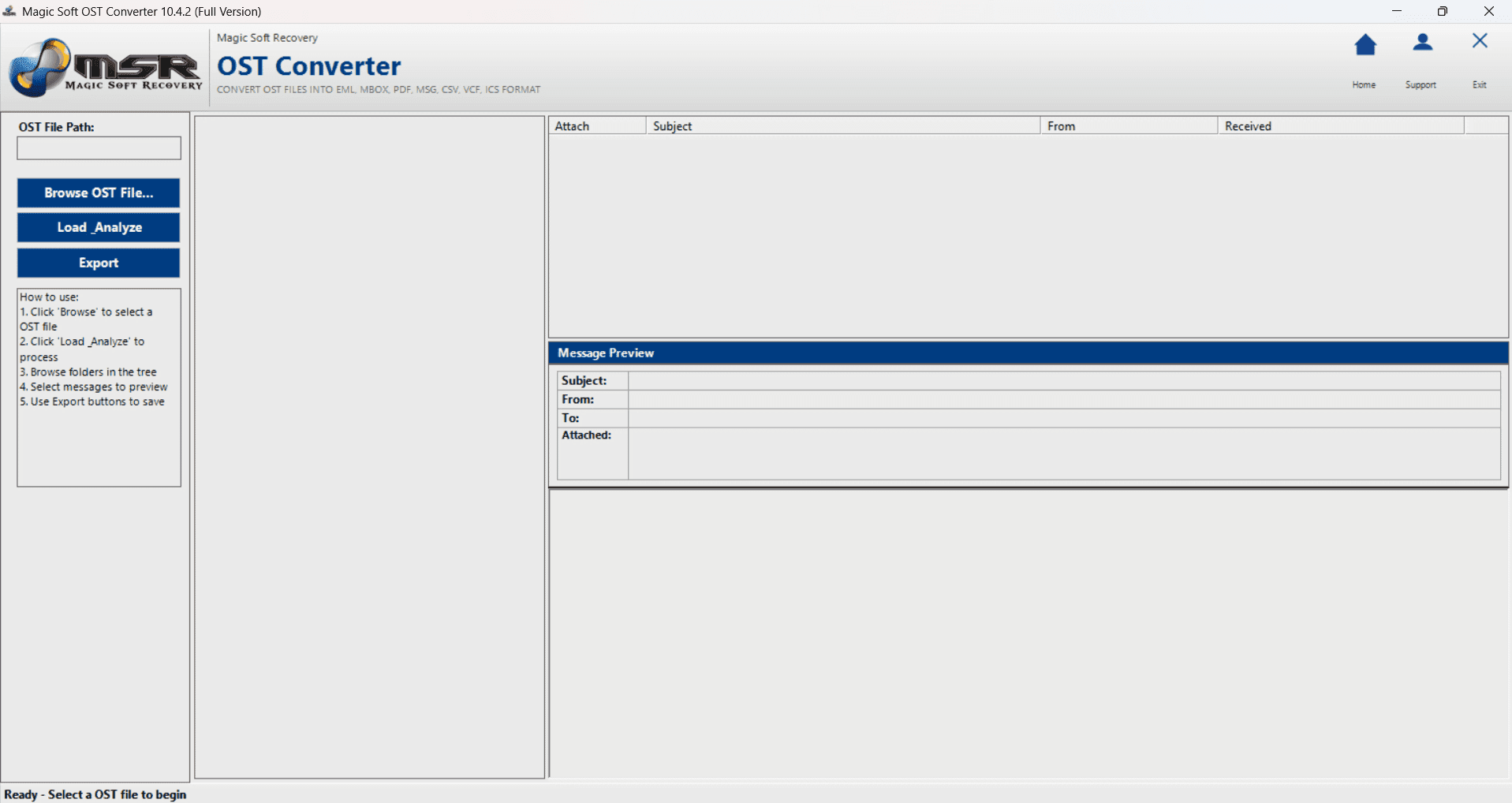
About this app
Magic Soft OST to PST Converter is a dedicated Windows utility for converting Outlook OST files into PST, EML, MSG, PDF, MBOX, CSV, VCF, and ICS formats without an active Exchange connection or installed Outlook profile. The tool is built for orphaned, damaged, and password-protected OST files, preserving folder hierarchy, timestamps, headers, attachments, and metadata during conversion. It supports ANSI and UNICODE OSTs, multi-gigabyte files (including 500GB+), batch processing of multiple OSTs, and selective export of emails, contacts, calendars, tasks, and notes. The app includes a deep preview engine before conversion, custom naming, attachment handling, duplicate removal, and a demo version that exports 10 items per folder. Built for IT admins, compliance auditors, legal teams, and freelancers, it keeps all processing on-premises — no cloud uploads — and is available as a personal or technician license for Windows 11/10/8/7 and Outlook versions 2000 through 2024.
Key features
- 1Offline OST to PST/EML/MSG/PDF/MBOX/CSV/VCF/ICS conversion with no Exchange server or Outlook profile required
- 2Handles orphaned, damaged and password-protected OSTs, including ANSI and UNICODE, and files of 500GB+
- 3Preserves folder hierarchy, timestamps, headers, attachments and metadata; selective export of mail, contacts, calendars, tasks, notes
- 4Deep preview engine, custom naming, duplicate removal and batch processing across multiple OST files
Target customer profile
Drawn from the product itself, not from a survey.
Demographic
IT operations and system engineers managing Exchange or Microsoft 365 outages
Pain points
Orphaned or de-provisioned OST files lock teams out during server failures
Primary needs
Fast, offline OST-to-PST conversion with intact folder hierarchy and attachments
Demographic
Data compliance officers, legal teams, and internal auditors doing e-discovery
Pain points
Raw OST mailboxes are not searchable or portable for regulatory review
Primary needs
Export emails to PDF, CSV, or EML with metadata preserved and duplicate removal
Demographic
Small business owners and freelancers archiving client email history
Pain points
Old OST backups are inaccessible without a paid Exchange or Outlook license
Primary needs
Readable, archival output (PST/PDF) from standalone OST files on any Windows PC
Scout Review
Written by AI from measured evidence, scored out of 100.
Magic Soft OST to PST Converter is a competent Windows utility with a clear, specific pitch: convert orphaned, damaged or password-protected OST files to PST, EML, MSG, PDF, MBOX, CSV, VCF and ICS entirely offline, with folder hierarchy, timestamps and attachments preserved. The site communicates that well and the app's three-pane layout mirrors an email client. The execution gaps are what hold it back — copy errors on a data-integrity product, low-contrast text, a 6.5s mobile LCP, a 4/12 security header score with no published audit, and a demo capped at 10 items per folder that can't prove the 500GB claim. Solid, unremarkable, and beatable on polish.
Measure by measure
Usability
60Hero answers the compatibility question fast and the in-app Browse/Load_Analyze/Export steps give a short onboarding cue. But the demo caps at 10 items per folder, so you can't test a 500GB file before paying.
Design
57Conventional but readable hero with a clear Download/Buy CTA hierarchy and platform pills. Undone by low-contrast grey body text, inconsistent section heading styles, and copy errors ('loosing', 'avail') on a data-integrity product.
Speed
58Desktop Lighthouse 93/100 but mobile drops to 71 with a 6.5s LCP — well past the 2.5s 'good' line. CLS 0 and TBT 15ms are clean, so it's a heavy hero asset, not a bloated script problem.
Security
52HTTPS enforced with SPF and DMARC, and privacy/return policies exist. But the header probe scores 4/12: no HSTS, CSP, frame protection or X-Content-Type-Options, and no SOC 2/ISO/pen-test page appears in the fetched content.
Accessibility
79Lighthouse accessibility lands a clean 100/100 on automated axe checks. No published a11y statement and the visual audit flags small low-contrast grey text that automated checks can miss; Windows-only with no multi-language support.
Growth
62Real, specific pain — orphaned OSTs locked out during Exchange/M365 outages — with a genuine offline wedge and named buyer segments. But it's a crowded converter category and the wedge is a feature, not a moat.
Improvement areas
- Copy errors and low-contrast text undermine a product whose pitch is data integrity
- Demo capped at 10 items per folder can't validate the large-file claims before purchase
- Security headers score 4/12 with no published SOC 2, ISO or pen-test evidence
- Mobile LCP of 6.5s and no accessibility statement or multi-language support
Design & Usability
The homepage is a conventional converter landing page that gets the basics right: a clear dark 'Download Now' beside an outlined 'Buy Now', Windows/Mac pills up front, and a floating panel linking Features, Specification, Software Guide, Screenshots, Video and How It Works. Inside the app, a Browse/Load_Analyze/Export step strip gives a short onboarding cue. What drags it down is craft: small low-contrast grey body text, section headings that switch between three different treatments, and copy errors ('loosing', 'avail', 'This one in hand solution') on a product whose entire promise is data integrity. The hero screenshot shows three empty panes, so it demonstrates nothing about how the tool handles a real mailbox. The 10-items-per-folder demo cap makes the free trial nearly useless for the multi-gigabyte files the product is built for.
Speed & Security
Measured Lighthouse gives desktop 93/100 but mobile only 71 with a 6.5s LCP — far past the 2.5s 'good' threshold. CLS is 0 and TBT is 15ms, so the problem is a heavy hero asset rather than bloated JavaScript, and it's fixable. Security is the weaker story: HTTPS is enforced and SPF/DMARC are in place, but the header probe scores 4/12 — no HSTS, no CSP, no frame protection, no X-Content-Type-Options, no Referrer-Policy, no Permissions-Policy. For a utility that markets itself to legal, compliance and e-discovery teams handling password-protected OSTs, there is no visible SOC 2, ISO, pen-test or bug-bounty page in the fetched content. 'Full Secured Download Version' is a badge, not an audit.
Accessibility & Growth
Accessibility scores 100/100 on the Lighthouse axe audit, which is genuinely clean for automated coverage — but automated checks only catch part of WCAG, and the visual audit found small light-grey text on pale backgrounds in the hero bullets and feature cards. There is no published accessibility statement, no multi-language support, and the product is Windows-only with Mac listed as 'launching soon'. Growth is a judgement on the idea: the problem is real and specific — orphaned or de-provisioned OST files lock teams out during Exchange or Microsoft 365 outages — and the wedge (fully offline, on-premises conversion of 500GB+ files with no Exchange or Outlook dependency) is concrete. Named buyers (IT admins, compliance/legal/e-discovery, freelancers) are specific rather than 'everyone'. The limit is that this is a crowded converter category where SysTools and others sell the same lifeline, and offline processing is a checkbox competitors can match. The domain dates to 2014 and there's one social profile — context, not a score.
Conclusion
If you're an IT admin staring at an orphaned OST during an outage, this does the job the page says it does, and the offline processing is the right call for sensitive mailboxes. Before you buy, test the demo against a real file — the 10-item cap won't tell you much — and ask support directly for their security posture, because the site doesn't publish one. The product is real and the problem is real; the marketing just needs the same care as the conversion engine.
Suggestions for improvement
- Fix the copy errors ('loosing', 'avail', 'This one in hand solution') — they undercut the data-integrity pitch on the page that makes it.
- Raise the demo cap or offer a time-limited full export so buyers can prove the 500GB claim before paying.
- Add HSTS, CSP, X-Content-Type-Options and frame protection; publish a security page with any audits or pen-test results.
- Compress the hero asset to bring mobile LCP under 2.5s, and raise body-text contrast to meet WCAG AA.
Alternatives comparison
Named competitors, point by point. Nobody paid to appear here or to be left out.
 Magic Soft OST to PST Converter |  SysTools OST Converter | |
|---|---|---|
| Offline conversion without Exchange server or Outlook profile | Yes — core selling point, no Exchange or Outlook dependency | Yes — supports orphaned OST recovery without Exchange |
| Output formats supported | PST, EML, MSG, PDF, MBOX, CSV, VCF, ICS | PST plus multiple email and document formats |
| Batch conversion of multiple OST files | Yes — batch processing of multiple OSTs | Yes — batch conversion supported |
| Free trial / demo limits | Demo exports 10 items per folder | Free demo version available (item limits apply) |
| Platform support | Windows 11/10/8/7; Mac listed as 'launching soon' | Windows |
| Licensing model | Personal or technician license | Personal, business and enterprise licensing |
Comparing options? See Magic Soft OST to PST Converter alternatives, scored side by side
More Productivity apps
View all Productivity
Puzzly – B2B Lead Generation & Sales Intelligence Platform
92Puzzly is an all-in-one B2B lead generation platform that...

Qamarero
92An all-in-one hospitality software for restaurants and ba...

EmbedMyReviews
92White-label reputation management software for agencies s...

StoryPad
92Privacy-first open source journal app with a continuous t...

Notion
92All-in-one AI workspace for docs, projects, and knowledge...

The Stack Newsletter
92A weekly newsletter delivering curated tech jobs, intervi...

Vibe Coding Agent Skills
92A free, open-source platform offering 110 AI agent skills...

QRBliss
91Branded QR codes with AI Brand Sync, 15 free dynamic code...

Gerty
91Private, local AI assistant for Mac that runs offline

Strukchad Property Management
91Property management for Kenyan letting agents: rent invoices raised every month, M-Pesa rent prompts to tenants, arrears tracking and landlord statements.

CC Switch
91Open-source desktop app for switching AI coding providers...

PitchWhip
90AI cold call scripts & direct dials from LinkedIn


A platform dedicated to providing unbiased reviews of newly launched applications, analyzing everything from their features to their full potential.
info@scoutforge.net© 2026 Scoutforge. All rights reserved.
