Cycling through all six. Tap any point to stop.
Measured on six things
Convert Lotus Notes NSF files to Outlook PST with zero da...
Design
46Functional but dated. The homepage leans on repetitive feature grids and a real app screenshot that shows an aging Windows UI — complete with an 'Ivanti Community' preview pane that undercuts the zero-data-loss pitch.
Screenshots
1 / 1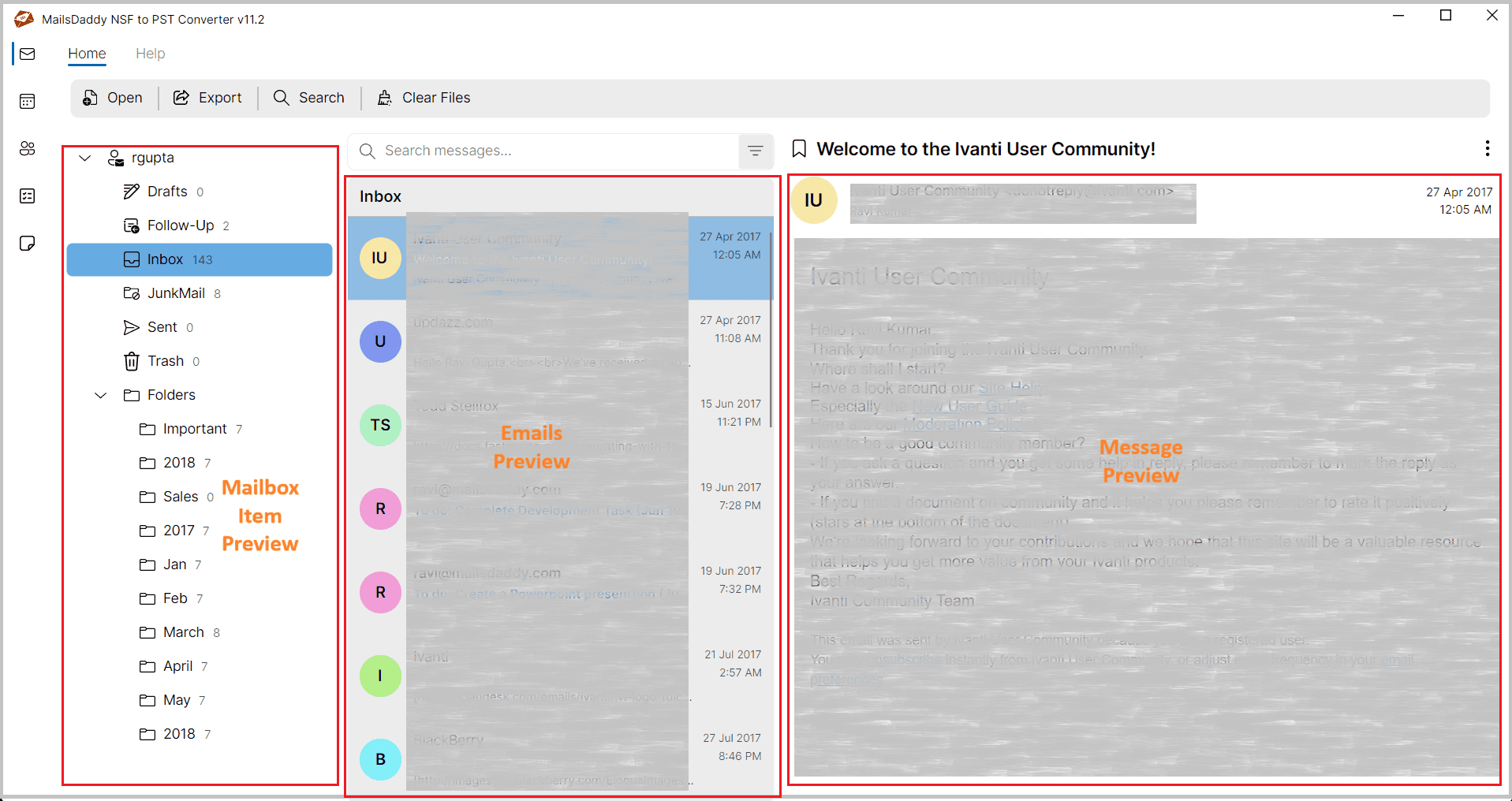
About this app
MailsDaddy NSF to PST Converter ensures smooth nsf to pst conversion with complete accuracy. It converts NSF files into PST format while preserving emails, attachments, contacts, and calendars without altering the original structure. This nsf to pst converter maintains folder hierarchy and metadata throughout the conversion process. It supports batch conversion, allowing multiple NSF files to be processed efficiently. The software also includes selective migration options to convert only required data. With its consistent performance, it becomes a reliable solution to convert lotus notes to outlook and convert hcl notes to outlook without complexity.
Key features
- 1Batch conversion of multiple NSF files to PST, EML, MSG, or MBOX with folder hierarchy preserved.
- 2Selective export with date and metadata filters (To, From, Subject, Time) for targeted migrations.
- 3Preserves read/unread flags, calendar recurrence, formatting, and attachments during conversion.
Target customer profile
Drawn from the product itself, not from a survey.
Demographic
IT Administrators in enterprises migrating from Lotus Notes to Outlook
Pain points
Complex migration process, risk of data loss, large NSF files
Primary needs
Reliable, bulk conversion with folder hierarchy and metadata preserved
Demographic
Small business owners upgrading their email system
Pain points
Limited technical expertise, budget constraints, need for simple tools
Primary needs
User-friendly interface, affordable pricing, no dependency on Outlook or Notes
Demographic
Individual professionals with archived NSF files
Pain points
Difficulty accessing old NSF data, need to convert only specific emails or contacts
Primary needs
Selective conversion, support for multiple output formats, free trial to test
Demographic
Managed Service Providers (MSPs) handling email migrations for clients
Pain points
Tight deadlines, diverse client environments, need for scalable solution
Primary needs
Batch processing, compatibility with all Windows and Outlook versions, 24/7 support
Scout Review
Written by AI from measured evidence, scored out of 100.
MailsDaddy NSF to PST Converter is a workmanlike legacy-migration tool with a fast site, a thorough feature list, and a dated presentation. The product does what it says — batch conversion, selective export, metadata preservation, multi-format output — but the marketing undersells it with repetitive grids and a preview pane that shows the wrong mailbox. Security headers are half-done and there's no published compliance. It's a solid pick for IT admins who need the job done; it's not going to win a design award.
Measure by measure
Usability
58Clear CTAs and a well-enumerated feature set (selective export, date filters, batch conversion) help, but there's no live demo, the trial is a desktop download, and the nav is cluttered with Offers/Blogs dropdowns.
Design
46Functional but dated. The homepage leans on repetitive feature grids and a real app screenshot that shows an aging Windows UI — complete with an 'Ivanti Community' preview pane that undercuts the zero-data-loss pitch.
Speed
90Lighthouse mobile 99/100 with LCP 1.8s, CLS 0.001, TBT 58ms; desktop also 99/100. The marketing site is genuinely fast — no heavy SPA, no bloat.
Security
52HTTPS enforced with CSP, SPF, and DMARC in place, but HSTS, frame protection, X-Content-Type-Options, Referrer-Policy, and Permissions-Policy are all missing (6/12 checks). No SOC 2, ISO, or pen-test claims published.
Accessibility
68Lighthouse a11y 91/100, but failing audits include insufficient color contrast, non-sequential headings, small touch targets, and mismatched accessible names. No WCAG statement published.
Growth
58A real, specific problem (Notes-to-Outlook migration) with concrete differentiators — batch conversion, selective export, multi-format output. But it's a shrinking legacy niche against entrenched peers.
Improvement areas
- Security headers incomplete (6/12) — missing HSTS, frame protection, and three policy headers.
- Accessibility failures: contrast, heading order, touch targets, and accessible names.
- No live demo or browser-based preview; trial requires desktop download.
Design & Usability
MailsDaddy's landing page is competent but stuck in 2016: repetitive feature grids, a hero mockup that's more polished than the actual product screenshot, and a preview pane showing an Ivanti community forum instead of converted mail. Usability is better than design — the feature list is genuinely thorough (selective export, metadata filters, batch conversion, multi-format output) and the CTAs are clear. But there's no live demo, the trial is a desktop download, and the nav buries the product under Offers and Blogs dropdowns. It works; it just doesn't inspire confidence.
Speed & Security
Speed is the standout: Lighthouse 99/100 on both mobile and desktop, LCP 1.8s, CLS 0.001, TBT 58ms. The marketing site is genuinely snappy. Security is middling — HTTPS, CSP, SPF, and DMARC are in place, but HSTS, frame protection, and three other headers are missing (6/12 checks), and there's no published SOC 2, ISO, or pen-test evidence. For a tool that handles email archives and credentials, that's a gap worth closing.
Accessibility & Growth
Accessibility scores 91/100 on Lighthouse but fails on contrast, heading order, touch targets, and accessible names — table-stakes issues that suggest the audit was passed by accident rather than design. Growth is the interesting one: the problem is real (Notes-to-Outlook migration is a genuine pain), the differentiators are concrete (batch conversion, selective export, PST/EML/MSG/MBOX output), but the category is shrinking and crowded with SysTools, Stellar, and Kernel. There's a business here; there isn't obviously a rocket.
Conclusion
If you're an IT admin staring down a Notes-to-Outlook migration and you need batch conversion with folder hierarchy intact, this will do the job. If you're evaluating on polish, compliance, or modern UX, look at Stellar or Kernel first. The bones are fine; the wrapping needs work.
Suggestions for improvement
- Replace the Ivanti Community preview screenshot with real converted mail — it directly contradicts the zero-data-loss claim.
- Add HSTS, frame protection, X-Content-Type-Options, Referrer-Policy, and Permissions-Policy headers to reach 11/12.
- Publish a WCAG conformance statement and fix the contrast, heading order, and touch-target failures flagged by Lighthouse.
- Offer a browser-based demo or sample conversion so buyers can see output before downloading a desktop installer.
Alternatives comparison
Named competitors, point by point. Nobody paid to appear here or to be left out.
 MailsDaddy NSF to PST Converter MailsDaddy NSF to PST Converter |  SysTools NSF to PST Converter SysTools NSF to PST Converter |  Stellar NSF to PST Converter Stellar NSF to PST Converter |  Kernel for NSF to PST Kernel for NSF to PST | |
|---|---|---|---|---|
| Batch conversion of multiple NSF files | Yes — multiple NSF to single or individual PSTs | Yes | Yes | Yes |
| Output formats beyond PST | PST, EML, MSG, MBOX | PST, EML, MSG, HTML, RTF | PST, EML, MSG, RTF, HTML | PST, EML, MSG, HTML, RTF |
| Selective conversion / filters | Yes — folder selection plus date/metadata filters | Yes | Yes | Yes |
| Free trial available | Yes — free download | Yes | Yes | Yes |
| Preview before conversion | Yes — mail, contacts, calendar, journal preview | Yes | Yes | Yes — highlighted as a strength |
SysTools NSF to PST Converter
A popular tool that converts NSF files to PST and other formats with a similar feature set, including batch conversion and selective export.
Stellar NSF to PST Converter
Offers conversion of NSF to PST and other formats, with options to save in EML, MSG, RTF, and HTML. Known for its user-friendly interface.
Kernel for NSF to PST
A well-known converter that supports large NSF files and provides preview before conversion. It also offers a free trial version.
Comparing options? See MailsDaddy NSF to PST Converter alternatives, scored side by side
More Productivity apps
View all Productivity
Qamarero
92An all-in-one hospitality software for restaurants and ba...

The Stack Newsletter
92A weekly newsletter delivering curated tech jobs, intervi...

EmbedMyReviews
92White-label reputation management software for agencies s...

StoryPad
92Privacy-first open source journal app with a continuous t...

Puzzly – B2B Lead Generation & Sales Intelligence Platform
92Puzzly is an all-in-one B2B lead generation platform that...

Notion
92All-in-one AI workspace for docs, projects, and knowledge...

Vibe Coding Agent Skills
92A free, open-source platform offering 110 AI agent skills...

CC Switch
91Open-source desktop app for switching AI coding providers...

username.md
90One verified handle for your online identity, readable by...

What the GIF
89Frame-perfect video-to-GIF maker that runs entirely in yo...

AuditCloser
89White-label website audits that close deals for digital a...

NudgeWin
89Automated quote follow-up for trades and service businesses.


A platform dedicated to providing unbiased reviews of newly launched applications, analyzing everything from their features to their full potential.
info@scoutforge.net© 2026 Scoutforge. All rights reserved.
