Cycling through all six. Tap any point to stop.
Measured on six things
Migrate emails between IMAP servers safely and selectively.
Design
44Dated, unstyled-document feel: default serif body copy, clip-art icons, unreadable screenshot thumbnails and an award band with no award names. The desktop app's three-pane UI and stepper are the one genuinely considered piece.
Screenshots
1 / 1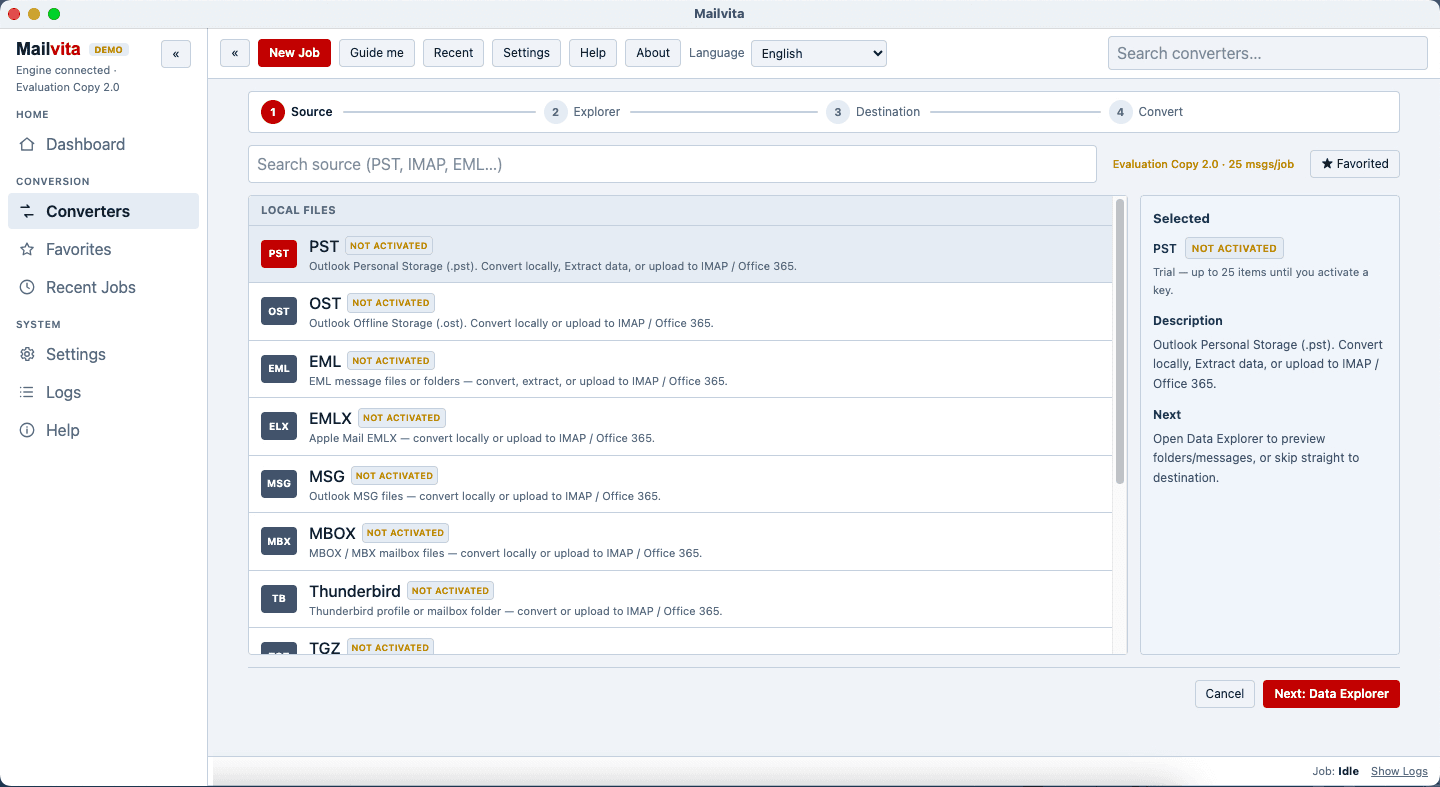
About this app
Mailvita IMAP to IMAP Migration tool allows users to smoothly move mailboxes across various servers by migrating emails directly from source to destination IMAP accounts. It works with popular email providers such as Gmail, Office 365, Yahoo Mail and AOL. Users can transfer specific folders while preserving the mailbox structure, messages and attachments. The application can be used for changing email hosting providers, migrating enterprise mailboxes or merging accounts. It offers a free trial to evaluate the performance.
Key features
- 1Direct IMAP-to-IMAP mailbox migration across Gmail, Office 365, Yahoo, AOL, Zoho and other IMAP servers.
- 2Selective folder migration with preservation of folder hierarchy, metadata, attachments and formatting.
- 3Windows desktop app with a numbered four-step stepper and a 25-messages-per-job free trial.
Target customer profile
Drawn from the product itself, not from a survey.
Demographic
IT administrators in small to medium enterprises
Pain points
Manual IMAP migration is error-prone, time-consuming, and risks data loss.
Primary needs
A reliable, automated tool to migrate multiple mailboxes without downtime.
Demographic
Individual professionals switching email providers
Pain points
Lack of technical expertise to transfer emails manually between IMAP accounts.
Primary needs
A simple, guided tool to migrate emails and attachments securely.
Demographic
Managed service providers (MSPs)
Pain points
Client email migrations require a scalable solution that supports various IMAP servers.
Primary needs
A versatile migration tool that works with multiple IMAP providers and offers selective migration.
Scout Review
Written by AI from measured evidence, scored out of 100.
Mailvita IMAP to IMAP Migration Tool is a competent, dated Windows utility wrapped in a homepage that looks like it was built in 2010 and never revisited. The app itself has a clear stepper and a sensible three-pane layout; the marketing site has clip-art trophies, unreadable screenshots and a self-reported 4.9/5 rating with no third-party verification. Speed is genuinely good (desktop 98, mobile 85), security headers are strong (12/13) but DMARC is missing and the tool takes raw IMAP credentials instead of OAuth. Accessibility is mid-band with five real Lighthouse failures. Growth is real but unfocused — the problem is genuine, the selective-migration wedge is concrete, but the copy tries to sell to everyone at once.
Measure by measure
Usability
52App stepper is clear and the trial limit is surfaced in-app, but the site never explains what the trial includes, the docs are a purchase FAQ, and the key selective-migration answer is collapsed behind a click.
Design
44Dated, unstyled-document feel: default serif body copy, clip-art icons, unreadable screenshot thumbnails and an award band with no award names. The desktop app's three-pane UI and stepper are the one genuinely considered piece.
Speed
68Desktop Lighthouse 98/100 and mobile 85/100 with CLS 0 and TBT 53ms — genuinely snappy. Mobile LCP of 4.4s is the weak spot, dragging the otherwise strong profile down.
Security
74Strong header hygiene — HSTS, CSP, frame protection, secure cookies, 12/13 checklist points. DMARC is missing and there's no SOC 2, pen-test or bug bounty published, and the tool asks for raw IMAP credentials rather than OAuth.
Accessibility
58Lighthouse 79/100 with real failures: low contrast, color-only links, unnamed links, prohibited ARIA and no main landmark. No accessibility statement or WCAG claim, English-only. Mid-band for the category.
Growth
56Real problem, real buyer, and selective folder migration with metadata preservation is a concrete wedge. But the copy speaks to SMB admins, individuals and MSPs at once, and free provider-native migration tools exist.
Improvement areas
- Dated homepage design: default serif type, clip-art icons, unreadable screenshots, unsupported award claims.
- Thin documentation: purchase FAQ only, no migration walkthrough or troubleshooting guide.
- Security gaps: missing DMARC, no SOC 2/pen-test, credential-based auth instead of OAuth.
- Accessibility: five failing Lighthouse audits, no WCAG statement, English-only.
Design & Usability
Mailvita's homepage reads like an unstyled document: Times-style serif body copy, repeated clip-art icons, a 'Shareware Awards' band with no award names or dates, and screenshot thumbnails too small to read. The one place design thought clearly went in is the desktop app itself — a three-pane layout with a numbered four-step stepper and trial limits surfaced in the UI. Usability is competent but thin: the stepper is clear, but the site never explains what the trial includes before the Download/Buy Now buttons, the docs are a purchase FAQ with no migration walkthrough, and the selective-migration answer sits collapsed in an accordion. The 485 ratings at 4.9/5 are self-reported on the site with no third-party review platform verifiable in the collected evidence.
Speed & Security
Speed is a genuine strength: Lighthouse desktop 98/100, mobile 85/100, CLS 0 and TBT 53ms. The one blemish is mobile LCP at 4.4s, which lands in 'needs improvement' and suggests the hero imagery is heavier than it needs to be. Security is above category average on hygiene — HTTPS enforced, HSTS, CSP, frame protection, secure cookies, 12 of 13 checklist points — but DMARC is missing and no SOC 2, ISO 27001, pen-test or bug bounty is published. More importantly, the tool asks users to enter raw credentials for both source and destination IMAP accounts rather than using OAuth, which is a real risk for the enterprise admins the product targets.
Accessibility & Growth
Accessibility lands at 58: Lighthouse 79/100 with five real failures — prohibited ARIA attributes, insufficient contrast, color-only link distinction, links without discernible names, and no main landmark. There's no accessibility statement, no WCAG claim and no multi-language support, which is table-stakes-missing for a tool sold to IT admins. Growth is a judgement on the idea: IMAP-to-IMAP migration is a real, paid problem, and selective folder migration with metadata and hierarchy preservation is a concrete differentiator. But the category is crowded with established migration utilities and free provider-native options, and the site speaks to SMB admins, individual switchers and MSPs simultaneously with the same generic copy — no segment is served better than another. The 8.7-year-old domain and five social profiles are context, not a moat.
Conclusion
If you're an SMB admin who needs to move a handful of mailboxes between IMAP providers and you can live with a dated UI and a purchase-FAQ-only docs page, Mailvita will probably do the job — the stepper is clear, the migration claims are specific, and the price is likely lower than enterprise migration suites. If you're an MSP or an enterprise buyer, the missing DMARC, absent SOC 2, credential-based auth and lack of an accessibility statement are real blockers. Try the free trial on a small mailbox first, and don't trust the 4.9/5 until you've seen it on a review platform that isn't the vendor's own homepage.
Suggestions for improvement
- Replace the default serif body copy with a real type system and swap the clip-art icons for actual product screenshots.
- Publish a migration walkthrough in the docs — not just a purchase FAQ — covering source/destination setup and selective folder selection.
- Add OAuth support for Gmail and Office 365 so users aren't pasting raw IMAP credentials into a desktop app.
- Publish a DMARC record and an accessibility statement; fix the five failing Lighthouse a11y audits (contrast, link names, main landmark).
Alternatives comparison
Named competitors, point by point. Nobody paid to appear here or to be left out.
 Mailvita IMAP to IMAP Migration Tool | ||
|---|---|---|
| Migration method | Desktop Windows app, guided four-step wizard | Not specified in provided details |
| Selective folder migration | Yes — choose specific folders to migrate | Not specified in provided details |
| Free trial | Yes — 25 messages per job | Not specified in provided details |
| Authentication model | Raw IMAP credentials for source and destination | Not specified in provided details |
| Supported platforms | Windows 11/10/8 (site also lists macOS and Linux) | Not specified in provided details |
| Published compliance / security certifications | None published (no SOC 2, ISO, pen-test or bug bounty) | Not specified in provided details |
Comparing options? See Mailvita IMAP to IMAP Migration Tool alternatives, scored side by side
More Productivity apps
View all Productivity
Puzzly – B2B Lead Generation & Sales Intelligence Platform
92Puzzly is an all-in-one B2B lead generation platform that...

Qamarero
92An all-in-one hospitality software for restaurants and ba...

EmbedMyReviews
92White-label reputation management software for agencies s...

StoryPad
92Privacy-first open source journal app with a continuous t...

Notion
92All-in-one AI workspace for docs, projects, and knowledge...

The Stack Newsletter
92A weekly newsletter delivering curated tech jobs, intervi...

Vibe Coding Agent Skills
92A free, open-source platform offering 110 AI agent skills...

QRBliss
91Branded QR codes with AI Brand Sync, 15 free dynamic code...

Gerty
91Private, local AI assistant for Mac that runs offline

Strukchad Property Management
91Property management for Kenyan letting agents: rent invoices raised every month, M-Pesa rent prompts to tenants, arrears tracking and landlord statements.

CC Switch
91Open-source desktop app for switching AI coding providers...

PitchWhip
90AI cold call scripts & direct dials from LinkedIn


A platform dedicated to providing unbiased reviews of newly launched applications, analyzing everything from their features to their full potential.
info@scoutforge.net© 2026 Scoutforge. All rights reserved.
