Cycling through all six. Tap any point to stop.
Measured on six things
A calm, fast Mac mail app for all your accounts. Your mail stays on your Mac, with no servers in between.
Security
54HTTPS, SPF and DMARC are in place and the local-storage, Keychain, no-analytics model is a genuine privacy stance. But 6/12 header checklist points, no HSTS, CSP or frame protection, and no published audit.
Screenshots
1 / 4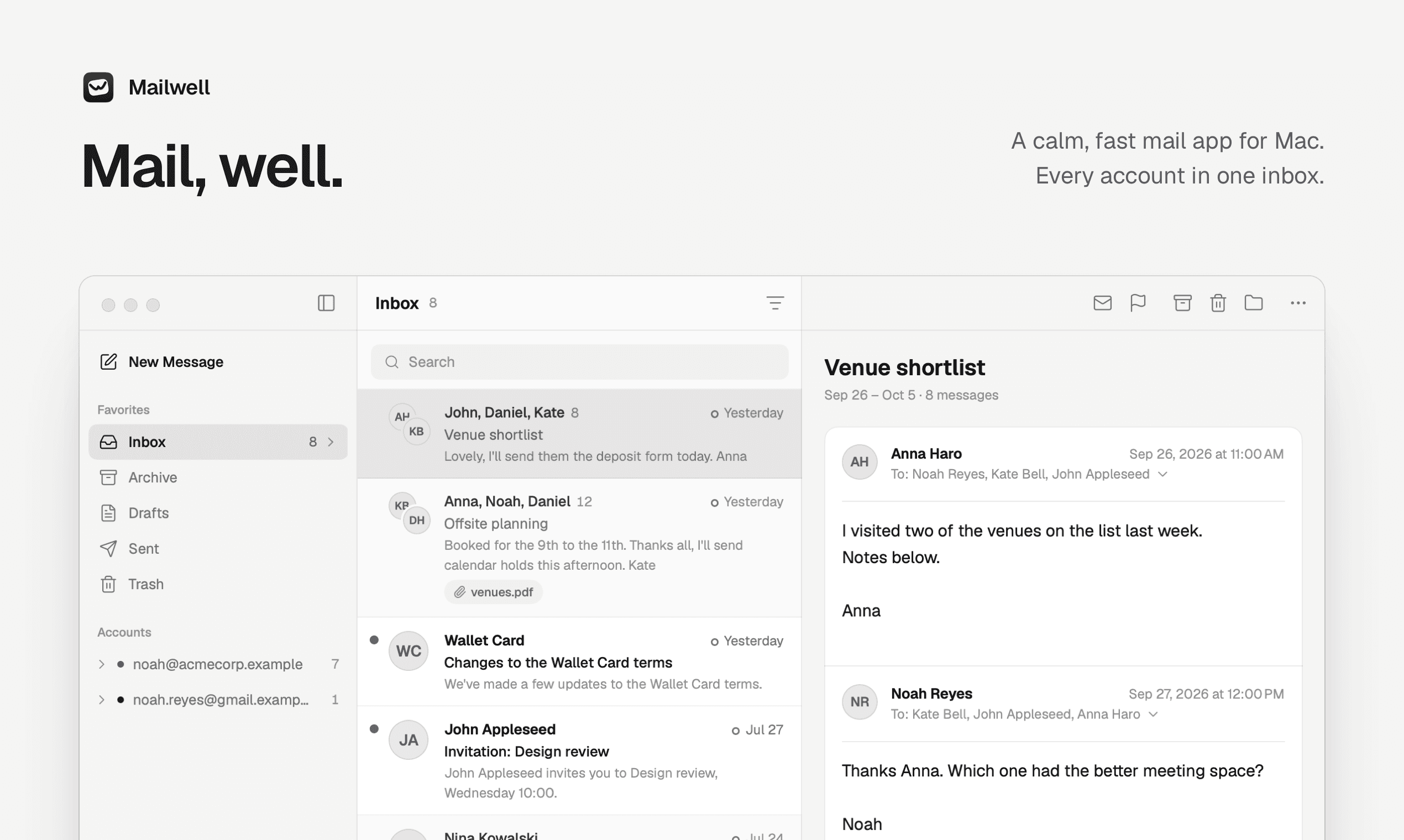

About this app
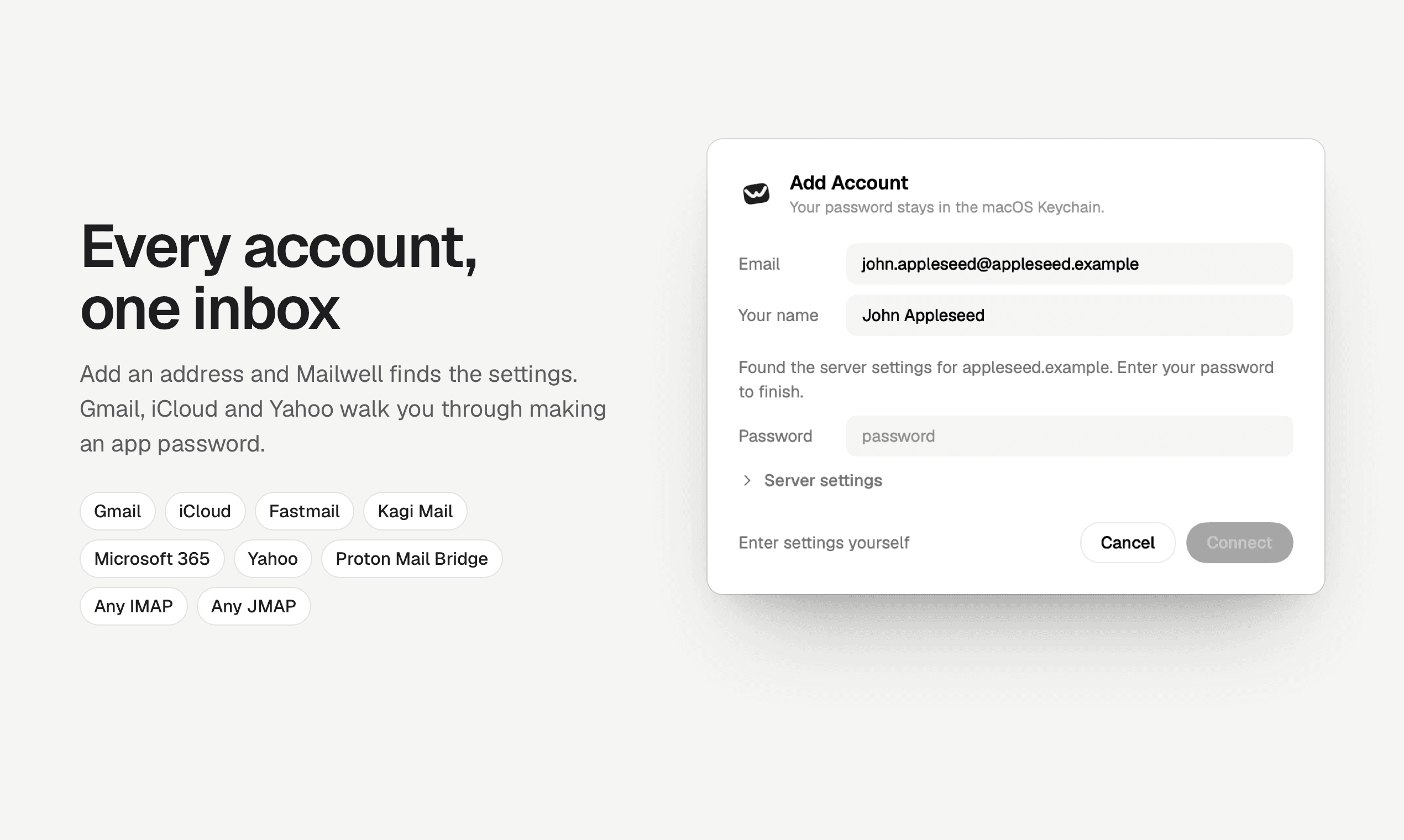
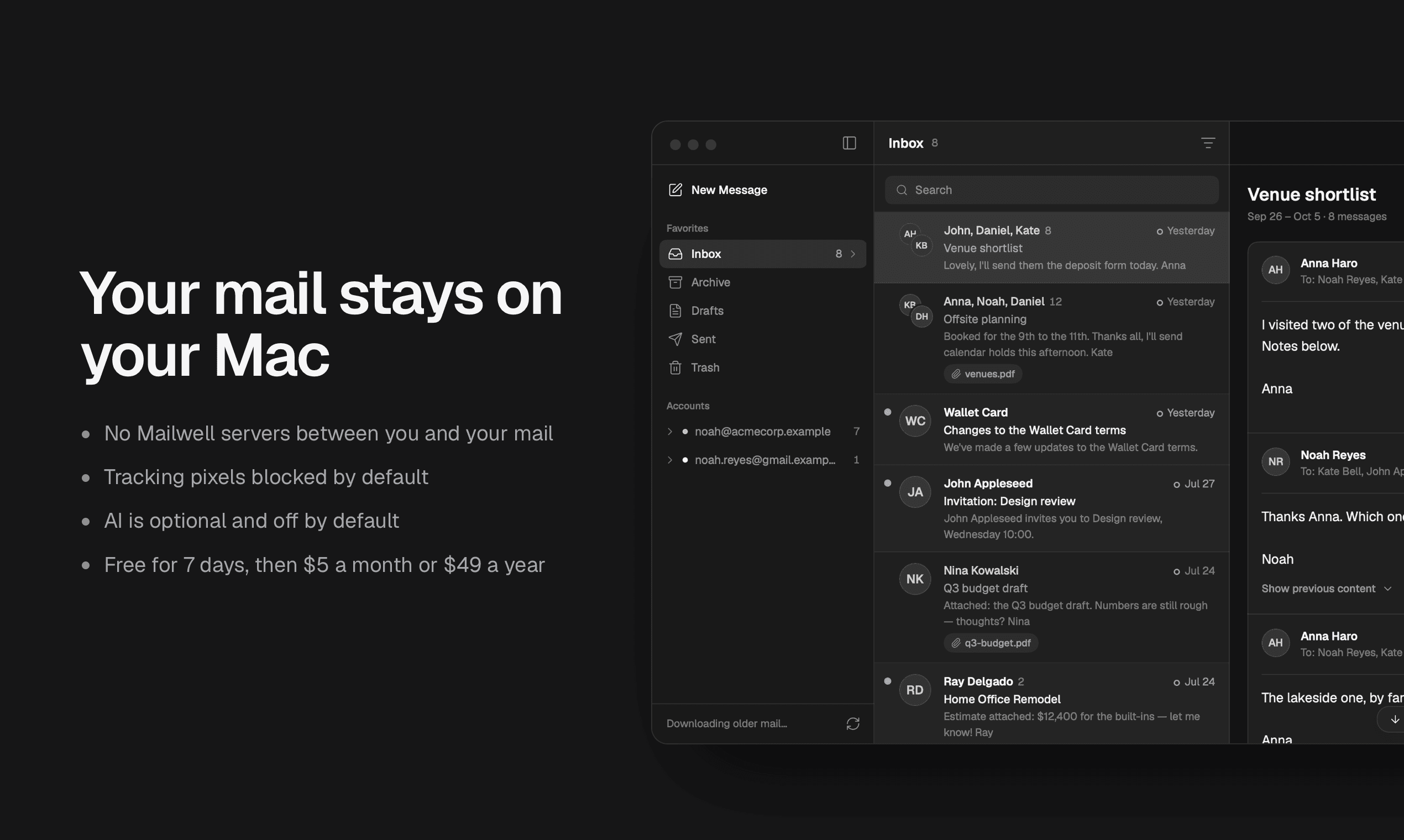
Mailwell is a native Mac mail app that I make on my own. It puts Gmail, iCloud, Fastmail, Kagi Mail, Microsoft 365 and any IMAP or JMAP account in one window, with one unified inbox. Your mail is stored on your Mac and syncs straight to your provider. There are no Mailwell servers in between and no analytics, and remote images are blocked until you allow them. Fastmail and Kagi Mail connect over JMAP, so new mail shows up right away and your aliases are already in the From menu. Inbox tabs work with every provider. Sign-in codes copy in one click, and airline emails show the trip and confirmation code at the top. AI is optional and off by default. Free for 7 days with no card needed, then $5 a month or $49 a year for up to 3 Macs. Needs macOS 14 or later on Apple silicon.
Key features
- 1Unified inbox for Gmail, iCloud, Fastmail, Kagi Mail, Microsoft 365 and any IMAP or JMAP account in one native Mac window
- 2Mail stored locally on your Mac with no Mailwell servers in between; passwords in the macOS Keychain, no analytics
- 3Native JMAP support for Fastmail, Kagi Mail and FranklyMail with instant new mail and aliases auto-populated in the From menu
Target customer profile
Drawn from the product itself, not from a survey.
Demographic
Mac users with work and personal accounts
Pain points
Switching between apps or webmail tabs for each account
Primary needs
One calm, native window with a unified inbox
Demographic
Privacy-conscious people
Pain points
Mail apps that keep your mail or password on their servers, plus read tracking
Primary needs
Mail stored on the Mac, no servers in between, images blocked by default
Demographic
JMAP users
Pain points
Most Mac apps only speak IMAP, so aliases are set up by hand
Primary needs
Native JMAP, with new mail right away and aliases that show up on their own
Scout Review
Written by AI from measured evidence, scored out of 100.
Mailwell is a native Mac mail client built by one person, and it is more considered than most solo projects. It unifies Gmail, iCloud, Fastmail, Kagi Mail, Microsoft 365 and any IMAP or JMAP account in one window, stores mail locally with no servers in between, blocks remote images by default, and keeps AI off until you ask for it. The measured results are strong where it counts: 99/100 mobile and 100/100 desktop Lighthouse performance, 96/100 accessibility with only a contrast failure. The docs are genuinely useful, the 7-day no-card trial is frictionless, and the privacy architecture is a real stance rather than a bullet point. The gaps are the usual early-stage ones: thin security headers, no published audit, no accessibility statement, no third-party reviews to corroborate the claims. At $5/month or $49/year for three Macs, it is priced to be tried.
Measure by measure
Usability
68Docs give a ~5-minute setup with a provider-by-provider connection table, and the 7-day no-card trial lowers the risk. Onboarding flow reads clear and linear.
Design
71Coherent macOS-native styling, disciplined spacing and clear hierarchy make the long page readable. Repeated hero screenshot and 'New' badges on nearly every card dilute impact.
Speed
88Lighthouse mobile 99/100 (LCP 2.0s, CLS 0, TBT 0ms) and desktop 100/100. Local mail storage is a real architectural reason search and open feel instant.
Security
54HTTPS, SPF and DMARC are in place and the local-storage, Keychain, no-analytics model is a genuine privacy stance. But 6/12 header checklist points, no HSTS, CSP or frame protection, and no published audit.
Accessibility
79Lighthouse a11y 96/100 with only a contrast-ratio failure. No WCAG statement or multi-language support found, so it sits at the top of the measured band rather than above it.
Growth
62Real, specific problem with a defensible wedge: native JMAP, Microsoft 365 without IMAP, local storage. Mimestream is Gmail-only, Spark is cloud, Apple Mail lacks JMAP — the gap is real.
Improvement areas
- Security headers are thin (6/12 checklist points, no HSTS, CSP or frame protection) and no published audit or security page
- No accessibility statement or WCAG conformance claim despite a strong 96/100 automated score
- Homepage repeats the same inbox screenshot and overuses 'New' badges, diluting the visual signal
Design & Usability
Mailwell's homepage is a well-built marketing page: consistent macOS-native window chrome across every screenshot, disciplined spacing, and a clear hierarchy that makes a long feature list scannable. The visual audit flagged two real issues — the same inbox screenshot reappears in the hero and later sections, and 'New' badges sit on nearly every feature card, which flattens the signal. Usability is the stronger half: the docs page walks through setup in about five minutes with a provider-by-provider table that tells you exactly which credential type each service needs, and the 7-day no-card trial removes the usual friction. The add-account modal is a clean linear flow with provider pills. The honest caveat is that no third-party reviews exist yet to confirm the onboarding claims hold up in practice.
Speed & Security
Speed is the standout measured result: Lighthouse mobile 99/100 with LCP 2.0s, CLS 0 and TBT 0ms, and desktop 100/100. That is a genuinely fast marketing site, and the architecture backs it up — mail stored locally means opening messages and searching years of history does not wait on the network. Security is more mixed. The privacy model is real and specific: no Mailwell servers, passwords in the macOS Keychain, no analytics, remote images blocked by default, app signed and notarized. SPF and DMARC are configured. But the HTTP probe returned only 6/12 checklist points — no HSTS, no CSP, no frame protection, no Permissions-Policy — and there is no published SOC 2, ISO, pen-test or bug-bounty page. For an app handling your entire inbox, the header hygiene is thinner than the privacy copy implies.
Accessibility & Growth
Accessibility scores well on automated checks: Lighthouse 96/100 with a single failing audit for insufficient background/foreground contrast. That is a fixable, specific issue rather than a structural one. What is missing is the human layer — no accessibility statement, no WCAG conformance claim, and the site is English-only. Growth is a judgement on the idea, and the idea holds up. The problem is real and named precisely: Mac users juggling work and personal accounts across apps and webmail tabs, plus privacy-conscious users who do not want their mail sitting on someone else's server. The differentiators are concrete — native JMAP for Fastmail, Kagi Mail and FranklyMail with aliases that populate automatically, Microsoft 365 sign-in that works even when IMAP is disabled, inbox tabs across every provider. Against the alternatives, the wedge is clear: Mimestream is Gmail-only, Spark stores data in the cloud, Apple Mail lacks JMAP and unified tabs. The limit is audience size — this is a power-user niche, and the $129 lifetime offer reads like an early-stage cash-flow move.
Conclusion
Mailwell is worth a download if you are a Mac user with more than one account and you have grown tired of tab-hopping or handing your inbox to a cloud service. The local-storage model and native JMAP support are the two things that actually distinguish it from Spark and Mimestream, and the performance numbers are not marketing — they are measured. What it needs next is proof: a security page with real headers and ideally an audit, an accessibility statement, and enough users to generate reviews that confirm the onboarding holds up outside the docs. The 7-day trial costs nothing but time, and the lifetime option at $129 is a reasonable bet for anyone who wants to stop paying subscriptions. It is early, it is honest about being early, and it is built by someone who clearly uses their own product.
Suggestions for improvement
- Add HSTS, a Content-Security-Policy and frame protection headers to the marketing site — 6/12 checklist points is thin for a mail app.
- Publish a security page covering the local-storage model, Keychain handling and any audit or pen-test results.
- Fix the contrast failure flagged by Lighthouse and add an accessibility statement with a WCAG conformance target.
- Vary the screenshots on the homepage — the same inbox window appears in the hero and several feature sections.
Alternatives comparison
Named competitors, point by point. Nobody paid to appear here or to be left out.
 Mailwell Mailwell |  Spark Spark |  Mimestream Mimestream |  Apple Mail Apple Mail | |
|---|---|---|---|---|
| Unified inbox across multiple providers | Yes — Gmail, iCloud, Fastmail, Kagi, Microsoft 365, any IMAP/JMAP in one window | Yes — smart inbox across accounts, but some data stored in the cloud | No — Gmail and Google Workspace accounts only | Yes — unified inbox, but no per-provider inbox tabs |
| Native JMAP support (Fastmail, Kagi Mail) | Yes — JMAP for Fastmail, Kagi Mail and FranklyMail; aliases auto-populate | No — IMAP-based connections | No — Gmail API only | No — IMAP only |
| Mail stored locally, no vendor servers | Yes — mail on your Mac, no Mailwell servers, passwords in macOS Keychain | No — stores some data in the cloud | Yes — local storage, no intermediary servers | Yes — local storage, iCloud sync optional |
| Pricing model | 7-day free trial, then $5/mo or $49/yr for up to 3 Macs; $129 lifetime during founding period | Free tier; paid plans for teams and advanced features | Subscription-based; free trial available | Free — bundled with macOS |
| AI features | Optional and off by default; uses Apple Intelligence or your own API key | Yes — AI writing assistant and smart features built in | Limited — no major AI feature set | Apple Intelligence features on supported macOS versions |
| Platform availability | macOS 14+ on Apple silicon only | macOS, iOS, Android, Windows | macOS only | macOS, iOS, iPadOS, watchOS |
Spark
A popular email client for Mac and mobile that offers smart inbox, team collaboration, and AI features, but stores some data in the cloud.
Mimestream
A polished native Mac app for Gmail. It only works with Google accounts.
Apple Mail
The default macOS email client, free and integrated with the system, but lacks advanced features like unified inbox tabs and JMAP support.
Comparing options? See Mailwell alternatives, scored side by side
More E-Mail apps
View all E-Mail
youtubetomp3.ink
87Free online YouTube to MP3 converter with no signup or so...

CaptainVerify
82.5CaptainVerify is a powerful email and mobile number verif...

VerifiedEmail
82A specialized tool for real-time email verification and list cleaning, boosting deliverability and compliance.

Mailmodo
82Mailmodo revolutionizes email marketing with AMP-powered interactive emails, AI tools, and automation to boost engagement and ROI.

Harmony AI Email Voice Assistant
81A voice-controlled email assistant for hands-free inbox management, ideal for multitaskers and privacy-conscious users.

PromptLy
81An AI-powered email assistant that automates drafting, personalizes replies, and streamlines inbox management for professionals and teams.

Mailto Live
81AI-driven email management tool for Gmail that automates tasks like unsubscribing and organizing emails to boost productivity.

Gblock
81A Chrome extension that blocks hidden email trackers in Gmail, ensuring privacy by detecting spy pixels and anonymizing links.

MessageBot
81TRAI-compliant bulk SMS, WhatsApp, Voice & RCS platform f...

Leadsgram
81All-in-one business growth platform with AI landing pages...

TrueTerms
80TrueTerms scans the terms and privacy policies you agree to, explains them in plain English, and shows you exactly where to opt out.

FranklyMail
80Email hosting on your own domain for $9/year with unlimit...


A platform dedicated to providing unbiased reviews of newly launched applications, analyzing everything from their features to their full potential.
info@scoutforge.net© 2026 Scoutforge. All rights reserved.
