Cycling through all six. Tap any point to stop.
Measured on six things
AI receipt scanner and expense tracker for small businesses.
Security
52HTTPS and CSP present, DMARC set, but no HSTS, no frame protection, no SPF, and 5/12 header checks. No SOC 2/ISO page found; encryption and deletion are claims only.
Screenshots
1 / 1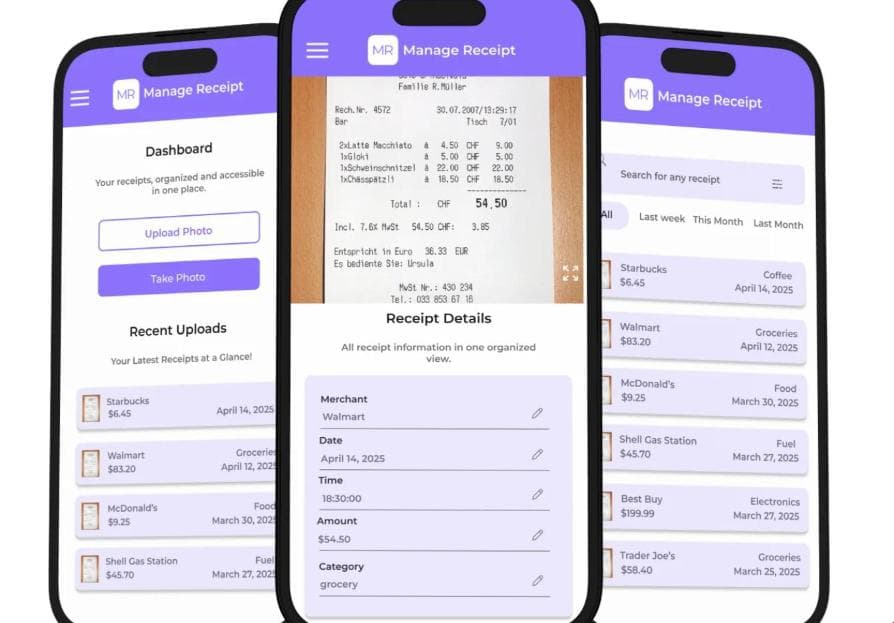
About this app
Manage Receipt is a business receipt management app that uses AI to scan receipts, extract vendor, date, amount, and tax details, and file them as categorized expenses. It offers ten tools in one: an AI receipt scanner, expense tracker, tax and expense reports, bill reminders, email receipt import, receipt splitting, multi-currency conversion, a PIN-protected Doc Wallet, and MR Bucks rewards. Built for small businesses, freelancers, accountants, real estate and insurance agents, healthcare providers, contractors, and NGOs, it works across web, iPhone, and Android. The Basic plan includes up to 100 receipts and 20 Doc Wallet documents; Pro costs $4.99/month or $49.99/year for unlimited receipts and PDF/Excel report exports. Data is encrypted in transit, never sold or shared, and users can request deletion.
Key features
- 1AI receipt scanner that extracts vendor, date, amount and tax from photos or PDFs, with editable fields before saving.
- 2Ten bundled tools: expense tracker, tax and expense reports, bill reminders, email import, splitting, multi-currency, PIN Doc Wallet, MR Bucks.
- 3PDF and Excel report exports on Pro ($4.99/mo or $49.99/yr), with a free Basic tier capped at 100 receipts on mobile.
Target customer profile
Drawn from the product itself, not from a survey.
Demographic
Small business owners and office managers
Pain points
Receipts pile up in drawers and inboxes; manual data entry wastes hours; missed bills cause late fees; tax-season paperwork panic.
Primary needs
Fast receipt scanning with AI categorization, bill reminders before due dates, and tax-ready PDF/Excel reports for accountants.
Demographic
Freelancers and independent consultants
Pain points
Client expenses scattered across projects; write-offs hard to track; no time for bookkeeping between gigs.
Primary needs
Project-based expense tracking, clean reimbursement reports, and affordable pricing without enterprise complexity.
Demographic
Accountants and bookkeeping firms
Pain points
Chasing clients for loose receipts; inconsistent categorization; rebuilding records at year-end.
Primary needs
Clean, categorized client reports, receipt-backed tax documentation, and easy sharing via PDF or Excel.
Demographic
Real estate and insurance agents
Pain points
Travel, client meals, and marketing costs happen on the go; receipts get lost between showings and visits.
Primary needs
Mobile-first scanning, mileage-adjacent expense logging, and quick reports for brokers or tax prep.
Scout Review
Written by AI from measured evidence, scored out of 100.
Manage Receipt is a competent, well-packaged receipt manager with a real AI scanner, a coherent brand, and an unusually strong accessibility score. It is priced aggressively against Expensify and QuickBooks and aimed at segments those tools underserve. The problems are execution details: a mobile site that loads in 4.5 seconds, a security header set missing six of twelve checks, and store screenshots with truncated text that make the product look less finished than it is. None of these are fatal; all of them are fixable in a week.
Measure by measure
Usability
62Goal-split hero, prominent 'Take Receipt Photo' button, free Basic tier and a real resource library (glossary, four calculators). Long stacked homepage adds scroll before pricing.
Design
58Judging the app UI and store material: a coherent purple system and a credible scan-vs-source screen, undercut by truncated titles, clipped rows and lowercase category labels in maker screenshots.
Speed
58Desktop Lighthouse 96/100 but mobile 67/100 with LCP 4.5s and FCP 4.4s — the phone experience, which is the product's whole pitch, is the slow one.
Security
52HTTPS and CSP present, DMARC set, but no HSTS, no frame protection, no SPF, and 5/12 header checks. No SOC 2/ISO page found; encryption and deletion are claims only.
Accessibility
80Lighthouse a11y 95/100 with only contrast and a missing main landmark failing. Strong automated result, but one-language localization and no published a11y statement.
Growth
58Real problem, specific segments, and a $4.99 price wedge — but the ten-tool bundle is copyable and Expensify/QuickBooks own the integrations. Early: domain 2025, 2 App Store ratings.
Improvement areas
- Mobile performance: LCP 4.5s and FCP 4.4s on a phone-first product; desktop is already 96/100.
- Security headers: missing HSTS, SPF, frame protection, X-Content-Type-Options, Referrer-Policy and Permissions-Policy (5/12 checks).
- Store and marketing assets: truncated vendor names, clipped rows and inconsistent casing undermine the organization pitch.
Design & Usability
Judged on the app itself, not the landing page: the purple system carries cleanly from store screenshots to homepage mockups, and the receipt-details screen showing the source image beside extracted fields is the most credible thing on the page. The cracks are in the details — a truncated 'PRIMACARE REHABILITATI...', a vendor clipped under the home indicator, a lowercase 'grocery' among title-case fields. Usability is stronger: the hero splits by goal, the dashboard leads with 'Take Receipt Photo', and the free Basic tier plus glossary and four calculators give a visitor real value before paying. The cost is a long stacked homepage that repeats download CTAs and buries pricing under ten feature sections.
Speed & Security
Speed is a split verdict: desktop Lighthouse 96/100 is excellent, but mobile 67/100 with LCP 4.5s and FCP 4.4s is the number that matters for a product whose entire pitch is snapping receipts on a phone. Security is the weakest measured dimension. HTTPS is enforced and CSP and DMARC are present, but HSTS, frame protection, X-Content-Type-Options, Referrer-Policy, Permissions-Policy and SPF are all missing — 5/12 header checks. For an app holding tax receipts and financial records, that is thin. The site claims encryption in transit and deletion on request, but no SOC 2, ISO or pen-test page was found in the collected content.
Accessibility & Growth
Accessibility is the standout measured result: Lighthouse 95/100, with only insufficient color contrast and a missing main landmark failing. That is genuinely above category norm for an indie finance app, though the app is localized in one language and no WCAG statement is published. Growth is a judgement on the idea: the problem is real, the segments are named specifically (real estate, insurance, NGOs, accountants), and $4.99/mo undercuts Expensify and QuickBooks. But the wedge is price and simplicity, and the ten-tool bundle is copyable — nothing here is a workflow the incumbents structurally cannot add. Traction is early: domain registered January 2025, iOS app released June 2025, 5/5 from two ratings.
Conclusion
If you are a freelancer or small office drowning in paper and you want something cheaper and simpler than Expensify, Manage Receipt is a reasonable bet — the scanner works, the reports export, and the free tier is genuinely usable. If you are an accountant handling client financial data at scale, wait for a security page with an audit behind it. The product is early and the fundamentals are sound; the next twelve months of polish will decide whether it stays a nice indie tool or becomes a real contender.
Suggestions for improvement
- Fix mobile LCP: 4.5s is double the 'good' threshold. Compress hero images and defer non-critical JS to get under 2.5s.
- Add HSTS, X-Content-Type-Options, Referrer-Policy, Permissions-Policy and an SPF record — six missing headers on a finance app is a trust problem.
- Publish a security page with encryption details, data retention, and a path to SOC 2 or a pen-test summary.
- Clean up store screenshots: fix truncated vendor names, clipped rows, and inconsistent category casing before the next release.
Alternatives comparison
Named competitors, point by point. Nobody paid to appear here or to be left out.
 Manage Receipt |  Expensify | Shoeboxed |  QuickBooks Solopreneur | |
|---|---|---|---|---|
| Free tier | Yes — Basic, up to 100 receipts on iPhone/Android | Yes — limited free plan with receipt scanning | No — paid plans only, free trial | No — paid subscription |
| Starting price | $4.99/mo or $49.99/yr (Pro) | Per-user monthly pricing, higher for teams | Monthly plans starting around $18/mo | Monthly subscription, higher tier |
| AI receipt scanning | Yes — vendor, date, amount, tax extracted from photo or PDF | Yes — SmartScan receipt capture | Yes — plus mail-in physical receipt digitization | Yes — receipt capture into QuickBooks |
| Accounting integration | PDF/Excel export only; no direct ledger sync | Yes — QuickBooks, Xero, NetSuite, corporate cards | Yes — QuickBooks, Xero exports | Native — it is the accounting platform |
| Team approvals and roles | Enterprise tier only, custom setup | Yes — approval workflows and policy controls | Limited — focused on single-user capture | Limited — solopreneur focus |
| Bill reminders | Yes — alerts before due dates | No — expense-focused, not bill pay | No | Partial — via QuickBooks bill management |
Expensify
Popular expense management platform with receipt scanning, approval workflows, and corporate card integration, aimed at teams and enterprises.
Shoeboxed
Receipt and document digitization service with mail-in options and expense categorization, focused on small businesses and freelancers.
QuickBooks Solopreneur
Intuit's expense and income tracker with receipt capture and tax deduction insights, tightly integrated with QuickBooks accounting.
Comparing options? See Manage Receipt alternatives, scored side by side
More Expense Management apps
View all Expense Management
Receipt Bot
88Automated bookkeeping software that extracts data from re...

Faxvio
87Faxvio is an online fax service. Send a fax from any browser, iPhone or Mac. First page free, then pay-as-you-go per page with no subscription.

OpenBudget
87Connect your bank to AI for real answers about your money.

FollowIncome
86Business workspace for solo founders and small teams.

PropHours
86PropHours is a material participation tracker for STR and REPS: log rental hours by AI, voice, scan or timer, attach evidence, and export a CPA-ready file.

FreeBillKit
86FreeBillKit: free invoices, receipts, estimates & business documents in your browser. No signup, no watermark.

Dokta
84Dokta is an AI-powered document management and invoicing ...

Fake Receipt Maker
84Fake Receipt Maker is a free online receipt generator that lets you create realistic, fully customizable receipts in seconds.

Traceback
83Reveal No Caller ID, unknown numbers, and private callers...

DEFTER
83Sleek account book for personal & business finance with s...

BarBrain
82BarBrain is a digital inventory app for the hospitality i...

Receipt Generator
82An online tool for creating realistic store receipts with...


A platform dedicated to providing unbiased reviews of newly launched applications, analyzing everything from their features to their full potential.
info@scoutforge.net© 2026 Scoutforge. All rights reserved.
