Cycling through all six. Tap any point to stop.
Measured on six things
A Mac app that opens damaged video, PDFs, archives and documents and writes out everything it can still read. $9 once, no uploads.
Security
42HTTPS is enforced and the local-only processing claim is strong, but the header probe finds no HSTS, CSP, frame protection or Referrer-Policy (3/12 checklist points), DMARC is missing, and no SOC 2 or pen-test is published.
Screenshots
1 / 3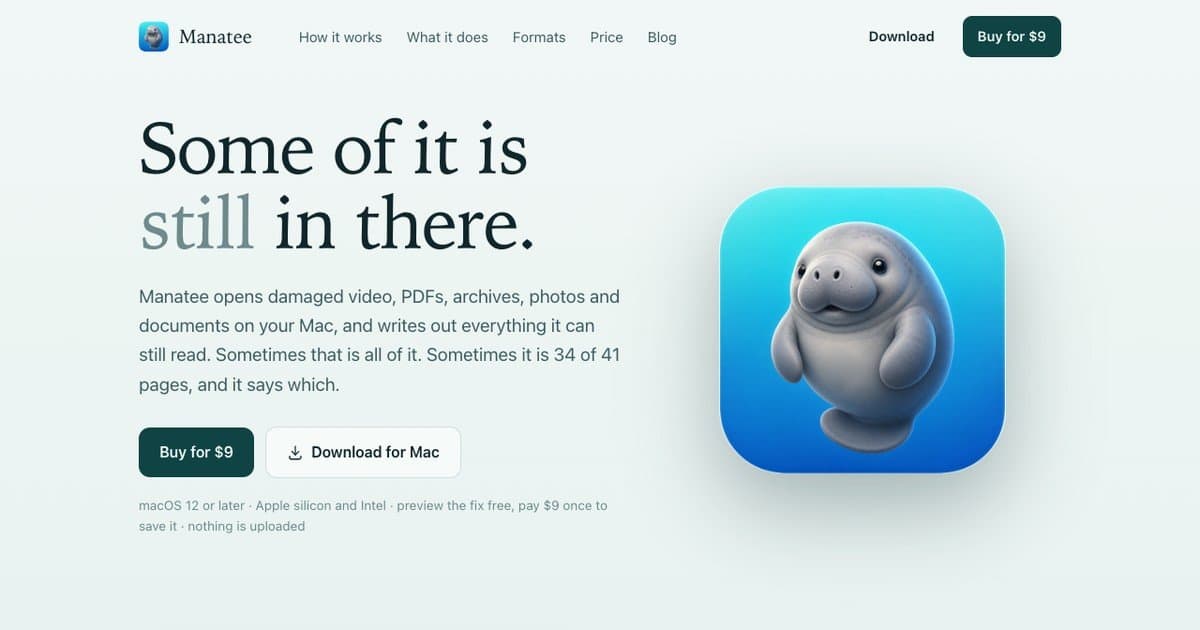
About this app
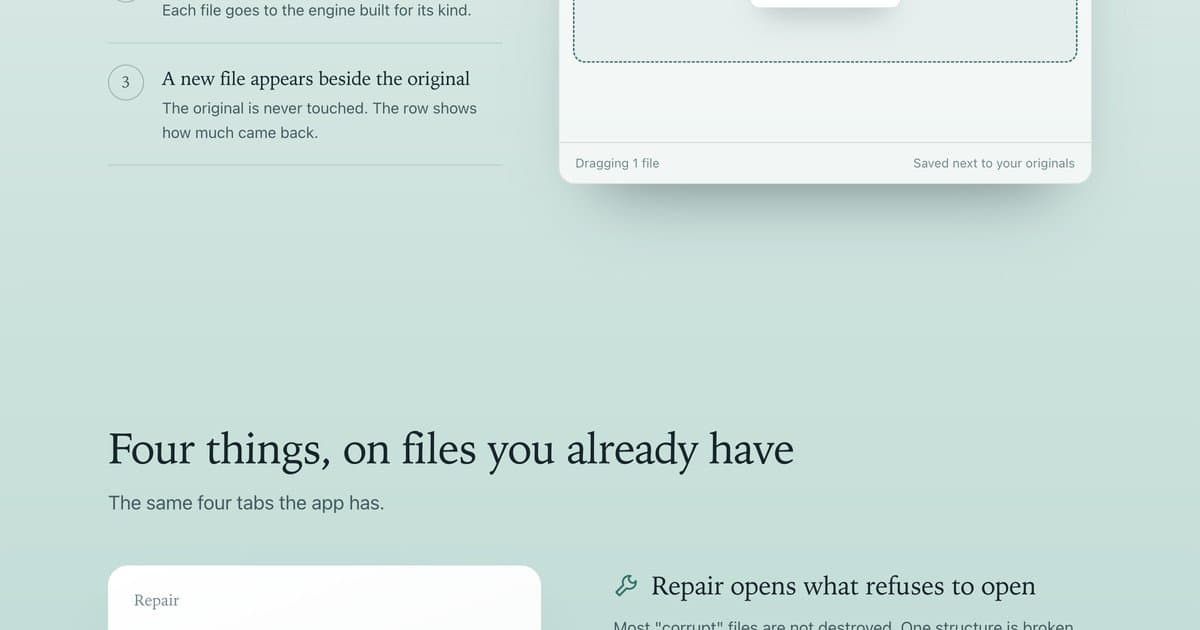
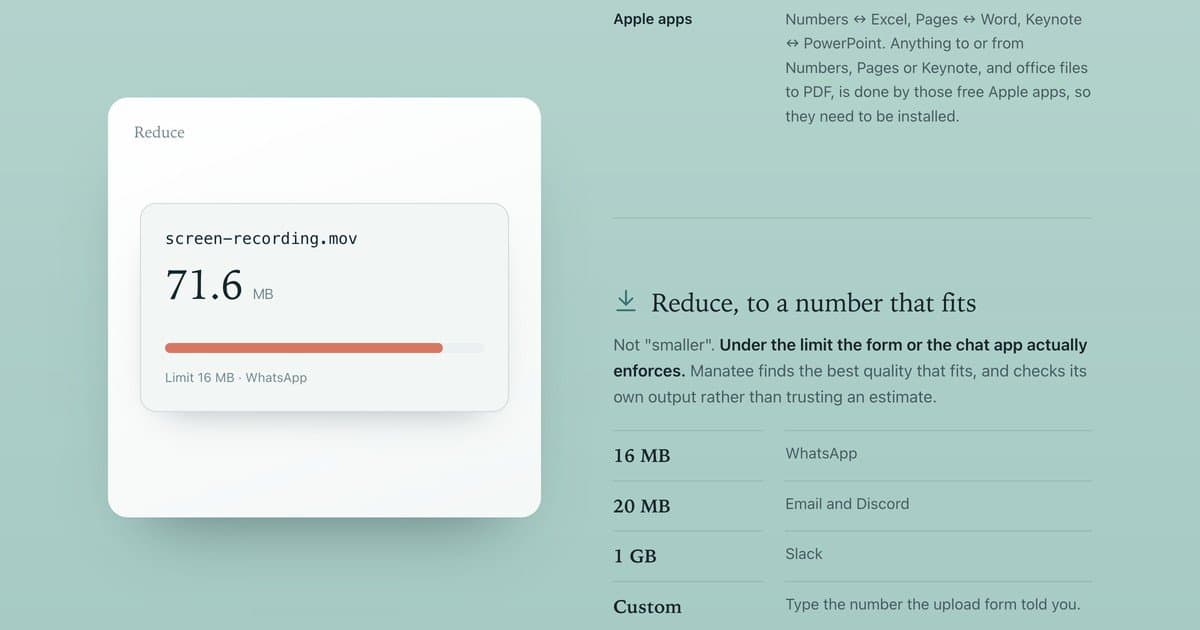
Manatee opens damaged video, PDFs, archives, photos and documents on your Mac and writes out everything it can still read, then tells you exactly what it recovered (for example 34 of 41 pages). The original is never touched. Four tabs: Repair rebuilds a video's index (mp4, mov, mkv), a PDF's cross-reference table, damaged zip, docx, xlsx and epub files, and fixes srt, csv and txt encodings. Convert handles images, video, audio, documents, spreadsheets and presentations. Reduce shrinks a file to a size limit such as 16 MB for WhatsApp or 20 MB for email. Clean strips EXIF, GPS, camera serials and document authors. Preview the fix for free, then pay $9 once to save it. Nothing is uploaded. macOS 12 or later.
Key features
- 1Repair rebuilds broken video indexes, PDF cross-reference tables, zip/docx/xlsx/epub archives and subtitle encodings, reporting exactly how much was recovered.
- 2Convert handles images, video, audio, documents, spreadsheets and presentations, including Apple apps to Office and PDF.
- 3Reduce shrinks files to a specific limit (16 MB WhatsApp, 20 MB email, 1 GB Slack) and Clean strips EXIF, GPS, camera serials and document authors.
- 4Free preview before a one-time $9 payment; nothing is uploaded and the original file is never touched.
Target customer profile
Drawn from the product itself, not from a survey.
Scout Review
Written by AI from measured evidence, scored out of 100.
Manatee is a focused macOS utility for damaged files, and its website is unusually honest about what recovery actually means. The file cards show partial results (34 of 41 pages) instead of promising miracles, the free preview lets you see the outcome before paying, and the $9 one-time price with no upload is a clean pitch. Design is good — coherent mint branding, realistic mockups, clear hierarchy — with a blank section and faint dividers as the visible seams. Usability is the strongest dimension: three steps, no account, a 125-extension table and explicit size limits. Speed is fine on desktop and slow on mobile (6.7s LCP). Security is the weak spot: strong local-processing claims undermined by missing HTTP security headers and no published audit. Accessibility is competent but fails contrast, touch targets and landmark checks. Growth is a real niche with a real wedge, capped by the macOS-only, one-time-payment model.
Measure by measure
Usability
68Three numbered steps, a live app-window mockup and a free preview before the $9 save make the flow obvious. The 125-extension table and explicit size limits (16 MB WhatsApp, 20 MB email) answer the questions users actually have.
Design
72Coherent mint palette, friendly manatee branding and realistic file cards (34 of 41 pages, 212 of 240 entries) make the recovery promise concrete. A blank section and low-contrast microcopy under the hero keep it from the top of the band.
Speed
68Desktop Lighthouse 94/100 and CLS 0 show a light page, but mobile performance is 75/100 with a 6.7s LCP — the hero takes too long to paint on a phone. TBT 93ms and FCP 1.7s are fine.
Security
42HTTPS is enforced and the local-only processing claim is strong, but the header probe finds no HSTS, CSP, frame protection or Referrer-Policy (3/12 checklist points), DMARC is missing, and no SOC 2 or pen-test is published.
Accessibility
66Lighthouse accessibility 90/100, but three real failures: insufficient color contrast, undersized touch targets, and no main landmark. English-only with no WCAG statement, and the app is macOS 12+ only.
Growth
62A real, specific problem — damaged files on a Mac — with a demonstrable wedge: free preview, $9 one-time, nothing uploaded, 125 extensions. Narrow macOS-only audience caps how far it can travel.
Improvement areas
- Mobile Lighthouse LCP of 6.7s — the hero image needs compression or lazy-loading.
- Missing HTTP security headers (HSTS, CSP, frame protection, Referrer-Policy) and no DMARC or published audit.
- Three failing accessibility audits: contrast, touch target sizing and missing main landmark.
- A blank section and faint process dividers break the homepage rhythm on smaller screens.
Design & Usability
Manatee's site does the hard part well: it makes file recovery legible. The hero ('Some of it is still in there.') is followed immediately by four file cards showing real outcomes — 34 of 41 pages, 212 of 240 entries — so the value proposition is concrete before you scroll. The three-step workflow sits beside a macOS window mockup with the actual Repair/Convert/Reduce/Clean tabs, and the free-preview-then-$9 model removes the usual trust barrier. The 125-extension table and explicit size limits (16 MB WhatsApp, 20 MB email, 1 GB Slack) answer the questions a buyer actually has. Where it slips: a blank section interrupts the page rhythm, the microcopy under the hero buttons is low-contrast, and the process dividers are too faint on mint. Usability is strong for a single-purpose Mac utility — no account, no onboarding maze, just drop and read the bar.
Speed & Security
Speed is split down the middle: desktop Lighthouse 94/100 with CLS 0 and TBT 93ms, but mobile 75/100 with a 6.7-second LCP, which is the number that matters for anyone landing from a phone. The page is light, so this looks like a mobile rendering issue rather than a heavy stack. Security is the weakest dimension. HTTPS is enforced and the local-processing story is genuinely good — no server sees your files, no account, no analytics, only licence and update checks. But the HTTP probe finds no HSTS, CSP, frame protection, X-Content-Type-Options, Referrer-Policy or Permissions-Policy (3/12 checklist points), DMARC is absent, and there is no published SOC 2, ISO or pen-test. For a paid desktop app handling personal photos and documents, the missing headers are a fixable gap rather than a dealbreaker, but they are a gap.
Accessibility & Growth
Accessibility lands at 66: Lighthouse gives 90/100, but three audits fail — insufficient color contrast, touch targets too small or tightly spaced, and no main landmark. The site is English-only, publishes no WCAG statement, and the product itself is macOS 12+ only, so platform reach is deliberately narrow. Growth is the more interesting question. The problem is real and specific: damaged files that refuse to open, and a tool that recovers what survived and tells you exactly how much. The wedge is concrete — free preview before a one-time $9 payment, nothing uploaded, 125 extensions, four tools in one window. Against generic converters and cloud repair services, that is a defensible position for Mac users who care about privacy. The honest limit is the audience: macOS-only, one-time pricing, no account layer means no network effects and no expansion revenue. It can be a solid indie business; it is unlikely to become a platform.
Conclusion
If you have a wedding video that won't open or a PDF that lost its cross-reference table, Manatee is aimed exactly at you, and the free preview means you risk nothing to find out. The $9 one-time price is refreshing in a category that loves subscriptions. Before recommending it widely, though, the maker should fix the mobile LCP, add the standard security headers, and address the three failing accessibility audits — none of which are hard, and all of which would move this from 'good indie tool' to 'obvious buy'.
Suggestions for improvement
- Fix the 6.7s mobile LCP — compress or lazy-load the hero imagery so phones paint the headline faster.
- Add HSTS, CSP, X-Content-Type-Options, Referrer-Policy and Permissions-Policy headers; they are cheap and close most of the 3/12 probe gap.
- Resolve the three Lighthouse accessibility failures: contrast on hero microcopy, touch target sizing, and a main landmark element.
- Fill the blank section on the homepage and darken the process-step dividers so the page rhythm holds on mobile.
Alternatives comparison
Named competitors, point by point. Nobody paid to appear here or to be left out.
 Manatee Manatee |  | |
|---|---|---|
| Price model | $9 one-time, free preview before paying | Not specified in provided details |
| File processing location | Entirely local on the Mac; nothing uploaded | Not specified in provided details |
| Damaged-file repair | Rebuilds video indexes, PDF xref tables, zip/docx/xlsx/epub archives, subtitle encodings | Not specified in provided details |
| Supported formats | 125 extensions across video, audio, images, RAW, archives, documents, subtitles, text and Apple apps | Not specified in provided details |
| Platform | macOS 12 or later, Apple silicon and Intel | Not specified in provided details |
Comparing options? See Manatee alternatives, scored side by side
More Productivity apps
View all Productivity
Qamarero
92An all-in-one hospitality software for restaurants and ba...

The Stack Newsletter
92A weekly newsletter delivering curated tech jobs, intervi...

EmbedMyReviews
92White-label reputation management software for agencies s...

StoryPad
92Privacy-first open source journal app with a continuous t...

Puzzly – B2B Lead Generation & Sales Intelligence Platform
92Puzzly is an all-in-one B2B lead generation platform that...

Notion
92All-in-one AI workspace for docs, projects, and knowledge...

Vibe Coding Agent Skills
92A free, open-source platform offering 110 AI agent skills...

CC Switch
91Open-source desktop app for switching AI coding providers...

username.md
90One verified handle for your online identity, readable by...

What the GIF
89Frame-perfect video-to-GIF maker that runs entirely in yo...

AuditCloser
89White-label website audits that close deals for digital a...

NudgeWin
89Automated quote follow-up for trades and service businesses.


A platform dedicated to providing unbiased reviews of newly launched applications, analyzing everything from their features to their full potential.
info@scoutforge.net© 2026 Scoutforge. All rights reserved.
