

A platform dedicated to providing unbiased reviews of newly launched applications, analyzing everything from their features to their full potential.
info@scoutforge.net© 2026 Scoutforge. All rights reserved.
A platform dedicated to providing unbiased reviews of newly launched applications, analyzing everything from their features to their full potential.
info@scoutforge.net© 2026 Scoutforge. All rights reserved.
A platform dedicated to providing unbiased reviews of newly launched applications, analyzing everything from their features to their full potential.
info@scoutforge.net© 2026 Scoutforge. All rights reserved.
Cycling through all six. Tap any point to stop.
Measured on six things
Manga Translator AI translates manga and comics into the languages readers choose.
Real problem (language barrier in manga), three distinct segments (readers, studios, API devs), and a Photoshop-style editor as a wedge over Google Translate and open-source tools. Category has headroom but competition is heavy.
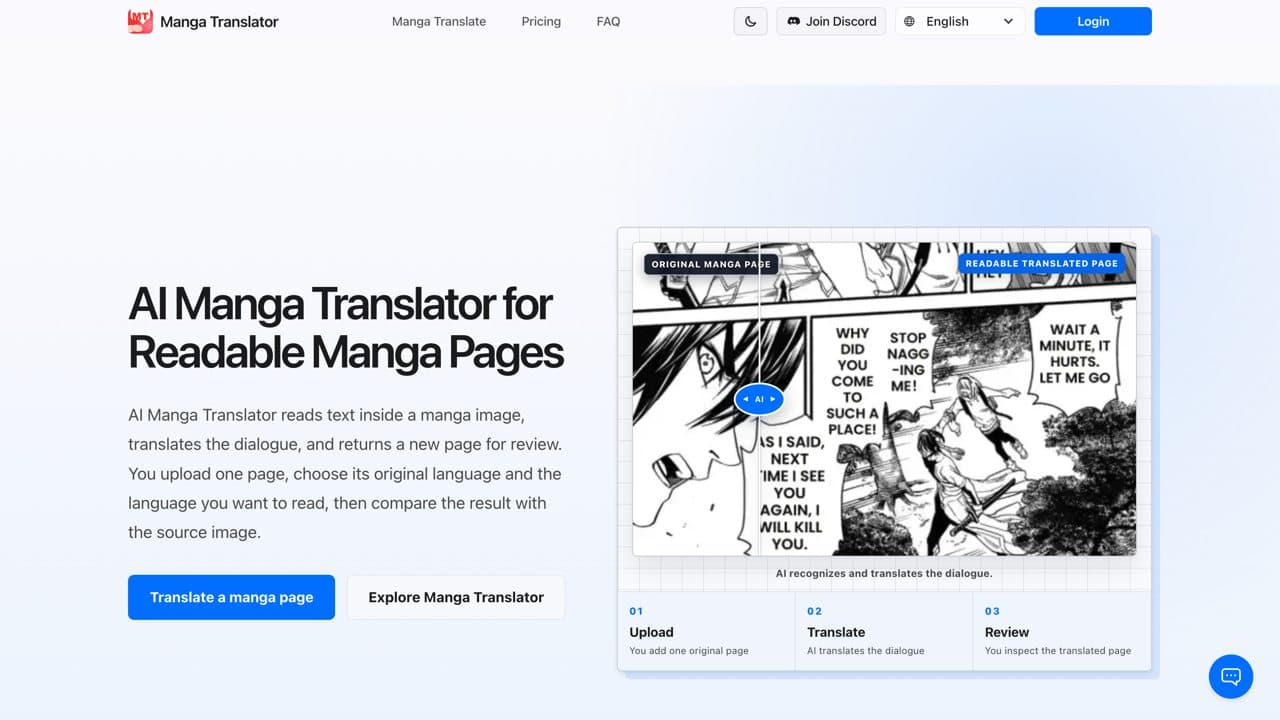
Manga Translator AI translates manga, manhwa, and comic pages into the languages readers choose. Individual readers upload pages, translate multiple pages in batches, and customize each translation for a particular project. Studio teams use a complete online Photoshop-style editor to refine translated pages and prepare polished releases. Developers connect the API to personal workflows and build translation steps into their own tools. Ficory LLC provides this enterprise-grade platform for multilingual comic localization.
Drawn from the product itself, not from a survey.
Demographic
Manga readers who don't understand the original language
Pain points
Language barrier prevents enjoying manga in its original form
Primary needs
Accurate translation that preserves context and layout
Demographic
Scanlation groups and fan translators
Pain points
Manual translation and typesetting is time-consuming
Primary needs
Fast, batch translation with editing capabilities
Demographic
Publishers and localization companies
Pain points
High cost of professional translation services
Primary needs
API integration for automated workflows and scalable pricing
Written by AI from measured evidence, scored out of 100.
Manga Translator AI is a competent, fast, and well-designed tool for translating manga pages. The landing page is polished, the pricing is transparent, and the language coverage is impressive. Speed is a standout strength, and security basics are in place. The main weaknesses are unverified studio features (the editor is never shown), missing compliance documentation for enterprise buyers, and minor accessibility issues. It's a solid choice for individual readers and small scanlation groups, but studios and publishers should ask for a demo before committing.
Inline upload widget, 100+ target languages, three model tiers and 12 font styles with clear use-case descriptions. Free trial via daily check-ins. Checkout requires JS; editor demo not captured.
Clean, modern landing page with a clear before/after demo and numbered workflow. Pricing cards are tidy. The advertised Photoshop-style editor UI is not shown, so its design quality is unverified.
Lighthouse mobile 98/100, desktop 100/100. LCP 2.0s, CLS 0, TBT 56ms, FCP 1.7s. No lag complaints found. Genuinely fast for a media-heavy translation tool.
HTTPS enforced, CSP, frame protection, X-Content-Type-Options, Referrer-Policy, secure cookies, SPF and DMARC all present. HSTS and Permissions-Policy missing. No SOC 2 or audit claims found.
Lighthouse accessibility 96/100. Failing audits: insufficient color contrast and visible text labels without matching accessible names. 100+ target languages listed. No WCAG statement found.
Real problem (language barrier in manga), three distinct segments (readers, studios, API devs), and a Photoshop-style editor as a wedge over Google Translate and open-source tools. Category has headroom but competition is heavy.
The landing page is polished and modern, with a clear before/after demo and a numbered three-step workflow that makes the value proposition obvious. The pricing page is clean and well-organized, with credit packs and subscriptions clearly labeled. Usability is solid: an inline upload widget, over 100 target languages, three model tiers, and twelve font styles each with use-case descriptions. The free trial via daily check-ins is a low-friction entry point. However, the advertised Photoshop-style editor — the key differentiator for studio teams — is never shown in screenshots or a demo, so its usability is unverified. Checkout requires JavaScript, which is standard but worth noting. Overall, the front-end experience is competent and above-average for an indie tool, but the core studio workflow remains a black box.
Speed is a genuine strength: Lighthouse mobile 98/100 and desktop 100/100, with LCP 2.0s, CLS 0, TBT 56ms, and FCP 1.7s. That's excellent for a media-heavy translation tool and suggests a well-optimized front end. Security is solid but not exceptional: HTTPS is enforced, and CSP, frame protection, X-Content-Type-Options, Referrer-Policy, secure cookies, SPF, and DMARC are all present. HSTS and Permissions-Policy are missing, and there are no published SOC 2, ISO, or pen-test reports. For an 'enterprise-grade platform' targeting publishers and localization companies, the absence of compliance documentation is a gap. The basics are in place, but enterprise buyers will want more.
Accessibility scores 96/100 on Lighthouse, with two failing audits: insufficient color contrast and visible text labels without matching accessible names. For a translation tool, those are notable — readable text is the product. The site supports over 100 target languages, which is a strong inclusivity signal, but no WCAG conformance statement was found. Growth potential is moderate: the problem is real, and the product targets three segments (readers, studios, API developers). The Photoshop-style editor is a genuine differentiator over Google Translate and open-source tools, but it's not demonstrated on the site. The category has headroom, but competition is heavy and the wedge needs to be sharper to win.
Conclusion
If you're a solo reader tired of squinting at untranslated pages, this tool does the job quickly and cleanly. If you're a studio or publisher, the lack of a visible editor demo and compliance docs means you'll want to test it thoroughly before adopting it. The foundation is strong; the next step is showing the work.
Named competitors, point by point. Nobody paid to appear here or to be left out.
 manga translator AI manga translator AI |  Manga Translator (by JiXiangTools) Manga Translator (by JiXiangTools) |  Google Translate Google Translate | |
|---|---|---|---|
| Translation model specialization | Three tiers: Manga (CJK-optimized), Ultra (high-quality), EagleEye (early-access R&D) | Open-source model, community-maintained, no tiered quality options | General-purpose translation, no manga-specific model or layout preservation |
| Built-in editor for refining translated pages | Advertised Photoshop-style online editor for studio teams (not demonstrated on site) | No built-in editor; output is a translated image, manual editing required externally | No image editing; translates text only, no layout or typesetting |
| Batch translation and API access | Batch translation supported; API available for developer workflows | CLI-based batch processing possible; no hosted API | Google Cloud Translation API available separately; no manga-specific batch tool |
| Pricing model | Credit packs from $4.99 (1,100 credits) to $99.90 (28,700 credits); subscriptions from $12.90/month | Free and open-source; costs are compute/hosting only | Free for web use; API pricing separate and usage-based |
Manga Translator (by JiXiangTools)
Open-source manga translation tool with similar features, available on GitHub.
Google Translate
General-purpose translation tool that can be used on manga images, but lacks specialized manga features.
Comparing options? See manga translator AI alternatives, scored side by side

An all-in-one hospitality software for restaurants and ba...

A weekly newsletter delivering curated tech jobs, intervi...

White-label reputation management software for agencies s...

Privacy-first open source journal app with a continuous t...

Puzzly is an all-in-one B2B lead generation platform that...

All-in-one AI workspace for docs, projects, and knowledge...

A free, open-source platform offering 110 AI agent skills...

Open-source desktop app for switching AI coding providers...

One verified handle for your online identity, readable by...

Frame-perfect video-to-GIF maker that runs entirely in yo...

White-label website audits that close deals for digital a...

Automated quote follow-up for trades and service businesses.
A platform dedicated to providing unbiased reviews of newly launched applications, analyzing everything from their features to their full potential.
info@scoutforge.net© 2026 Scoutforge. All rights reserved.
