Cycling through all six. Tap any point to stop.
Measured on six things
MarkAny converts PDF, Word, Excel, PowerPoint, HTML, EPUB, and images to Markdown, and exports editable Markdown to nine useful file formats.
Security
52HTTPS and HSTS are in place, but CSP, frame protection, X-Content-Type-Options, Referrer-Policy, Permissions-Policy, SPF, and DMARC are all missing. No SOC 2 or audit claims. The site itself warns against uploading sensitive files.
Screenshots
1 / 1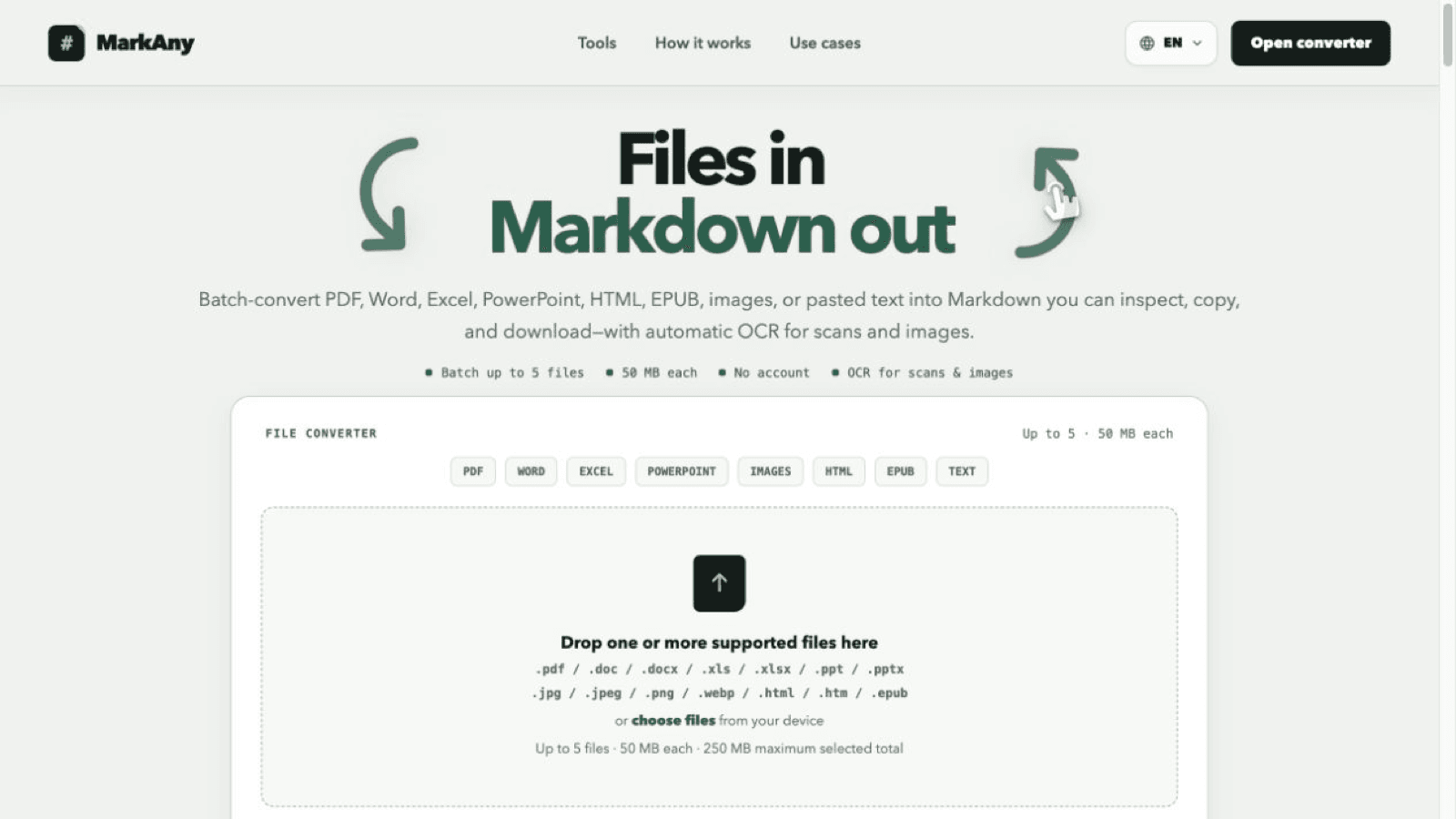
About this app
MarkAny is a web-based converter for moving content between common files and Markdown. It batch-converts documents, spreadsheets, presentations, HTML, EPUB, and images into structured Markdown, with automatic OCR for scans and images, and exports edited Markdown to DOCX, PDF, HTML, images, EPUB, PPTX, or XLSX.
Key features
- 1Two-way conversion: files to Markdown and Markdown back to DOCX, PDF, HTML, images, EPUB, PPTX, XLSX
- 2Batch-convert up to 5 files (50 MB each, 250 MB total) with automatic OCR for scans and images
- 3Free tier with 5 conversions, no credit card required; Pro at $9/month or $49/year for unlimited
Target customer profile
Drawn from the product itself, not from a survey.
Scout Review
Written by AI from measured evidence, scored out of 100.
MarkAny is a web-based file-to-Markdown converter with a genuinely useful twist: it converts both ways. Drop in a PDF, Word doc, spreadsheet, presentation, HTML file, EPUB, or image, and it spits out structured Markdown with automatic OCR for scans. Edit the Markdown and export it back to DOCX, PDF, HTML, images, EPUB, PPTX, or XLSX. The converter sits directly in the hero, works without signup, and the free tier gives 5 conversions with no card required. Pricing is straightforward: $9/month or $49/year for unlimited conversions. Speed is excellent — 90/100 mobile, 99/100 desktop, zero layout shift. Accessibility scores 97/100 on automated checks. But the landing page ends abruptly after the converter, security headers are largely absent, and there's no SOC 2 or compliance story. For a tool handling documents, that's a gap worth noting.
Measure by measure
Usability
63Converter is usable on arrival with clear format tabs, file limits, and a 3-step flow. Free tier needs no card. But no onboarding, no example output below the fold, and the 'choose files' link is nearly invisible.
Design
71Clean hero with the converter front and center, tight type hierarchy, and a coherent green accent motif. But the page dies right after the card — empty white space where social proof should live.
Speed
82Lighthouse mobile 90/100 (LCP 3.3s, CLS 0, TBT 122ms) and desktop 99/100. Layout is rock-solid with zero cumulative shift. LCP is the only soft spot, likely the hero image.
Security
52HTTPS and HSTS are in place, but CSP, frame protection, X-Content-Type-Options, Referrer-Policy, Permissions-Policy, SPF, and DMARC are all missing. No SOC 2 or audit claims. The site itself warns against uploading sensitive files.
Accessibility
79Lighthouse a11y 97/100 with only two failing audits: contrast ratio and mismatched accessible names. Site ships 20+ languages. No WCAG statement or a11y page found, which keeps it out of the 80s.
Growth
58Two-way conversion (files↔Markdown) is a real differentiator over one-way tools, and the use cases are concrete. But the category is crowded and the wedge is thin. Domain is 0.1 years old — very early.
Improvement areas
- Landing page ends abruptly after the converter — add social proof, example output, and trust signals
- Security headers are largely absent (no CSP, frame protection, DMARC, SPF) and no compliance certifications
- No accessibility statement or WCAG conformance claim despite 20+ language support
Design & Usability
MarkAny's homepage puts the converter exactly where it belongs — front and center, with seven format tabs, a clear dropzone, and visible file limits. The visual language is tight: green accent arrows, readable type hierarchy, generous card padding. But the page ends abruptly after the converter card, leaving the entire lower viewport as empty off-white space. No social proof, no testimonials, no example output. The nav menu also differs between renders (Pricing vs Use cases), which suggests the navigation structure isn't stable. Usability-wise, the tool is immediately usable on arrival — no signup wall, no onboarding friction. The three-step flow is explained, and the free tier gives 5 conversions without a card. But the secondary 'choose files' link is small and low-contrast, and there's no example output below the fold to show what the Markdown actually looks like. For a converter, that's a missed opportunity to demonstrate quality.
Speed & Security
Speed is a genuine strength. Lighthouse mobile performance scores 90/100 with an LCP of 3.3s, CLS of 0, TBT of 122ms, and FCP of 2.0s. Desktop scores 99/100. The zero cumulative layout shift is particularly notable — the page doesn't jump around while loading. The only soft spot is the 3.3s LCP on mobile, likely the hero image. Security is where MarkAny falls short. HTTPS and HSTS are enforced, which is table stakes. But the HTTP probe found no CSP, no frame protection, no X-Content-Type-Options, no Referrer-Policy, no Permissions-Policy, no SPF, and no DMARC. That's 4 out of 12 checklist points. There's no SOC 2, ISO, or bug bounty program mentioned. The site itself warns users not to upload confidential material — which is honest, but also an admission that the platform isn't built for sensitive documents. For a tool that handles documents, that's a meaningful gap.
Accessibility & Growth
Accessibility scores 97/100 on the Lighthouse audit, with only two failing checks: insufficient color contrast and visible text labels without matching accessible names. The site ships 20+ language options in the header, which is a strong signal for international reach. But there's no accessibility statement or WCAG conformance claim anywhere in the collected content, which keeps the score out of the 80s. Growth potential is moderate. The two-way conversion — files to Markdown AND Markdown back to DOCX, PDF, HTML, EPUB, PPTX, XLSX — is a real differentiator over the many one-way Markdown converters. The homepage names concrete use cases: publishing drafts, building research libraries, migrating legacy docs. Pricing is aggressive: free tier with 5 conversions, $9/month Pro, $49/year Pro. But the category is crowded with free alternatives, the domain is only 0.1 years old, and pay-as-you-go packs are still 'coming next.' The wedge is real but thin.
Conclusion
MarkAny gets the hard part right: the converter works, it's fast, and the two-way flow is genuinely useful. The free tier is generous enough to evaluate properly. But the product feels unfinished in ways that matter. The landing page has no social proof, no example output, and no explanation of what happens to your files after conversion. Security headers are missing across the board, and the site explicitly warns against uploading sensitive material — which is honest but also a limitation for business users. If you're converting public documents and want a fast, no-friction tool, MarkAny is worth a look. If you need compliance, audit trails, or enterprise-grade security, keep looking. The foundation is solid; the polish and trust signals aren't there yet.
Suggestions for improvement
- Add example output below the fold so users can see the Markdown quality before uploading
- Publish a security page covering data retention, encryption, and file deletion policies
- Add CSP, frame protection, and DMARC records to close the obvious security header gaps
- Fix the two failing accessibility audits: color contrast and accessible name mismatches
Alternatives comparison
Named competitors, point by point. Nobody paid to appear here or to be left out.
 MarkAny |  | |
|---|---|---|
| Pricing model | Free tier (5 conversions), $9/month Pro, $49/year Pro | Not available |
| Two-way conversion (files ↔ Markdown) | Yes — files to Markdown and Markdown to DOCX, PDF, HTML, images, EPUB, PPTX, XLSX | Not available |
| Batch conversion limit | Up to 5 files, 50 MB each, 250 MB total | Not available |
| Automatic OCR for scans and images | Yes — automatic OCR, no language selection required | Not available |
| Supported input formats | PDF, Word, Excel, PowerPoint, images, HTML, EPUB, pasted text | Not available |
| Lighthouse mobile performance score | 90/100 (LCP 3.3s, CLS 0, TBT 122ms) | Not available |
Comparing options? See MarkAny alternatives, scored side by side
More Productivity apps
View all Productivity
Puzzly – B2B Lead Generation & Sales Intelligence Platform
92Puzzly is an all-in-one B2B lead generation platform that...

Qamarero
92An all-in-one hospitality software for restaurants and ba...

EmbedMyReviews
92White-label reputation management software for agencies s...

StoryPad
92Privacy-first open source journal app with a continuous t...

Notion
92All-in-one AI workspace for docs, projects, and knowledge...

The Stack Newsletter
92A weekly newsletter delivering curated tech jobs, intervi...

Vibe Coding Agent Skills
92A free, open-source platform offering 110 AI agent skills...

QRBliss
91Branded QR codes with AI Brand Sync, 15 free dynamic code...

Gerty
91Private, local AI assistant for Mac that runs offline

Strukchad Property Management
91Property management for Kenyan letting agents: rent invoices raised every month, M-Pesa rent prompts to tenants, arrears tracking and landlord statements.

CC Switch
91Open-source desktop app for switching AI coding providers...

PitchWhip
90AI cold call scripts & direct dials from LinkedIn


A platform dedicated to providing unbiased reviews of newly launched applications, analyzing everything from their features to their full potential.
info@scoutforge.net© 2026 Scoutforge. All rights reserved.
