Cycling through all six. Tap any point to stop.
Measured on six things
Free online tool that instantly converts Markdown to clea...
Security
41HTTPS and SPF are in place, but HSTS, CSP, frame protection, and DMARC are all missing (3/12 header checklist). No security page, audit, or bug bounty. Local-processing claim is a plus but unverified.
Screenshots
1 / 2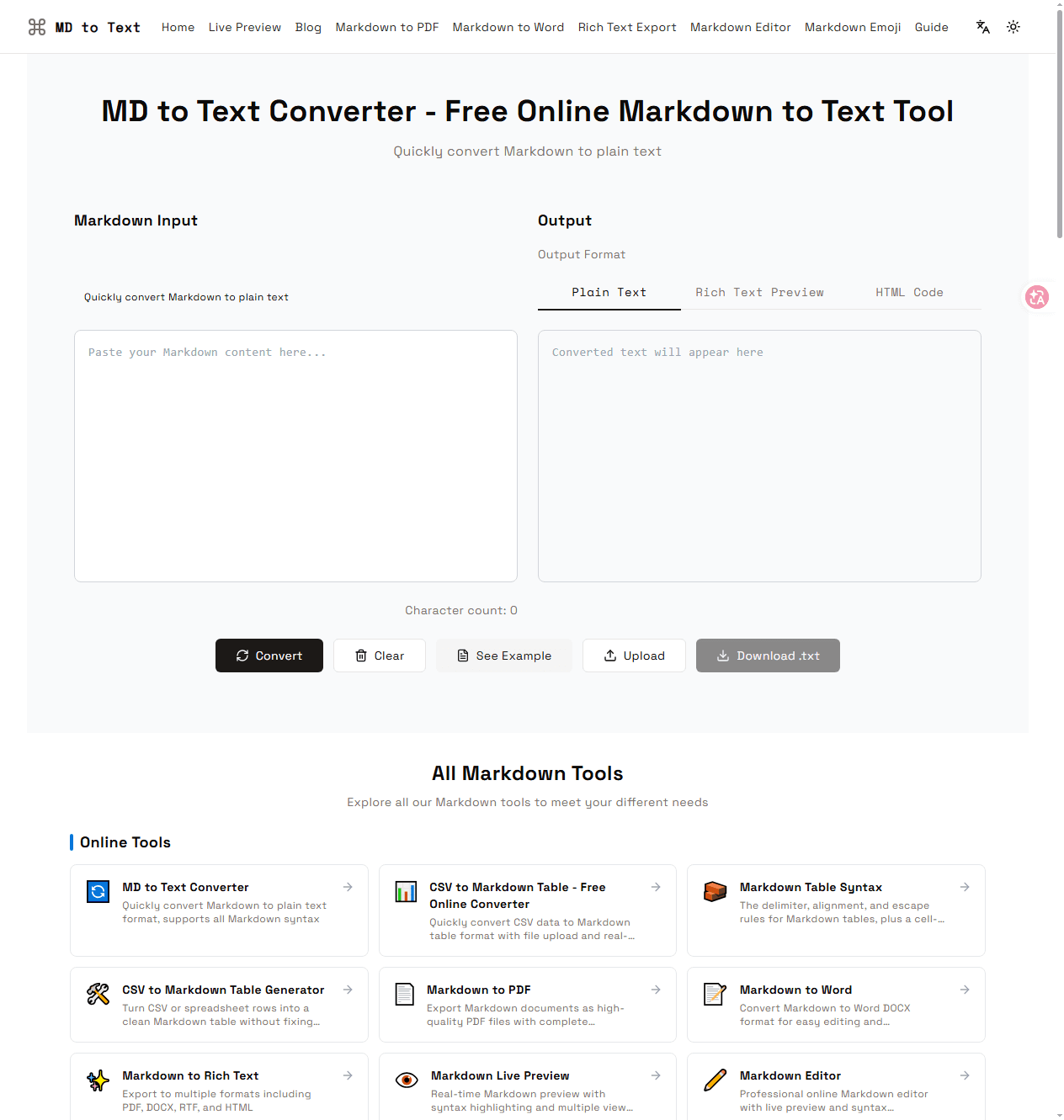
About this app
MD to Text is a free, browser-based tool that converts Markdown-formatted content into clean plain text. It supports all Markdown syntax, including CommonMark and GitHub Flavored Markdown, and processes everything locally for privacy. You can paste or upload Markdown, see real-time conversion, and download the result as a .txt file. Beyond basic conversion, the site offers a suite of related tools: Markdown to PDF, Word, HTML, and Rich Text, plus a CSV-to-Markdown table converter, a live Markdown editor, and an emoji picker. It's ideal for content creators, developers, and AI workflows where clean text is essential. No registration, no cost, and no data leaves your browser.
Key features
- 1Real-time Markdown to plain text conversion with Plain Text, Rich Text Preview, and HTML Code output tabs.
- 2Free, no-registration, browser-local processing — paste, upload, or convert and download as .txt.
- 3Suite of related tools: MD to PDF/Word/HTML/Rich Text, CSV to Markdown, live editor, and emoji picker.
Target customer profile
Drawn from the product itself, not from a survey.
Demographic
Content creators and bloggers
Pain points
Need to strip Markdown from drafts for publishing or analysis
Primary needs
Quick, free conversion without losing text structure
Demographic
Developers and technical writers
Pain points
Documentation in Markdown needs to be converted for non-technical systems
Primary needs
Accurate conversion supporting all Markdown syntax, including tables and code blocks
Demographic
Data scientists and AI engineers
Pain points
Training data often contains Markdown artifacts that interfere with models
Primary needs
Clean plain text output for NLP and machine learning pipelines
Scout Review
Written by AI from measured evidence, scored out of 100.
MD to Text Converter is a fast, focused, genuinely useful utility with a clean developer-toned landing page and a core loop that works in one glance. It's free, needs no account, and runs in the browser — the right shape for a tool people reach for mid-task. The cracks are in the polish and the plumbing: truncated card copy, a dead-looking Download button, an empty state that shrugs, and a security posture that's three headers out of twelve. Accessibility is close but has real failing audits. Growth rests on convenience rather than a moat. For a free tool, it clears the bar comfortably; it just hasn't finished the last 10%.
Measure by measure
Usability
62Core paste-convert-copy flow is instant and obvious, with output tabs that surface options without extra clicks. But the empty state is a lonely placeholder and the How-to steps hide below an SEO essay.
Design
58Clean, developer-toned landing page with a clear converter focal point and consistent type system, but truncated card copy, mixed emoji/icon styles, and a dead-looking Download button drag it down.
Speed
88Lighthouse mobile 99/100 (LCP 1.1s, CLS 0, TBT 67ms), desktop 94/100. Client-side conversion means no server round-trip — genuinely snappy.
Security
41HTTPS and SPF are in place, but HSTS, CSP, frame protection, and DMARC are all missing (3/12 header checklist). No security page, audit, or bug bounty. Local-processing claim is a plus but unverified.
Accessibility
68Lighthouse 90/100, but failing audits include unnamed buttons, insufficient contrast, and out-of-order headings. No a11y statement or WCAG mention; multi-locale paths exist.
Growth
58Real, specific problem (Markdown cleanup for AI/publishing) with a free, no-signup, browser-local suite as the wedge against Dillinger, Coderstool, and Pandoc. Early-stage, no moat beyond convenience.
Improvement areas
- Security headers are 3/12 — missing HSTS, CSP, frame protection, X-Content-Type-Options, Referrer-Policy, and DMARC.
- Accessibility failing audits: unnamed buttons, insufficient contrast, and non-sequential heading order.
- UI polish: truncated card descriptions, inconsistent icon styles, and a dead-looking Download button.
- Information architecture: How-to steps buried under SEO copy; a lone Documentation card under its own heading.
Design & Usability
The landing page knows what it is: a converter first, everything else second. The split input/output panel sits above the fold with a dominant Convert button and output tabs that make Plain Text, Rich Text Preview, and HTML Code discoverable in one glance. The type system is disciplined — geometric headings, monospace input — and the tool grid scans cleanly. Where it slips is the details: card descriptions truncated mid-word, emoji and detailed icons mixed across cards, a lone 'Documentation' card under a heading of its own, and a greyed Download button that reads as broken rather than pending. Usability is solid for the core loop but thin on guidance: the empty state is a placeholder and a zero counter, and the How-to steps are buried under a long SEO essay about Markdown's origins.
Speed & Security
Speed is the standout. Lighthouse mobile 99/100 with LCP 1.1s, CLS 0, and TBT 67ms; desktop 94/100. Conversion runs client-side, so there's no server round-trip and the page feels instant. Security is the weak flank: HTTPS and SPF are present, but HSTS, CSP, frame protection, X-Content-Type-Options, Referrer-Policy, Permissions-Policy, and DMARC are all absent — 3 of 12 checklist points. There's no security page, no SOC 2 or ISO claim, and no bug bounty. The 'all processing is local' promise is the right architecture for a converter handling drafts and training data, but it's a claim on the page, not a verified guarantee.
Accessibility & Growth
Accessibility lands at 90/100 on Lighthouse, which sounds better than it is: the failing audits are the ones that matter — buttons without accessible names, insufficient contrast on the small grey SEO copy, and headings out of sequence. No WCAG statement or accessibility page exists, though locale paths suggest some internationalization. Growth is a judgment on the idea: the problem is real and specific (stripping Markdown for NLP pipelines, publishing, and non-technical systems), and the wedge is a free, no-signup, browser-local suite that goes wider than Dillinger's editor, deeper than Coderstool's single converter, and friendlier than Pandoc's CLI. That's a legitimate position, but convenience is a thin moat — the domain registered in July 2025 and there's no lock-in, data advantage, or network effect to compound.
Conclusion
If you need to strip Markdown right now, this does the job in under a second and doesn't ask for your email. That's worth something. But the site is doing a lot of SEO heavy-lifting around a tool that could be tightened into something sharper: fix the Download state, name your buttons, add the missing headers, and cut the essay between the tool and the instructions. The foundation is solid and the speed is real. The next version should feel as finished as it is fast.
Suggestions for improvement
- Add HSTS, CSP, X-Content-Type-Options, Referrer-Policy, and DMARC headers — you're at 3/12 and it's cheap to fix.
- Give every button an accessible name and fix the heading order; the contrast on the grey SEO copy needs a bump.
- Replace the dead grey Download button with a clear disabled state plus a tooltip explaining when it activates.
- Move the 'How to Use' steps above the long SEO essay so new users hit guidance before the history lesson.
Alternatives comparison
Named competitors, point by point. Nobody paid to appear here or to be left out.
 MD to Text Converter |  Dillinger |  Markdown to Text Converter by Coderstool |  Pandoc | |
|---|---|---|---|---|
| Plain text conversion | Yes — dedicated MD to plain text with real-time preview and .txt download | Limited — editor-focused, export to HTML/PDF/MD, plain text not a first-class output | Yes — basic conversion, no real-time preview | Yes — via CLI, requires installation and flags |
| No registration / free | Free, no account, browser-local processing | Free, no account required | Free, no account required | Free and open source, but requires local install |
| Real-time preview | Yes — auto-conversion plus Rich Text Preview tab | Yes — live editor preview | No — convert-on-click only | No — batch CLI conversion |
| Additional export formats | PDF, Word, HTML, Rich Text, plus CSV-to-Markdown and emoji tools | HTML, PDF, Markdown | Plain text only | Extensive — dozens of formats via CLI |
| Setup required | None — open the page and paste | None — browser-based | None — browser-based | Install binary and learn CLI flags |
Dillinger
Online Markdown editor with export to HTML, PDF, and Markdown, but limited plain text conversion.
Markdown to Text Converter by Coderstool
Simple converter that removes Markdown formatting, but lacks advanced features and real-time preview.
Pandoc
Command-line tool for document conversion, including Markdown to plain text, but requires installation and technical know-how.
Comparing options? See MD to Text Converter alternatives, scored side by side
More Productivity apps
View all Productivity
Puzzly – B2B Lead Generation & Sales Intelligence Platform
92Puzzly is an all-in-one B2B lead generation platform that...

Qamarero
92An all-in-one hospitality software for restaurants and ba...

EmbedMyReviews
92White-label reputation management software for agencies s...

StoryPad
92Privacy-first open source journal app with a continuous t...

Notion
92All-in-one AI workspace for docs, projects, and knowledge...

The Stack Newsletter
92A weekly newsletter delivering curated tech jobs, intervi...

Vibe Coding Agent Skills
92A free, open-source platform offering 110 AI agent skills...

QRBliss
91Branded QR codes with AI Brand Sync, 15 free dynamic code...

Gerty
91Private, local AI assistant for Mac that runs offline

Strukchad Property Management
91Property management for Kenyan letting agents: rent invoices raised every month, M-Pesa rent prompts to tenants, arrears tracking and landlord statements.

CC Switch
91Open-source desktop app for switching AI coding providers...

PitchWhip
90AI cold call scripts & direct dials from LinkedIn


A platform dedicated to providing unbiased reviews of newly launched applications, analyzing everything from their features to their full potential.
info@scoutforge.net© 2026 Scoutforge. All rights reserved.
