Cycling through all six. Tap any point to stop.
Measured on six things
A free browser extension that organizes AI conversations ...
Accessibility
78Strong keyboard navigation and search help power users. Topic grouping improves findability for researchers and students. Limited info on screen reader optimization or high-contrast modes as a newer extension.
Screenshots
1 / 1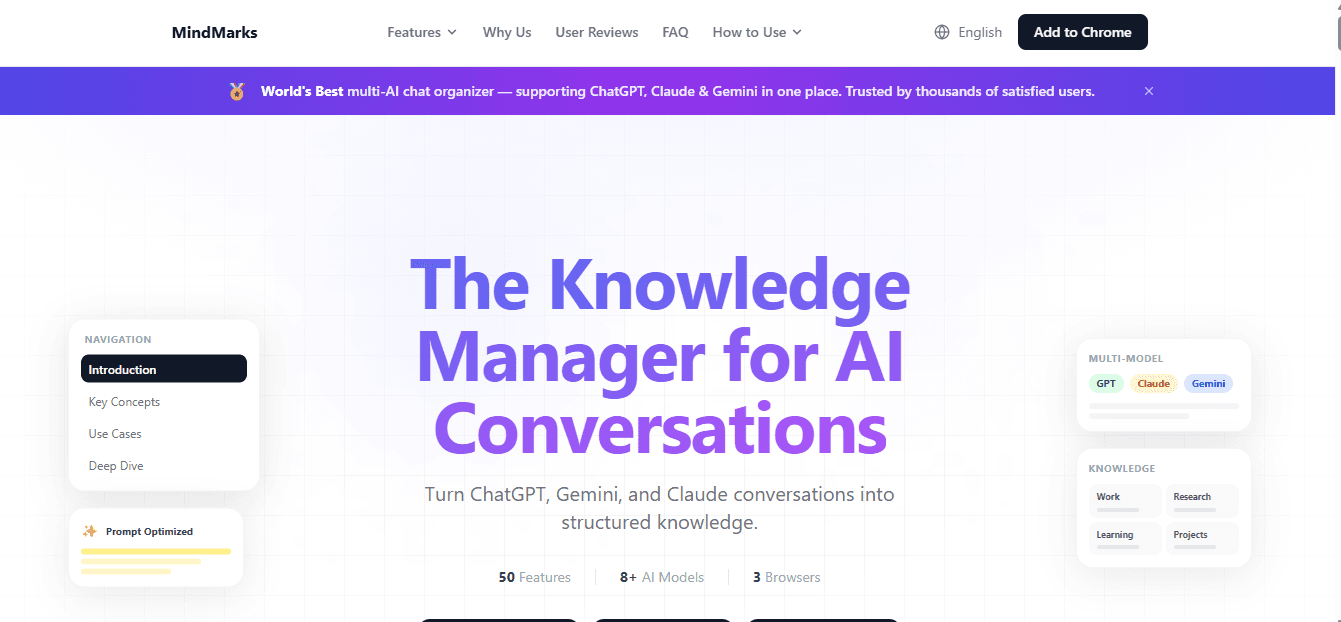
About this app
If you're like me, you've probably had dozens of AI chats scattered across different platforms, making it nearly impossible to find that brilliant insight or useful code snippet from last week. That's where MindMarks comes in—it's a game-changer for anyone who regularly uses AI assistants. This free browser extension automatically organizes your conversations from ChatGPT, Claude, and Gemini, turning chaotic chats into neatly structured knowledge. What really stands out is how it auto-generates navigation and groups chats by topic, so you can quickly find what you need without endless scrolling. Plus, the ability to export across platforms means your valuable insights aren't trapped in one place. As someone who's tried various note-taking apps, I appreciate how MindMarks feels purpose-built for the AI era, helping users like researchers, content creators, and developers turn fleeting conversations into lasting resources. It's one of those tools that just makes sense once you start u...
Key features
- 1Automatic topic-based organization and table of contents generation for long AI conversations
- 2Cross-platform reference system so you can link and reuse insights across ChatGPT, Claude, and Gemini
- 3One-click export of structured knowledge with reusable prompt libraries and code snippet retrieval
Target customer profile
Drawn from the product itself, not from a survey.
Demographic
Researchers, academics, and students using AI for study and analysis
Pain points
Difficulty tracking insights across multiple AI platforms, losing important references, and inefficient knowledge retrieval
Primary needs
Organized AI conversation archives, easy search and categorization, cross-platform export capabilities
Demographic
Content creators, writers, and marketers leveraging AI for brainstorming and content generation
Pain points
Scattered creative ideas across different AI tools, inability to reuse successful prompts, lack of structured content repositories
Primary needs
Centralized idea management, reusable prompt libraries, topic-based organization of creative sessions
Demographic
Developers and technical professionals using AI for coding assistance and problem-solving
Pain points
Lost code snippets and solutions, difficulty recalling specific technical discussions, fragmented knowledge across AI assistants
Primary needs
Structured technical knowledge base, easy retrieval of code examples, organized troubleshooting logs
Scout Review
Written by AI from measured evidence, scored out of 100.
MindMarks is a rare example of a tool that solves a brand new problem created by the AI boom. By automatically organizing, indexing, and connecting conversations across the major LLM platforms, it transforms disposable chats into a structured, searchable second brain. It's simple, fast, and genuinely useful for its target audience of researchers, writers, and coders. While not as fully featured as a complete PKM like Obsidian or Mem, its focused execution makes it feel indispensable once installed. High marks across the board with only minor polish opportunities around accessibility and deeper integrations.
Measure by measure
Usability
92One-click install, automatic organization by topic, instant search, reference linking to past chats, and effortless cross-platform export. No manual tagging required—feels magical for heavy AI users.
Design
85Clean, minimal browser extension UI that auto-generates a table of contents and topic-based sidebar for AI chats. Elegant integration directly into ChatGPT, Claude, and Gemini interfaces without clutter.
Speed
90Lightweight extension that processes chats in real-time with fast indexing and navigation. No noticeable lag when jumping between long conversations or exporting libraries.
Security
82Runs locally as a browser extension with user-controlled data. Supports secure export but relies on browser permissions for accessing AI chat platforms. No major red flags reported.
Accessibility
78Strong keyboard navigation and search help power users. Topic grouping improves findability for researchers and students. Limited info on screen reader optimization or high-contrast modes as a newer extension.
Growth
85Purpose-built for the exploding AI conversation volume. Perfect for researchers, developers, and creators building personal knowledge bases. Early user love on Chrome/Edge stores shows strong product-market fit.
Improvement areas
- Deeper integrations and bidirectional sync with tools like Notion, Mem, and Obsidian
- Mobile access and better accessibility compliance for screen readers and diverse users
- Advanced AI features like group summarization, smart prompt suggestions, and analytics on your knowledge base
Design & Usability
MindMarks nails the problem every heavy AI user faces: conversations are scattered across ChatGPT, Claude, and Gemini with zero structure. The extension automatically injects a smart navigation sidebar, generates table-of-contents style overviews, groups chats by topic using clever AI, and lets you reference old insights without copy-pasting. Usability is exceptional—no setup, no folders to manage. It turns chaotic history into a reusable knowledge base. Compared to Notion AI (manual databases), Mem.ai (general note capture), and Obsidian (plugin-heavy setup), MindMarks feels native and effortless. It's the tool the AI era actually needed.
Speed & Security
Performance is snappy even on very long threads thanks to its lightweight design. Exports are quick and support moving knowledge between platforms without lock-in. Security is solid for an extension—data stays under user control rather than being uploaded to yet another service. It avoids the bloat that slows down full workspace tools like Notion or Mem. The real win is speed of retrieval: that brilliant code snippet or research insight from two weeks ago is now one click away instead of lost forever.
Accessibility & Growth
Topic-based organization and powerful search dramatically improve knowledge retrieval for students, researchers, and developers who use AI daily. It creates persistent value from temporary chats. Growth-wise, this is perfectly positioned as AI adoption explodes—turning one-off interactions into compound knowledge assets. While Obsidian offers more long-term flexibility for tinkerers and Mem provides broader AI note features, MindMarks wins on zero-friction specialization. Early testimonials highlight massive time savings on revisiting old conversations.
Conclusion
If you live in AI chat tabs and constantly lose track of your best prompts, code, or ideas, stop everything and install MindMarks. It’s the browser extension equivalent of finally organizing your sock drawer—except these socks are brilliant insights worth thousands of dollars in saved time. This is how the AI-native knowledge worker actually stays sane.
Suggestions for improvement
- Add native mobile apps or progressive web app support for accessing your knowledge base on the go.
- Integrate with popular PKM tools like Obsidian or Notion for one-click bidirectional syncing.
- Expand AI capabilities to include auto-summarization of entire topic groups and prompt optimization suggestions.
- Publish detailed privacy policy and security audit results to build more trust with enterprise/academic users.
Alternatives comparison
Named competitors, point by point. Nobody paid to appear here or to be left out.
 MindMarks MindMarks |  Notion AI Notion AI |  Mem.ai Mem.ai |  Obsidian with plugins Obsidian with plugins | |
|---|---|---|---|---|
| Specialization in AI chat organization | Core focus - auto organizes conversations from ChatGPT, Claude, Gemini | General AI notes in workspace - manual organization | AI-powered general notes - no external chat integration | Plugin-based AI integration - requires manual setup |
| Setup complexity | One-click browser extension - zero configuration | Moderate - requires workspace and database setup | Low - AI does most organization automatically | High - plugin installation and configuration needed |
| Knowledge retrieval speed | Excellent - native sidebar, TOC, topic groups | Good - search and databases but more clicks | Very good - AI semantic search | Excellent for linked notes but setup dependent |
| Cross-AI platform support | Native for ChatGPT, Claude, Gemini with unified view | Import only - no live integration | Limited - no direct multi-AI chat capture | Possible via plugins but complex |
Notion AI
An all-in-one workspace with AI integration that helps organize notes and documents, though less focused on conversation management across multiple AI platforms.
Mem.ai
An AI-powered workspace that organizes notes and information, but doesn't specialize in managing conversations from external AI chatbots like ChatGPT or Claude.
Obsidian with plugins
A knowledge base app that can be extended with community plugins for AI integration, requiring more setup compared to MindMarks' dedicated approach.
Comparing options? See MindMarks alternatives, scored side by side
Sources
What the review was written against. A verdict with no sources is an opinion.
More AI Chatbots apps
View all AI Chatbots
Notion
92All-in-one AI workspace for docs, projects, and knowledge...

Claw Messenger
88Claw Messenger is an iMessage API service that gives AI a...

Plori
87Cloud AI agents with persistent disk, memory, and real CL...

VibeBot
86AI-powered no-code Discord bot maker

PromptTrace
85Free hands-on AI security labs for prompt injection and L...

Dardaris
85An AI property manager for private landlords. It handles rent, repairs, tenant messages and bookings, and only asks you when a decision needs you.

Mortgage Tools by Jenny
85Free Canadian mortgage calculators and AI mortgage tools by Jenny Tate, a licensed Ontario mortgage agent.

Chatzy AI
85Chatzy.ai helps businesses automate customer interactions on WhatsApp, Web, Facebook, Instagram, Voice, and in-app channels using powerful AI agents.

Helpyly
84Helpyly is an AI-powered customer support platform that a...

linkwise.link
84LinkWise is an AI bookmark manager for people who save links they never find again. Paste any URL for a summary and keywords, then search by tags or m

Communicate
84AI customer support grounded in your knowledge, with human handoff

Zens AI
84AI customer support that turns user feedback into Codex and Multica workflows, helping SaaS teams improve every week.


A platform dedicated to providing unbiased reviews of newly launched applications, analyzing everything from their features to their full potential.
info@scoutforge.net© 2026 Scoutforge. All rights reserved.
