Cycling through all six. Tap any point to stop.
Measured on six things
Browser-based job time tracking for shops and crews
Growth
58Real problem (paper timesheets, unclear labor cost) with a specific wedge: dead-simple start/stop/switch at $4.99/employee and a free tier, aimed at job shops and crews. Differentiated but in a crowded field.
Screenshots
1 / 5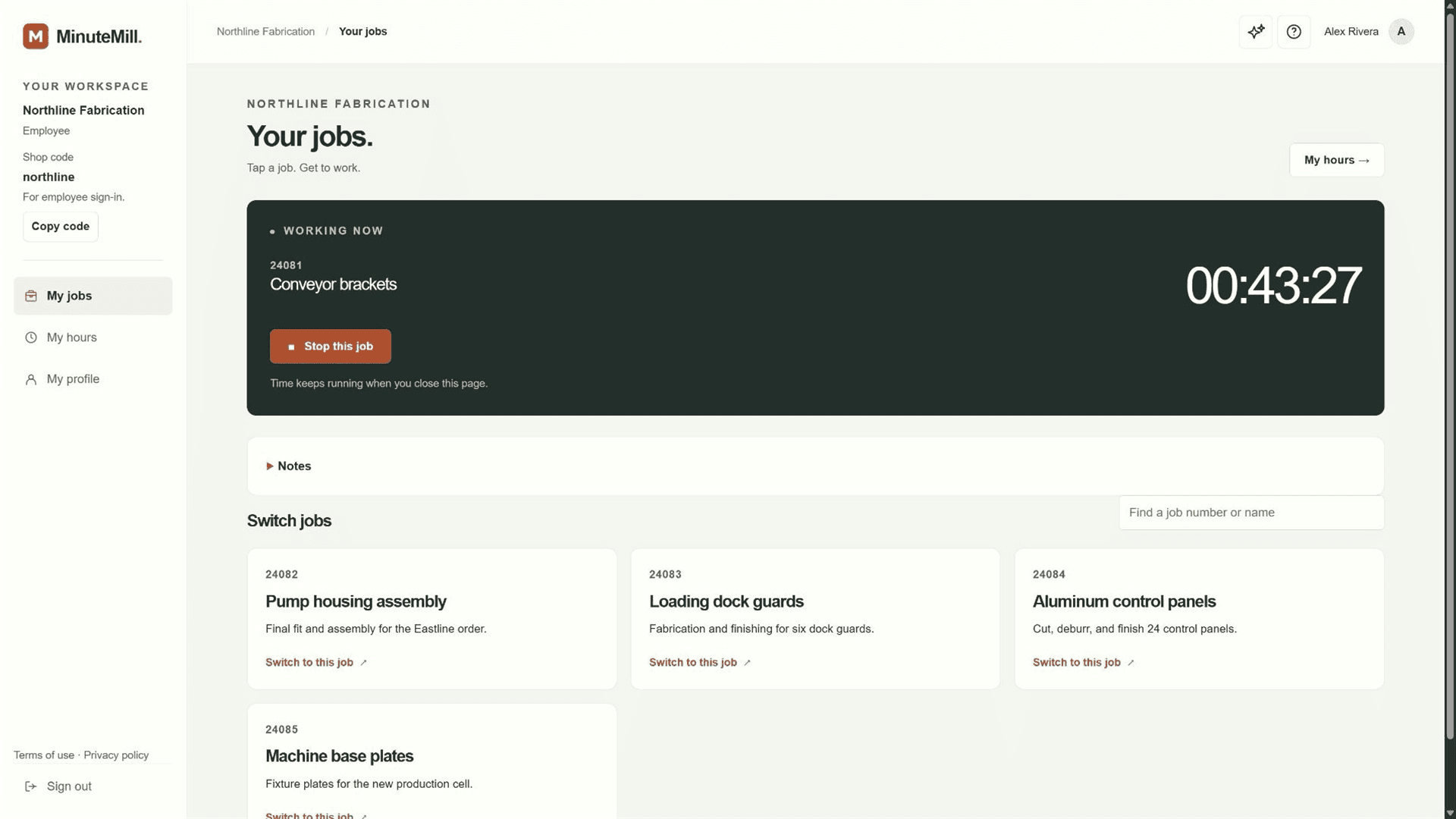
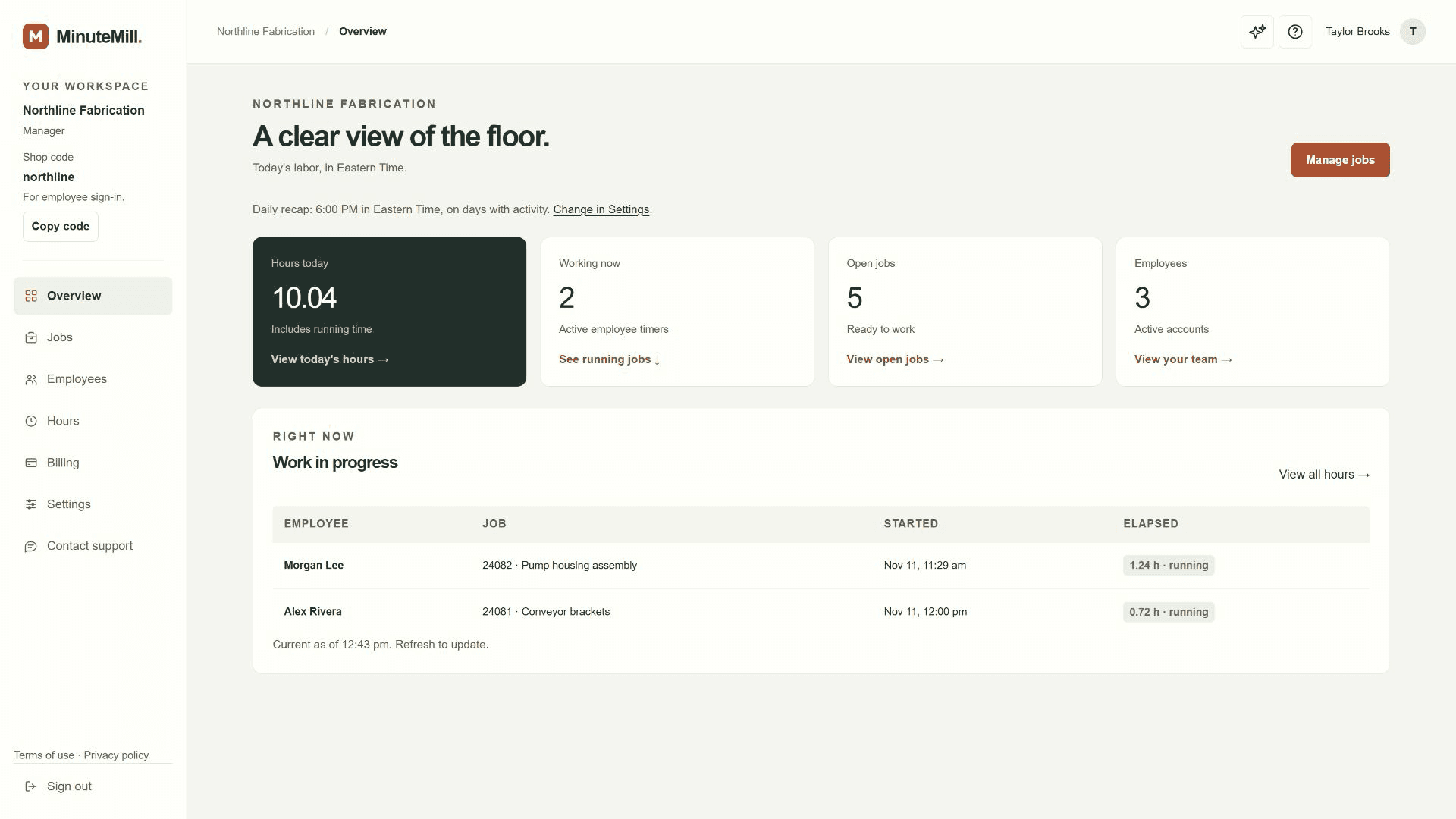
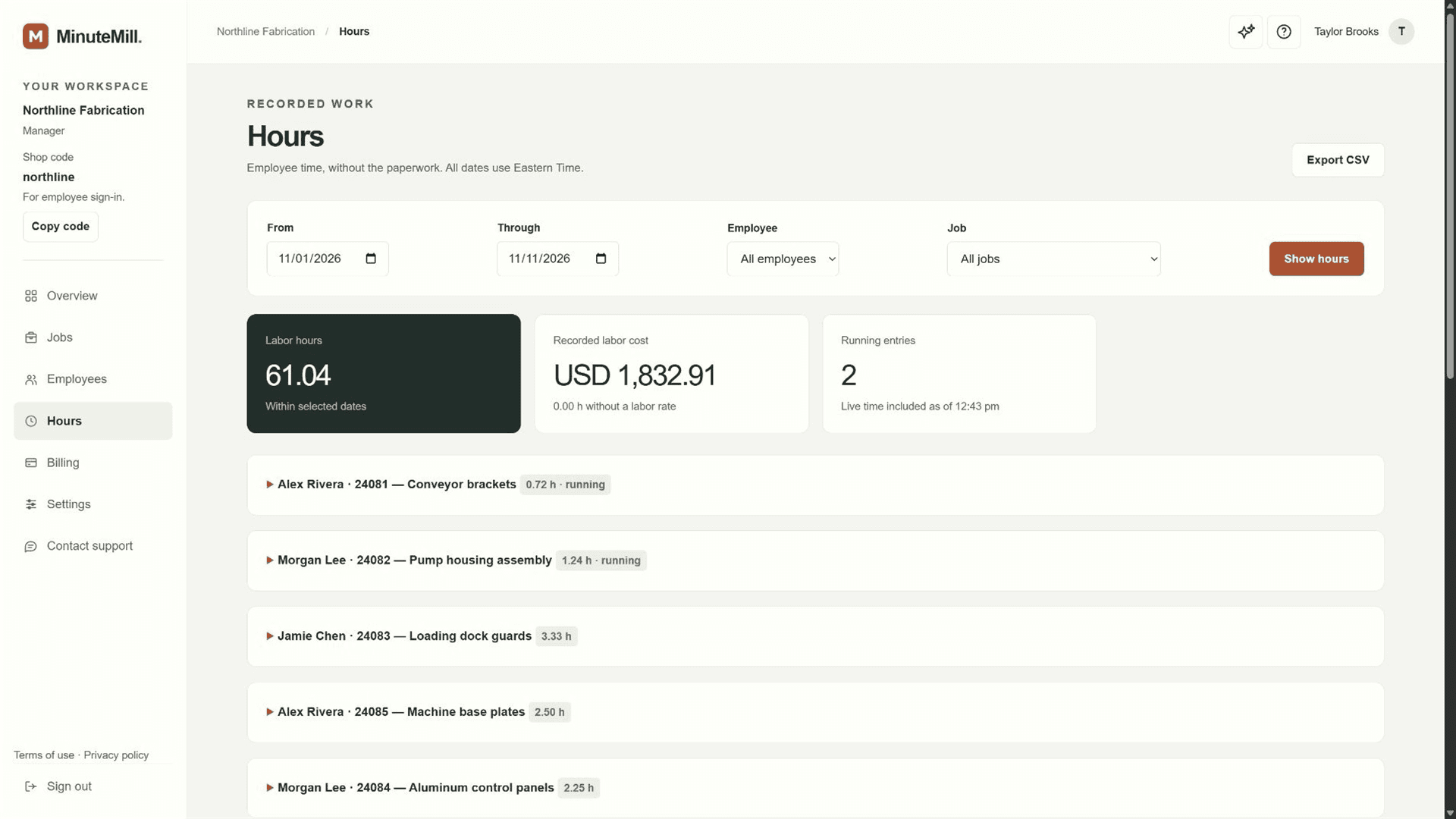
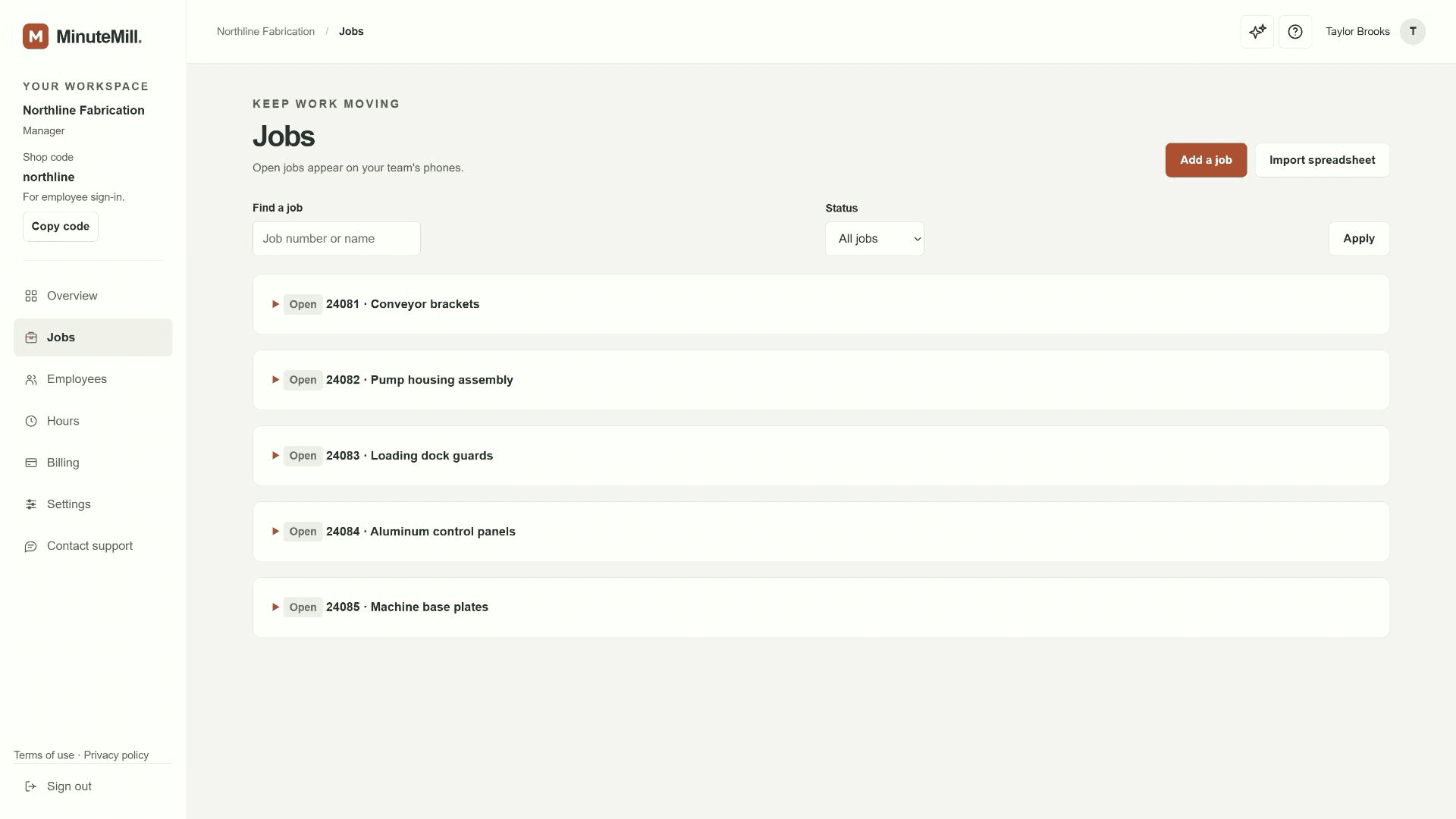
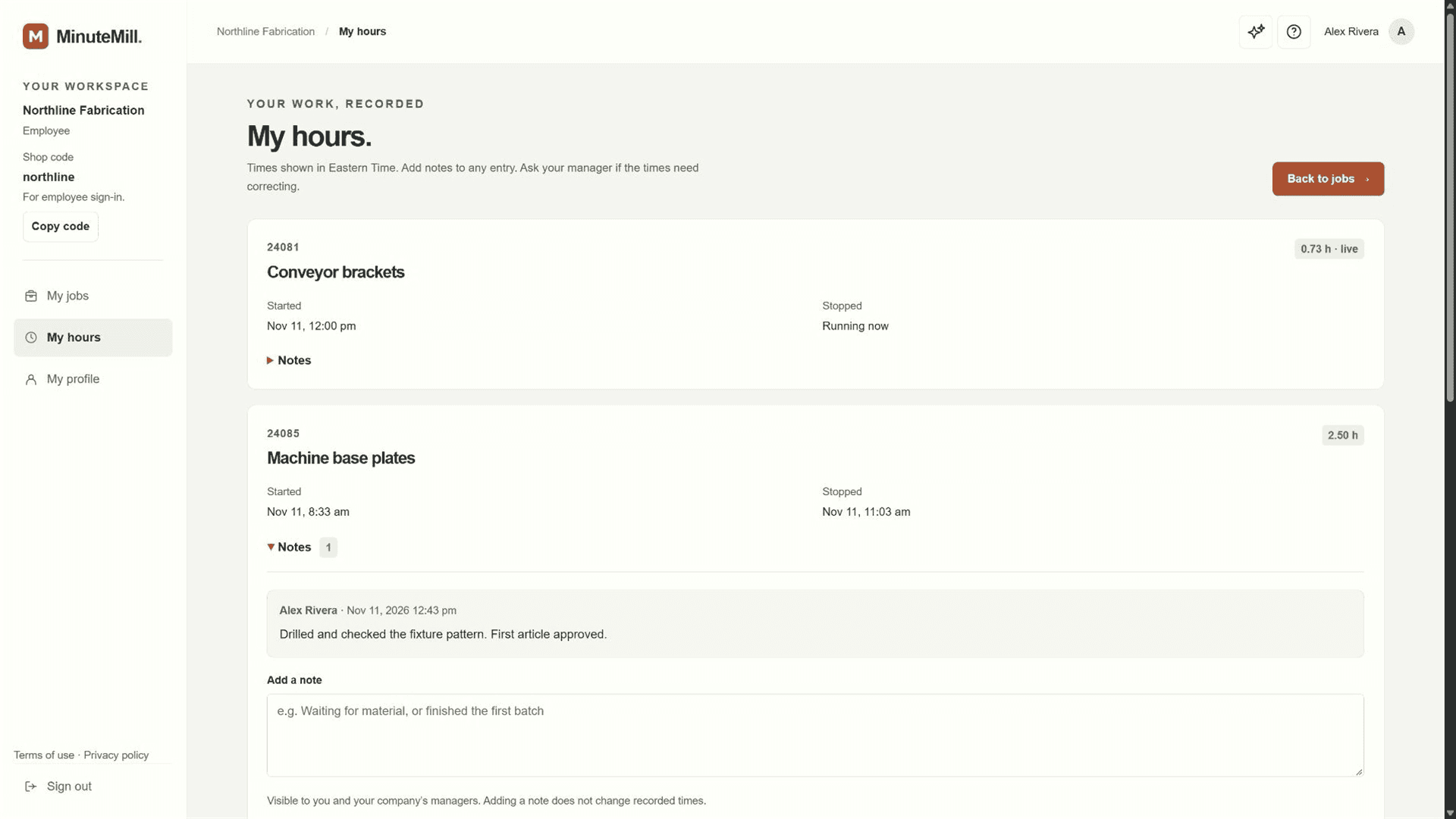
About this app
MinuteMill is a browser-based job time tracker for manufacturing teams and job shops. Employees tap to start, stop, or switch jobs on their phones, and managers see labor hours and costs by job without retyping timesheets.
Key features
- 1Tap-to-start/stop/switch job tracking in a browser on phone, tablet or computer — no app download.
- 2Manager Hours report with labor hours and optional labor cost by job and person, plus CSV export.
- 3Free tier for one manager and one employee; $4.99 per additional active employee per month.
Target customer profile
Drawn from the product itself, not from a survey.
Demographic
Small manufacturing shop owners
Pain points
Paper timesheets are error-prone, labor costs are unclear, quoting is guesswork
Primary needs
Simple job time tracking, accurate labor cost data for pricing, easy employee adoption
Demographic
Construction crew managers
Pain points
Workers move between tasks, tracking hours by job is tedious, no real-time visibility
Primary needs
Quick job switching on phones, daily hour reports, correction tools for missed stops
Demographic
Cleaning service business owners
Pain points
Multiple sites and shifts, manual time entry, lack of job-level profitability insight
Primary needs
Mobile time tracking by site, labor cost per clean, simple employee onboarding
Scout Review
Written by AI from measured evidence, scored out of 100.
MinuteMill is a browser-based job time tracker for manufacturing shops and job-based crews, and it's a genuinely tidy early product. The site is well-branded with real interface screenshots, the free tier is real (one manager, one employee, no card), and the changelog shows active iteration on onboarding. Speed is strong (mobile 87, desktop 98) and security headers are near-complete at 12/13. Accessibility scores a perfect 100 on automated checks. The weak points are small: a consent banner that shoves the hero down, low-contrast grey body text, a dense Hours screenshot, and an internet requirement buried in fine print. Against Workyard, Hubstaff and ClockShark it competes on simplicity and price rather than feature depth — a defensible wedge for small shops, but a crowded one.
Measure by measure
Usability
66Free tier with no card, a 'See it in action' demo link, and a changelog full of onboarding fixes (first-job/first-employee steps, clearer stop/switch). Dense Hours screenshot and buried connection requirement cost it points.
Design
70Coherent cream/green/terracotta palette and real app screenshots (running timer, Hours table) make the product feel concrete. Undercut by a full-width consent banner over the hero and small low-contrast grey body text.
Speed
72Lighthouse mobile 87/100 (LCP 1.7s, TBT 3ms) and desktop 98/100 — genuinely fast. CLS 0.252 is the blemish, likely the consent banner shoving the hero around on load.
Security
74Strong header hygiene: HTTPS, HSTS, CSP, frame protection, secure cookies, SPF and DMARC all present (12/13 checklist). Analytics vendors disclosed and job records excluded. No SOC 2/pen-test claim found.
Accessibility
80Lighthouse accessibility 100/100 and browser-based access across phone, tablet and computer. No published WCAG statement or multi-language support found, so it sits at the top of the measured band rather than beyond it.
Growth
58Real problem (paper timesheets, unclear labor cost) with a specific wedge: dead-simple start/stop/switch at $4.99/employee and a free tier, aimed at job shops and crews. Differentiated but in a crowded field.
Improvement areas
- Consent banner sits above the hero and shifts layout (CLS 0.252); low-contrast grey body text.
- Internet-connection requirement disclosed only in small grey text, not near the CTA.
- No published WCAG/accessibility statement or multi-language support found.
- No SOC 2/ISO/pen-test or bug-bounty claim; Permissions-Policy header missing.
Design & Usability
MinuteMill's site is more polished than most indie trackers: a consistent cream/green/terracotta palette, real app screenshots showing a live timer and a manager Hours table with believable demo data, and a clean 01/02/03 explainer of start-stop-switch. The weak spots are legibility and first-load order — a full-width consent banner sits above the hero and pushes the headline down, and small grey body text in the feature sections is hard to read. Usability is the stronger half: a genuinely free tier (one manager, one employee, no card), a 'See it in action' demo link, and a changelog documenting real onboarding fixes like first-job/first-employee steps and a clearer stop/switch control. The manager Hours screenshot is dense with tiny labels, and the internet-connection requirement is disclosed only in small grey text — a real risk for someone on a job site.
Speed & Security
Speed is a clear strength. Lighthouse gives mobile 87/100 (LCP 1.7s, TBT 3ms, FCP 964ms) and desktop 98/100 — the page is light and snappy. The one blemish is CLS 0.252, above the 0.1 'good' threshold and most likely caused by the consent banner shifting the hero on load. Security is solid for the stage: HTTPS enforced with HSTS, CSP, frame protection, X-Content-Type-Options, Referrer-Policy, secure cookies, SPF and DMARC — 12 of 13 checklist items, missing only Permissions-Policy. The site discloses its analytics vendors and states job records stay out of website analytics, and a privacy policy is linked. What's absent is the deeper compliance layer — no SOC 2, ISO, pen-test or bug-bounty claim found — which is normal for a product this young but keeps the score out of the top band.
Accessibility & Growth
Accessibility is the standout measured result: Lighthouse scores 100/100, and browser-based access on phone, tablet and computer widens platform coverage. What's missing is the human layer — no published WCAG statement and no multi-language support found — so it earns the top of the measured band, not beyond it. Growth is a judgement on the idea, not traction. The problem is real and specific: paper timesheets, unclear labor cost, guesswork quoting. The wedge is deliberate simplicity — start, stop, switch, nothing else — at $4.99 per additional employee with a free tier, aimed at job shops, construction crews, cleaning teams and automotive shops. It has dedicated comparison pages against Workyard, Hubstaff and ClockShark, which is honest positioning. But those incumbents already own the category with GPS, scheduling and payroll, so MinuteMill's ceiling depends on whether 'less to learn' is enough to win shops that don't want the complexity.
Conclusion
If you run a small shop or crew and your timesheet process is a clipboard and a prayer, MinuteMill is worth the free tier test — the start/stop/switch loop is exactly as simple as advertised, and the labor-cost-by-job view is the payoff. Go in knowing what it isn't: no GPS, no payroll, no dispatch, and it needs a connection to record time. It's a focused tool doing one job well, priced to match. For a product this young, the execution on speed, security headers and accessibility is above its weight class. The open question is whether 'less to learn' beats the incumbents' feature lists — try it on one crew before you commit the whole shop.
Suggestions for improvement
- Move the analytics consent banner below the hero or make it a compact bar so the headline isn't pushed down on first load.
- Raise contrast on the grey body text in feature and 'Built for' sections to meet WCAG AA at normal sizes.
- Surface the internet-connection requirement near the primary CTA, not only in small grey text — job-site users will hit it.
- Publish a short accessibility statement and consider a lightweight offline queue for start/stop when the signal drops.
Alternatives comparison
Named competitors, point by point. Nobody paid to appear here or to be left out.
 MinuteMill | Workyard |  Hubstaff | ClockShark | |
|---|---|---|---|---|
| Pricing model | Free for 1 manager + 1 employee; $4.99 per additional active employee/month | Per-user subscription tiers (paid, no permanent free tier) | Per-user tiers, free plan limited to 1 user | Per-user subscription tiers (paid) |
| GPS / location verification | No — site says use other tools for location verification | Yes — GPS location verification | Yes — GPS tracking available | Yes — GPS tracking |
| Job costing / labor cost by job | Yes — hours and optional labor cost by job and person | Yes — job costing features | Yes — project/task budgets and costs | Yes — job costing |
| Scheduling & dispatch | No — site says keep dispatch tools alongside MinuteMill | Yes — scheduling | Yes — scheduling and workforce management | Yes — scheduling |
| Payroll integration | No — payroll stays in existing systems; CSV export only | Yes — payroll integrations | Yes — payroll integration | Yes — payroll integrations |
| Employee monitoring (screenshots/activity) | No — job time tracking only | Limited — GPS/location focus | Yes — screenshots and activity monitoring | Limited — GPS focus |
Workyard
Workyard is a time tracking and GPS solution for construction and field service teams, offering features like location verification and scheduling.
Hubstaff
Hubstaff is a comprehensive time tracking and workforce management platform with features like screenshots, activity monitoring, and payroll integration.
ClockShark
ClockShark is a time tracking app for construction and field service with GPS, scheduling, and job costing features.
Comparing options? See MinuteMill alternatives, scored side by side
More Productivity apps
View all Productivity
Puzzly – B2B Lead Generation & Sales Intelligence Platform
92Puzzly is an all-in-one B2B lead generation platform that...

Qamarero
92An all-in-one hospitality software for restaurants and ba...

EmbedMyReviews
92White-label reputation management software for agencies s...

StoryPad
92Privacy-first open source journal app with a continuous t...

Notion
92All-in-one AI workspace for docs, projects, and knowledge...

The Stack Newsletter
92A weekly newsletter delivering curated tech jobs, intervi...

Vibe Coding Agent Skills
92A free, open-source platform offering 110 AI agent skills...

QRBliss
91Branded QR codes with AI Brand Sync, 15 free dynamic code...

Gerty
91Private, local AI assistant for Mac that runs offline

Strukchad Property Management
91Property management for Kenyan letting agents: rent invoices raised every month, M-Pesa rent prompts to tenants, arrears tracking and landlord statements.

CC Switch
91Open-source desktop app for switching AI coding providers...

PitchWhip
90AI cold call scripts & direct dials from LinkedIn


A platform dedicated to providing unbiased reviews of newly launched applications, analyzing everything from their features to their full potential.
info@scoutforge.net© 2026 Scoutforge. All rights reserved.
