Cycling through all six. Tap any point to stop.
Measured on six things
AI photo culling and image enhancement in your browser
Speed
46Lighthouse mobile 54/100 with LCP 10.9s and FCP 6.9s — slow first paint on mobile. Desktop 77/100 is fine. CLS 0 keeps layout stable despite the heavy hero.
Screenshots
1 / 1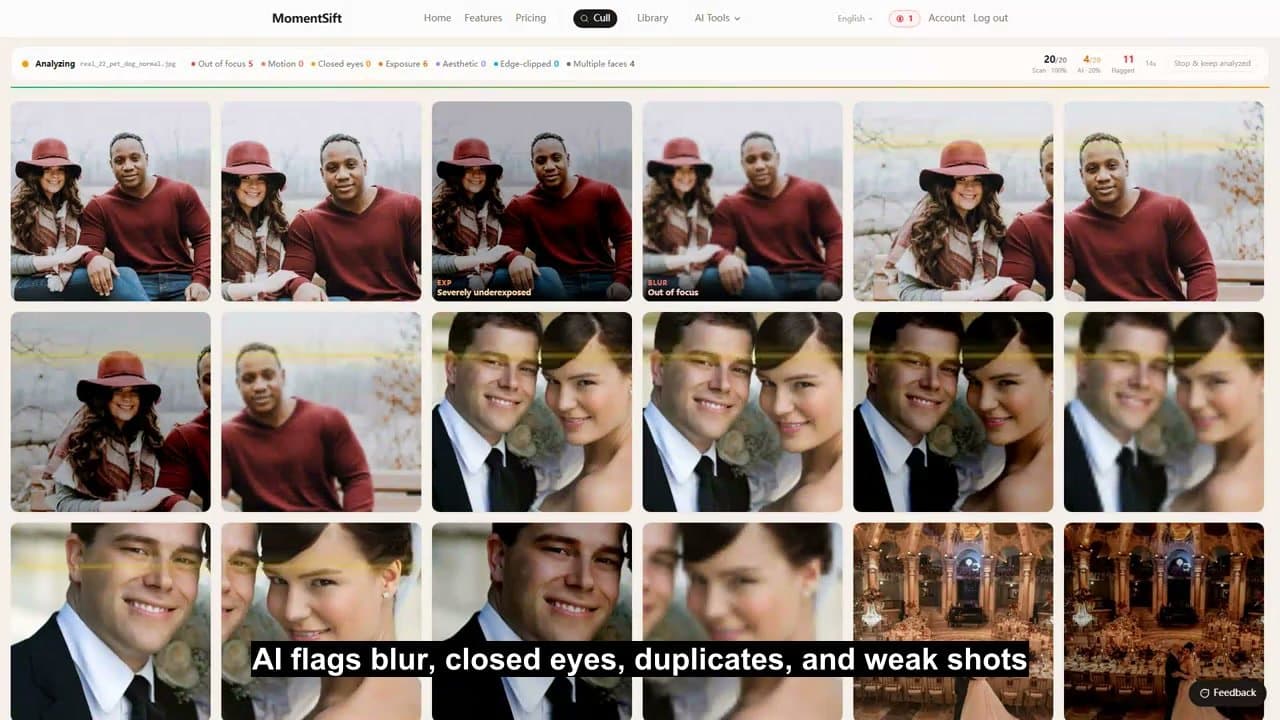
About this app
MomentSift helps photographers, travelers, families and content creators sort photo collections before editing. It groups similar images and flags blur, closed eyes and exposure issues while leaving the final choice to the user. Selected images can be enhanced, restored, upscaled or edited with background removal and generative tools. The free trial includes 100 photos and 10 AI credits; paid plans start at $19.90/month.
Key features
- 1AI culling: groups similar shots, flags blur, closed eyes, and exposure issues, with keyboard-driven keep/reject and undo
- 2Enhancement suite: denoise, 4x upscale, face restoration, portrait retouching, background removal, and text/image-to-image generation
- 3Lightroom-ready export: ZIP or local folder output with optional .xmp rating files for post-processing workflows
- 4Privacy-first architecture: basic detection runs locally, originals never uploaded, only previews sent for AI analysis
Target customer profile
Drawn from the product itself, not from a survey.
Demographic
Wedding & event photographers
Pain points
Spending hours culling thousands of similar shots after each shoot
Primary needs
Fast AI culling, blur/closed-eye detection, Lightroom-ready export
Demographic
Travelers & vloggers with large backlogs
Pain points
Thousands of phone photos unorganized after trips, no time to sort
Primary needs
HEIC support, similar-shot grouping, one-click enhancement
Demographic
Parents & family memory keepers
Pain points
Years of baby and family photos mixed together, blurry shots kept
Primary needs
Date-based grouping, old photo restoration, easy export
Demographic
Content creators & small businesses
Pain points
Selecting campaign photos and generating new visuals quickly
Primary needs
AI image generation, reference-based creation, commercial use
Scout Review
Written by AI from measured evidence, scored out of 100.
MomentSift is a browser-based photo culling and enhancement tool that groups similar shots, flags blur, closed eyes, and exposure issues, then lets you enhance, restore, upscale, or generate from your picks. The workflow is genuinely well-designed: a five-step linear flow, keyboard-driven selection, Lightroom XMP export, and a free trial of 100 photos plus 10 AI credits with no card required. Pricing runs from $19.90/month (Pro, 2,500 photos) up to $69.90/month (Premium, 10,000 photos), with one-time credit packs from $9.90 that never expire — a fair structure for occasional users. The privacy story is a real differentiator: originals stay on your device, only previews are uploaded for AI analysis. The weak points are mobile performance (LCP 10.9s) and thin security hardening headers. Design is polished, accessibility is strong, and the idea has a defensible professional wedge despite over-broad targeting.
Measure by measure
Usability
68Clear 5-step workflow, keyboard-driven selection, and a no-card 100-photo trial make onboarding easy. Guides section adds real workflow depth beyond marketing copy.
Design
71Polished rounded cards, strong CTA contrast, and genuinely useful before/after portraits. Hero mockup is cluttered with overlapping demo banners and beige sections blur content boundaries.
Speed
46Lighthouse mobile 54/100 with LCP 10.9s and FCP 6.9s — slow first paint on mobile. Desktop 77/100 is fine. CLS 0 keeps layout stable despite the heavy hero.
Security
52HTTPS enforced with HSTS, SPF and DMARC set. Missing CSP, frame protection, and several hardening headers. Local-processing claim is a real privacy plus, but no audits published.
Accessibility
82Lighthouse accessibility 95/100 with one contrast failure. Language selector present, keyboard shortcuts built into the core workflow. No WCAG statement published.
Growth
58Real problem (culling fatigue) with a clear wedge: browser-based culling plus enhancement in one flow, no desktop install. Multi-segment targeting dilutes the pitch.
Improvement areas
- Mobile performance: LCP 10.9s and FCP 6.9s make the phone-photo workflow painful on the devices most casual users shoot with
- Security hardening: missing CSP, frame protection, X-Content-Type-Options, Referrer-Policy, and Permissions-Policy headers
- Positioning clarity: homepage targets five distinct segments, diluting the professional culling wedge that actually differentiates
- Accessibility documentation: no WCAG conformance statement despite a strong 95/100 automated score
Design & Usability
MomentSift's homepage is competently built: rounded cards, a strong black CTA, and before/after portrait comparisons that actually show the enhancement tools working rather than describing them. The hero mockup is the weak spot — multiple demo overlays and a black banner compete for attention inside a single preview, and the beige section backgrounds blur the boundaries between content blocks. Usability is the stronger half: a numbered five-step workflow (import, AI shortlist, pick, enhance, export) reads linearly, keyboard shortcuts with skip and undo are built into the selection step, and the free trial gives 100 photos plus 10 AI credits with no card required. The /guides section goes beyond marketing with a dozen practical culling and enhancement workflow articles, which is more documentation than most tools at this stage bother to write.
Speed & Security
Speed is the weak dimension. Lighthouse mobile performance lands at 54/100 with an LCP of 10.9 seconds and FCP of 6.9 seconds — slow enough that mobile users, the exact audience importing phone photos, will feel it. Desktop is a healthier 77/100, and CLS of 0 means the layout at least doesn't jump around while you wait. Security sits in the middle: HTTPS is enforced with HSTS, and SPF and DMARC are configured, but the probe found no CSP, no frame protection, and none of the X-Content-Type-Options, Referrer-Policy, or Permissions-Policy headers — six of twelve checklist points. The privacy architecture is a genuine strength: basic detection runs locally and only a preview image is uploaded for AI analysis, with cloud copies deleted after roughly seven days. No SOC 2, ISO, or pen-test documentation is published.
Accessibility & Growth
Accessibility is a bright spot: Lighthouse scores 95/100 with a single failing audit for insufficient color contrast. A language selector sits in the nav, and the core selection workflow is keyboard-driven with arrow keys and A/D, skip, and undo — real keyboard support, not a checkbox. There is no published WCAG conformance statement, which is normal at this stage but worth adding. Growth is a judgement call on the idea. The problem is real and expensive: photographers spend hours culling thousands of near-identical frames, and the alternatives — Photo Mechanic, Aftershoot, Narrative Select — are desktop-first culling tools. MomentSift's wedge is running culling and enhancement in the browser with no install, plus Lightroom XMP export for the professional workflow. The limit is positioning: the site pitches wedding photographers, travelers, parents, pet owners, and content creators all at once, and a product that serves everyone's photo backlog competes with free defaults like Apple Photos and Google Photos for the casual segments. The professional culling angle is the defensible one.
Conclusion
If you shoot events or weddings and cull in Lightroom, MomentSift is worth a free-trial run — the browser workflow and XMP export slot into an existing pipeline without a new desktop install, and the local-processing claim is a genuine privacy win over cloud-first competitors. If you're a casual phone-photo user, the free tier of Apple Photos or Google Photos already handles similar-shot grouping and blur detection at zero cost, so the $19.90/month entry point is hard to justify unless you need the enhancement and restoration tools. The main things to watch: mobile load times are slow enough to be annoying on the exact devices most casual users shoot with, and the security headers are half-configured. Neither is a dealbreaker for a young product, but both are fixable and should be fixed.
Suggestions for improvement
- Fix mobile LCP (10.9s) — compress and lazy-load the hero mockup and demo overlays, which are the likely culprits
- Add the missing security headers: CSP, X-Content-Type-Options, Referrer-Policy, Permissions-Policy, and frame protection
- Narrow the homepage targeting — lead with wedding/event photographers where the Lightroom XMP export and culling depth actually differentiate
- Publish a WCAG conformance statement and fix the one failing contrast audit to back up the 95/100 score
Alternatives comparison
Named competitors, point by point. Nobody paid to appear here or to be left out.
 MomentSift MomentSift |  Photo Mechanic Photo Mechanic |  Aftershoot Aftershoot | Narrative Select | |
|---|---|---|---|---|
| Platform | Browser-based, no desktop install required | Desktop application (Mac/Windows) | Desktop application (Mac/Windows) | Desktop application (Mac/Windows) |
| AI culling (blur/closed-eye detection) | Yes — blur, closed eyes, exposure, scene grouping | Limited — metadata and manual selection focus | Yes — core AI culling feature | Yes — AI-assisted selection and review |
| Built-in AI enhancement (upscale, restore, generate) | Yes — upscale, face restore, retouch, text/image-to-image | No — browsing and metadata only | Yes — AI editing and profile grading | Limited — selection-focused, not generation |
| Lightroom integration | Yes — XMP rating export for Lightroom Classic | Yes — metadata and XMP workflows | Yes — Lightroom catalog integration | Yes — Lightroom workflow support |
| Pricing model | Free trial (100 photos); subscriptions $19.90–$69.90/mo; credit packs from $9.90 | One-time license purchase | Subscription-based | Subscription-based |
| Local processing / privacy | Basic detection local; originals never uploaded | Fully local desktop processing | Local desktop with cloud AI components | Local desktop processing |
Photo Mechanic
Photo Mechanic is desktop software for photo browsing, selection and metadata workflows.
Aftershoot
Aftershoot provides AI-assisted photo culling and editing workflows for photographers.
Narrative Select
Narrative Select provides photo selection and review workflows for photographers.
Comparing options? See MomentSift alternatives, scored side by side
More Productivity apps
View all Productivity
Qamarero
92An all-in-one hospitality software for restaurants and ba...

The Stack Newsletter
92A weekly newsletter delivering curated tech jobs, intervi...

EmbedMyReviews
92White-label reputation management software for agencies s...

StoryPad
92Privacy-first open source journal app with a continuous t...

Puzzly – B2B Lead Generation & Sales Intelligence Platform
92Puzzly is an all-in-one B2B lead generation platform that...

Notion
92All-in-one AI workspace for docs, projects, and knowledge...

Vibe Coding Agent Skills
92A free, open-source platform offering 110 AI agent skills...

CC Switch
91Open-source desktop app for switching AI coding providers...

username.md
90One verified handle for your online identity, readable by...

What the GIF
89Frame-perfect video-to-GIF maker that runs entirely in yo...

AuditCloser
89White-label website audits that close deals for digital a...

NudgeWin
89Automated quote follow-up for trades and service businesses.


A platform dedicated to providing unbiased reviews of newly launched applications, analyzing everything from their features to their full potential.
info@scoutforge.net© 2026 Scoutforge. All rights reserved.
