Cycling through all six. Tap any point to stop.
Measured on six things
Convert MP3 melodies into editable MIDI files online for ...
Security
41HTTPS is enforced and SPF is set, but HSTS, CSP, frame protection, Referrer-Policy and DMARC are all missing — 3/12 on the header checklist, with no published audits or compliance claims.
Screenshots
1 / 1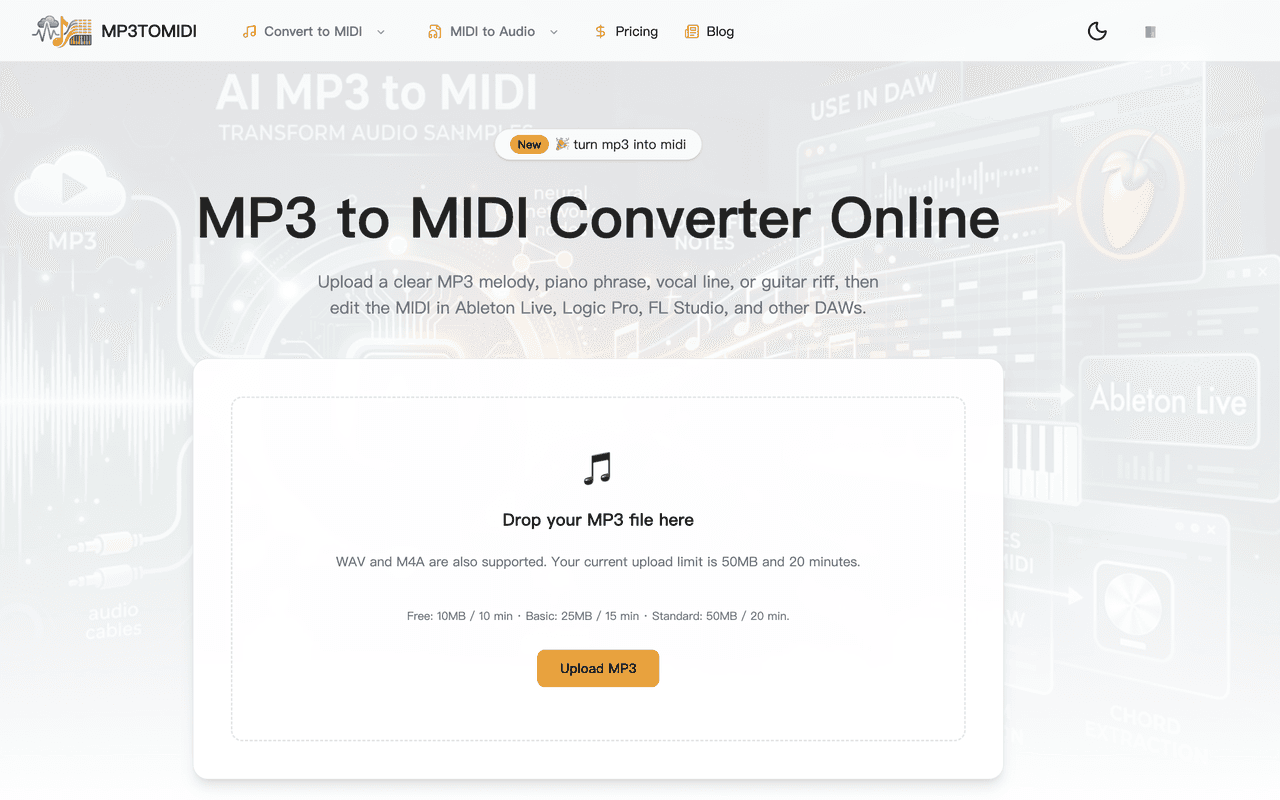
About this app
MP3 to MIDI Converter is a browser-based tool that turns clear MP3, WAV, and M4A recordings into editable .mid files you can drop straight into Ableton Live, Logic Pro, FL Studio, and other DAWs. It works best with focused material — an isolated vocal, a piano phrase, a guitar riff, a bass line, or a synth lead — rather than dense full mixes, which tend to produce messy, extra, or missing notes. The workflow is simple: upload a file, let the AI transcription engine detect pitch, timing, and note starts, preview the first 30 seconds (free and guest users get up to three previews a day), then download and refine the result in your DAW. Upload limits scale by plan (10MB free, 25MB Basic, 50MB Standard), and files are auto-cleaned after conversion. It's a practical starting point for producers, transcribers, and musicians rather than a one-click final arrangement.
Key features
- 1Browser-based MP3/WAV/M4A to MIDI conversion with no plugin or desktop install required.
- 2Three free 30-second previews per day for guests and free users before committing to a paid conversion.
- 3DAW-ready .mid export for Ableton Live, Logic Pro, FL Studio, GarageBand, Reaper and Cubase.
- 4Tiered plans ($9.99 Basic / $19.99 Standard, cheaper yearly) scaling file size, minutes and queue priority.
- 5Auto-cleanup of uploaded files after conversion, per the site's stated workflow.
Target customer profile
Drawn from the product itself, not from a survey.
Demographic
Music producers and beatmakers
Pain points
Recreating melodies by ear from reference tracks is slow and tedious
Primary needs
Fast editable MIDI to seed a project or cover version
Demographic
Music students and transcribers
Pain points
Manual note-by-note transcription of recordings eats hours
Primary needs
A draft MIDI to speed up ear training and notation work
Demographic
Content creators and hobbyist musicians
Pain points
No time or skill to manually build MIDI parts from samples
Primary needs
A quick, browser-based way to turn riffs into playable MIDI
Scout Review
Written by AI from measured evidence, scored out of 100.
Mp3toMidi is a competent, honestly-positioned browser converter that does one job and does it without ceremony: drop a focused MP3/WAV/M4A, get an editable .mid for Ableton, Logic or FL Studio. The upload flow is immediate, three free 30-second previews a day lower the barrier, and pricing at $9.99/$19.99 (cheaper yearly) is legible. Measured speed is decent on mobile (75/100, 1.2s LCP) but dragged by 699ms TBT and a weaker desktop score. Security is the real soft spot — 3/12 on headers, no HSTS/CSP/DMARC, no published audits — for a product handling users' unreleased audio. Design is average with a noisy hero and buried limits; accessibility is strong at 96/100 bar a contrast issue. Growth hinges on whether a paid browser middle can hold against free Basic Pitch and pro Melodyne.
Measure by measure
Usability
63Drop zone front and center, three free 30-second previews a day, and clear pricing tiers make the path to value short. Long repetitive explainer copy and buried file limits are the friction.
Design
57Clean utility-first converter with an obvious orange upload CTA and consistent type hierarchy, but a busy low-contrast hero collage, orphaned grid cells and tiny grey plan-limit text drag it to average.
Speed
68Lighthouse mobile 75/100 with a 1.2s LCP and near-zero CLS is solid, but a 699ms TBT and a lower desktop score (64) show real main-thread blocking under the hood.
Security
41HTTPS is enforced and SPF is set, but HSTS, CSP, frame protection, Referrer-Policy and DMARC are all missing — 3/12 on the header checklist, with no published audits or compliance claims.
Accessibility
79Lighthouse a11y 96/100 with a single failing audit — insufficient color contrast — which the visual audit confirms in the small grey supporting text. No WCAG statement or multi-language support found.
Growth
58A real, recurring producer workflow with an honest 'focused stems, not full mixes' wedge — but it sits between a free open-source option and a pro desktop standard, with no moat yet.
Improvement areas
- Security headers are largely absent (3/12) with no published audit or data-handling page.
- Hero collage and orphaned grid cells make the top of the page noisy and break layout rhythm.
- Plan-limit and supporting text fail contrast and are too small to read at a glance.
- No clear moat against free Basic Pitch or established Melodyne; positioning needs a sharper wedge.
Design & Usability
The homepage does the one thing a converter must: it puts a dashed drop zone and a single orange Upload button front and center, so a visitor can start without scrolling. Type hierarchy is consistent and the FAQ/accordion patterns are tidy. Where it slips is craft — a faded collage of DAW screenshots and 'AI MP3 to MIDI' lettering sits behind the nav and headline and makes the top of the page noisy, orphaned grid cells leave awkward gaps, and the plan limits (10MB free, 25MB Basic, 50MB Standard) are printed in tiny light-grey text right where users need them most. Usability is helped by three free 30-second previews a day and clear $9.99/$19.99 tiers, but the explainer copy repeats 'how it works' across several sections for what is fundamentally an upload-and-convert tool.
Speed & Security
Speed is a mixed bag with real receipts: Lighthouse mobile scores 75/100 with a 1.2s LCP, 1.2s FCP and a near-perfect 0.002 CLS, so the page paints fast and doesn't jump. But TBT is 699ms and the desktop score drops to 64 — worse than mobile — which points to main-thread work that will bite on slower machines. Security is the weak flank. HTTPS is enforced and SPF is configured, but the header probe found no HSTS, no CSP, no frame protection, no X-Content-Type-Options, no Referrer-Policy and no DMARC, scoring 3/12 on the checklist. For a service that asks users to upload unreleased audio, the absence of a published security page, audit or bug bounty is a real gap, not just an unverified nice-to-have.
Accessibility & Growth
Accessibility is the strongest measured dimension: Lighthouse scores 96/100 with a single failing audit — insufficient color contrast — and the visual audit independently flags the same small light-grey supporting text and plan-limit copy. Fixing contrast on that microcopy would likely close the gap. There's no WCAG statement or multi-language support, so it's good-but-not-documented. Growth is a judgement on the idea: converting a focused stem into editable MIDI is a real, recurring producer task, and the site is admirably honest that dense mixes produce messy results. The problem is the competitive box — Spotify's Basic Pitch is free and open-source, Melodyne is the paid desktop standard — leaving this browser tool as a convenience play with no clear moat. The domain is only about half a year old, so traction is context, not verdict.
Conclusion
If you're a producer who wants a fast MIDI sketch from an isolated vocal or riff and you'd rather not install anything, this is a reasonable starting point — the free previews let you judge quality before paying. Go in expecting cleanup in your DAW, which the site itself says. Before trusting it with sensitive unreleased material, note the thin security posture: no CSP, no HSTS, no DMARC, no published audit. The product's honesty about its limits is its best feature; its missing moat and missing security page are what to watch.
Suggestions for improvement
- Ship HSTS, CSP, frame protection, Referrer-Policy and DMARC — 3/12 on headers is a fixable, credibility-building gap.
- Publish a short security/data-handling page explaining the auto-cleanup of uploads and retention windows.
- Raise contrast on the small grey plan-limit and supporting text to clear the one failing Lighthouse audit.
- Simplify the hero: drop or heavily fade the DAW collage so the headline and upload card own the top of the page.
Alternatives comparison
Named competitors, point by point. Nobody paid to appear here or to be left out.
 Mp3toMidi |  Melodyne |  Basic Pitch (Spotify) | |
|---|---|---|---|
| Price to start | Free previews; paid from $9.99/mo ($4.99 yearly) | Paid desktop license, no free tier | Free and open-source |
| Platform | Browser-based, no install | Desktop application | Browser-based / open-source library |
| Transcription precision | Best on focused stems; dense mixes need cleanup | Professional-grade pitch/timing editing, far more precise | Solid open-source polyphonic transcription |
| Free preview / trial | Three 30-second previews per day | Trial available, then paid | Fully free |
| MIDI export to DAW | Yes — .mid for Ableton, Logic, FL Studio, etc. | Yes — audio-to-MIDI export | Yes — MIDI output |
Melodyne
Professional pitch and timing editing tool with audio-to-MIDI export, far more precise but paid and desktop-based.
Basic Pitch (Spotify)
Free open-source audio-to-MIDI converter by Spotify's Audio Intelligence Lab.
Comparing options? See Mp3toMidi alternatives, scored side by side
More Productivity apps
View all Productivity
Puzzly – B2B Lead Generation & Sales Intelligence Platform
92Puzzly is an all-in-one B2B lead generation platform that...

Qamarero
92An all-in-one hospitality software for restaurants and ba...

EmbedMyReviews
92White-label reputation management software for agencies s...

StoryPad
92Privacy-first open source journal app with a continuous t...

Notion
92All-in-one AI workspace for docs, projects, and knowledge...

The Stack Newsletter
92A weekly newsletter delivering curated tech jobs, intervi...

Vibe Coding Agent Skills
92A free, open-source platform offering 110 AI agent skills...

QRBliss
91Branded QR codes with AI Brand Sync, 15 free dynamic code...

Gerty
91Private, local AI assistant for Mac that runs offline

Strukchad Property Management
91Property management for Kenyan letting agents: rent invoices raised every month, M-Pesa rent prompts to tenants, arrears tracking and landlord statements.

CC Switch
91Open-source desktop app for switching AI coding providers...

PitchWhip
90AI cold call scripts & direct dials from LinkedIn


A platform dedicated to providing unbiased reviews of newly launched applications, analyzing everything from their features to their full potential.
info@scoutforge.net© 2026 Scoutforge. All rights reserved.
