Is this your app?
Claim MuteDeck to manage its page, add your badge and see your traffic — free, and it stays free.
Cycling through all six. Tap any point to stop.
Measured on six things
MuteDeck simplifies video conferencing with one-button controls for muting, video, and more across platforms like Zoom and Teams.
Accessibility
60Large, clear buttons help visually impaired users, but lacks screen reader support, voice control, or advanced accessibility features.
Screenshots
1 / 3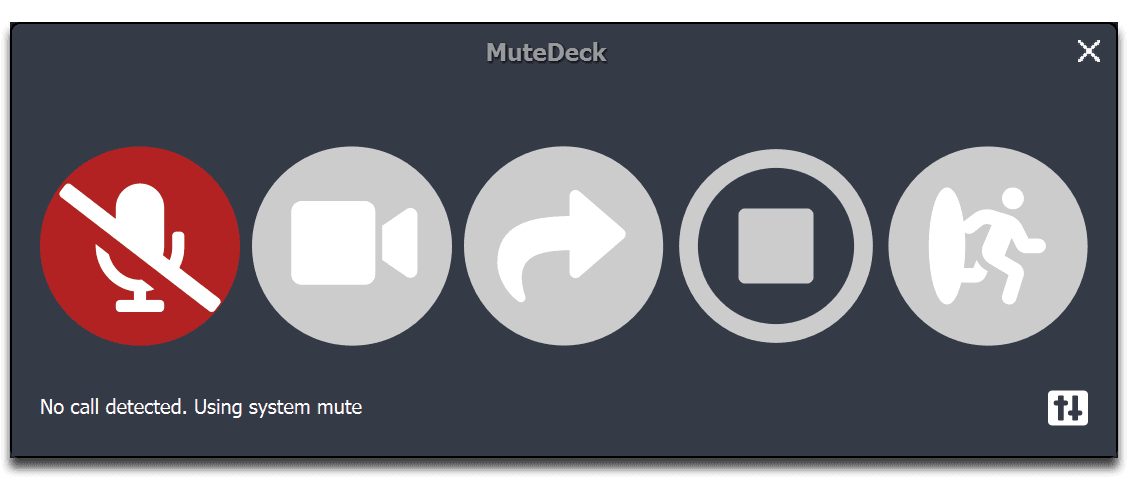
About this app
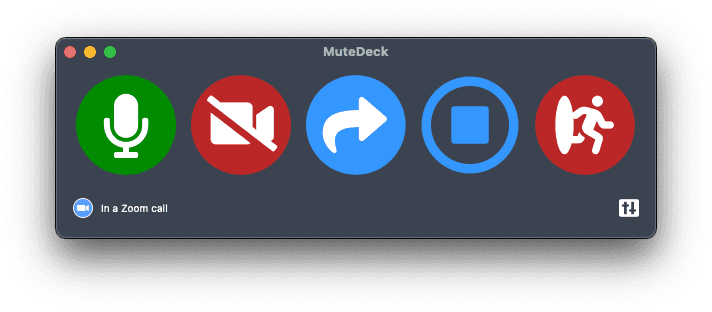
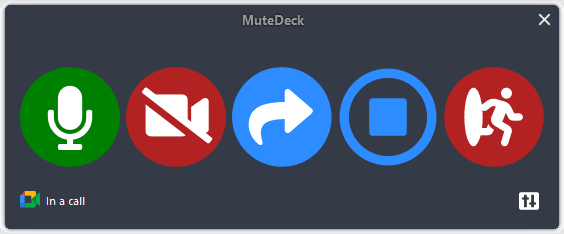
As someone who's navigated countless video calls, I can confidently say MuteDeck is a game-changer for remote workers. This clever software unifies meeting controls across Zoom, Microsoft Teams, Google Meet, and Cisco Webex, so you can mute, toggle video, share screens, or leave calls with a single click or hardware button. It automatically detects your active meetings, reducing those awkward 'you're on mute' moments and cutting down on interface-switching stress. With support for Stream Deck and Loupedeck integration, it's perfect for tech-savvy users craving tactile feedback. MuteDeck runs locally on Windows or macOS, ensuring quick, secure performance without hogging resources. While its design is minimalistic, its reliability and ease of use make it a must-try for boosting productivity in hybrid work environments. SEO keywords: video conferencing tools, remote work software, meeting controls, Stream Deck integration, productivity apps.
Key features
- 1Unified controls for Zoom, Teams, Google Meet, and Webex with single-click actions
- 2Hardware integration with Stream Deck and Loupedeck for tactile feedback
- 3Automatic meeting detection and background operation without resource hogging
Target customer profile
Drawn from the product itself, not from a survey.
Demographic
Remote workers and hybrid employees
Pain points
Frequent switching between video apps, forgetting mute status, inconsistent interfaces leading to errors
Primary needs
Streamlined meeting controls, reduced cognitive load, efficiency in handling multiple platforms
Demographic
Tech-savvy professionals and content creators
Pain points
Complex keyboard shortcuts, desire for physical controls like Stream Deck integration
Primary needs
Hardware compatibility, customizable shortcuts, API for automation
Demographic
Large organizations with standardized tools
Pain points
Onboarding challenges, support tickets for meeting issues, productivity loss
Primary needs
Enterprise reliability, scalability, integration with existing workflows
Scout Review
Written by AI from measured evidence, scored out of 100.
MuteDeck delivers exactly what it promises: consistent, reliable meeting controls across multiple platforms. It eliminates the cognitive load of remembering different interfaces and keyboard shortcuts, making video calls less stressful and more productive. The software's strength lies in its simplicity and performance—it does one job exceptionally well without unnecessary complexity.
Measure by measure
Usability
96One-button controls eliminate interface confusion. Automatic meeting detection and seamless hardware integration make it incredibly intuitive for daily use.
Design
70Minimalist interface with clear icons that adapt to different platforms. Functional rather than visually striking, but physical deck integration adds tactile value.
Speed
90Lightweight software with instant response times. No noticeable lag even when switching between multiple active meetings.
Security
80Local operation minimizes cloud risks. No external data transmission, though more transparency on security practices would be beneficial.
Accessibility
60Large, clear buttons help visually impaired users, but lacks screen reader support, voice control, or advanced accessibility features.
Growth
90Strong market position in remote work tools with expandable API support. High demand for unified meeting controls across growing platforms.
Improvement areas
- Advanced accessibility features like screen reader and voice control support
- Modern UI design with customization options for visual appeal
- Expanded platform compatibility beyond major conferencing tools
Design & Usability
MuteDeck's design philosophy prioritizes function over form, delivering a clean, minimal interface that gets straight to business. The software features straightforward icons for core functions—mute, video toggle, screen share, and leave meeting—that automatically adapt to whatever conferencing platform you're using. When paired with hardware like Stream Deck or Loupedeck, the experience transforms with satisfying tactile feedback that builds muscle memory. The background operation is seamless, detecting active meetings without intrusive notifications. While the standalone app won't win any design awards, its no-nonsense approach means you spend less time learning the interface and more time actually participating in meetings.
Speed & Security
Performance is where MuteDeck truly shines. The lightweight application consumes minimal system resources, ensuring your computer doesn't slow down during CPU-intensive video calls. Actions execute instantly—muting and unmuting happens in real-time without the frustrating lag that plagues some native app controls. Security benefits from the local-first approach: all processing happens on your device without cloud dependency, reducing potential attack vectors. While the company could be more transparent about specific security measures, the fact that no meeting data leaves your computer provides significant privacy reassurance. The software's reliability in background operation means you can trust it to work when you need it most.
Accessibility & Growth
Accessibility is MuteDeck's area for improvement. The large, recognizable buttons and simple layout benefit users with minor visual impairments, but there's no mention of screen reader compatibility, voice control, or high-contrast modes. The hardware integration provides physical alternatives that can help users with motor control challenges, but the software itself lacks advanced accessibility features. However, the growth potential is substantial—as remote work becomes permanent for many organizations, demand for unified meeting controls will only increase. The existing API support and compatibility with popular hardware platforms position MuteDeck well for expanding to new conferencing tools and enterprise environments.
Conclusion
If you're tired of fumbling between Zoom, Teams, and Google Meet interfaces, or if you want to enhance your Stream Deck setup with meeting controls, MuteDeck is absolutely worth trying. The free trial makes it easy to test whether it fits your workflow. For remote workers, frequent presenters, and organizations standardizing on multiple conferencing tools, this could be the productivity boost that finally eliminates those awkward 'you're on mute' moments.
Suggestions for improvement
- Implement screen reader compatibility and voice control features to improve accessibility for users with disabilities
- Modernize the standalone app UI with customizable themes and layout options for better visual appeal
- Expand platform support to include emerging conferencing tools and niche business applications
- Publish detailed security documentation to build user trust and enterprise adoption confidence
Alternatives comparison
Named competitors, point by point. Nobody paid to appear here or to be left out.
 MuteDeck MuteDeck |  MuteMe MuteMe |  Geekria RGB Meeting Mute Controller Geekria RGB Meeting Mute Controller |  On Air Warning MuteSwitch On Air Warning MuteSwitch | |
|---|---|---|---|---|
| Platform Support | Zoom, Teams, Google Meet, Webex | Limited platform integration | Zoom-focused with limited others | Basic platform support |
| Hardware Integration | Stream Deck, Loupedeck compatible | Dedicated physical button device | Standalone hardware controller | Physical button with basic software |
| Software Features | Mute, video, share, leave meeting | Primarily mute-focused with illumination | Basic mute/video mechanical controls | Mute with on-screen indicators |
MuteMe
A physical mute button with software integration, focused on tactile feedback and illumination, as seen on Shark Tank.
Geekria RGB Meeting Mute Controller
A hardware controller compatible with Zoom and other apps, offering mechanical buttons for mute/video control without software unification across platforms.
On Air Warning MuteSwitch
Combines software with a physical button for muting, emphasizing on-screen indicators and security, but lacks MuteDeck's broad platform support.
Comparing options? See MuteDeck alternatives, scored side by side
More Productivity apps
View all Productivity
Notion
92All-in-one AI workspace for docs, projects, and knowledge...

Qamarero
92An all-in-one hospitality software for restaurants and ba...

EmbedMyReviews
92White-label reputation management software for agencies s...

StoryPad
92Privacy-first open source journal app with a continuous t...

Puzzly – B2B Lead Generation & Sales Intelligence Platform
92Puzzly is an all-in-one B2B lead generation platform that...

The Stack Newsletter
92A weekly newsletter delivering curated tech jobs, intervi...

Vibe Coding Agent Skills
92A free, open-source platform offering 110 AI agent skills...

QRBliss
91Branded QR codes with AI Brand Sync, 15 free dynamic code...

Gerty
91Private, local AI assistant for Mac that runs offline

CC Switch
91Open-source desktop app for switching AI coding providers...

username.md
90One verified handle for your online identity, readable by...

PitchWhip
90AI cold call scripts & direct dials from LinkedIn


A platform dedicated to providing unbiased reviews of newly launched applications, analyzing everything from their features to their full potential.
info@scoutforge.net© 2026 Scoutforge. All rights reserved.
