Cycling through all six. Tap any point to stop.
Measured on six things
Free browser-based AI tool to change photo backgrounds in...
Security
52HTTPS enforced with HSTS, SPF and DMARC present, and on-device processing limits server exposure. But no CSP, frame protection, or Referrer-Policy — 6/12 on the header checklist, and no published audit or security page.
Screenshots
1 / 1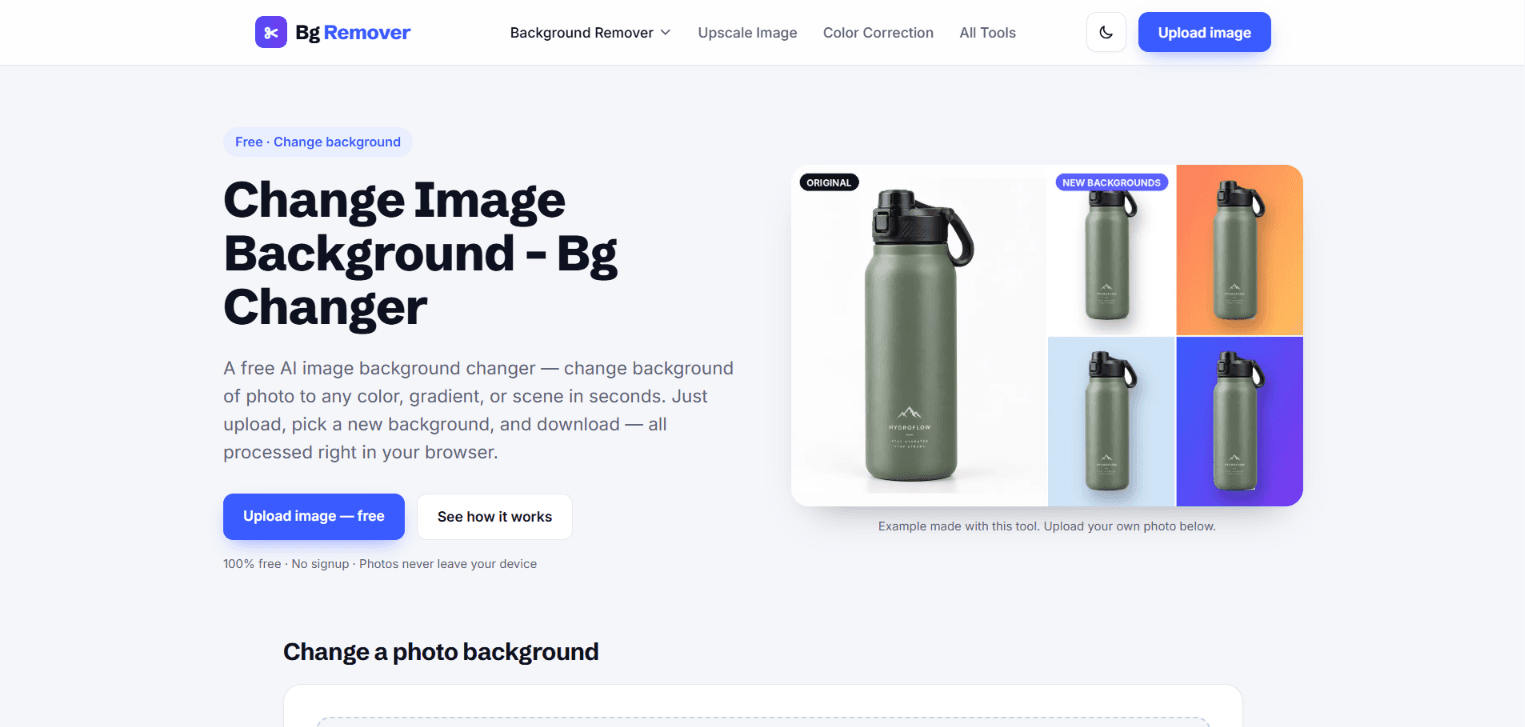
About this app
MyBgRemover's Background Changer is a free, browser-based AI tool that lets you swap any photo's background in seconds. Unlike most online editors, it runs entirely on-device—your photos never leave your phone or computer, and there's no signup, watermark, or usage limit. Upload a PNG, JPG, or WebP (up to 20MB), and the built-in AI automatically detects the subject and removes the original background. Then pick from ten presets (white, black, gray, sky blue, mint, pastel pink, and three gradients), any custom color via a color picker, a transparent background, or your own image as a new scene. The best part: the AI only runs once, so switching between backgrounds afterward is instant—no re-processing. Results keep your original resolution up to 2560px on the longest side. It's ideal for creating clean white product photos for marketplaces like Amazon, Etsy, and Shopify, prepping passport-size photos, or building eye-catching social media thumbnails with bold gradients. The interface...
Key features
- 1On-device AI background removal — photos never leave the browser, no upload to a server.
- 2Ten presets plus custom color picker, transparent, and your-own-image backgrounds; swaps are instant after one AI pass.
- 3Free with no signup, no watermark, and no usage limit; supports PNG, JPG, WebP up to 20MB, output up to 2560px.
Target customer profile
Drawn from the product itself, not from a survey.
Demographic
Online sellers and small e-commerce shop owners
Pain points
Messy product photos, need pure white backgrounds for Amazon, Etsy, Shopify listings
Primary needs
Fast, free bulk background changes to white with clean edges
Demographic
Social media content creators and influencers
Pain points
Boring or cluttered photo backgrounds, limited editing skills
Primary needs
Eye-catching gradients and brand colors for thumbnails and posts
Demographic
Job seekers and students needing document photos
Pain points
Expensive photo studios, strict passport/ID background color rules
Primary needs
Quick DIY background swap to white, gray, or blue for official photos
Scout Review
Written by AI from measured evidence, scored out of 100.
MyBgRemover's Background Changer is a competent, genuinely useful free tool with a clear value proposition: upload, AI removes the background, pick a new one, download — no signup, no watermark, no limit, and processing stays on your device. The landing page communicates that well up top, and desktop performance is excellent. The problems are execution details: mobile LCP of 6.9s, three accessibility audit failures, a half-finished security header set, and a lower page that buries the tool under repetitive copy. None of these are fatal; all are fixable.
Measure by measure
Usability
63Drop zone sits right under the hero, a three-step explainer sets the workflow, and no signup/watermark/limit means near-zero friction. Dense lower-page copy and a 12-question FAQ add reading effort.
Design
57Clean type pairing, consistent blue CTAs, and honest before/after demos give the page a competent look, but a reused dog photo and an awkward live headline ('Editing of Photo Background') keep it average.
Speed
68Desktop Lighthouse 96/100 is genuinely snappy, but mobile sits at 76 with a 6.9s LCP — the first paint drags on phones. CLS 0 and 53ms TBT show the layout and main thread are well-behaved.
Security
52HTTPS enforced with HSTS, SPF and DMARC present, and on-device processing limits server exposure. But no CSP, frame protection, or Referrer-Policy — 6/12 on the header checklist, and no published audit or security page.
Accessibility
68Lighthouse 89/100 with real failures: low-contrast text, non-sequential headings, and links distinguishable only by color. The visual audit flagged the same small grey captions. No WCAG statement published.
Growth
58Real, recurring needs (marketplace white backgrounds, passport photos, social thumbnails) with a genuine wedge: on-device, no signup, no watermark, no limit. But it's a crowded free-tool category with no moat.
Improvement areas
- Mobile performance: 6.9s LCP drags the phone experience despite a 96 desktop score.
- Accessibility: three failing Lighthouse audits (contrast, heading order, color-only links) and no WCAG statement.
- Security headers incomplete (6/12): missing CSP, frame protection, Referrer-Policy, Permissions-Policy.
Design & Usability
The landing page does the hard part right: the upload drop zone sits directly under the hero, a three-step explainer sets expectations, and the privacy line ('Photos never leave your device') lands right where trust matters. The type pairing is disciplined and the blue CTA is consistent across nav, hero, and closing card. Where it slips is curation — the same golden retriever appears in three sections, the live headline ('Editing of Photo Background - Free Background Changer') is awkwardly phrased, and the lower half stacks near-identical paragraphs plus a 12-question FAQ that pushes the actual tool and visuals far down. Usability is strong at the top and bloated at the bottom.
Speed & Security
Speed is a tale of two devices: desktop Lighthouse hits 96/100, but mobile lands at 76 with a 6.9s LCP — the first meaningful paint drags on phones, which is where most of this tool's users will be. CLS 0 and 53ms TBT show the layout and main thread are well-behaved, so the fix is likely asset weight, not architecture. Security is mid-pack: HTTPS enforced with HSTS, SPF and DMARC present, and on-device processing genuinely limits server-side exposure. But the header checklist is 6/12 — no CSP, no frame protection, no Referrer-Policy — and there's no published audit or security page to point to.
Accessibility & Growth
Accessibility scores 89/100 on Lighthouse but fails three real audits: insufficient color contrast, non-sequential heading order, and links distinguishable only by color — and the visual audit independently flagged the same small grey captions. No WCAG statement is published. Growth is a judgment on the idea: the needs it targets (marketplace white backgrounds, passport photos, social thumbnails) are real and recurring, and the wedge — on-device, no signup, no watermark, no limit — is genuinely differentiated against Canva's Pro-gated remover. But free background removal is a crowded category with no network effects or data moat, so the wedge is a feature, not a defensible position.
Conclusion
For an indie, browser-based tool, this is above the median — the on-device privacy angle is a real differentiator and the core workflow is frictionless. The path to a stronger score runs through three concrete fixes: cut mobile LCP (compress the hero imagery), fix the contrast and heading-order audits, and add the missing security headers plus a short security/privacy page. Do those and this moves from 'solid free tool' to 'the one I recommend.'
Suggestions for improvement
- Compress and lazy-load hero/demo imagery to bring mobile LCP under 2.5s — desktop is already at 96.
- Fix the three failing a11y audits: raise contrast on grey captions, order headings sequentially, underline in-text links.
- Add CSP, X-Frame-Options, X-Content-Type-Options, Referrer-Policy and Permissions-Policy to reach 11/12 headers.
- Replace the reused dog photo with varied real examples and trim the 12-question FAQ to the top 5.
Alternatives comparison
Named competitors, point by point. Nobody paid to appear here or to be left out.
 MyBgRemover Background Changer |  Canva Background Remover | |
|---|---|---|
| Price / free tier | Completely free, no signup, no watermark, no limit | Requires Canva Pro subscription for background remover |
| Processing location / privacy | On-device in browser; photos never leave the device | Cloud-processed within Canva's platform |
| Background options | 10 presets, custom color picker, transparent, or own image | Any Canva design element, color, or uploaded image as background |
| Signup required | No signup required | Canva account required |
| Design / editing suite | Single-purpose background changer only | Full design platform with templates, text, and layout tools |
Comparing options? See MyBgRemover Background Changer alternatives, scored side by side
More Productivity apps
View all Productivity
Puzzly – B2B Lead Generation & Sales Intelligence Platform
92Puzzly is an all-in-one B2B lead generation platform that...

Qamarero
92An all-in-one hospitality software for restaurants and ba...

EmbedMyReviews
92White-label reputation management software for agencies s...

StoryPad
92Privacy-first open source journal app with a continuous t...

Notion
92All-in-one AI workspace for docs, projects, and knowledge...

The Stack Newsletter
92A weekly newsletter delivering curated tech jobs, intervi...

Vibe Coding Agent Skills
92A free, open-source platform offering 110 AI agent skills...

QRBliss
91Branded QR codes with AI Brand Sync, 15 free dynamic code...

Gerty
91Private, local AI assistant for Mac that runs offline

Strukchad Property Management
91Property management for Kenyan letting agents: rent invoices raised every month, M-Pesa rent prompts to tenants, arrears tracking and landlord statements.

CC Switch
91Open-source desktop app for switching AI coding providers...

PitchWhip
90AI cold call scripts & direct dials from LinkedIn


A platform dedicated to providing unbiased reviews of newly launched applications, analyzing everything from their features to their full potential.
info@scoutforge.net© 2026 Scoutforge. All rights reserved.
