Cycling through all six. Tap any point to stop.
Measured on six things
Turn any workflow into a professional SOP in minutes with...
Security
52HTTPS and HSTS are solid, but missing CSP and other security headers. No compliance certifications found, typical for early-stage tool.
Screenshots
1 / 4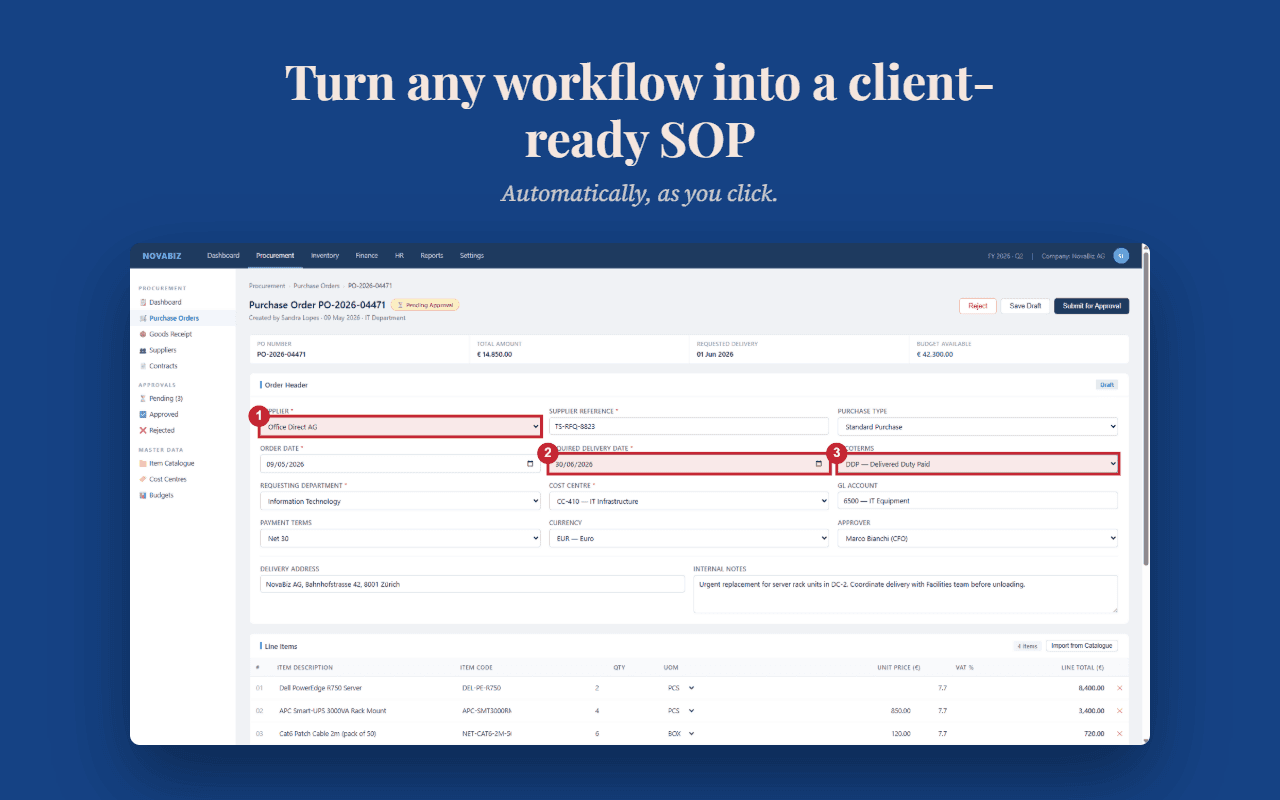
About this app
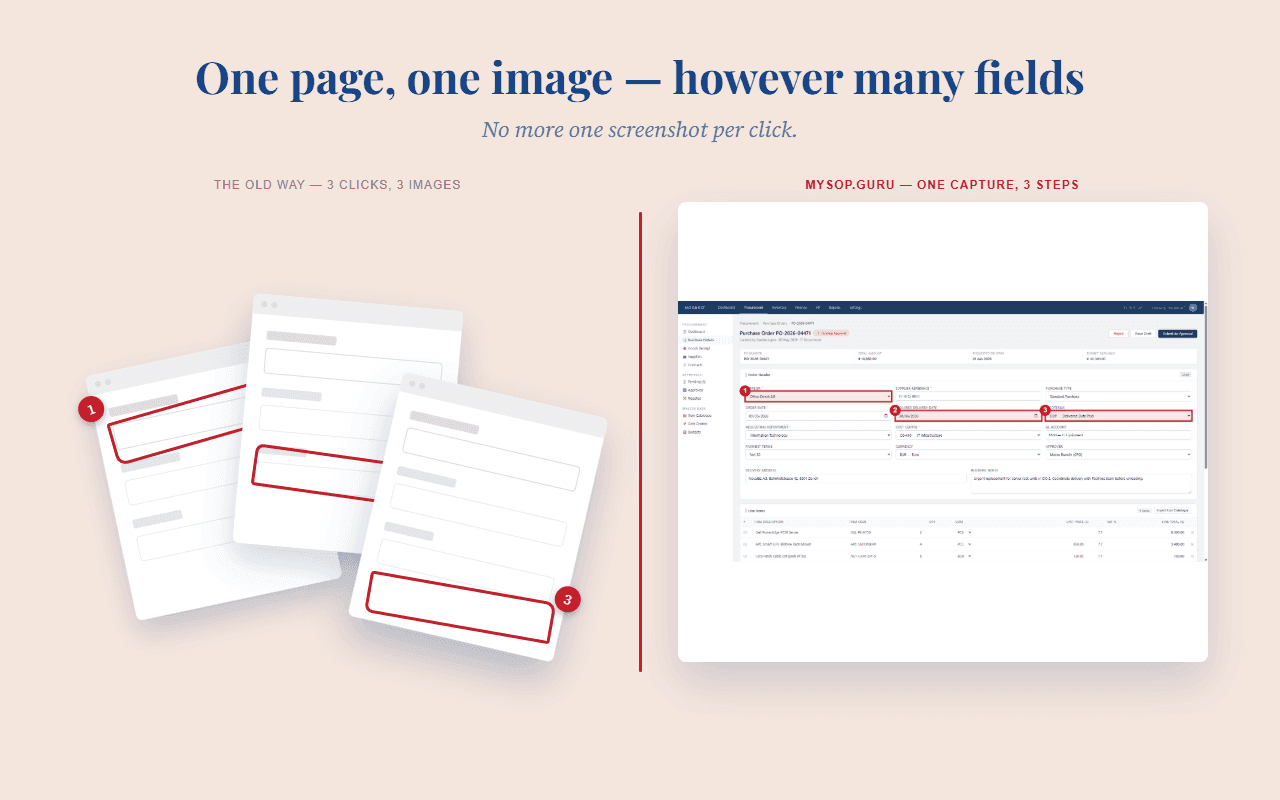
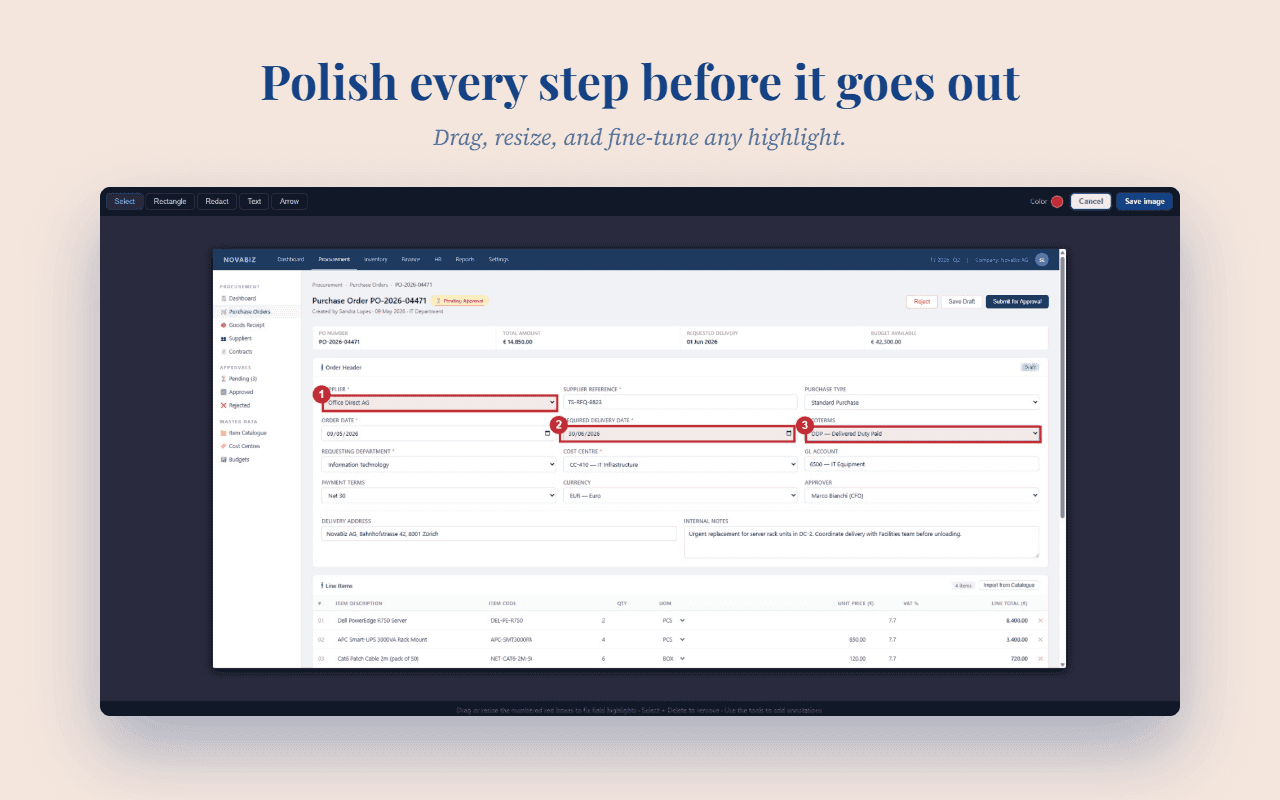
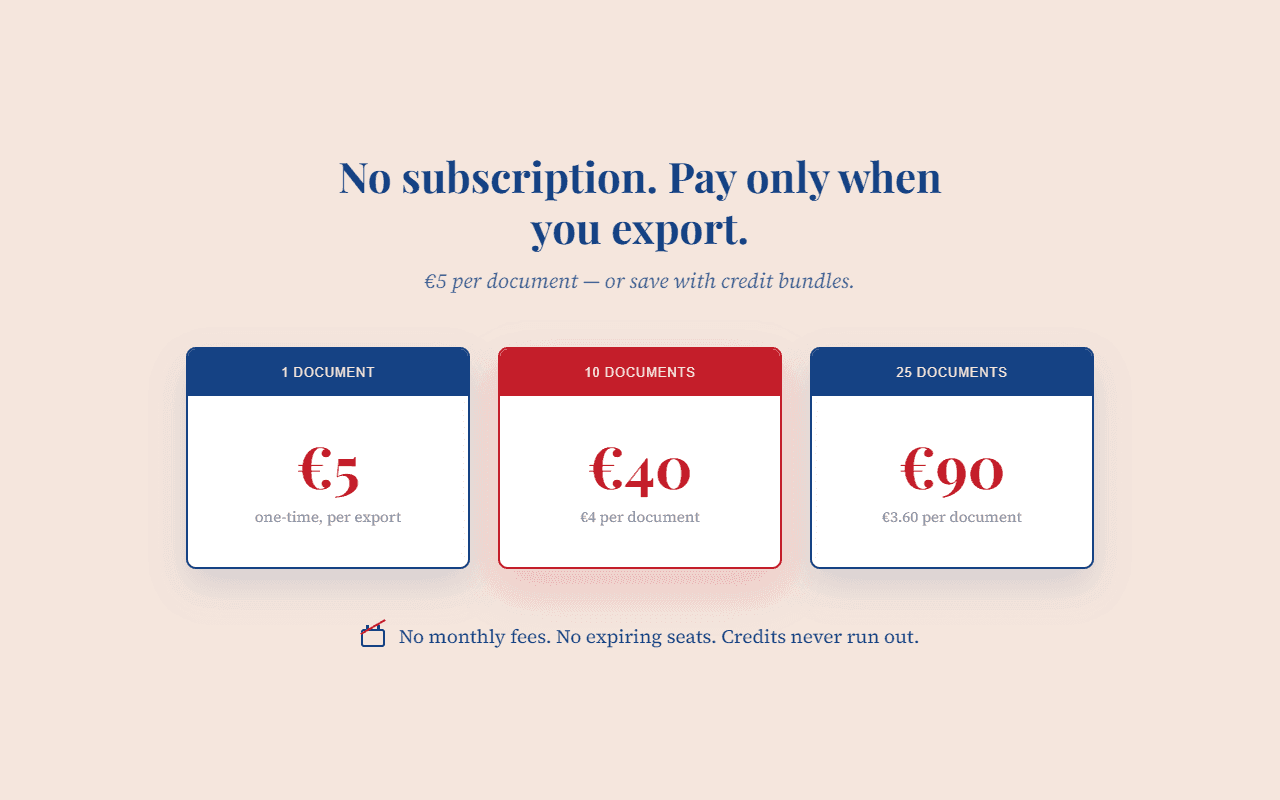
MySOP.guru is a Chrome extension that captures your clicks and automatically generates a professional Standard Operating Procedure (SOP) document. You simply install the extension, click through a process once, and it records every step with screenshots and numbered callouts. You can then edit the steps, add branding, and export a polished PDF. The first export is free, and after that it's a flat €5 per document with no subscription. It's designed for teams that document occasionally, not daily, making it a cost-effective alternative to subscription-based documentation tools.
Key features
- 1Automatic screenshot capture with numbered callouts
- 2Pay-per-export pricing (€5/PDF, €3/HTML) with no subscription
- 3Full editor control: reorder, edit, split, merge steps
Target customer profile
Drawn from the product itself, not from a survey.
Demographic
HR professionals
Pain points
Creating onboarding procedures manually is time-consuming and repetitive.
Primary needs
A quick way to document onboarding steps with visual clarity.
Demographic
Operations managers
Pain points
Handover processes are often undocumented, leading to knowledge loss.
Primary needs
Capture workflows efficiently before employees leave or changes occur.
Demographic
IT administrators
Pain points
Configuring new systems requires documenting changes for support and compliance.
Primary needs
Generate clear SOPs for new tools and system updates.
Demographic
Consultants and agencies
Pain points
Delivering client documentation often involves tedious manual work.
Primary needs
Produce branded, professional SOPs as part of client deliverables.
Scout Review
Written by AI from measured evidence, scored out of 100.
MySOP.guru is a focused Chrome extension that turns any workflow into a professional SOP in minutes. Its pay-per-export model (€5 per PDF, first free) is a refreshing alternative to subscription-based tools, appealing to teams that document occasionally. The landing page is clean and communicates the value proposition well, though it suffers from excessive whitespace and marketing graphics that overstate the product's polish. Performance is solid on desktop but sluggish on mobile. Security is basic but adequate for an early-stage tool, with HTTPS and HSTS in place but missing key headers. Accessibility is strong, with only contrast issues. Growth potential is real, but the product faces stiff competition from Scribe and Tango. Overall, it's a competent tool with a clear niche, but it needs to prove it can stand out in a crowded market.
Measure by measure
Usability
64Clear 4-step workflow, intuitive capture-to-export flow, and transparent pricing. CTA below fold and small nav links are minor friction.
Design
58Clean, modern landing page with strong value prop and consistent red accents, but sparse hero and marketing graphics overstate polish.
Speed
68Desktop performance is excellent (96/100); mobile LCP 3.9s is acceptable but could improve. No lag complaints found.
Security
52HTTPS and HSTS are solid, but missing CSP and other security headers. No compliance certifications found, typical for early-stage tool.
Accessibility
70Lighthouse 93/100 with only contrast issues. No explicit a11y statement, but site is responsive and keyboard-navigable.
Growth
62Pay-per-export model addresses a real pain for occasional documenters, but faces stiff competition from established tools.
Improvement areas
- Add security headers (CSP, frame protection) to harden the site
- Improve mobile performance to reduce LCP time
- Provide a live demo or interactive tutorial to showcase the capture flow
Design & Usability
MySOP.guru presents a clean, focused landing page that immediately communicates its value: turn any workflow into a professional SOP in minutes. The hero pairs a bold headline with a mockup of a numbered-step PDF, making the core benefit instantly scannable. The red accent color is used consistently for CTAs, adding visual cohesion. However, the design suffers from excessive whitespace, particularly at the top of the homepage and within the hero section, creating a sparse first impression. The maker media images are polished marketing graphics rather than actual product screens, which overstates the extension's polish. Usability-wise, the 4-step flow (install, capture, review, export) is clearly explained, and the pricing is transparent: first export free, then €5 per PDF. The primary CTA sits below the fold, and navigation links are small and low-contrast, adding minor friction. Overall, the product is easy to understand and use, but the design could be tighter and more representative of the actual experience.
Speed & Security
Performance is a mixed bag: desktop scores an excellent 96/100 on Lighthouse, while mobile lags at 76/100 with a 3.9s LCP. The desktop experience is snappy, but mobile users may notice a delay. Security is adequate for an early-stage tool: HTTPS and HSTS are enforced, and SPF/DMARC are present. However, the site lacks essential security headers like CSP, frame protection, and X-Content-Type-Options, leaving it vulnerable to certain attacks. No SOC 2 or ISO certifications are mentioned, which is typical for a product of this size but could be a concern for enterprise clients. The privacy policy is not deep, and there's no bug bounty program. For a tool that captures screenshots of workflows, users might expect stronger security assurances, but the basics are in place.
Accessibility & Growth
Accessibility is a strong point, with a Lighthouse score of 93/100, the only failing audit being insufficient color contrast. The site is responsive and keyboard-navigable, but there's no explicit WCAG statement or multi-language support. Growth potential is promising: the pay-per-export model directly addresses the pain of occasional documenters who don't want to pay monthly subscriptions. The target segments (HR, ops, IT, consultants) are well-defined with specific use cases. However, the category is crowded with established players like Scribe and Tango, which offer similar features. MySOP.guru's differentiator is pricing, but it may not be enough to sway users who are already invested in a subscription tool. The idea has room to grow, especially among small teams that document infrequently, but it faces an uphill battle against incumbents.
Conclusion
If you're tired of paying $15-29 per seat per month for documentation tools you barely use, MySOP.guru's pay-per-export model is worth a look. The first export is free, so you can test it without commitment. Just be prepared for a sparse landing page and a mobile experience that could be faster. It's not a game-changer, but for occasional documenters, it might be exactly what you need.
Suggestions for improvement
- Add a live demo or interactive tutorial to show the capture flow without installing the extension.
- Improve mobile performance by optimizing images and reducing LCP time.
- Add security headers like CSP and X-Content-Type-Options to strengthen the security posture.
- Publish an accessibility statement and fix contrast issues to reach full WCAG compliance.
Alternatives comparison
Named competitors, point by point. Nobody paid to appear here or to be left out.
 MySOP.guru MySOP.guru |  Scribe Scribe |  Tango Tango |  StepShot StepShot | |
|---|---|---|---|---|
| Pricing model | Pay-per-export: €5/PDF, €3/HTML, first free | Subscription-based (free tier with limits, paid plans) | Freemium with subscription for advanced features | One-time license or subscription (varies) |
| Capture method | Chrome extension records clicks and screenshots | Browser extension and desktop app capture steps | Browser extension captures clicks and annotations | Desktop app captures screenshots and edits |
| Export formats | PDF and HTML with branding | PDF, HTML, and shareable links | PDF, HTML, and shareable links | PDF, HTML, and image formats |
| Target audience | Occasional documenters: HR, ops, IT, consultants | Teams needing frequent documentation and collaboration | Teams and individuals creating how-to guides | Technical writers and trainers |
Scribe
Scribe is a similar tool that automatically generates step-by-step guides from your workflows.
Tango
Tango captures processes and creates how-to guides with screenshots and annotations.
StepShot
StepShot helps create software documentation and training materials from screenshots.
Comparing options? See MySOP.guru alternatives, scored side by side
More Productivity apps
View all Productivity
StoryPad
92Privacy-first open source journal app with a continuous t...

Puzzly – B2B Lead Generation & Sales Intelligence Platform
92Puzzly is an all-in-one B2B lead generation platform that...

Qamarero
92An all-in-one hospitality software for restaurants and ba...

Notion
92All-in-one AI workspace for docs, projects, and knowledge...

EmbedMyReviews
92White-label reputation management software for agencies s...

The Stack Newsletter
92A weekly newsletter delivering curated tech jobs, intervi...

Vibe Coding Agent Skills
92A free, open-source platform offering 110 AI agent skills...

CC Switch
91Open-source desktop app for switching AI coding providers...

username.md
90One verified handle for your online identity, readable by...

What the GIF
89Frame-perfect video-to-GIF maker that runs entirely in yo...

AuditCloser
89White-label website audits that close deals for digital a...

NudgeWin
89Automated quote follow-up for trades and service businesses.


A platform dedicated to providing unbiased reviews of newly launched applications, analyzing everything from their features to their full potential.
info@scoutforge.net© 2026 Scoutforge. All rights reserved.
