Cycling through all six. Tap any point to stop.
Measured on six things
A compact WebKit browser that drops out of your MacBook's...
Security
54HTTPS and HSTS enforced, SPF and DMARC present, and the app claims zero analytics and no account. But the probe found no CSP, frame protection, X-Content-Type-Options, Referrer-Policy or Permissions-Policy (6/12 checklist), and no published audit or security page.
Screenshots
1 / 1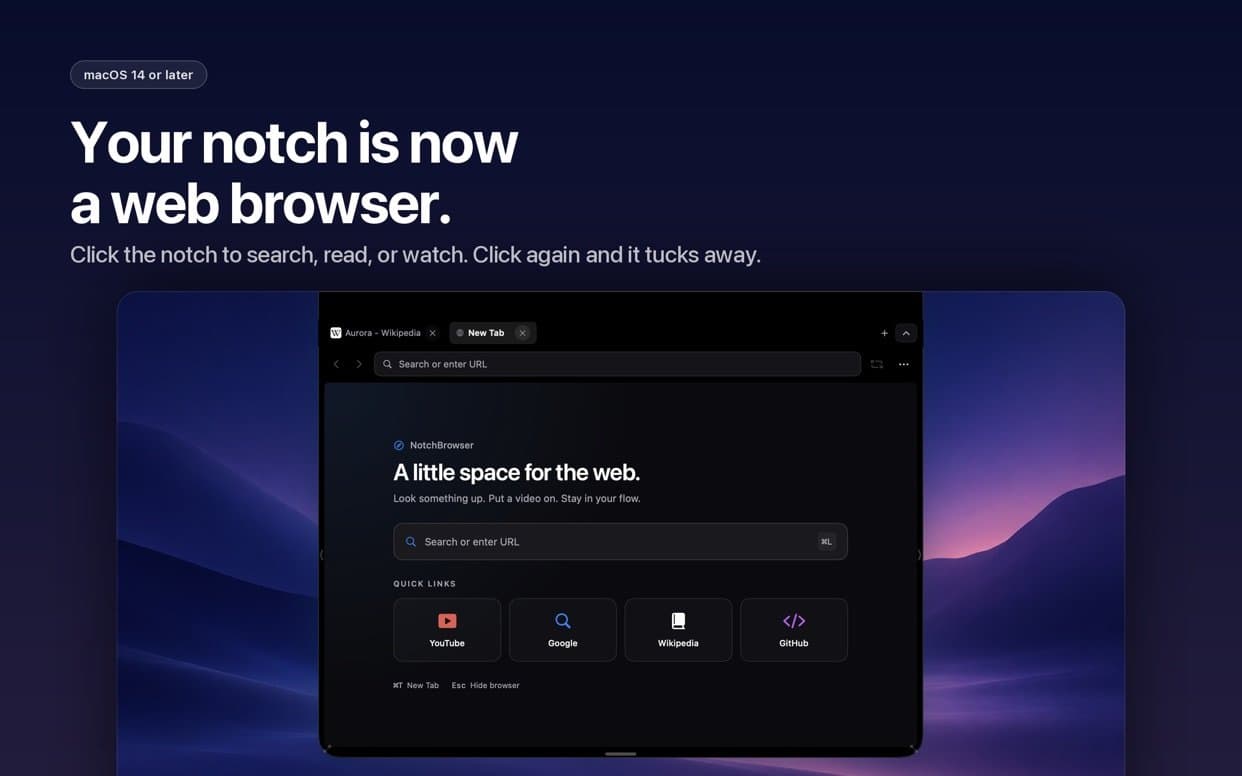
About this app
NotchBrowser is a $3.99 paid-once Mac app that puts a full WebKit browser behind your MacBook's notch. Click the notch and a compact browser panel drops down over whatever you're doing, with tabs that restore after a restart, a Cinema Mode for video pages, and a solid set of keyboard shortcuts. It's built for quick lookups, doc checks, and leaving a video playing without cluttering your desktop. No account, no subscription, no analytics. Requires macOS 14 Sonoma or later. If your Mac doesn't have a notch, it opens from the top center of the screen, and there's a 'Use on Any Display' setting for external monitors.
Key features
- 1Notch-anchored WebKit browser panel that drops down over any app with one click.
- 2Tab restoration after relaunch (selected tab plus up to eight others) with lazy background loading.
- 3Cinema Mode that hides everything but the HTML video player, plus 20+ keyboard shortcuts.
- 4Paid once at $3.99, no account, no subscription, no analytics; works on non-notch Macs and external displays.
Target customer profile
Drawn from the product itself, not from a survey.
Demographic
MacBook Air/Pro users with a notch
Pain points
Switching to a full browser window for quick lookups feels disruptive
Primary needs
A fast, unobtrusive way to check something without leaving the current app
Demographic
Multitaskers who watch videos while working
Pain points
Video players get buried behind other windows
Primary needs
A floating, compact video panel that stays visible
Demographic
Minimalist Mac users
Pain points
Full browsers feel heavy and cluttered for simple tasks
Primary needs
A lightweight browser with tabs, shortcuts, and no subscription
Scout Review
Written by AI from measured evidence, scored out of 100.
NotchBrowser is a focused, well-executed niche Mac app: a real WebKit browser that drops out of the notch, restores your tabs, and gets out of the way. The site is fast (Lighthouse 100/100 both platforms), the app UI is coherent, and the documentation is unusually honest about what it can't do. The weak points are security headers (6/12), no trial or demo before a $3.99 purchase, and a hardware-gated market that caps how big this can get. It knows exactly what it is — a small browser for a small problem — and does that job cleanly.
Measure by measure
Usability
68Tightly scoped: click notch, panel drops, tabs restore, Esc closes. Twenty-plus shortcuts documented in a scannable table and an FAQ that honestly admits DRM and multi-monitor limits. No trial or demo, so $3.99 is a blind buy.
Design
71Judging the app UI and store material: a coherent dark WebKit-style panel that matches macOS conventions, with clean shortcut tables and gradient store shots. Homepage repeats near-identical floating screenshots and CTAs are small and low-contrast.
Speed
88Lighthouse 100/100 on both mobile and desktop: LCP 1.9s, CLS 0, TBT 50ms, FCP 902ms. Static Vercel hosting with no heavy SPA payload. The marketing site is genuinely fast; app runtime speed is unmeasured but WebKit-based.
Security
54HTTPS and HSTS enforced, SPF and DMARC present, and the app claims zero analytics and no account. But the probe found no CSP, frame protection, X-Content-Type-Options, Referrer-Policy or Permissions-Policy (6/12 checklist), and no published audit or security page.
Accessibility
79Lighthouse accessibility 100/100, 30-language localization, and a keyboard-first design with 20+ documented shortcuts. Automated checks only cover part of WCAG and there's no published a11y statement, so this sits high in the band rather than at the ceiling.
Growth
58A real, specific problem (quick lookups without leaving your app) with a hardware-gated audience and a clear wedge: notch-anchored WebKit panel plus Cinema Mode. Paid-once pricing caps revenue and the notch requirement caps reach.
Improvement areas
- No free trial or demo before a $3.99 purchase; zero store ratings to build trust.
- Missing security headers (CSP, frame protection, X-Content-Type-Options, Referrer-Policy, Permissions-Policy).
- No published accessibility statement despite strong automated a11y scores.
- Repetitive store screenshots and low-contrast CTA buttons on the homepage.
Design & Usability
NotchBrowser's design is judged on the app itself, not the landing page: a compact dark WebKit panel that looks native to macOS, with clean shortcut tables and gradient store shots. It's coherent but repetitive — two of five store screenshots are near-duplicates and the homepage stacks similar floating mockups. Usability is the stronger half: click the notch, the panel drops, tabs restore after relaunch, Esc tucks it away. Twenty-plus shortcuts are documented in a scannable table, and the FAQ honestly admits Cinema Mode doesn't bypass DRM and multi-monitor setups are untested. The gap is trust: no trial, no demo, $3.99 upfront, and zero store ratings to lean on.
Speed & Security
Speed is the standout measured result: Lighthouse 100/100 on both mobile and desktop, LCP 1.9s, CLS 0, TBT 50ms, FCP 902ms, served as a static Vercel site. That's about as clean as a marketing page gets. Security is the weak flank. HTTPS and HSTS are enforced, SPF and DMARC are present, and the app's no-analytics, no-account stance is a genuine privacy selling point. But the header probe scored 6/12: no CSP, no frame protection, no X-Content-Type-Options, Referrer-Policy or Permissions-Policy. There's also no published audit, security page or bug bounty — normal for a small indie app, but it means buyers are trusting the copy, not a certificate.
Accessibility & Growth
Accessibility scores well: Lighthouse 100/100 on automated checks, 30-language localization, and a keyboard-first design with 20+ documented shortcuts — more than most indie Mac utilities bother with. The caveat is that automated audits cover only part of WCAG, and there's no published accessibility statement. Growth is a judgement on the idea: the problem is real (quick lookups without leaving your current app), the customer is specific (notch-owning MacBook Air/Pro users), and the wedge is concrete — a WebKit browser anchored to the notch with Cinema Mode, which Safari, Arc and NotchNook don't offer. The limits are structural: hardware-gated audience, $3.99 paid-once revenue, and a feature that macOS could theoretically absorb. Store listing shows v1.5 with no ratings yet — early days.
Conclusion
If you own a notched MacBook and Cmd+Tab into Safari ten times a day just to check a doc, this is a sensible $3.99. If you're on an external monitor most of the time, or you want a trial before paying, wait. The product is honest about its limits; the question is whether those limits match your workflow.
Suggestions for improvement
- Add a free trial or a limited demo mode so buyers can test the notch interaction before paying $3.99.
- Ship the missing security headers (CSP, X-Content-Type-Options, Referrer-Policy, Permissions-Policy) on the site.
- Publish a short accessibility statement and test Cinema Mode against common streaming services to set expectations.
- Diversify store screenshots — replace the near-duplicate with a distinct view like settings or error handling.
Alternatives comparison
Named competitors, point by point. Nobody paid to appear here or to be left out.
 NotchBrowser NotchBrowser |  Safari Safari |  NotchNook NotchNook | Arc | |
|---|---|---|---|---|
| Price model | $3.99 one-time | Free | Paid license (subscription/one-time tiers) | Free |
| Notch integration | Core feature — browser drops from notch | None | Dynamic hub for widgets and files | None |
| Full web browser | Yes — WebKit engine, tabs, search | Yes — full-featured | No — utility hub, not a browser | Yes — sidebar-focused browser |
| Cinema / video mode | Cinema Mode hides all but HTML video | Picture-in-Picture | Not applicable | Picture-in-Picture |
| Account / subscription required | No account, no subscription | No | License required | Optional account for sync |
Safari
Apple's default browser with full features, but it's a full-window app rather than a notch-based panel.
NotchNook
A Mac utility that turns the notch into a dynamic hub for widgets and files, but it's not a browser.
Arc
A modern Mac browser focused on tab management and a sidebar, but it doesn't integrate with the notch.
Comparing options? See NotchBrowser alternatives, scored side by side
More Productivity apps
View all Productivity
Qamarero
92An all-in-one hospitality software for restaurants and ba...

The Stack Newsletter
92A weekly newsletter delivering curated tech jobs, intervi...

EmbedMyReviews
92White-label reputation management software for agencies s...

StoryPad
92Privacy-first open source journal app with a continuous t...

Puzzly – B2B Lead Generation & Sales Intelligence Platform
92Puzzly is an all-in-one B2B lead generation platform that...

Notion
92All-in-one AI workspace for docs, projects, and knowledge...

Vibe Coding Agent Skills
92A free, open-source platform offering 110 AI agent skills...

CC Switch
91Open-source desktop app for switching AI coding providers...

username.md
90One verified handle for your online identity, readable by...

What the GIF
89Frame-perfect video-to-GIF maker that runs entirely in yo...

AuditCloser
89White-label website audits that close deals for digital a...

NudgeWin
89Automated quote follow-up for trades and service businesses.


A platform dedicated to providing unbiased reviews of newly launched applications, analyzing everything from their features to their full potential.
info@scoutforge.net© 2026 Scoutforge. All rights reserved.
