Cycling through all six. Tap any point to stop.
Measured on six things
No-code API sync for Notion. Import data from any API into Notion.
Accessibility
42Responsive design helps, but zero mentions of WCAG, alt text, or a11y features; inherits Notion's accessibility indirectly.
Screenshots
1 / 1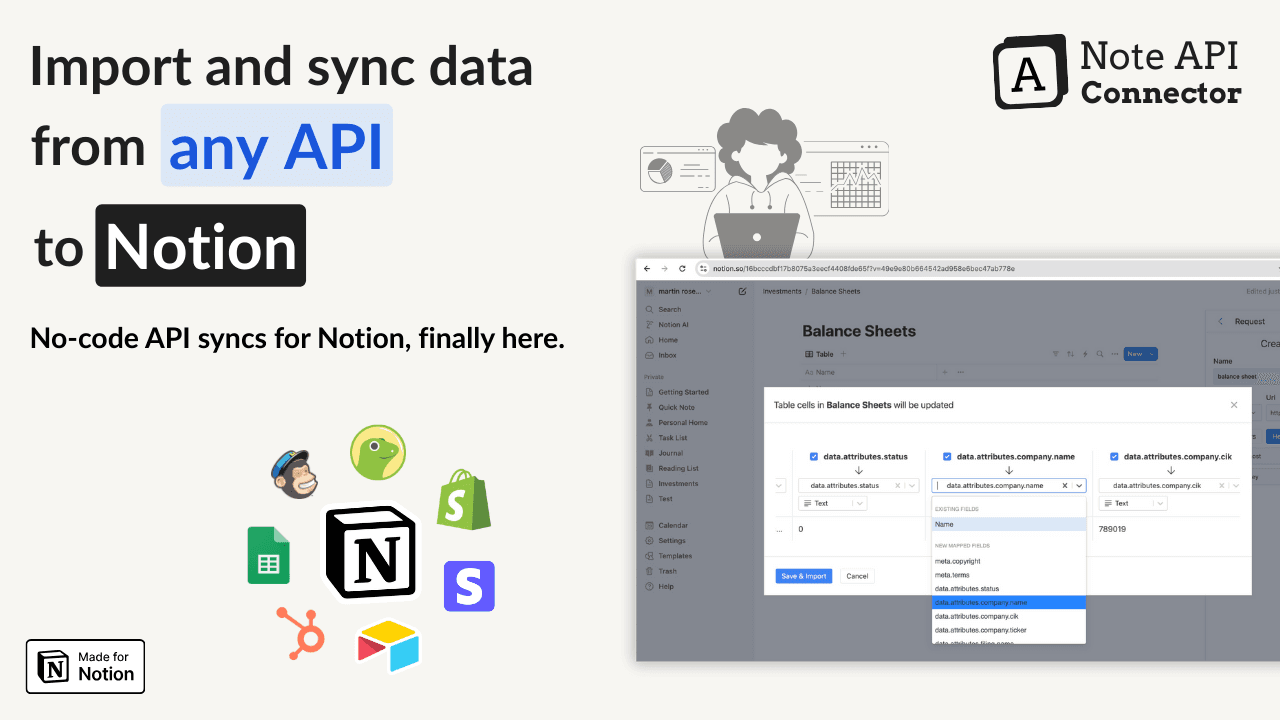
About this app
Note API Connector is a game-changer for Notion users who need live data from external apps without writing a single line of code. It lets you pull in data from thousands of APIs—think YouTube analytics, Stripe payments, Shopify orders, Google Sheets, HubSpot CRM, and more—directly into your Notion databases. The setup is incredibly simple: paste an API endpoint, select the fields you want, and schedule automatic syncs (every 5 minutes, hourly, daily, or custom). You can also link databases automatically, handle large datasets with pagination, and control updates with append or sync modes. Best of all, it's an official Notion integration, trusted by Meta and Google, and starts free with no credit card required. If you're tired of manual copy-paste or expensive automation tools, this is your solution.
Key features
- 1No-code API import with visual field mapping and JMESPath/JSONata transforms
- 2Scheduled syncs (5 min+), pagination for large datasets, append/sync write modes
- 3Auto database relations, OAuth/auth reuse, and official Notion integration
Target customer profile
Drawn from the product itself, not from a survey.
Demographic
Small business owners and solopreneurs
Pain points
Needs to centralize data from multiple apps without hiring a developer
Primary needs
Automated data sync, no-code setup, affordable solution
Demographic
Notion power users and productivity enthusiasts
Pain points
Manual data entry is time-consuming and error-prone
Primary needs
Live dashboards, real-time updates, seamless integrations
Demographic
Marketing and analytics professionals
Pain points
Spending hours exporting CSVs and merging data from ad platforms, Google Analytics, and social media
Primary needs
Automated reporting, custom field mapping, scheduled syncs
Scout Review
Written by AI from measured evidence, scored out of 100.
A focused, affordable no-code bridge for pulling live API data into Notion that beats manual CSV hell and undercuts expensive alternatives on price. Strong on simplicity and specific Notion-native features like auto-relations, but thin on advanced compliance, broad reviews, and polish in secondary areas.
Measure by measure
Usability
79Simple no-code setup, free trial without CC, detailed help docs, and direct Notion integration make onboarding fast.
Design
85Polished, modern landing page with demo video, clear visuals, and strong branding as official Notion integration.
Speed
72Site feels snappy with light assets; supports frequent syncs (5 min) and pagination for large data, no lag complaints found.
Security
65OAuth/auth options, privacy policy, and official Notion status provide baseline trust; no SOC2/audits or breach history noted.
Accessibility
42Responsive design helps, but zero mentions of WCAG, alt text, or a11y features; inherits Notion's accessibility indirectly.
Growth
555k claimed users, PH presence, Chrome extension traction, and Notion listings; sparse reviews and no major funding signals.
Improvement areas
- Limited public reviews and case studies reduce social proof
- No published security/compliance certifications beyond basic privacy policy
- Sparse preset integrations compared to broader automation platforms
Design & Usability
Note API Connector delivers a clean, professional landing experience with intuitive no-code flows that get users from API paste to scheduled sync in minutes. The visual field selector and relation auto-linking stand out versus manual Notion work or clunky Zapier setups. Docs are thorough for a small team product, and the free tier removes friction effectively. It shines for solopreneurs who want Notion dashboards without hiring devs or paying Zapier premiums.
Speed & Security
Performance is adequate for its niche—frequent sync options and pagination handle real-world datasets without reported issues. Security is functional with standard auth methods and a clear privacy stance, plus the official Notion partnership adds credibility. However, the lack of compliance certifications or detailed infrastructure transparency keeps it in the 'good enough for most' category rather than enterprise-ready.
Accessibility & Growth
Accessibility is an afterthought with no dedicated statements, though the responsive site works reasonably across devices. Growth shows promise with thousands of claimed users and organic mentions across Product Hunt, Reddit, and Notion communities, yet review volume remains low and the product lacks the viral momentum of bigger automation platforms. It's steadily building but hasn't broken out yet.
Conclusion
If you're a Notion power user tired of copy-paste or Zapier bills, this is worth testing immediately—the free tier makes it low-risk. Just verify it handles your exact API quirks before committing.
Suggestions for improvement
- Publish SOC 2 or basic security audit details to build B2B trust.
- Add more preset integrations and a public changelog for transparency.
- Improve review collection and case studies to boost social proof.
- Implement explicit accessibility improvements and statements.
Alternatives comparison
Named competitors, point by point. Nobody paid to appear here or to be left out.
 Note API Connector Note API Connector |  Zapier Zapier |  Make (formerly Integromat) Make (formerly Integromat) |  n8n n8n | |
|---|---|---|---|---|
| No-code API to Notion sync with scheduling | Native support, 5-min intervals, visual mapping | Supported via Notion actions but task-based pricing | Powerful scenarios but steeper learning curve | Flexible but requires self-hosting or technical setup |
| Pricing for frequent API calls | Starter $19/mo (2,500 runs), Pro $35/mo | Often more expensive for high-volume tasks | Usage-based, can get costly for complex workflows | Free self-hosted or cloud plans with limits |
| Auto database relations & pagination | Built-in auto-relations and pagination handling | Requires workarounds or multiple steps | Supported via iterators but more complex | Highly customizable with code nodes |
Zapier
Popular automation tool with Notion integration, but can be expensive for frequent API calls.
Make (formerly Integromat)
Powerful no-code automation platform for complex workflows, but steeper learning curve.
n8n
Open-source workflow automation with high flexibility, but requires self-hosting or technical setup.
Comparing options? See Note API Connector alternatives, scored side by side
Sources
What the review was written against. A verdict with no sources is an opinion.
More Productivity apps
View all Productivity
Notion
92All-in-one AI workspace for docs, projects, and knowledge...

Qamarero
92An all-in-one hospitality software for restaurants and ba...

EmbedMyReviews
92White-label reputation management software for agencies s...

StoryPad
92Privacy-first open source journal app with a continuous t...

Puzzly – B2B Lead Generation & Sales Intelligence Platform
92Puzzly is an all-in-one B2B lead generation platform that...

The Stack Newsletter
92A weekly newsletter delivering curated tech jobs, intervi...

Vibe Coding Agent Skills
92A free, open-source platform offering 110 AI agent skills...

QRBliss
91Branded QR codes with AI Brand Sync, 15 free dynamic code...

Gerty
91Private, local AI assistant for Mac that runs offline

CC Switch
91Open-source desktop app for switching AI coding providers...

username.md
90One verified handle for your online identity, readable by...

PitchWhip
90AI cold call scripts & direct dials from LinkedIn


A platform dedicated to providing unbiased reviews of newly launched applications, analyzing everything from their features to their full potential.
info@scoutforge.net© 2026 Scoutforge. All rights reserved.
