Cycling through all six. Tap any point to stop.
Measured on six things
Convert Apple Numbers (.numbers) to Excel (.xlsx) online — first sheet free.
Security
41HTTPS is enforced and the local-first privacy claim is real and specific — the file stays in the browser tab on the free path. But the header posture is thin: no HSTS, CSP, frame protection, Referrer-Policy, or Permissions-Policy, and no SPF/DMARC on the domain. 3/12 on the header checklist.
Screenshots
1 / 1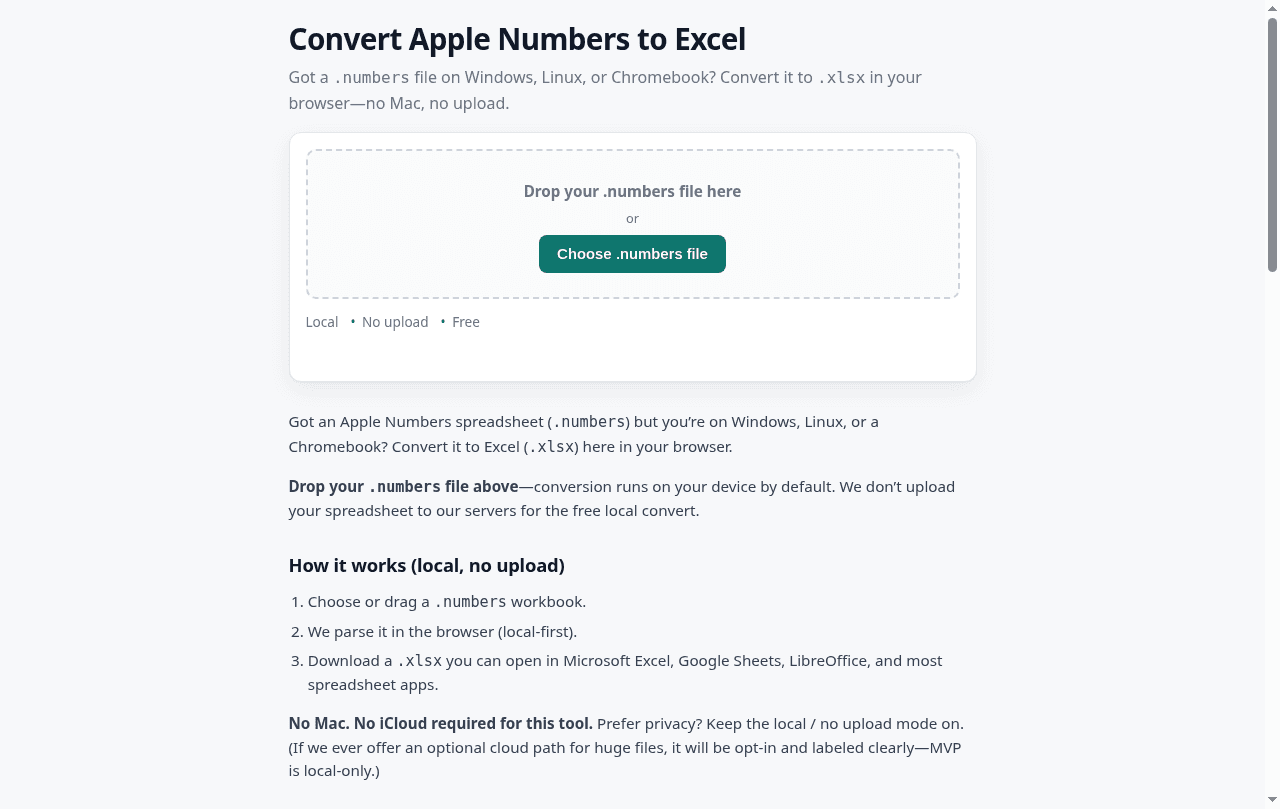
About this app
Convert Apple Numbers (.numbers) workbooks to Excel (.xlsx) in your browser — first sheet free, local-first, no Mac required. Numbers2Excel turns Apple Numbers files into Excel (.xlsx) so you can open them on Windows, Linux, or Chromebook. Conversion runs in the browser by default (local-first). Free exports the first sheet; unlock full workbook $2.90 one-time, or
Key features
- 1Converts Apple .numbers workbooks to .xlsx entirely in the browser — no upload, no Mac, no account for the free path.
- 2Free tier exports the first sheet; full workbook unlock is $2.90 one-time or $9/mo for unlimited while active.
- 3Explicit 'what converts cleanly / what may break' disclosure covering formulas, charts, and merged-region edge cases.
Target customer profile
Drawn from the product itself, not from a survey.
Demographic
Windows/Linux/Chromebook users receiving .numbers files
Pain points
Can't open Apple Numbers files natively; no Mac available.
Primary needs
Quick, private conversion to .xlsx without installing software.
Demographic
Students and educators submitting assignments
Pain points
LMS platforms like Canvas don't accept .numbers files.
Primary needs
Convert homework to .xlsx locally, then submit.
Demographic
Freelancers and accountants handling client spreadsheets
Pain points
Need to open client-provided .numbers files for bookkeeping.
Primary needs
Reliable conversion with multi-sheet support and privacy.
Scout Review
Written by AI from measured evidence, scored out of 100.
Numbers2Excel is a narrow tool that does one thing well: turn a .numbers file into .xlsx in the browser, no Mac, no upload, no account. The page loads at a perfect 100/100 Lighthouse score on both mobile and desktop, the flow is a single drop-and-download, and the site is unusually candid about what will and won't survive conversion. Where it's thin: security headers (3/12, no HSTS/CSP/DMARC), accessibility (86/100 with the primary drop zone among the unlabeled elements), and support depth (no docs, no help center, homepage FAQ only). The pricing is honest — free first sheet, $2.90 one-time, or $9/mo — and the local-first claim appears to be genuine. It's a competent utility with a real wedge and a low ceiling.
Measure by measure
Usability
66One-step flow: drop file, get .xlsx, no account needed for the free path. The 'what converts cleanly / what may break' section is refreshingly honest. Docked for having no real docs, help center, or changelog — the homepage FAQ is the entire support surface.
Design
58Clean single-purpose landing page with a clear drag-drop hero and inline pricing. But the copy is bloated — the same 'no Mac, no upload' pitch repeats across five sections, and there's no separate pricing or docs page to break up the wall of text.
Speed
88Lighthouse 100/100 on both mobile and desktop, LCP 781ms, CLS 0, TBT 80ms. Client-side conversion means no server round-trip on the free path. Genuinely fast — among the best-loading pages in this category.
Security
41HTTPS is enforced and the local-first privacy claim is real and specific — the file stays in the browser tab on the free path. But the header posture is thin: no HSTS, CSP, frame protection, Referrer-Policy, or Permissions-Policy, and no SPF/DMARC on the domain. 3/12 on the header checklist.
Accessibility
57Lighthouse 86/100 with five real failures: contrast ratio, unlabeled form elements, undersized touch targets, no main landmark, and visible-label/accessible-name mismatches. No a11y statement or WCAG claim anywhere. The drop zone — the one thing everyone must use — is among the unlabeled elements.
Growth
58Real, specific problem with a clear wedge: local-first, no-upload, $2.90 one-time vs. iCloud's Apple ID + upload or LibreOffice's install + fidelity roulette. Ceiling is low — one-off utility, no repeat usage, no network effects.
Improvement areas
- Security headers are thin (3/12): no HSTS, CSP, frame protection, Referrer-Policy, Permissions-Policy, SPF, or DMARC.
- Accessibility gaps: unlabeled drop zone, contrast failures, undersized touch targets, no main landmark (86/100).
- No docs site, help center, or changelog — the homepage FAQ is the entire support surface.
Design & Usability
The design is a competent single-purpose converter page: clear headline, obvious drag-drop zone, three trust bullets, inline pricing. It does the job. The problem is volume — the same 'no Mac, no upload, local-first' claim is restated in at least five separate sections, and there's no separate pricing or docs page to give the reader a break. Usability is the stronger half: the flow is genuinely one step, no account needed for the free path, and the 'what converts cleanly / what may break' section is more honest than most converters bother to be. The gap is support depth — no docs site, no help center, no changelog. The homepage FAQ is the entire support surface, which is fine for a one-button tool until something breaks and you need to know why.
Speed & Security
Speed is the standout: Lighthouse 100/100 on both mobile and desktop, LCP 781ms, CLS 0, TBT 80ms. Client-side conversion means no server round-trip on the free path, so the tool is as snappy as the page. Security is the weak flank. HTTPS is enforced and the local-first privacy claim is real — the file genuinely stays in the browser tab — but the header posture is thin: no HSTS, no CSP, no frame protection, no Referrer-Policy, no Permissions-Policy, and no SPF or DMARC on the domain. That's 3/12 on the header checklist. For a product whose entire pitch is 'your file never leaves your machine,' the domain itself should be locked down harder than it is. No SOC 2, ISO, or pen-test claims found, which is normal at this stage but leaves the trust story resting entirely on the local-processing claim.
Accessibility & Growth
Accessibility lands at 86/100 on Lighthouse with five real failures underneath: insufficient contrast, unlabeled form elements, undersized touch targets, no main landmark, and visible-label/accessible-name mismatches. The painful one is the drop zone — the single control every user must interact with — failing the label audit. No accessibility statement or WCAG claim anywhere on the site, and the content is English-only. Growth is a judgement on the idea, not the traction. The problem is real and specific: .numbers files are unopenable on Windows, Linux, and ChromeOS without a Mac or an Apple ID. The wedge is concrete — local-first, no-upload conversion at $2.90 one-time versus iCloud's account-and-upload requirement or LibreOffice's install-and-fidelity-roulette. That's a genuine reason to pick this over both listed alternatives. The honest limit is the category: one-off utility conversions, low repeat usage, no network effects, no data advantage that compounds. It can be a good small business. It cannot be a big one.
Conclusion
If you get .numbers files and don't own a Mac, this is a reasonable $2.90 to spend — the local-first processing is a real privacy advantage over iCloud, and the speed is genuinely excellent. Go in expecting a single-sheet happy path and spot-check your formulas after conversion, because the site itself warns you they may not all survive. If you're the maker: the header posture and the unlabeled drop zone are the two cheapest wins on the board, and both are worth fixing before you push the privacy pitch any harder.
Suggestions for improvement
- Add HSTS, CSP, frame protection, Referrer-Policy, and Permissions-Policy — 3/12 on headers undercuts the privacy pitch.
- Publish SPF and DMARC records on numbers2excel.com; the domain currently has neither.
- Label the file drop zone and add a <main> landmark — the primary control fails the accessible-name audit.
- Cut the homepage copy by half; the 'no Mac, no upload' claim appears in five separate sections and reads as padding.
Alternatives comparison
Named competitors, point by point. Nobody paid to appear here or to be left out.
 Numbers2Excel |  iCloud Numbers |  LibreOffice | |
|---|---|---|---|
| Requires an account to convert | No — free path needs no account | Yes — Apple ID required | No — but requires desktop install |
| File upload / cloud processing | No — local browser conversion by default | Yes — file uploaded to Apple's cloud | No — fully offline after install |
| Works on Windows / Linux / Chromebook without install | Yes — browser only | Yes — browser only | No — requires desktop installation |
| Pricing | Free first sheet; $2.90 one-time or $9/mo for full workbook | Free with Apple ID | Free and open source |
| Multi-sheet support | Paid only — free tier exports first sheet | Yes — full workbook | Yes — full workbook, fidelity varies |
| Formula / chart fidelity disclosure | Explicit 'may break' list published on site | Native Apple format — no conversion loss | Not documented; varies by file |
iCloud Numbers
Apple's web app that lets you open and export .numbers files via iCloud.com, but requires an Apple ID and uploads the file to Apple's cloud.
LibreOffice
Free desktop software that can open many .numbers files offline after installation; formatting and formula fidelity varies.
Comparing options? See Numbers2Excel alternatives, scored side by side
More Productivity apps
View all Productivity
Vibe Coding Agent Skills
92A free, open-source platform offering 110 AI agent skills...

Puzzly – B2B Lead Generation & Sales Intelligence Platform
92Puzzly is an all-in-one B2B lead generation platform that...

Qamarero
92An all-in-one hospitality software for restaurants and ba...

StoryPad
92Privacy-first open source journal app with a continuous t...

The Stack Newsletter
92A weekly newsletter delivering curated tech jobs, intervi...

Notion
92All-in-one AI workspace for docs, projects, and knowledge...

EmbedMyReviews
92White-label reputation management software for agencies s...

Gerty
91Private, local AI assistant for Mac that runs offline

CC Switch
91Open-source desktop app for switching AI coding providers...

QRBliss
91Branded QR codes with AI Brand Sync, 15 free dynamic code...

username.md
90One verified handle for your online identity, readable by...

PitchWhip
90AI cold call scripts & direct dials from LinkedIn


A platform dedicated to providing unbiased reviews of newly launched applications, analyzing everything from their features to their full potential.
info@scoutforge.net© 2026 Scoutforge. All rights reserved.
