Cycling through all six. Tap any point to stop.
Measured on six things
Train your ear for spoken numbers in 8 languages on iPhone: phone numbers, prices, dates, codes, decimals. Listen, type the digits, check, repeat.
Security
52HTTPS enforced and SPF present, but no HSTS, no CSP, no frame protection, no DMARC — 5/12 on the header checklist. A privacy page exists; no audit, SOC 2 or bug bounty claims found. Typical for an indie iOS app.
Screenshots
1 / 1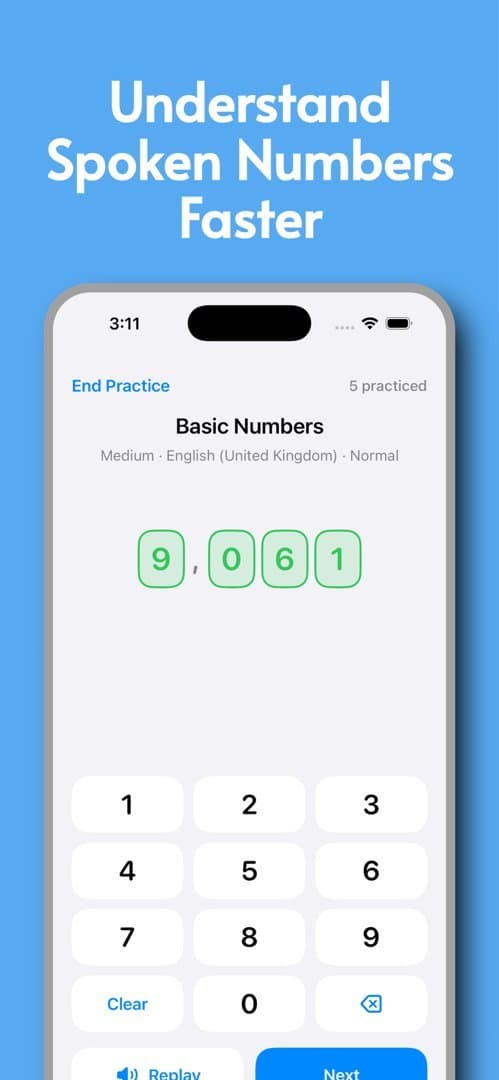
About this app
Train your ear for spoken numbers in 8 languages on iPhone: phone numbers, prices, dates, codes, decimals. Listen, type the digits, check, repeat. Made by MarcX Studio, an independent studio building small, focused apps for everyday tasks. Free to download on the App Store.
Key features
- 1Spoken-number drills in 8 voice languages (English, Spanish, French, German, Italian, Portuguese, Japanese, Mandarin).
- 2Six practice types: Basic Numbers, Phone Numbers, Codes & IDs, Money & Prices, Dates & Times, Decimals & Percentages.
- 3Four specialist drills: English Teen vs Ty, French 70–99, German 21–99, Japanese irregular hundreds and thousands.
- 4Separate interface-language and number-voice-language settings, with selectable system voices.
Target customer profile
Drawn from the product itself, not from a survey.
Demographic
Language learners who understand lessons but miss spoken numbers
Pain points
Numbers spoken at native speed sound like a blur; they can't convert sound to digits quickly
Primary needs
Targeted listening drills that isolate number recognition in multiple languages
Demographic
Frequent travelers and students abroad
Pain points
Struggle to catch phone numbers, prices, dates, and booking codes in noisy real-world situations
Primary needs
Practice with authentic number formats and multiple voice languages
Demographic
Professionals handling international calls, payments, or verification codes
Pain points
Mishearing digits leads to errors and wasted time; ordinary listening practice doesn't cover numbers
Primary needs
Fast, focused number-listening training with realistic prompts and instant feedback
Scout Review
Written by AI from measured evidence, scored out of 100.
NumListen is a small, well-aimed iOS app that does one thing: turn spoken numbers into typed digits, in eight languages, across six practice formats. The app UI is clean and native; the marketing site is sparse and top-heavy. Speed is excellent on desktop and merely okay on mobile. Security headers are thin but the risk surface is a static page. Accessibility is strong with one contrast fix outstanding. The idea is narrow but genuinely underserved — nobody else isolates number recognition this deliberately.
Measure by measure
Usability
68Six labeled practice modes, a documented five-step flow, visible progress and Replay/Next within reach. Interface language and voice language are separate settings, which is the right call. No in-app onboarding evidence beyond store screenshots.
Design
70Judging the app UI: clean iOS-native screens with scannable colored practice cards and clear hierarchy. The marketing homepage is the weak half — sparse, top-heavy empty space with content jammed at the bottom.
Speed
68Desktop Lighthouse 97/100 is genuinely quick. Mobile drops to 76 with a 4.3s LCP — the largest element takes over four seconds to paint on a phone, which is the one number worth fixing.
Security
52HTTPS enforced and SPF present, but no HSTS, no CSP, no frame protection, no DMARC — 5/12 on the header checklist. A privacy page exists; no audit, SOC 2 or bug bounty claims found. Typical for an indie iOS app.
Accessibility
78Lighthouse a11y 95/100 with a single failing contrast audit. Eight-language localization and native iOS controls help. No WCAG statement or a11y documentation published, so the ceiling is capped by what automated checks can see.
Growth
62A real, narrow problem — numbers at native speed — with a wedge Anki can't copy without becoming a different app. Six practice types plus four specialist drills show depth. Ceiling is a focused utility, not a platform.
Improvement areas
- Mobile Lighthouse LCP of 4.3s — the largest element takes over four seconds to paint on a phone.
- Missing HSTS, CSP, frame protection, Permissions-Policy and DMARC; 5/12 on the header checklist.
- One failing contrast audit prevents a clean automated accessibility score.
- Homepage layout is top-heavy with the pitch crammed into the bottom fifth of the viewport.
Design & Usability
The app itself is the stronger half. Store screenshots show native iOS patterns, a scannable six-card practice menu, green digit pills and a keypad that behaves the way thumbs expect. Progress counters and Replay/Next sit where you'd reach for them. The homepage is the opposite: a thin nav bar, an ocean of pale blue, and the actual pitch shoved into the bottom fifth of the screen. It reads like a page that was designed at 1440px and never checked at any other height. Usability is helped by the deliberate separation of interface language and number-voice language — a detail most multilingual apps fumble. The five-step flow on the site is clear enough that you know what you're getting before you download.
Speed & Security
Desktop Lighthouse lands at 97/100, which is genuinely fast. Mobile is the story: 76/100 with a 4.3s Largest Contentful Paint. CLS is a clean 0 and TBT is a reasonable 164ms, so the page isn't janky — it's just slow to paint its biggest element on a phone, which is exactly where an App Store link gets tapped. Security is the weakest dimension. HTTPS is enforced and SPF is published, but there's no HSTS, no Content-Security-Policy, no frame protection, no Permissions-Policy and no DMARC — 5 of 12 checklist points. For a static marketing site with no login and no payment flow, that's low-risk, but it's also low-effort to fix. A privacy and support page exists; no audit, SOC 2 or bug bounty claims were found.
Accessibility & Growth
Accessibility scores 95/100 on Lighthouse with exactly one failing audit: insufficient contrast between background and foreground colors. That's a fixable, specific flaw rather than a systemic problem. The app ships in eight languages and the site documents the interface/voice language split, which is real multilingual support rather than a translated footer. What's missing is a published accessibility statement or WCAG conformance claim — normal for an indie app, but it caps how far the score can go. Growth is the interesting one. The problem is real and specific: learners who follow lessons fine but freeze when a native speaker rattles off a phone number. NumListen isolates that. The specialist drills — English teen vs ty, French 70–99, German units-before-tens, Japanese irregular hundreds — are the kind of detail that only comes from someone who has actually studied these languages. Against Anki (manual card creation, no audio drills) and Numfred, the wedge is clear. The ceiling is a focused utility, not a platform.
Conclusion
If you've ever nodded along to a Spanish podcast and then completely lost a price, a date, or a phone number, this is aimed directly at you. Download it, run the specialist drills for whichever language keeps tripping you up, and give it a week. The app is the product here — the website is just a doorway, and a slightly empty one. Fix the mobile LCP, add HSTS and a CSP, correct the contrast, and this goes from a good small app to a properly finished one.
Suggestions for improvement
- Cut mobile LCP from 4.3s — compress or lazy-load the hero image and preload the largest element.
- Add HSTS, a Content-Security-Policy and DMARC; all are low-effort on a static marketing site.
- Fix the one failing contrast audit so accessibility lands at a clean 100 on automated checks.
- Rebalance the homepage: the pitch currently sits in the bottom 20% under a large empty viewport.
Alternatives comparison
Named competitors, point by point. Nobody paid to appear here or to be left out.
 NumListen NumListen | Numfred |  Anki Anki | |
|---|---|---|---|
| Spoken-number listening drills | Core purpose — six practice types across 8 voice languages | Yes — listen-and-type number practice, similar goal | No — requires manual card creation, no built-in audio number drills |
| Number of practice voice languages | 8 (English, Spanish, French, German, Italian, Portuguese, Japanese, Mandarin) | Compared directly on NumListen's site; fewer per its comparison page | Any language, but only if the user builds the deck and audio themselves |
| Specialist number-pattern drills | Yes — English Teen vs Ty, French 70–99, German 21–99, Japanese irregular hundreds | Not documented in collected evidence | No — no built-in specialist number drills |
| Setup effort before first practice | Low — pick a practice type and voice language, start immediately | Low — listen-and-type flow | High — user must author cards and source audio |
| Pricing | Free to download on the App Store | Compared on NumListen's site; see comparison page for current pricing | Free on desktop; AnkiMobile is a paid iOS app |
Numfred
A listen-and-type number practice app with similar goals; NumListen offers a direct comparison on its site covering languages, practice types, and pricing.
Anki
Flashcard app often used for language learning, but it requires manual card creation and doesn't specialize in spoken number drills.
Comparing options? See NumListen alternatives, scored side by side
More Education apps
View all Education
The Stack Newsletter
92A weekly newsletter delivering curated tech jobs, intervi...

TranscriptYou
88Free YouTube transcript generator with timestamps and AI ...

Startup Science
88A unified platform replacing 12-20 disconnected tools for...

Coloring Pages Pro
87A massive collection of free printable coloring pages for...

CertWorthIt
87Data-driven tool revealing which certifications actually ...

RBQ Exam
87Online practice for the RBQ contractor licence exams in Québec: original questions, timed mock exams and lessons, in French or English.

HireVue Practice
85AI-powered HireVue practice with timed mock interviews, role-specific questions, transcripts, scoring, and actionable feedback.

Case Cub
85AI-powered law school study platform with 20,000+ case br...

Ciroexam
84All-in-one CIRO exam prep for CIRE and 8 other exams, wit...

Aptitude Test Prep
84Free timed practice for SHL, numerical, and logical tests...

PageCub
84Custom illustrated children's books created around your c...

WellWired
84AI explained simply for older adults, with safety lessons...


A platform dedicated to providing unbiased reviews of newly launched applications, analyzing everything from their features to their full potential.
info@scoutforge.net© 2026 Scoutforge. All rights reserved.
