Cycling through all six. Tap any point to stop.
Measured on six things
Ultimate batch media converter for Windows with offline p...
Accessibility
50No a11y data available. Dark theme with low-contrast progress bar may hinder visibility. No WCAG statement found. Category-typical for a desktop app with no a11y focus.
Screenshots
1 / 1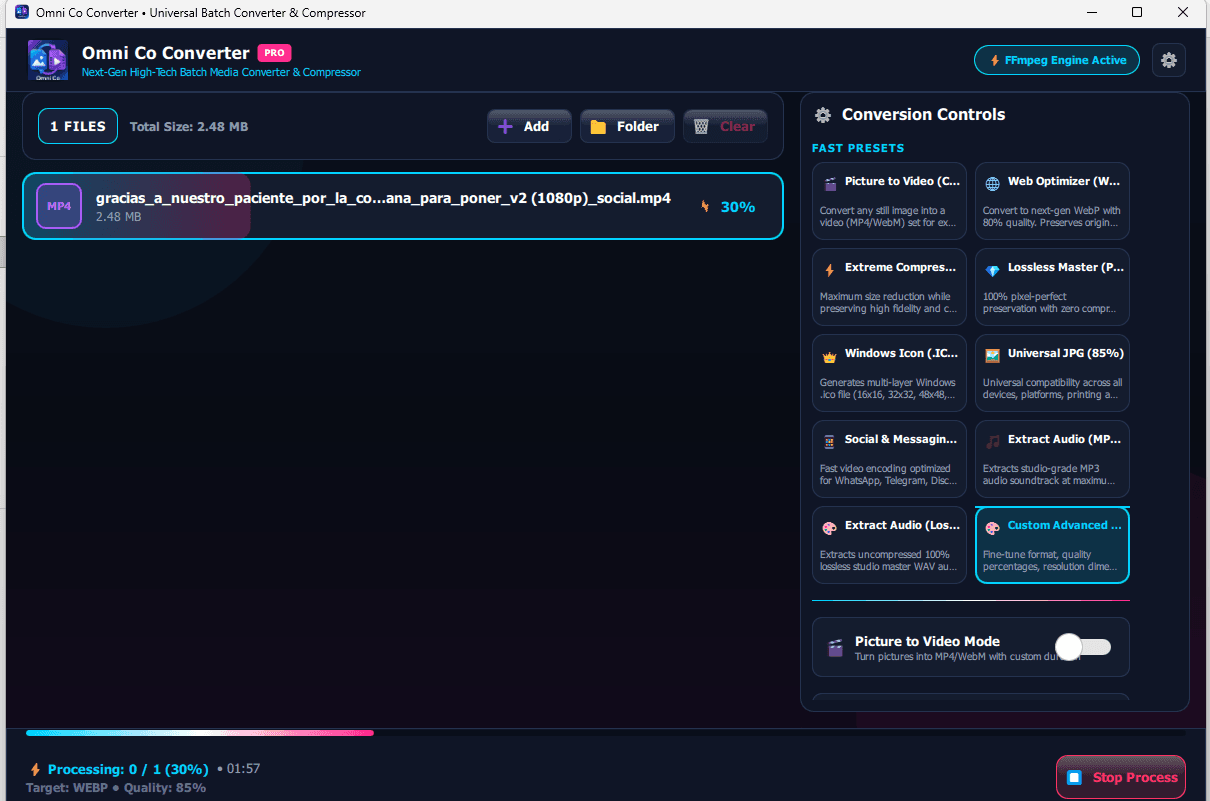
About this app
Omni Co Converter is a powerful, all-in-one media conversion tool for Windows 10 and 11 that handles images, videos, and audio with remarkable speed and ease. What sets it apart is its 100% offline-first approach—your files never leave your PC, ensuring total privacy. You can convert single files or massive batches with just a few clicks. It supports a wide range of formats including WebP, PNG, JPG, ICO, MP4, MKV, MP3, FLAC, and more. A standout feature is its ability to turn still images into videos with custom audio, perfect for YouTubers and podcasters. It also offers watermarking, video trimming, and high-quality audio extraction. The interface is clean and intuitive, making it easy for both beginners and professionals. While it's a paid app, you get a free trial for one batch conversion, and the pricing is flexible with monthly, annual, and lifetime options. If you're looking for a reliable, secure, and fast media converter on Windows, Omni Co Converter is definitely worth chec...
Key features
- 1100% offline-first conversion for total privacy
- 2Batch conversion for images, videos, and audio
- 3Image-to-video creation with custom audio for content creators
Target customer profile
Drawn from the product itself, not from a survey.
Demographic
Content creators and YouTubers who need to produce videos, compress files for upload, and protect their work.
Pain points
Spending too much time on file conversion and compression; concerns about online privacy; need for reliable batch processing.
Primary needs
A fast, private converter that handles multiple formats, offers video creation from images, and includes watermarking.
Demographic
Professionals and developers who frequently work with images, videos, and audio files in their daily tasks.
Pain points
Managing large files across different platforms; finding tools that are both efficient and secure.
Primary needs
Batch conversion capabilities, support for professional formats like ICO and TIFF, and high-quality compression without losing data.
Demographic
Everyday users who want to share media on social media, send files via email, or organize their personal collections.
Pain points
Dealing with file size limits and incompatible formats; lack of technical knowledge.
Primary needs
An easy-to-use converter that simplifies size reduction and format changes, with clear interface and no learning curve.
Scout Review
Written by AI from measured evidence, scored out of 100.
Omni Co Converter is a capable media converter for Windows, offering offline-first privacy and a range of formats. Its interface is functional but not visually refined, and the lack of documentation and user reviews is a concern. Speed and accessibility are unverified, but the offline nature is a security plus. The growth potential is moderate, given the competition from free tools. It's a decent choice for privacy-focused creators, but it needs more polish and community proof to stand out.
Measure by measure
Usability
62Side-by-side layout makes workflow clear, and the free trial lowers barrier. But no docs or reviews found; learning curve for advanced features is unknown.
Design
58Dark-themed desktop app with consistent styling, but preset grid feels cramped with uneven buttons and dense text. Interface is functional but not visually refined.
Speed
55No performance data available. Offline FFmpeg engine suggests fast conversion, but no benchmarks or user reports to confirm. Category-typical for a desktop converter.
Security
68Offline-first design ensures files never leave the PC, a strong privacy feature. No security certifications or breach history found, but offline nature mitigates many risks.
Accessibility
50No a11y data available. Dark theme with low-contrast progress bar may hinder visibility. No WCAG statement found. Category-typical for a desktop app with no a11y focus.
Growth
58Targets a real niche (YouTubers needing image-to-video) but faces free alternatives. Differentiation is clear but not defensible long-term.
Improvement areas
- Improve preset grid layout for better visual hierarchy
- Add comprehensive documentation and tutorials
- Provide more transparent security and performance details
Design & Usability
Omni Co Converter presents a dark-themed desktop interface that is functional but not visually polished. The side-by-side layout for file management and conversion options is intuitive, but the preset grid suffers from uneven button heights and dense text, making it feel cramped. The free trial for one batch conversion is a low-friction way to test the app, but the lack of documentation or user reviews leaves the learning curve for advanced features uncertain. Overall, it's a competent tool that gets the job done, but it doesn't stand out in terms of design or usability polish.
Speed & Security
No performance measurements were available for this review, so speed claims rest on the app's offline-first FFmpeg engine, which typically offers fast conversion. However, without benchmarks or user reports, it's hard to verify. On the security front, the offline-first approach is a strong privacy feature, ensuring files never leave the PC. Yet, the absence of security certifications or a detailed security page is a gap, though the offline nature mitigates many risks. The app appears to be a solid choice for privacy-conscious users, but speed and security details remain under-verified.
Accessibility & Growth
Accessibility is a weak point, with no WCAG statement and a low-contrast progress bar that could hinder visibility. The growth potential is moderate: the app targets a specific niche of content creators who need image-to-video conversion and watermarking, which is a real need. However, it faces strong competition from free tools like HandBrake and Format Factory, which offer similar features without cost. The offline-first privacy angle is a differentiator, but it may not be enough to win over users who are price-sensitive. The category has headroom, but the wedge is narrow.
Conclusion
If you're a YouTuber who values privacy and needs to convert images to videos with custom audio, Omni Co Converter is worth a try, especially with its free trial. But before committing to a paid plan, compare it with free alternatives and check if the features justify the cost. The app has potential, but it needs to prove itself with more user feedback and performance data. For now, it's a solid but unremarkable tool in a crowded market.
Suggestions for improvement
- Add a comprehensive help center or in-app tutorials to guide new users through advanced features.
- Improve the preset grid by grouping related options and ensuring consistent button sizes for a cleaner look.
- Publish performance benchmarks and security details (e.g., encryption at rest) to build trust.
- Enhance accessibility by increasing contrast for progress indicators and adding keyboard navigation shortcuts.
Alternatives comparison
Named competitors, point by point. Nobody paid to appear here or to be left out.
 Omni Co Converter Omni Co Converter |  HandBrake HandBrake |  Format Factory Format Factory |  CloudConvert CloudConvert | |
|---|---|---|---|---|
| Offline-first privacy | Yes, files never leave the PC | Yes, runs locally | Yes, runs locally | No, requires file upload |
| Image-to-video conversion | Yes, with custom audio | No, video-focused only | No, not a primary feature | No, not offered |
| Watermarking | Yes, included | No | No | No |
| Batch processing | Yes, supports massive batches | Yes, supports batch | Yes, supports batch | Yes, but with upload limits |
| Pricing model | Paid with free trial (one batch) | Free and open-source | Free | Freemium with paid plans |
HandBrake
Open-source video transcoder that supports batch conversion and many formats, though it focuses more on video and less on images/audio.
Format Factory
Free multimedia converter supporting video, audio, and images with batch processing, but lacks offline-first privacy and some advanced features.
CloudConvert
Online converter with extensive format support, but requires uploading files which conflicts with Omni Co's privacy-focused offline approach.
Comparing options? See Omni Co Converter alternatives, scored side by side
More Productivity apps
View all Productivity
Qamarero
92An all-in-one hospitality software for restaurants and ba...

The Stack Newsletter
92A weekly newsletter delivering curated tech jobs, intervi...

EmbedMyReviews
92White-label reputation management software for agencies s...

StoryPad
92Privacy-first open source journal app with a continuous t...

Puzzly – B2B Lead Generation & Sales Intelligence Platform
92Puzzly is an all-in-one B2B lead generation platform that...

Notion
92All-in-one AI workspace for docs, projects, and knowledge...

Vibe Coding Agent Skills
92A free, open-source platform offering 110 AI agent skills...

CC Switch
91Open-source desktop app for switching AI coding providers...

username.md
90One verified handle for your online identity, readable by...

What the GIF
89Frame-perfect video-to-GIF maker that runs entirely in yo...

AuditCloser
89White-label website audits that close deals for digital a...

NudgeWin
89Automated quote follow-up for trades and service businesses.


A platform dedicated to providing unbiased reviews of newly launched applications, analyzing everything from their features to their full potential.
info@scoutforge.net© 2026 Scoutforge. All rights reserved.
