Cycling through all six. Tap any point to stop.
Measured on six things
An infinite-canvas note-taking app for notes, sketches, meetings, and files - organized spatially, synced everywhere, encrypted end-to-end.
Security
28No HTTPS enforcement, no HSTS, no CSP, no frame protection. Only SPF present. Optional E2EE claimed but no security docs or audits found.
Screenshots
1 / 1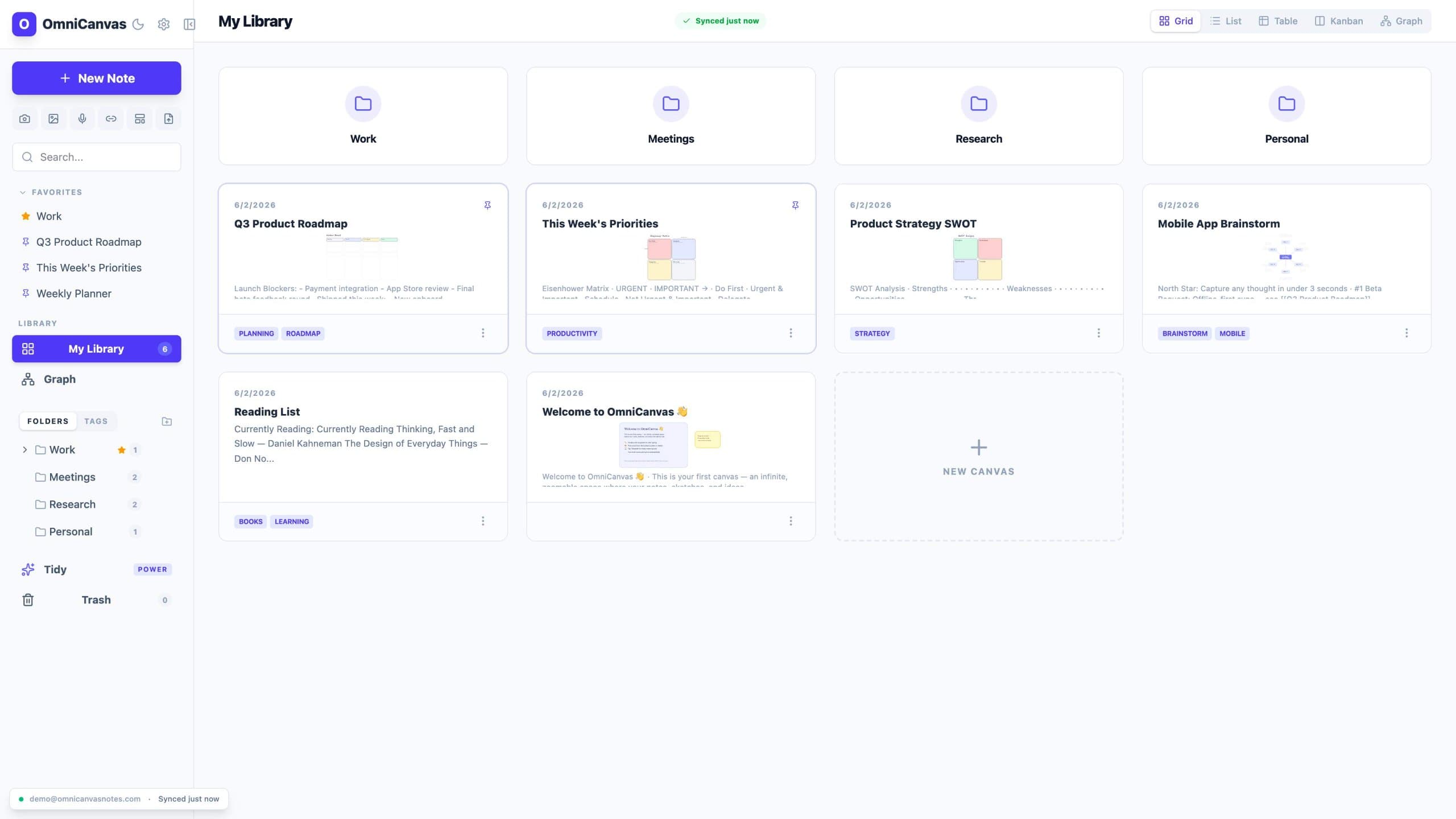
About this app
OmniCanvas is an infinite-canvas note-taking app for people who organize information spatially instead of in linear documents and nested folders. Notes, sketches, diagrams, images, and meeting transcripts live on the same zoomable workspace, connected by wiki-links and visualized in a graph view. The free tier costs $0 and includes unlimited notes and canvases, cloud sync, folders, tags, full-text search, graph view, Kanban view, and optional end-to-end encryption. Pro is $8/month and adds 10 hours of monthly meeting transcription, semantic search, AI actions and custom prompts, handwriting OCR, web and YouTube clipping, and REST API and MCP server access. OmniCanvas records meetings by capturing microphone and system audio directly - no bot joins your call - and puts the transcript and action items on the canvas beside your notes. OmniCanvas also publishes 40 free browser tools that need no account; the AI ones run locally, so files are never uploaded. On the web and macOS.
Key features
- 1Infinite canvas with rich text, drawing, images, and sticky notes
- 2Meeting capture with live transcription and no bot joining the call
- 3Graph, Kanban, Table, and Focus views with wiki-links and semantic search
Target customer profile
Drawn from the product itself, not from a survey.
Demographic
Product managers, project leads, and startup teams aged 25-45
Pain points
Struggling to keep meeting notes, decisions, and action items organized across multiple tools; losing follow-up context; missing tasks from meetings
Primary needs
A unified workspace to capture meeting transcriptions, extract decisions and action items, and track follow-through without jumping between apps
Demographic
Visual thinkers and creators (designers, researchers, writers) who prefer spatial organization
Pain points
Feeling constrained by linear document-based note apps; difficulty seeing connections between ideas; scattered notes in various formats
Primary needs
An infinite canvas to freely arrange notes, drawings, and links, with the ability to visually map relationships and brainstorm spatially
Demographic
Students and researchers (ages 18-35) who need to consolidate lecture notes, web clips, and research papers
Pain points
Overwhelmed by vast amounts of information; notes in different formats and locations; poor retention without visual context
Primary needs
A flexible canvas to combine text, images, and sketches, plus powerful search and graph views to retrieve information later
Scout Review
Written by AI from measured evidence, scored out of 100.
OmniCanvas is a promising infinite-canvas note-taking app with a strong visual identity and a clear 'capture-clarify-act-review' loop. The free tier is generous, and the meeting capture feature (no bot) is a standout. However, security is weak (no HTTPS enforcement, no security docs), mobile performance is sluggish, and the UI has unfinished elements. For a product launched less than a year ago, it shows potential, but it needs to address these gaps to compete with established players like Notion and Obsidian.
Measure by measure
Usability
65Clear free tier and sample meeting demo, but dual CTAs and cramped sidebar hurt onboarding clarity. No search/sort in library top bar.
Design
70Polished purple-accented UI with real canvas demo, but library grid feels unfinished with empty placeholders and broken trust row text.
Speed
58Mobile LCP 6.8s is sluggish, but desktop is fast at 90/100. Static marketing page with heavy hero canvas demo.
Security
28No HTTPS enforcement, no HSTS, no CSP, no frame protection. Only SPF present. Optional E2EE claimed but no security docs or audits found.
Accessibility
70Lighthouse 89/100 with contrast and button-name issues. No a11y statement, but site is keyboard-navigable and responsive.
Growth
62Real problem, clear wedge with meeting capture and visual loop, but crowded market and early stage. Needs differentiation to win.
Improvement areas
- Enforce HTTPS and add security headers (HSTS, CSP, frame protection)
- Improve mobile performance (LCP 6.8s) and reduce hero canvas weight
- Fix accessibility issues: button names, contrast, and main landmark
Design & Usability
OmniCanvas presents a polished, purple-accented interface with a real canvas demo that shows actual node connections and labels, giving a genuine feel for the product. The library grid, however, feels unfinished with empty white space and placeholder cards, and the hero trust row text appears broken. Usability is decent: the free tier is generous, and the sample meeting demo is a smart touch, but the dual CTAs create choice paralysis, and the sidebar mixes high-level and low-level items without clear separation. Search and sort controls are missing from the library top bar, which hurts navigation as your notes grow.
Speed & Security
Performance is a mixed bag: mobile Lighthouse scores 61/100 with a 6.8s LCP, which is sluggish, but desktop hits 90/100. The static marketing page is light, but the hero canvas demo adds weight. Security is a major concern: HTTPS is not enforced, and there's no HSTS, CSP, or frame protection. The checklist scores 1/12, which is poor for a product handling meeting transcripts. Optional end-to-end encryption is mentioned, but no security page or audit details are provided, leaving trust in question.
Accessibility & Growth
Accessibility is above average with a Lighthouse score of 89/100, but there are contrast issues and buttons without accessible names, plus no main landmark. No a11y statement is published. Growth potential is real: the problem of scattered meeting notes is common, and the 'no bot joins your call' differentiator is compelling. However, the market is crowded with Notion, Obsidian, and Miro, and the product is very early (domain registered March 2026). The free tier is a strong hook, but differentiation needs to be sharper to win over visual thinkers and meeting-heavy teams.
Conclusion
If you're a visual thinker tired of linear docs, OmniCanvas is worth a try — the free tier is risk-free. But wait for HTTPS enforcement and a security page before trusting it with sensitive meeting recordings. The team is iterating fast (daily changelog), so there's hope. For now, it's a solid beta with a bright future if they tighten security and polish the library view.
Suggestions for improvement
- Enforce HTTPS and add HSTS, CSP, and frame protection headers
- Publish a security page with encryption details and audit status
- Fix the library grid placeholders and add search/sort controls
- Reduce hero CTA clutter to a single primary action
Alternatives comparison
Named competitors, point by point. Nobody paid to appear here or to be left out.
 OmniCanvas OmniCanvas |  Notion Notion |  Obsidian Obsidian |  Miro Miro | |
|---|---|---|---|---|
| Infinite canvas | Yes, core feature | No, linear pages | No, file-based | Yes, but whiteboard-focused |
| Meeting transcription (no bot) | Yes, 10h/month on Pro | No native transcription | No native transcription | No native transcription |
| Free tier with unlimited notes | Yes, unlimited notes and canvases | Limited blocks on free tier | Free, but storage limited | Limited boards on free tier |
| Graph view | Yes, included in free tier | No native graph view | Yes, core feature | No graph view |
Notion
All-in-one workspace with databases, but linear structure; lacks infinite canvas
Obsidian
Markdown-based knowledge base with local storage and graph view; but based on files, not infinite canvas
Miro
Online whiteboard for collaboration, infinite canvas; but geared towards brainstorming, not note-taking
Comparing options? See OmniCanvas alternatives, scored side by side
More Productivity apps
View all Productivity
Notion
92All-in-one AI workspace for docs, projects, and knowledge...

Qamarero
92An all-in-one hospitality software for restaurants and ba...

EmbedMyReviews
92White-label reputation management software for agencies s...

StoryPad
92Privacy-first open source journal app with a continuous t...

Puzzly – B2B Lead Generation & Sales Intelligence Platform
92Puzzly is an all-in-one B2B lead generation platform that...

The Stack Newsletter
92A weekly newsletter delivering curated tech jobs, intervi...

Vibe Coding Agent Skills
92A free, open-source platform offering 110 AI agent skills...

QRBliss
91Branded QR codes with AI Brand Sync, 15 free dynamic code...

Gerty
91Private, local AI assistant for Mac that runs offline

CC Switch
91Open-source desktop app for switching AI coding providers...

username.md
90One verified handle for your online identity, readable by...

PitchWhip
90AI cold call scripts & direct dials from LinkedIn


A platform dedicated to providing unbiased reviews of newly launched applications, analyzing everything from their features to their full potential.
info@scoutforge.net© 2026 Scoutforge. All rights reserved.
