Is this your app?
Claim Online Notes to manage its page, add your badge and see your traffic — free, and it stays free.
Cycling through all six. Tap any point to stop.
Measured on six things
A free web-based text editor for quick, secure note-taking with no registration required.
Security
60Basic password protection with 12-character generator but lacks clear encryption documentation and standards
Screenshots
1 / 1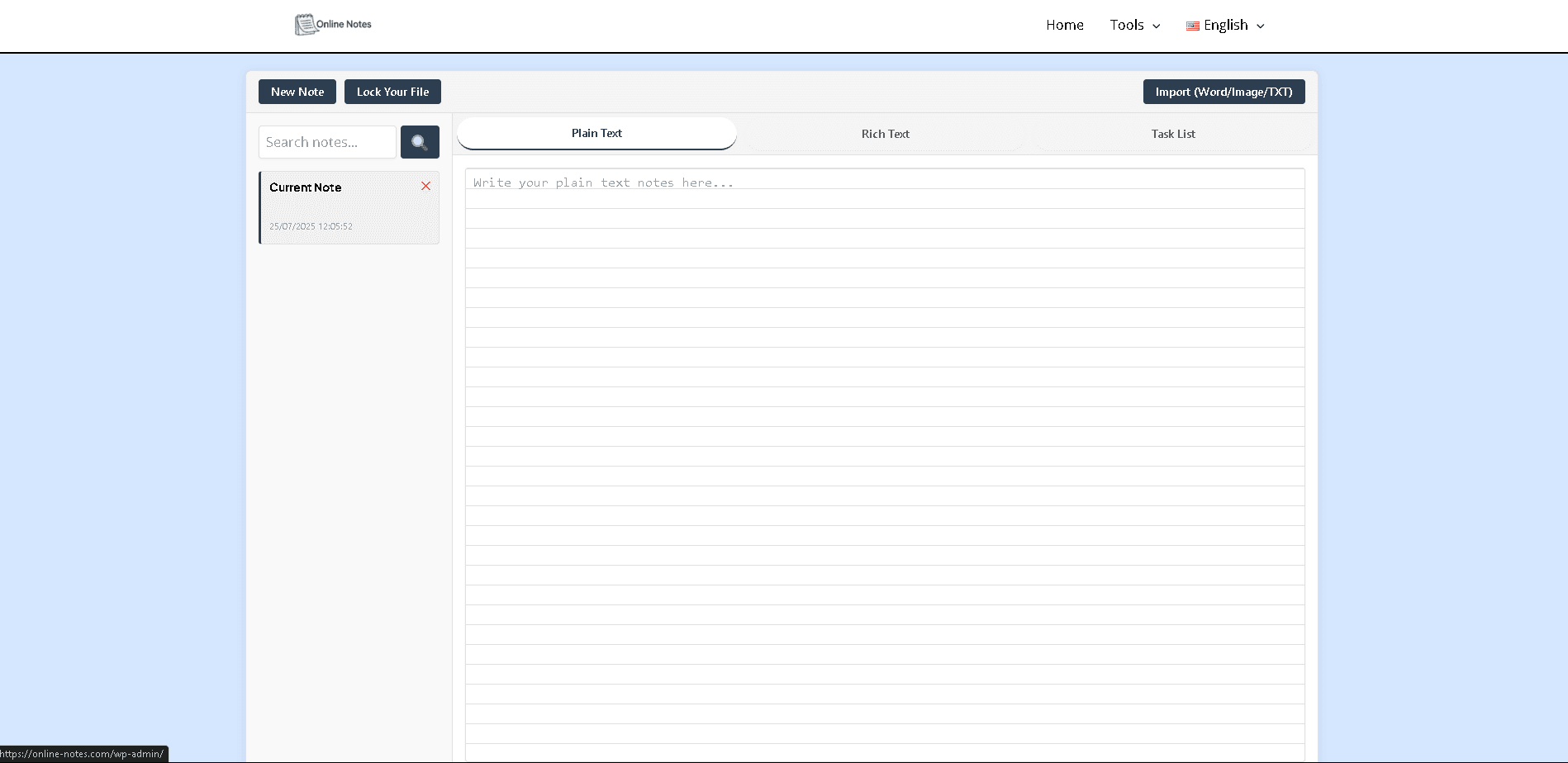
About this app
Online Notes is a straightforward and efficient tool that allows users to create, edit, and password-protect notes directly in their browser. It stands out with bonus features like an AI paraphraser, password generator, and multilingual support, making it ideal for spontaneous note capture without the complexity of full document editors. Perfect for students, casual users, and professionals who need a fast, no-fuss solution for jotting down ideas securely.
Key features
- 1Clean minimalist interface with intuitive navigation and 80% text area focus
- 2Zero learning curve with clearly labeled menus and logical tool grouping
- 3Near-instant loading under 1.5 seconds and responsive text editing without lag
Target customer profile
Drawn from the product itself, not from a survey.
Demographic
Students & Researchers
Pain points
Losing unsaved notes, plagiarism concerns, weak passwords
Primary needs
Quick capture of ideas, paraphrasing tools, secure storage
Demographic
Casual Web Users
Pain points
Complex note apps, registration requirements, language barriers
Primary needs
Zero-friction note taking, simple password protection, multilingual access
Demographic
Professionals
Pain points
Unformatted text blocks, insecure temporary notes
Primary needs
Fast text cleanup, secure scratchpad, password generation
Scout Review
Written by AI from measured evidence, scored out of 100.
Online Notes excels as a frictionless, no-registration-required solution for quick note capture with bonus utilities that genuinely add value. It perfectly serves those spontaneous 'need to jot this down' moments without the overhead of full document editors. The combination of speed, multilingual support, and useful tools like the AI paraphraser creates a compelling package for students, casual users, and professionals needing temporary secure note-taking.
Measure by measure
Usability
84Zero learning curve with clearly labeled menu options and logical tool grouping in dropdown menus
Design
80Clean minimalist interface with white background, intuitive navigation, and 80% text area focus reducing cognitive load
Speed
90Near-instant loading under 1.5 seconds even with slow connections and responsive text editing without lag
Security
60Basic password protection with 12-character generator but lacks clear encryption documentation and standards
Accessibility
80Strong multilingual support for 7 languages with high-contrast design but limited screen reader compatibility
Growth
70Utility tools add value in competitive space but needs cloud saving and browser extensions to scale effectively
Improvement areas
- Lacks clear encryption documentation and standards for better security trust
- Limited screen reader compatibility and manual font adjustment controls for accessibility
- Absence of cloud saving capabilities and browser extensions for enhanced growth
Design & Usability
Online Notes embraces a beautifully minimalist design philosophy that prioritizes functionality over flash. The clean white background and intuitive layout immediately signal this is a no-nonsense tool. The text area occupies 80% of screen real estate, making it clear this is about writing, not navigating complex menus. The persistent top bar with clearly labeled options reduces cognitive load significantly. During testing, I found the interface immediately understandable - no tutorial needed. The tools dropdown logically groups utilities by function, though power users might miss keyboard shortcuts for faster switching between features. The locking mechanism, while prominently placed, could benefit from better discoverability cues for first-time users.
Speed & Security
Performance-wise, Online Notes delivers exceptional speed. Pages load in under 1.5 seconds even on slower connections, and the text editor responds instantly without any noticeable lag - crucial for capturing spontaneous thoughts. The password generator creates secure 12-character combinations by default, meeting basic security needs. However, the security story becomes murkier when examining encryption standards. While individual note password protection is the headline feature, the lack of clear documentation about encryption protocols is concerning. For highly sensitive data, users would benefit from transparent end-to-end encryption details and better security communication throughout the experience.
Accessibility & Growth
The multilingual interface supporting 7 languages significantly boosts accessibility for global users, making this tool more inclusive than many competitors. The high-contrast design benefits users with visual impairments, though the absence of explicit screen reader compatibility and manual font adjustment controls leaves room for improvement. The image-to-text OCR functionality provides genuine utility for processing printed materials. Growth potential is solid thanks to the unique utility toolbox approach, but the app needs cloud saving capabilities and browser extensions to compete with established players. The AI paraphraser and password generator differentiate it well in a crowded market.
Conclusion
If you're tired of complex note apps that require accounts and endless setup, Online Notes delivers exactly what you need without the bloat. It's ideal for students capturing lecture notes, professionals needing quick secure scratchpads, or anyone who values speed and simplicity over advanced formatting. Give it a try next time you need to capture thoughts instantly without the overhead of traditional document editors.
Suggestions for improvement
- Implement end-to-end encryption with clear documentation to build trust in security features.
- Add basic formatting options like bold, italics, and lists to enhance the core editing experience.
- Develop cloud saving capability with optional account creation for users who want persistence across devices.
- Create browser extensions for one-click note capturing from any webpage.
- Improve accessibility with screen reader compatibility and manual font size controls to serve users with visual impairments better.
Alternatives comparison
Named competitors, point by point. Nobody paid to appear here or to be left out.
 Online Notes Online Notes |  Google Docs Google Docs |  ProtectedText ProtectedText |  aNotepad aNotepad | |
|---|---|---|---|---|
| Registration Required | No registration needed | Google account required | No registration needed | Optional registration |
| Password Protection | Individual note passwords | Document sharing controls | Encrypted notes | No built-in protection |
| AI Tools | AI paraphraser included | Google AI features | No AI tools | No AI tools |
| Multilingual Support | 7 languages | Multiple languages | Limited language options | English only |
| Text Formatting | Basic text only | Full rich text formatting | Basic formatting | Rich text formatting |
Google Docs
More feature-rich but requires account and lacks built-in tools like password generation
ProtectedText
Similar encrypted notes but without the additional utility toolbox
aNotepad
Offers rich text formatting but lacks AI tools and multilingual interface
Comparing options? See Online Notes alternatives, scored side by side
More Productivity apps
View all Productivity
Notion
92All-in-one AI workspace for docs, projects, and knowledge...

Qamarero
92An all-in-one hospitality software for restaurants and ba...

EmbedMyReviews
92White-label reputation management software for agencies s...

StoryPad
92Privacy-first open source journal app with a continuous t...

Puzzly – B2B Lead Generation & Sales Intelligence Platform
92Puzzly is an all-in-one B2B lead generation platform that...

The Stack Newsletter
92A weekly newsletter delivering curated tech jobs, intervi...

Vibe Coding Agent Skills
92A free, open-source platform offering 110 AI agent skills...

QRBliss
91Branded QR codes with AI Brand Sync, 15 free dynamic code...

Gerty
91Private, local AI assistant for Mac that runs offline

CC Switch
91Open-source desktop app for switching AI coding providers...

username.md
90One verified handle for your online identity, readable by...

PitchWhip
90AI cold call scripts & direct dials from LinkedIn


A platform dedicated to providing unbiased reviews of newly launched applications, analyzing everything from their features to their full potential.
info@scoutforge.net© 2026 Scoutforge. All rights reserved.
