Cycling through all six. Tap any point to stop.
Measured on six things
Lightweight AI dictation for Mac that sounds like you
Security
41HTTPS enforced and SPF present, but no HSTS, CSP, frame protection, or DMARC — 3/12 checklist points. No SOC 2, ISO, or pen-test claims found. Stripe handles checkout.
Screenshots
1 / 1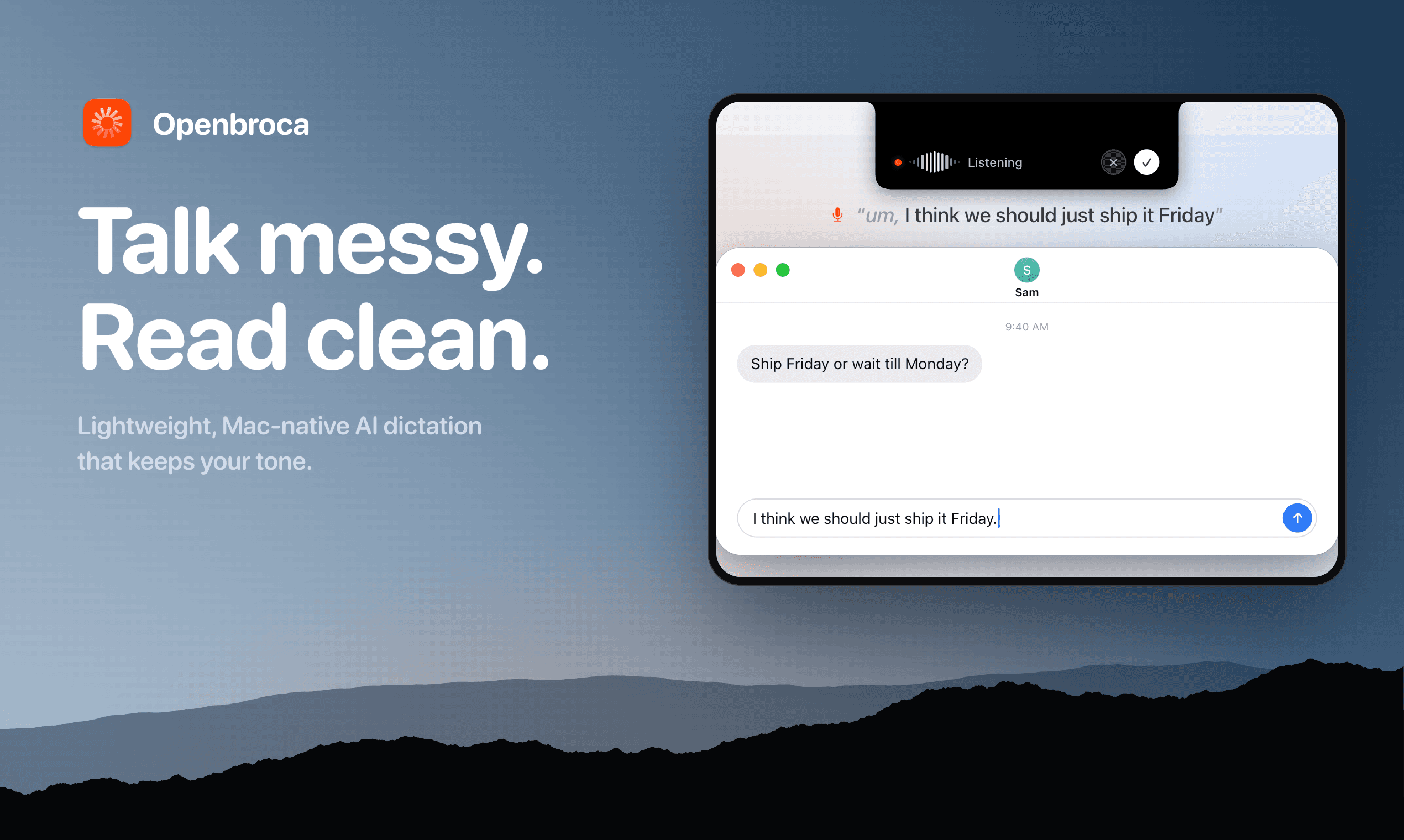
About this app
Openbroca helps Mac users write by voice in their focused app, from messages and emails to notes and editors. It removes filler words and repeated phrases while keeping the speaker’s meaning and tone. A personal dictionary helps with recurring names and terminology, and optional Screen Context provides spelling hints from visible text. It supports 30 dictation languages and translation into 28 output languages. The native Mac app requires macOS 15 or later and an internet connection. All features are available with 3,000 free text units per week; paid subscriptions provide unlimited usage.
Key features
- 1Voice dictation with AI cleanup that removes filler words and repeated phrases while preserving meaning and tone.
- 2Personal dictionary plus optional Screen Context (OCR) for spelling hints from visible text and recurring names.
- 3Multilingual support: dictation in 30 languages with automatic detection and translation into 28 output languages.
Target customer profile
Drawn from the product itself, not from a survey.
Demographic
Mac users who write emails, messages, notes and drafts
Pain points
Turning spoken ideas into clean written text while staying in the current app
Primary needs
Voice dictation with AI cleanup, personal terminology and optional translation
Scout Review
Written by AI from measured evidence, scored out of 100.
Openbroca is a Mac-native AI dictation app that turns messy speech into clean text in whatever app you're already using. Press ⌥ Space, talk, and it inserts polished text at your cursor — with filler-word removal, a personal dictionary, optional Screen Context for spelling hints, and translation into 28 languages. It supports 30 dictation languages and requires macOS 15 or later plus an internet connection. Pricing is straightforward: 3,000 free text units weekly (no card), Unlimited at $5/mo or $59.99/yr, and prepaid credits at CNY 9.90 for 30,000 units. The design is genuinely Mac-native and the onboarding is minimal. The weak spots are security headers (3/12), desktop Lighthouse performance (55/100), and documentation that's more SEO guide than product manual. For Mac users who dictate daily and want clean output without switching apps, it's a credible option — just not a category-defining one yet.
Measure by measure
Usability
64⌥ Space shortcut, minimal Preferences setup, and a detailed pricing page make onboarding clear. Docs are a Mac dictation guide rather than product docs, which limits depth.
Design
71Polished Mac-native aesthetic with consistent orange accent and clear hierarchy. Feature cards feel template-like and lower sections go sparse, but the app screenshots sell the product well.
Speed
68Lighthouse mobile 78/100 with LCP 3.5s and TBT 412ms; desktop drops to 55/100. Solid mobile snappiness but desktop rendering is heavier than it should be.
Security
41HTTPS enforced and SPF present, but no HSTS, CSP, frame protection, or DMARC — 3/12 checklist points. No SOC 2, ISO, or pen-test claims found. Stripe handles checkout.
Accessibility
70Lighthouse a11y 94/100 with only two failing audits: prohibited ARIA attributes and insufficient color contrast. 30 dictation languages and 28 output languages add real reach.
Growth
58Real problem (messy voice-to-text on Mac), specific target (Mac writers), and a clear wedge against Typeless. But no segment it serves uniquely better, and the category is crowded.
Improvement areas
- Security headers are largely missing (3/12 checklist points): no HSTS, CSP, frame protection, or DMARC.
- Desktop Lighthouse performance (55/100) trails mobile (78/100) — unusual for a Mac-focused product.
- Documentation is a Mac dictation guide rather than product docs; no troubleshooting, privacy, or security page.
Design & Usability
Openbroca's design is genuinely Mac-native — correct window chrome, traffic lights, Dock, and a consistent orange accent that ties the logo, icon, and CTAs together. The hero ('Talk messy. Read clean.') is sharp and the app screenshots do the selling. Where it slips is below the fold: the four feature cards under the hero feel cramped and template-like, and the lower sections drift into sparse rather than intentional. Usability is similarly front-loaded. The ⌥ Space shortcut, hold-to-talk, and recall-previous-transcript are clearly communicated, and the Preferences screenshots show setup is genuinely minimal. Pricing is transparent: 3,000 free text units weekly, Unlimited at $5/mo or $59.99/yr, and prepaid credits. The weak spot is documentation — the 'docs' page is a Mac dictation guide that name-drops Openbroca, not a product manual. For a tool that inserts text into other apps, users will want troubleshooting depth that isn't there yet.
Speed & Security
Speed is a mixed bag. Lighthouse mobile performance lands at 78/100 with LCP 3.5s, CLS 0.001, TBT 412ms, and FCP 1.4s — respectable for a marketing site with video and screenshots. Desktop, however, drops to 55/100, which is odd for a product whose entire audience is on Mac. The site claims cloud-powered processing, so the app itself depends on network round-trips; no published benchmarks or user complaints about lag surfaced in the collected evidence. Security is the weakest dimension. HTTPS is enforced and SPF is present, but the probe found no HSTS, no CSP, no frame protection, no X-Content-Type-Options, no Referrer-Policy, no Permissions-Policy, and no DMARC — 3/12 checklist points. There's no SOC 2, ISO, or pen-test claim, and no security page. The site does state 'Openbroca stores no audio,' which is a meaningful privacy claim, and checkout runs through Stripe. For a dictation tool that hears everything you say, the absence of a security posture page is a real gap.
Accessibility & Growth
Accessibility scores well on automated checks: Lighthouse a11y 94/100, with only two failing audits — prohibited ARIA attributes and insufficient color contrast. The contrast issue is worth fixing; the orange accent (#FF6B00) on light backgrounds is the likely culprit. There's no explicit WCAG statement or accessibility page, but the product does support 30 dictation languages and 28 output languages, which is meaningful reach for non-English speakers. Growth is a judgment on the idea. The problem is real: Mac users dictating into emails, notes, and editors get messy output, and Openbroca's cleanup + personal dictionary + Screen Context is a coherent answer. The target is specific (Mac writers), and the site explicitly positions against Typeless. But the category is crowded — Apple Dictation is free and built in, and several AI dictation apps already occupy this space. Openbroca's wedge is the cleanup quality and dictionary, which is real but not structurally defensible. The Windows waitlist suggests ambition, but there's no network effect or data moat here. It's a competent product in a crowded lane.
Conclusion
Openbroca gets the hard part right: it feels like a Mac app, not a web tool wearing a Mac costume. The ⌥ Space shortcut, the Preferences screenshots, the traffic lights — it all reads as native, and that matters for a tool that lives in your menu bar. The cleanup and dictionary features address a real annoyance with Apple's built-in dictation. What holds it back is the unglamorous stuff: security headers that are mostly missing, desktop performance that lags behind mobile, and docs that explain Apple's dictation more than Openbroca's. None of these are dealbreakers for an early-stage indie tool, but they're the difference between 'nice find' and 'I'm paying for this.' If you dictate daily on a Mac and want cleaner output than Apple gives you, try the free tier. If you're security-conscious or need deep troubleshooting docs, wait for a few more releases.
Suggestions for improvement
- Add HSTS, CSP, X-Content-Type-Options, Referrer-Policy, and DMARC — 3/12 security headers is a fixable gap that signals care.
- Fix the color contrast failure flagged by Lighthouse; the orange accent on light backgrounds is likely the culprit.
- Investigate why desktop Lighthouse performance (55) trails mobile (78) — Mac users will notice.
- Replace the SEO-style Mac dictation guide with real product docs: troubleshooting, insertion failures, dictionary sync, and privacy details.
Alternatives comparison
Named competitors, point by point. Nobody paid to appear here or to be left out.
 Openbroca Openbroca |  | |
|---|---|---|
| Platform and OS support | Native Mac app (Apple silicon + Intel), requires macOS 15 or later; Windows waitlist available. | No alternative details provided in App Details. |
| Free tier and pricing | 3,000 free text units weekly (no card); Unlimited at $5/mo or $59.99/yr; prepaid credits CNY 9.90 for 30,000 units. | No alternative details provided in App Details. |
| AI text cleanup and dictionary | Removes filler words and repeated phrases; personal dictionary learns from corrections; optional Screen Context OCR for spelling hints. | No alternative details provided in App Details. |
| Language support | Dictation in 30 languages with automatic detection; translation into 28 output languages. | No alternative details provided in App Details. |
| Privacy and data handling | Cloud-powered processing; site states 'Openbroca stores no audio'; requires internet connection. | No alternative details provided in App Details. |
Comparing options? See Openbroca alternatives, scored side by side
More Productivity apps
View all Productivity
Qamarero
92An all-in-one hospitality software for restaurants and ba...

The Stack Newsletter
92A weekly newsletter delivering curated tech jobs, intervi...

EmbedMyReviews
92White-label reputation management software for agencies s...

StoryPad
92Privacy-first open source journal app with a continuous t...

Puzzly – B2B Lead Generation & Sales Intelligence Platform
92Puzzly is an all-in-one B2B lead generation platform that...

Notion
92All-in-one AI workspace for docs, projects, and knowledge...

Vibe Coding Agent Skills
92A free, open-source platform offering 110 AI agent skills...

CC Switch
91Open-source desktop app for switching AI coding providers...

username.md
90One verified handle for your online identity, readable by...

What the GIF
89Frame-perfect video-to-GIF maker that runs entirely in yo...

AuditCloser
89White-label website audits that close deals for digital a...

NudgeWin
89Automated quote follow-up for trades and service businesses.


A platform dedicated to providing unbiased reviews of newly launched applications, analyzing everything from their features to their full potential.
info@scoutforge.net© 2026 Scoutforge. All rights reserved.
