Cycling through all six. Tap any point to stop.
Measured on six things
Scan documents to searchable PDF in your browser, no upload
Security
52HTTPS enforced with SPF and DMARC, and the local-first architecture is the real security story — nothing to breach if nothing is uploaded. But only 4/12 header checklist points: no HSTS, CSP, frame protection or Referrer-Policy, and no published audit.
Screenshots
1 / 1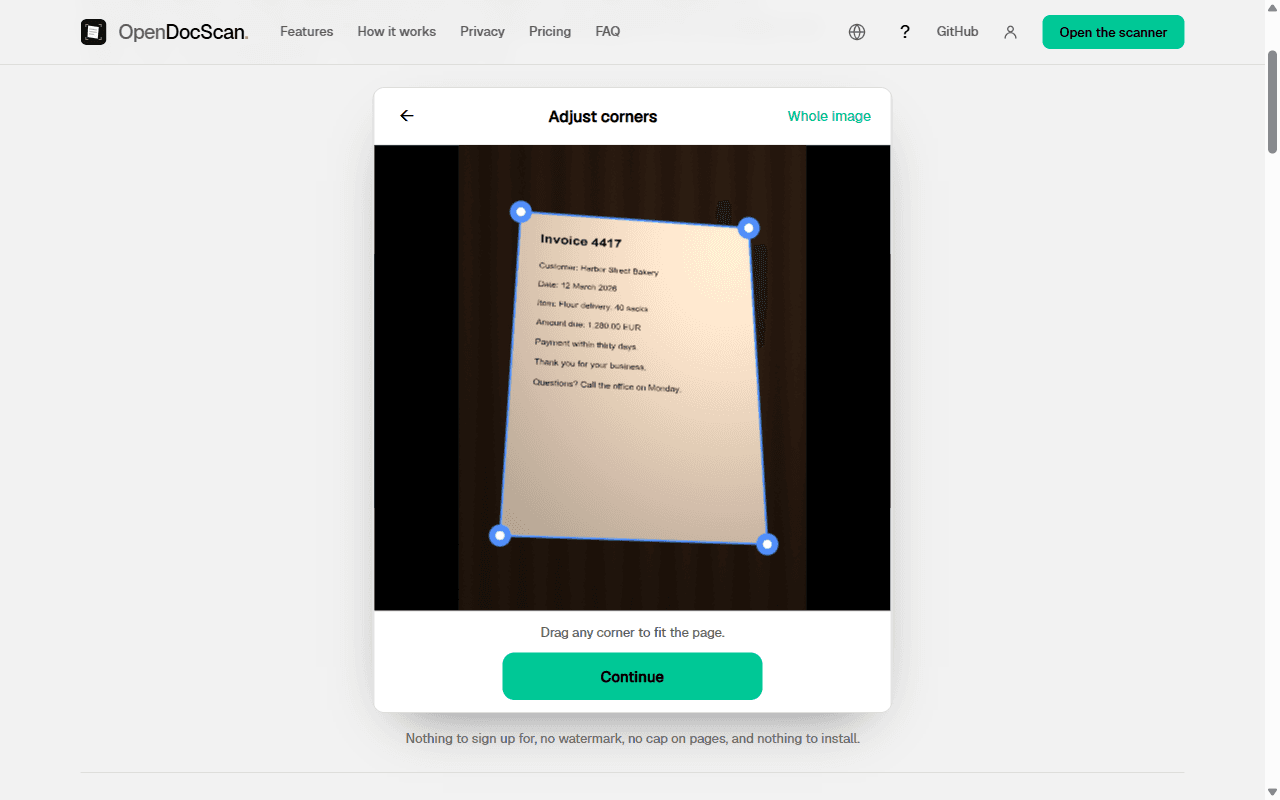
About this app
Most scanner apps charge a subscription to remove a watermark or lift a page limit, and many keep your documents on their servers. OpenDocScan does the whole job inside your own browser tab instead, so your scans never leave your device and there is nothing to pay for. Point your phone at a page, or import a photo you already have. OpenDocScan outlines the sheet, and you can drag any of the four corners if the outline is off. It then straightens the perspective so the page comes back rectangular, and evens out shadows and warm lighting so the paper reads white and the ink reads black. Keep adding pages, reorder or delete them, then export a PDF in A4, US Letter, US Legal or the scan's own shape. Text recognition (English) runs on your device and makes the PDF searchable and selectable. It is a progressive web app: add it to your home screen and it works offline. OpenDocScan is open source under MIT or Apache-2.0.
Key features
- 1Fully in-browser scanning: edge detection, perspective correction, lighting cleanup, OCR and PDF export all run on-device with nothing uploaded.
- 2No sign-up, no watermark, no page limit, no subscription — free and open source under MIT or Apache-2.0.
- 3Progressive web app with offline support; multi-page PDF export in A4, US Letter, US Legal or match-the-scan, with searchable OCR text.
Target customer profile
Drawn from the product itself, not from a survey.
Scout Review
Written by AI from measured evidence, scored out of 100.
OpenDocScan is a local-first document scanner that does the whole job — edge detection, perspective correction, lighting cleanup, OCR, multi-page PDF — inside your browser tab, with no sign-up, no watermark, no page limit, and nothing uploaded. It's open source, it's fast (89 mobile / 100 desktop Lighthouse), and the homepage is the product rather than a screenshot of it. The weak spots are brand coherence between site and app, a long homepage that buries the second CTA, a mobile CLS of 0.219, and a thin security-header profile (4/12) despite the strong local-first architecture. Accessibility is close to clean at 96/100. For an early-stage open-source tool, this is a genuinely useful, well-built product with a clear reason to exist.
Measure by measure
Usability
74No sign-up, no account, no page limit — the hero scanner is the product and you can start in one click. Platform availability is badged clearly. The cost is a very long homepage that buries the second CTA under a wall of explanation.
Design
71Judging the app UI plus store material: a live scanner in the hero instead of a screenshot is a strong choice, and the mono/grotesque type system is disciplined. Olive-vs-green accent mismatch and templated 3x2 card grids hold it back.
Speed
72Lighthouse mobile 89/100 with LCP 1.4s, TBT 0ms and FCP 901ms; desktop a clean 100/100. The one blemish is CLS 0.219 on mobile, well past the 0.1 'good' line. A sub-200 KB WASM core backs up the snappy feel.
Security
52HTTPS enforced with SPF and DMARC, and the local-first architecture is the real security story — nothing to breach if nothing is uploaded. But only 4/12 header checklist points: no HSTS, CSP, frame protection or Referrer-Policy, and no published audit.
Accessibility
79Lighthouse accessibility 96/100 with one failing audit — links without discernible names. Eight-language switcher is genuinely good coverage. No published WCAG statement or a11y docs, which keeps it out of the top band.
Growth
62Real, specific problem (watermarks and uploads in scanner apps) with a demonstrable wedge: in-browser, no upload, no cap, open source. CamScanner is the incumbent it undercuts. Domain is ~0.2 years old — early, but the idea has room.
Improvement areas
- Security headers are thin (4/12): add HSTS, CSP, frame protection, X-Content-Type-Options, Referrer-Policy and Permissions-Policy.
- Mobile CLS of 0.219 exceeds the 0.1 threshold — reserve space for the hero scanner and late-loading elements.
- Brand coherence: unify the olive site accent with the green/blue app UI, and break up the repetitive 3x2 feature card grids.
- Homepage length buries the second CTA — surface a 'Open the scanner' action higher on mobile.
Design & Usability
OpenDocScan's strongest move is putting the actual scanner in the hero instead of a screenshot — you land on the page and can scan immediately, no sign-up, no watermark, no page limit. The type system (grotesque headings, mono eyebrows) is deliberate and the restrained palette keeps the copy in charge. The cracks are brand coherence (olive on the site, green/blue in the app) and a templated 3x2 card grid repeated across sections. Usability is genuinely low-friction at the start, but the homepage is long enough that a visitor who just wants to scan has to scroll past a lot of explanation to find a second action.
Speed & Security
Speed is a real strength: Lighthouse mobile 89/100 with LCP 1.4s, TBT 0ms and FCP 901ms, and a clean 100/100 on desktop. The one metric out of line is CLS 0.219 on mobile — layout shift above the 0.1 threshold, worth fixing. Security is a mixed picture. The architecture is the best part: everything runs in the tab, nothing is uploaded, and the site invites you to verify with the Network tab. But the HTTP probe found only 4/12 checklist points — HTTPS, SPF and DMARC present, while HSTS, CSP, frame protection, X-Content-Type-Options, Referrer-Policy and Permissions-Policy are all missing. No published audit or bug bounty; open source under MIT/Apache-2.0 is the main verifiable trust signal.
Accessibility & Growth
Accessibility scores 96/100 on Lighthouse with a single failing audit — links without discernible names — and the site ships an eight-language switcher, which is better coverage than most indie tools bother with. There's no published WCAG statement, so the top band isn't earned. Growth is a judgement on the idea: the problem is real and specific (scanner apps charge to remove watermarks and upload your documents), and the wedge is concrete and demonstrable — in-browser, no upload, no cap, open source. CamScanner is the incumbent it undercuts on exactly the axes people complain about. The domain is roughly 0.2 years old and the only social presence listed is Twitter, so it's early — but the idea has room to grow if it finds an audience.
Conclusion
If you scan paperwork regularly and don't want a subscription or an upload, OpenDocScan is worth a bookmark — the value is immediate and the privacy claim is verifiable. The next steps are unglamorous but high-leverage: add the missing security headers, fix the mobile layout shift, name the unnamed links, and tighten the homepage so the second CTA isn't buried. The idea is strong; the execution just needs the last 10% of polish to match the ambition.
Suggestions for improvement
- Add HSTS, CSP, X-Content-Type-Options, Referrer-Policy and Permissions-Policy — the probe found only 4/12 checklist points.
- Fix the mobile CLS of 0.219 by reserving space for the hero scanner and late-loading elements.
- Give every link a discernible accessible name — the single failing Lighthouse audit.
- Unify the brand accent (olive on site vs. green/blue in app) and add a second CTA higher on the homepage.
Alternatives comparison
Named competitors, point by point. Nobody paid to appear here or to be left out.
 OpenDocScan |  CamScanner | |
|---|---|---|
| Where scanning happens | Entirely in the browser tab; nothing uploaded | Native app with cloud sync and server-side processing |
| Pricing model | Free, open source, no subscription | Freemium with premium subscription tiers |
| Watermark / page limit | No watermark, no page limit | Free tier carries limits and upsell prompts |
| OCR / searchable PDF | On-device OCR (English, Simplified & Traditional Chinese) | OCR available, often gated behind premium |
| Offline / install | PWA, installable, works offline after load | Native install via app stores |
| Open source | Yes — MIT or Apache-2.0 | No, proprietary |
Comparing options? See OpenDocScan alternatives, scored side by side
More Productivity apps
View all Productivity
Puzzly – B2B Lead Generation & Sales Intelligence Platform
92Puzzly is an all-in-one B2B lead generation platform that...

Qamarero
92An all-in-one hospitality software for restaurants and ba...

EmbedMyReviews
92White-label reputation management software for agencies s...

StoryPad
92Privacy-first open source journal app with a continuous t...

Notion
92All-in-one AI workspace for docs, projects, and knowledge...

The Stack Newsletter
92A weekly newsletter delivering curated tech jobs, intervi...

Vibe Coding Agent Skills
92A free, open-source platform offering 110 AI agent skills...

QRBliss
91Branded QR codes with AI Brand Sync, 15 free dynamic code...

Gerty
91Private, local AI assistant for Mac that runs offline

Strukchad Property Management
91Property management for Kenyan letting agents: rent invoices raised every month, M-Pesa rent prompts to tenants, arrears tracking and landlord statements.

CC Switch
91Open-source desktop app for switching AI coding providers...

PitchWhip
90AI cold call scripts & direct dials from LinkedIn


A platform dedicated to providing unbiased reviews of newly launched applications, analyzing everything from their features to their full potential.
info@scoutforge.net© 2026 Scoutforge. All rights reserved.
