Cycling through all six. Tap any point to stop.
Measured on six things
A local PDF editor that never uploads your files
Security
52Local-first design means files never leave the device, and AES-256 password protection is offered. But the site ships no HSTS, CSP, frame protection or Referrer-Policy (4/12 checklist). No SOC 2, pen-test or bug bounty found.
Screenshots
1 / 1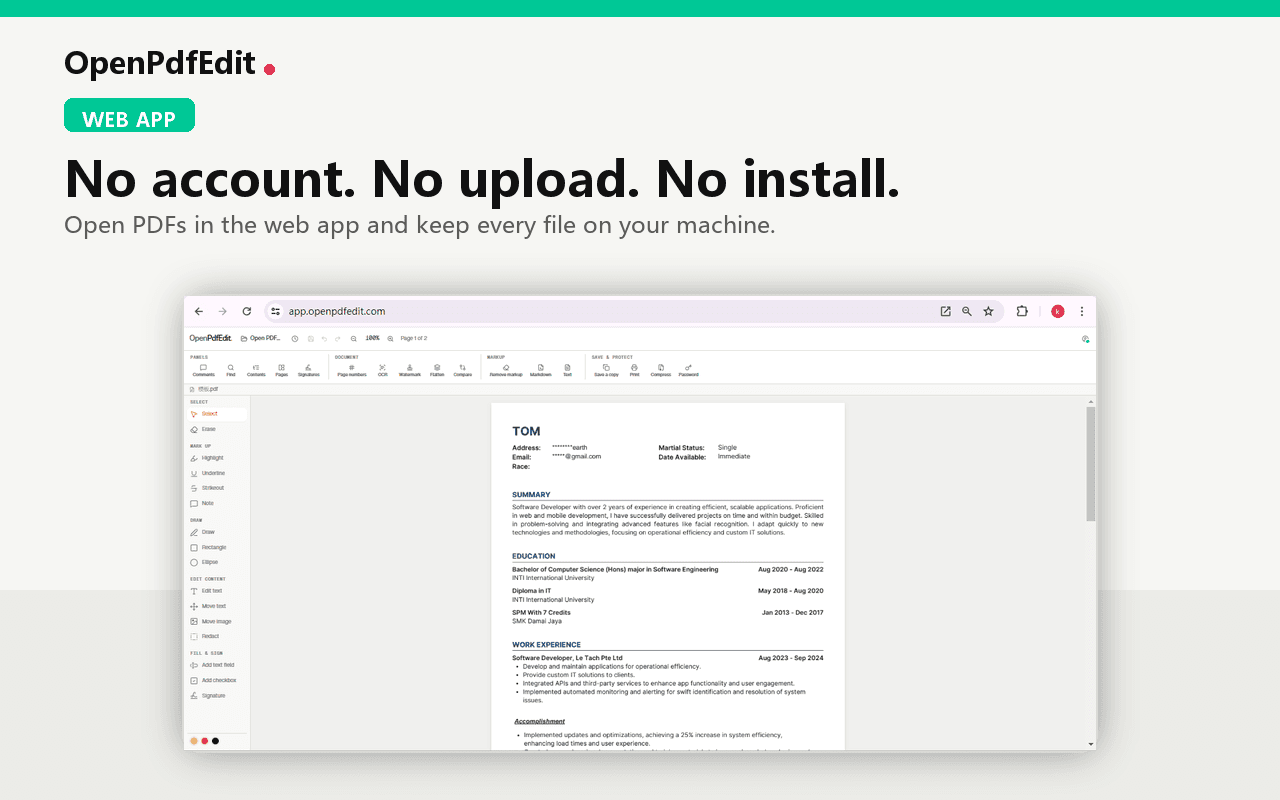
About this app
OpenPdfEdit is a PDF editor that does all of its work on your own device. The same Rust core runs natively on macOS and Windows and as WebAssembly in the browser, so there is no server to send a document to. It also runs as a Chrome and Microsoft Edge extension. It covers everyday PDF work: highlight, comment and draw; replace or move text and images; real redaction that removes the words from the file; fill forms and add a drawn signature; merge, split, reorder, rotate, crop and delete pages; password protection, page numbers, Bates numbering and compression; and side-by-side document comparison. OCR makes scans searchable in 12 languages, including Chinese, Japanese, Korean, Arabic and Russian. There is no account, no page limit, no export cap and nothing stamped on your output. Almost everything is free; watermarking and OCR are optional Supporter tools paid once. After the first load the web app keeps working offline. OpenPdfEdit is open source under AGPL-3.0.
Key features
- 1Local-first PDF editing via Rust/WASM in browser, native macOS/Windows, and Chrome/Edge extension — no upload, no account, no page limit.
- 2Real redaction that removes text from the file bytes, plus text/image editing, forms, drawn signatures and side-by-side document comparison.
- 3OCR in 12 languages including CJK, Arabic and Russian; AES-256 password protection, Bates numbering, compression and export to Word/Excel/Markdown.
Target customer profile
Drawn from the product itself, not from a survey.
Scout Review
Written by AI from measured evidence, scored out of 100.
OpenPdfEdit is a local-first, open source PDF editor that runs in the browser via WebAssembly, natively on macOS and Windows, and as a Chrome/Edge extension. It covers a genuinely wide surface — markup, real redaction, text and image editing, forms and signatures, page organisation, AES-256 protection, Bates numbering, OCR in 12 languages, and document comparison — with no account, no page limit and no watermark. The site is fast and well-crafted, the app UI is clean, and the privacy architecture is a real differentiator against Acrobat and iLovePDF. The gaps are in security hardening of the site itself and the absence of published compliance or audit signals.
Measure by measure
Usability
68No account, no page limit, no export cap, and 'Open the app' right in the hero — time-to-value is basically one click. Feature cards deep-link to how-to pages. High homepage density is offset by a four-step 'How it works'.
Design
71Judging the app UI and store material: clean mobile editor with icon+label toolbar and clear active states, plus a disciplined homepage using one red accent. Card grid is consistent but sparse where copy is thin.
Speed
88Lighthouse mobile 98/100 (LCP 1.1s, TBT 0ms, CLS 0.095) and desktop 100/100. Tiled rendering keeps huge documents from choking, and the app keeps working offline after first load. Genuinely fast.
Security
52Local-first design means files never leave the device, and AES-256 password protection is offered. But the site ships no HSTS, CSP, frame protection or Referrer-Policy (4/12 checklist). No SOC 2, pen-test or bug bounty found.
Accessibility
80Lighthouse accessibility 98/100 with one failing audit (missing main landmark). Site localized in 8 languages and the editor uses labelled toolbar controls. No explicit WCAG statement found, but the automated signals are strong.
Growth
62A real, growing privacy-driven problem with a specific wedge: local-only editing, no upload, no account, no page limit, open source. Clear differentiation from Acrobat and iLovePDF, though the category is crowded.
Improvement areas
- Site security headers are thin (4/12 checklist): no HSTS, CSP, frame protection or Referrer-Policy.
- No published SOC 2, ISO, pen-test or bug bounty signals; accessibility statement absent despite a 98 Lighthouse score.
- App Store listing localized in only one language versus eight on the website; sparse feature cards and a clipped mobile toolbar label.
Design & Usability
OpenPdfEdit's design is judged on the app UI and store material, not just the landing page, and it holds up: the mobile editor has a clean icon+label toolbar with a visible active-tool state, and the homepage commits to one coral-red accent used consistently across buttons, eyebrows and deep-links. The hero leads with the privacy promise before any feature copy, which is the right order. Usability is the stronger half — no account, no page limit, no export cap, and an 'Open the app' button above the fold mean time-to-value is a single click. Feature cards link out to how-to pages. The weak spots are cosmetic: sparse cards where copy is thin, and a mobile toolbar label that wraps.
Speed & Security
Speed is the standout: Lighthouse mobile 98/100 with LCP 1.1s, TBT 0ms and desktop 100/100, backed by tiled rendering that keeps large documents responsive and an offline-capable web app after first load. Security is more mixed. The architecture is genuinely privacy-forward — documents are processed locally and never uploaded, and AES-256 password protection is available for output files. But the site's own HTTP posture is thin: no HSTS, CSP, frame protection, Referrer-Policy or Permissions-Policy, landing at 4/12 on the header checklist. SPF and DMARC are present. No SOC 2, ISO, pen-test or bug bounty program was found, though AGPL-3.0 means the code is inspectable.
Accessibility & Growth
Accessibility scores well on automated checks — 98/100 with a single failing audit for a missing main landmark — and the site is localized in eight languages, though the app store listing is only in one. No explicit WCAG statement was found. Growth is a judgement on the idea: the problem (people wanting to edit PDFs without uploading sensitive files) is real and the wedge is concrete — local-only processing, no account, no page limit, open source, cross-platform via WASM, desktop and browser extension. It is aimed squarely at Adobe Acrobat and iLovePDF with a differentiator those incumbents structurally can't copy without abandoning their server-based models. The limit is category crowding and the fact that most users still default to whichever free converter ranks first.
Conclusion
For anyone who edits sensitive PDFs and would rather not hand them to a server, OpenPdfEdit is a credible, free, open source answer with a surprisingly complete toolset. It is early — the domain is months old and the app store listing has no ratings yet — but the core product is real and fast. The next step is tightening the site's security headers and publishing an accessibility statement to match the strong automated scores.
Suggestions for improvement
- Add HSTS, CSP, X-Frame-Options, Referrer-Policy and Permissions-Policy headers to close the 4/12 gap.
- Fix the missing main landmark flagged by Lighthouse and publish a short WCAG/a11y statement.
- Localize the app store listing beyond one language to match the site's eight.
- Fill out sparse feature cards with a second line of copy or a small screenshot to balance the grid.
Alternatives comparison
Named competitors, point by point. Nobody paid to appear here or to be left out.
 OpenPdfEdit |  Adobe Acrobat |  iLovePDF | |
|---|---|---|---|
| Where documents are processed | Entirely on-device (WASM/native); files never uploaded | Desktop local, but cloud services and Document Cloud sync available | Server-side; files uploaded for processing |
| Account required | No account | Adobe ID required for subscription and cloud features | No account for basic use; account for premium |
| Pricing model | Free; watermark and OCR are one-time Supporter tools | Subscription (Acrobat Pro/Standard) | Freemium with premium subscription |
| Open source | Yes, AGPL-3.0 | No | No |
| OCR support | Yes, 12 languages, one-time Supporter tool, offline after download | Yes, in Acrobat Pro | Yes, OCR tool available |
| Page/export limits | No page limit, no export cap, no watermark on output | No hard limit within subscription | Free tier has file-size and task limits |
Comparing options? See OpenPdfEdit alternatives, scored side by side
More Productivity apps
View all Productivity
Puzzly – B2B Lead Generation & Sales Intelligence Platform
92Puzzly is an all-in-one B2B lead generation platform that...

Qamarero
92An all-in-one hospitality software for restaurants and ba...

EmbedMyReviews
92White-label reputation management software for agencies s...

StoryPad
92Privacy-first open source journal app with a continuous t...

Notion
92All-in-one AI workspace for docs, projects, and knowledge...

The Stack Newsletter
92A weekly newsletter delivering curated tech jobs, intervi...

Vibe Coding Agent Skills
92A free, open-source platform offering 110 AI agent skills...

QRBliss
91Branded QR codes with AI Brand Sync, 15 free dynamic code...

Gerty
91Private, local AI assistant for Mac that runs offline

Strukchad Property Management
91Property management for Kenyan letting agents: rent invoices raised every month, M-Pesa rent prompts to tenants, arrears tracking and landlord statements.

CC Switch
91Open-source desktop app for switching AI coding providers...

PitchWhip
90AI cold call scripts & direct dials from LinkedIn


A platform dedicated to providing unbiased reviews of newly launched applications, analyzing everything from their features to their full potential.
info@scoutforge.net© 2026 Scoutforge. All rights reserved.
