Cycling through all six. Tap any point to stop.
Measured on six things
Animated slide decks in your browser, free and open source
Security
52HTTPS enforced with SPF and DMARC, and the local-first, no-account model plus sandboxed community components are real privacy positives. But headers are thin — no HSTS, CSP, frame protection or Referrer-Policy — and no audit or bug bounty is published.
Screenshots
1 / 1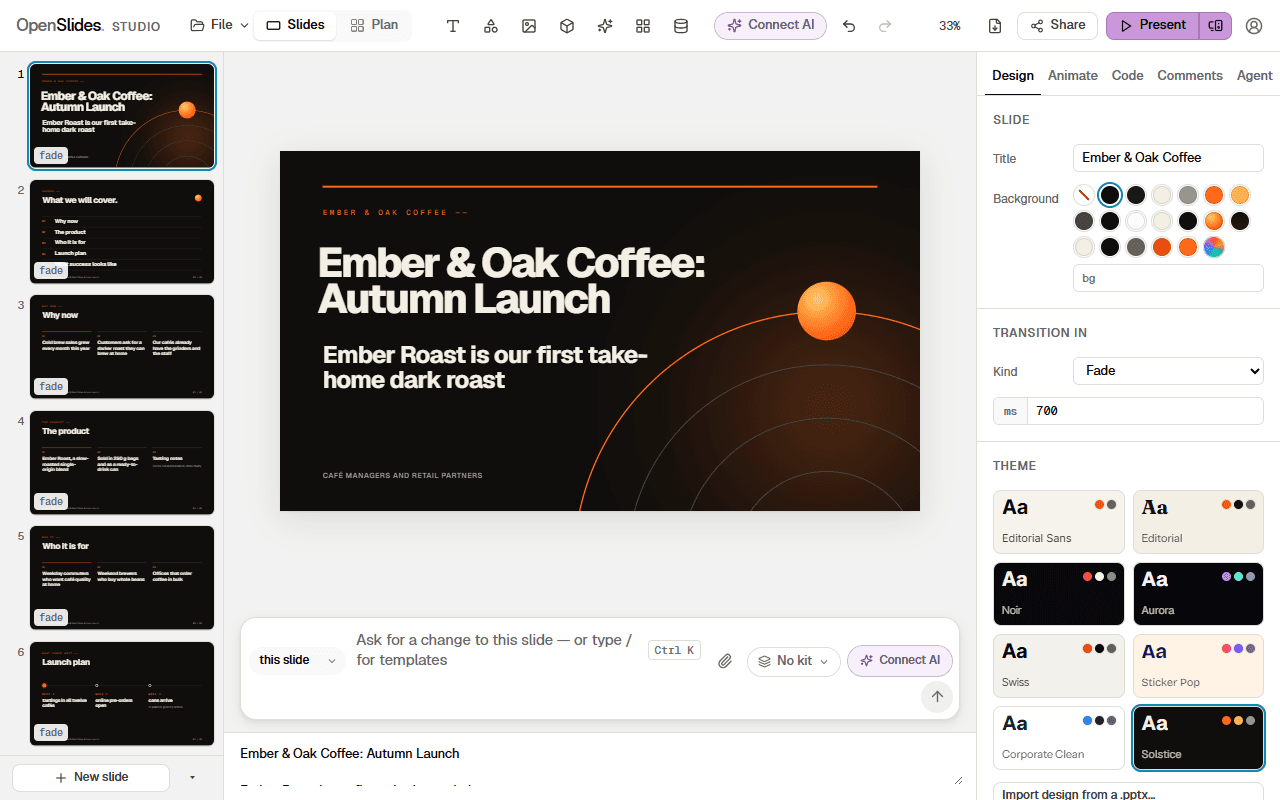
About this app
OpenSlides, at openslides.dev, is a presentation studio that runs in your browser tab. Paste your notes or load a Markdown file, check the slide-by-slide plan, and pick one of four looks. A first deck needs no AI model at all. Every slide can move: motion backgrounds, kinetic type, charts that race, maps, diagrams that draw themselves, and widgets the presenter operates, such as sliders, spin wheels and quizzes. Each slide's notes become its script. Record it in your own voice, use a voice that runs in the browser, or dub it into another language, then export the deck as an MP4 video. You can also import a .pptx, and export a static .pptx or a PDF. AI is optional. Add your own key for Anthropic, OpenAI or OpenRouter, or point it at a local model, and the studio shows an estimate before each turn. Decks, images and recordings stay in your browser, and there is no account. OpenSlides is open source under MIT or Apache-2.0.
Key features
- 1263 animated components — motion backgrounds, kinetic type, chart races, maps, 3D and presenter-operated widgets like sliders and spin wheels.
- 2Presenter view with notes, next slide and timer, plus operable slides, an ink layer and rehearsals that record clicks and voice together.
- 3Notes become the script: record your voice, generate one in-browser, or dub into another language, then export a frame-exact MP4.
- 4No account and AI optional — outline builds from your notes' headings and bullets, or bring your own Anthropic/OpenAI/OpenRouter key or local model.
- 5Import .pptx (slides or design system only) and export static .pptx or PDF; decks, images and recordings stay in the browser.
- 6Full studio on phone and tablet with filmstrip slides, tab bar tools, tap/drag/pinch gestures and presenting from the same device.
Target customer profile
Drawn from the product itself, not from a survey.
Scout Review
Written by AI from measured evidence, scored out of 100.
OpenSlides is a browser-based deck studio that takes animated, narrated presentations seriously: 263 motion components, a presenter view with operable widgets, in-browser voice generation, dubbing, and MP4 export — with no account and AI strictly optional. The measured numbers back the engineering: 91 mobile / 99 desktop Lighthouse performance, 97 accessibility, HTTPS with SPF and DMARC. The gaps are equally concrete: thin security headers (5/12), no published audit or disclosure policy, one color-only link failure, a lilac CTA that fights the orange product palette, and captions too small to read. It is a well-built tool with a marketing site that undersells its own legibility and a security posture that undersells its own privacy architecture.
Measure by measure
Usability
68No account, no mandatory AI key, and a documented Brief → Storyboard → Four looks flow make the first deck genuinely reachable. Nav is cluttered with six links plus Telegram and X, and key copy hides in small grey text.
Design
71Real product screenshots carry a confident, editorial dark homepage with disciplined type and mono section labels. Undercut by a lilac CTA that clashes with the orange product palette and tiny low-contrast captions.
Speed
82Lighthouse mobile 91/100 and desktop 99/100, with LCP 1.8s and TBT 2ms — genuinely snappy. The one blemish is CLS 0.175, above the 0.1 'good' threshold, so the mobile page shifts as it settles.
Security
52HTTPS enforced with SPF and DMARC, and the local-first, no-account model plus sandboxed community components are real privacy positives. But headers are thin — no HSTS, CSP, frame protection or Referrer-Policy — and no audit or bug bounty is published.
Accessibility
79Lighthouse a11y 97/100 with one failing audit — links distinguished by color alone. Mobile studio with touch gestures is a real coverage strength, but there's no accessibility statement or WCAG claim on the site.
Growth
63A real, specific problem — animated narrated decks with no account and optional AI — backed by 263 components, in-browser voice and MP4 export. Differentiated, but the wedge is craft, not lock-in.
Improvement areas
- Security headers are thin (5/12): no HSTS, CSP, frame protection or Referrer-Policy, and no published audit or disclosure policy.
- One failing accessibility audit — links distinguished by color alone — and no accessibility statement or WCAG conformance claim.
- Marketing legibility: captions, feature tags and metadata are small low-contrast grey, and the lilac CTA clashes with the orange product palette.
- Nav clutter (six links plus Telegram and X) and no team/shared-library features to give the open-source wedge a compounding advantage.
Design & Usability
OpenSlides looks like a product built by someone who actually presents. The homepage leads with a real editor screenshot — slide rail, orange Sankey diagram, Design/Animate inspector — rather than abstract art, and the type hierarchy (big grotesque headline, mono eyebrows like 'present' and 'file · powerpoint') reads as editorial rather than template. The stat band (46 backgrounds / 51 kinetic type / 50 interactive / 33 effects) is scannable in seconds. Two things drag it down: the lilac primary CTA belongs to a different palette than the orange product UI, and the captions and metadata are small, low-contrast grey on near-black. Usability is stronger than the marketing chrome suggests: no account, no mandatory AI key, and a documented Brief → Storyboard → Four looks path mean a first deck is genuinely reachable, and the storyboard accepts plain-English revisions like 'tighten to 8 slides'. The nav, though, carries six links plus Telegram and X buttons — a lot of furniture for a page with one job.
Speed & Security
Speed is the standout measured result: Lighthouse mobile 91/100 and desktop 99/100, LCP 1.8s, TBT 2ms, FCP 944ms. That is a fast site by any standard, and the only real blemish is CLS 0.175 — above the 0.1 'good' threshold — so the mobile layout shifts slightly as it settles. Security is the weaker half. HTTPS is enforced and SPF and DMARC are in place, but the header probe found no HSTS, no CSP, no frame protection and no Referrer-Policy: 5 of 12 checklist points. The architecture is genuinely privacy-friendly — decks, images and recordings stay in the browser, there is no account, and community components run in a sandboxed frame that cannot reach your keys — but none of that is a substitute for transport and framing headers, and no SOC 2, ISO, pen-test or bug bounty is published. For an open-source tool handling uploaded .pptx files and user API keys, a security page and a disclosure policy would be worth more than another component.
Accessibility & Growth
Accessibility scores 97/100 on the Lighthouse audit with exactly one failing check: links distinguished by color alone. That is a one-line CSS fix and the cheapest credibility win on the whole site. Beyond the audit, the mobile studio — filmstrip slides, tab bar, tap/drag/pinch/long-press — is real platform coverage that most deck tools skip, but there is no accessibility statement, no WCAG conformance claim, and the 'multi-language' story is about dubbing audio, not localizing the interface. Growth is a judgement on the idea: the problem is real and specific (animated, narrated, presenter-operated decks without an account or a mandatory AI bill), and the differentiators are concrete — 263 motion components, in-browser voice, frame-exact MP4 export, .pptx import, MIT/Apache-2.0. Against Canva, PowerPoint and Google Slides the wedge is craft plus local-first privacy, which is a genuine reason to pick it but not a moat: none of it compounds with adoption the way a shared library or a team workspace would. The domain is 0.2 years old, so this is early — the idea has room, the distribution does not yet exist.
Conclusion
If you present often and have ever wanted a slide to actually move — a chart that races, a slider the audience watches you drag — OpenSlides is the most interesting free option in the category right now, and the no-account, local-first model means trying it costs you nothing but a tab. Go in knowing what it is: an import-and-export tool for PowerPoint, not a round trip, with static .pptx output and motion that stays in the studio. The work ahead is unglamorous — ship the security headers, underline your links, publish a disclosure policy, and fix the contrast on the copy that explains the product. None of that is hard. All of it is the difference between a tool people admire and a tool people trust with their keynote.
Suggestions for improvement
- Add HSTS, a Content-Security-Policy, X-Frame-Options/frame-ancestors and a Referrer-Policy — you are at 5/12 on headers.
- Publish a SECURITY.md with a disclosure contact and a short security page covering local storage and API-key handling.
- Fix the single failing a11y audit: underline or otherwise distinguish links that currently rely on color alone.
- Raise contrast and size on captions, feature tags and the 'Free, open-source…' line; align the CTA color with the orange product palette.
Alternatives comparison
Named competitors, point by point. Nobody paid to appear here or to be left out.
 OpenSlides (openslides.dev) |  Canva |  Microsoft PowerPoint |  Google Slides | |
|---|---|---|---|---|
| Price / access model | Free, open source (MIT/Apache-2.0), no account; AI optional with your own key or local model | Freemium subscription; free tier limited, Pro paid monthly | Paid via Microsoft 365 subscription or one-time Office license | Free with a Google account; Workspace tiers for business |
| Animated / motion components | 263 motion components: backgrounds, kinetic type, chart races, maps, 3D, presenter widgets | Large animation and transition library, template-driven, less data-driven chart motion | Morph and animation pane; powerful but manual, steep learning curve | Basic transitions and simple animations only |
| Narration and video export | Notes as script; in-browser voice, own recording, dubbing; MP4 export in-browser or via CLI | Record yourself presenting; export to MP4 on paid plans | Record Slide Show with narration; export to MP4 | No native narrated video export |
| PowerPoint interoperability | Imports .pptx slides or design system; exports static .pptx and PDF (not a round trip) | Imports and exports .pptx with some fidelity loss | Native format, full fidelity | Imports and exports .pptx with fidelity caveats |
| Data privacy / account requirement | No account; decks, images and recordings stay in the browser; sandboxed community components | Account required; cloud-stored designs | Account/license required; OneDrive cloud storage | Google account required; cloud-stored in Drive |
| Mobile presenting | Full studio on phone/tablet with filmstrip, tab bar, gestures; present from the same device | Strong mobile apps for editing and presenting | Mobile app for viewing and light editing; presenting supported | Mobile app for viewing and light editing; presenting supported |
Comparing options? See OpenSlides (openslides.dev) alternatives, scored side by side
More Productivity apps
View all Productivity
Puzzly – B2B Lead Generation & Sales Intelligence Platform
92Puzzly is an all-in-one B2B lead generation platform that...

Qamarero
92An all-in-one hospitality software for restaurants and ba...

EmbedMyReviews
92White-label reputation management software for agencies s...

StoryPad
92Privacy-first open source journal app with a continuous t...

Notion
92All-in-one AI workspace for docs, projects, and knowledge...

The Stack Newsletter
92A weekly newsletter delivering curated tech jobs, intervi...

Vibe Coding Agent Skills
92A free, open-source platform offering 110 AI agent skills...

QRBliss
91Branded QR codes with AI Brand Sync, 15 free dynamic code...

Gerty
91Private, local AI assistant for Mac that runs offline

Strukchad Property Management
91Property management for Kenyan letting agents: rent invoices raised every month, M-Pesa rent prompts to tenants, arrears tracking and landlord statements.

CC Switch
91Open-source desktop app for switching AI coding providers...

PitchWhip
90AI cold call scripts & direct dials from LinkedIn


A platform dedicated to providing unbiased reviews of newly launched applications, analyzing everything from their features to their full potential.
info@scoutforge.net© 2026 Scoutforge. All rights reserved.
