Cycling through all six. Tap any point to stop.
Measured on six things
Your open tabs, grouped, on every new tab
Growth
62Real daily-friction problem with a specific wedge (open tabs, not bookmarks), free and open source with a pack marketplace. Early (domain ~0.2 yrs) but the idea has room.
Screenshots
1 / 1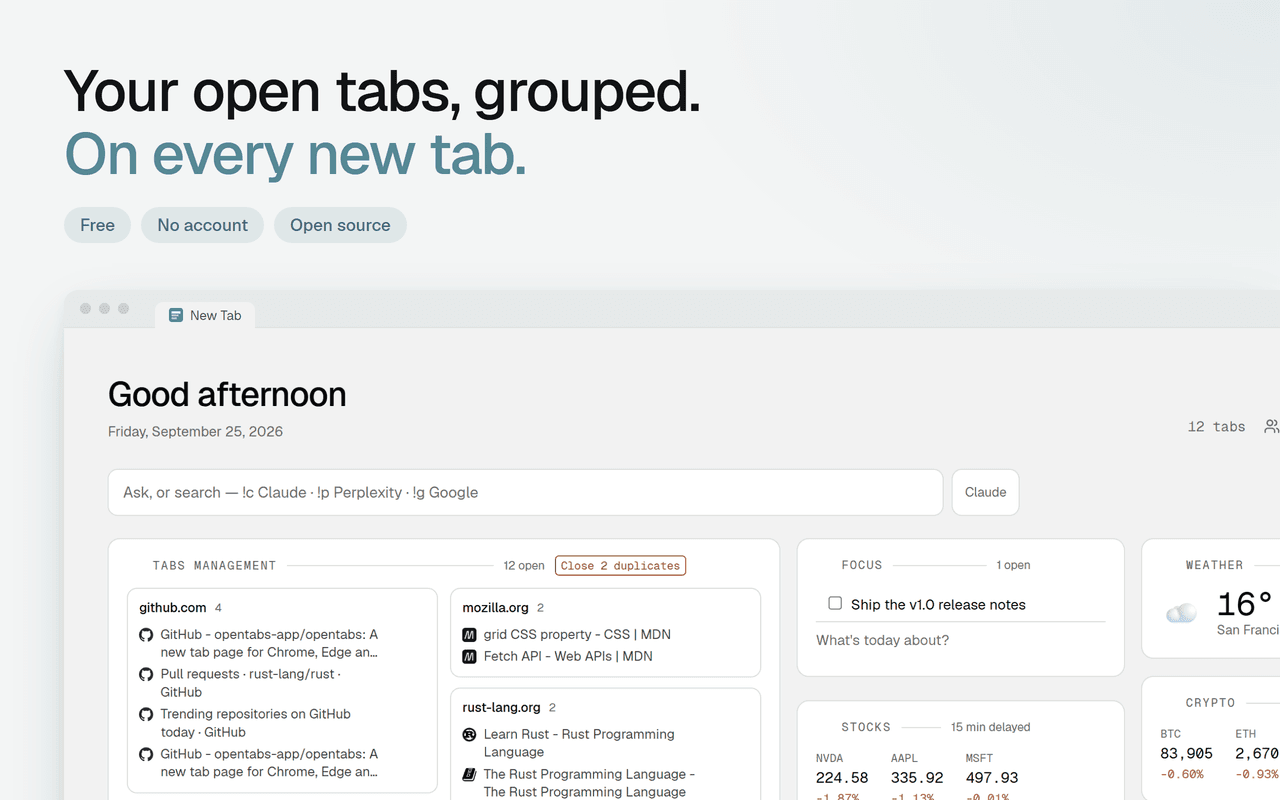
About this app
Most new tab pages show a grid of links you already have bookmarked. OpenTabs shows the tabs you actually have open: grouped by site, sorted by what you touched last, and closable from the page. Duplicate tabs can be closed in one press, and stale New Tab pages are closed on a schedule you set. Above the tabs sits a briefing you assemble yourself. Every group is optional and reorderable: topics from RSS, Hacker News, arXiv, Reddit or an X search, crypto and stock quotes, weather, a to-do list with sub-tasks, and a read-only calendar. Ready-made packs can be installed from the marketplace. The page is about 19 KB and makes no network request when it opens; all fetching happens in the background beforehand. The extension has no account, no analytics and no telemetry, and your configuration stays in your own browser profile. OpenTabs is free, with no paid tier, and open source under AGPL-3.0.
Key features
- 1New tab page showing open tabs grouped by site, with bulk close, duplicate close and scheduled stale-tab cleanup.
- 2Configurable briefing above the tabs: RSS/HN/arXiv/Reddit/X topics, crypto/stock quotes, weather, to-dos, read-only calendar.
- 3~19 KB page with no network request on open; no account, no analytics, no telemetry; AGPL-3.0 open source.
Target customer profile
Drawn from the product itself, not from a survey.
Scout Review
Written by AI from measured evidence, scored out of 100.
OpenTabs is a focused, well-engineered take on the new tab page: instead of a bookmark grid it shows the tabs you actually have open, grouped by site and closable in bulk, above a configurable briefing of RSS, markets, weather, to-dos and calendar. The engineering claims are backed by measurement — Lighthouse 98/100 mobile, a ~19 KB page with no network request on open — and the privacy architecture (no account, no telemetry, local config) is a genuine differentiator. Design is polished but the demo screenshot uses placeholder data, and security headers are solid rather than complete. Against Toby it has a clear wedge but not yet a moat.
Measure by measure
Usability
68One-click install from three browser stores, tabs grouped with zero config, and a nav that always shows the next step. Onboarding is genuinely short; docs depth beyond the FAQ is thin.
Design
70Confident grotesque headline, disciplined type scale and a legible product mockup put it above average. Undercut by 'Example Domain' placeholder data and tiny low-contrast mockup text.
Speed
88Lighthouse 98 mobile / 100 desktop, LCP 2.0s, TBT 0ms. The ~19 KB new tab page that makes no network request on open is a real, test-enforced budget, not marketing.
Security
64HTTPS enforced, frame protection, nosniff, Referrer-Policy, SPF and DMARC present. No HSTS, CSP or Permissions-Policy; no-account architecture genuinely shrinks the attack surface.
Accessibility
80Lighthouse a11y 98/100 with one failing audit (no main landmark). Responsive layout and readable body contrast; no published a11y statement or multi-language support.
Growth
62Real daily-friction problem with a specific wedge (open tabs, not bookmarks), free and open source with a pack marketplace. Early (domain ~0.2 yrs) but the idea has room.
Improvement areas
- Hero mockup uses 'Example Domain' placeholder data, weakening the demo's credibility.
- Missing HSTS, CSP and Permissions-Policy headers; no published security audit or bug bounty.
- No accessibility statement, no multi-language support, and a missing <main> landmark.
- Documentation beyond the FAQ is thin; no deep settings/configuration guide.
Design & Usability
The homepage is well-crafted: a large grotesque headline, a clear cyan primary CTA, and a product mockup that shows the actual grouped-tab layout rather than an abstract illustration. Type hierarchy is disciplined and the 'Free · No account · Open source' badge pre-empts the main objection. The weak spot is the demo itself — the mockup repeats 'Example Domain' and 'example.com', so the screenshot meant to prove grouping reads like a wireframe, and the small low-contrast grey text in the panels is hard to read. Usability is strong on the happy path: one-click install from Chrome, Edge and Firefox, tabs grouped with zero configuration, and a nav that keeps the next step visible. Depth beyond the FAQ is thin.
Speed & Security
Speed is the standout. Lighthouse scores 98 mobile and 100 desktop with LCP 2.0s, CLS 0.08 and TBT 0ms, and the product's own claim — a ~19 KB new tab page that makes no network request on open, enforced by a test suite — is the kind of architectural discipline most extensions skip. Security is competent but not exceptional: HTTPS enforced, frame protection, nosniff, Referrer-Policy, SPF and DMARC all present, but no HSTS, CSP or Permissions-Policy (7/12 on the header probe). The no-account, no-telemetry, config-stays-in-your-profile design genuinely reduces attack surface, which counts for more than a badge. No published audit or bug bounty found.
Accessibility & Growth
Accessibility scores 98/100 on Lighthouse with a single failing audit — the document lacks a main landmark, an easy fix. The site is responsive with readable body contrast, but there is no published accessibility statement and no multi-language support, so it lands at the top of the category-typical band rather than above it. Growth is a judgement on the idea: OpenTabs names a real, daily problem (tab overload) and differentiates from Toby by showing open tabs on the new tab page rather than a bookmark grid, with a free, AGPL-3.0, no-account model and a marketplace of shareable packs. The wedge is real but the moat is thin — Toby is free and entrenched, and 'open source' alone rarely wins mainstream users. Early stage (domain ~0.2 years).
Conclusion
If you live with forty tabs open and hate bookmark managers that show you links you already saved, OpenTabs is worth the install — it is free, fast, and respects your privacy by construction. The gaps are fixable: replace the placeholder mockup data, add a main landmark and the missing security headers, and publish a short accessibility statement. The bigger question is distribution — open source and no-account are principles, not growth engines, and Toby already owns the category's mindshare. OpenTabs wins on craft; it still has to win on reach.
Suggestions for improvement
- Replace 'Example Domain' placeholder data in the hero mockup with realistic tab groups to make the demo credible.
- Add a <main> landmark and the missing HSTS, CSP and Permissions-Policy headers.
- Publish an accessibility statement and consider multi-language support for the extension UI.
- Deepen docs beyond the FAQ — a real settings/configuration guide would shorten time-to-value.
Alternatives comparison
Named competitors, point by point. Nobody paid to appear here or to be left out.
 OpenTabs |  Toby | |
|---|---|---|
| Pricing model | Free, no paid tier, AGPL-3.0 open source | Free tier with paid plans for teams |
| Core new tab content | Open tabs grouped by site, closable in bulk | Saved bookmark collections in a grid |
| Account required | No account; config stays in browser profile | Account required to sync collections |
| Configurable briefing widgets | RSS/HN/arXiv/Reddit/X, markets, weather, to-dos, calendar | Limited; focused on bookmark organization |
| Open source | Yes, AGPL-3.0-or-later | No, proprietary |
| Browser support | Chrome 121+, Edge, Firefox | Chrome, Edge, Firefox, Safari |
Comparing options? See OpenTabs alternatives, scored side by side
More Productivity apps
View all Productivity
Puzzly – B2B Lead Generation & Sales Intelligence Platform
92Puzzly is an all-in-one B2B lead generation platform that...

Qamarero
92An all-in-one hospitality software for restaurants and ba...

EmbedMyReviews
92White-label reputation management software for agencies s...

StoryPad
92Privacy-first open source journal app with a continuous t...

Notion
92All-in-one AI workspace for docs, projects, and knowledge...

The Stack Newsletter
92A weekly newsletter delivering curated tech jobs, intervi...

Vibe Coding Agent Skills
92A free, open-source platform offering 110 AI agent skills...

QRBliss
91Branded QR codes with AI Brand Sync, 15 free dynamic code...

Gerty
91Private, local AI assistant for Mac that runs offline

Strukchad Property Management
91Property management for Kenyan letting agents: rent invoices raised every month, M-Pesa rent prompts to tenants, arrears tracking and landlord statements.

CC Switch
91Open-source desktop app for switching AI coding providers...

PitchWhip
90AI cold call scripts & direct dials from LinkedIn


A platform dedicated to providing unbiased reviews of newly launched applications, analyzing everything from their features to their full potential.
info@scoutforge.net© 2026 Scoutforge. All rights reserved.
