Cycling through all six. Tap any point to stop.
Measured on six things
AI transcription & note-taking app for iPhone with 60 fre...
Growth
60Real problem, three named segments, and a defensible wedge: no sign-up, on-device library, language-switching detection, translation. But it's a crowded category and the wedge is copyable by Otter.
Screenshots
1 / 1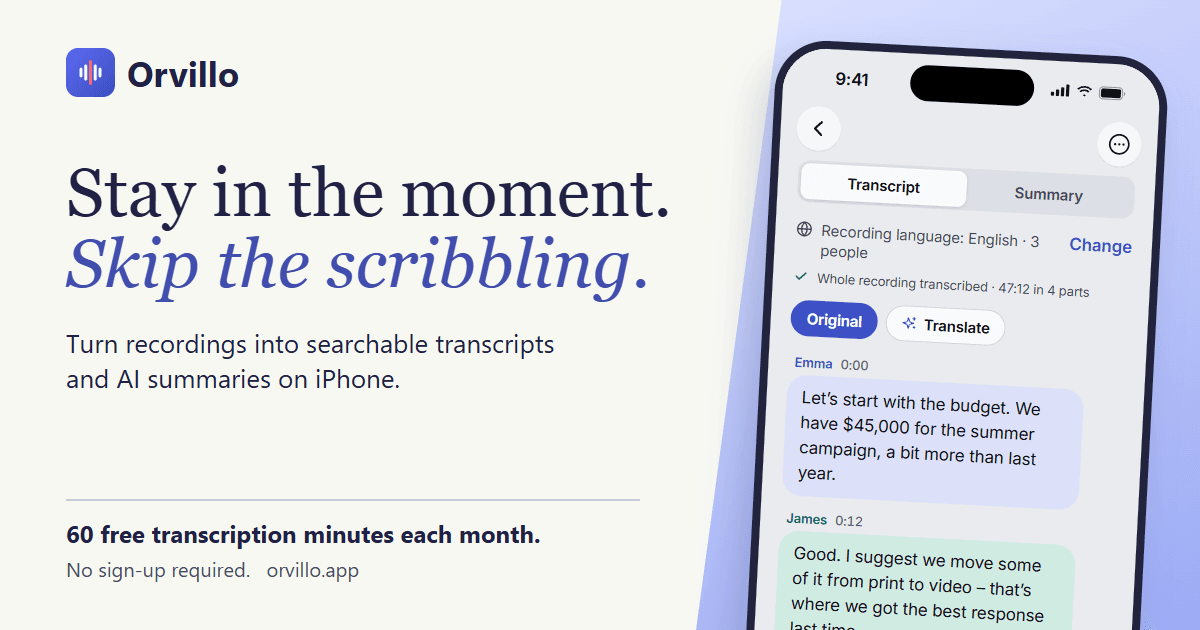
About this app
Orvillo is an AI-powered note-taking assistant for iPhone that turns meetings, lectures, interviews, and voice notes into searchable transcripts and actionable AI summaries. It automatically detects spoken languages, distinguishes speakers with color-coded labels, and generates summaries with key points, conclusions, and follow-up actions. The app offers 60 free transcription minutes per month with no sign-up required, while the Pro tier unlocks 300 minutes, longer recordings, and transcript translation. Privacy is central: recordings stay locally on the device, AI processing happens only with user consent, and no ads or tracking are present.
Key features
- 1On-device recording library with AI transcription, speaker labels and color-coded speaker naming
- 2Automatic spoken-language detection that handles mid-conversation language switches, plus one-tap translation on Pro
- 3AI summaries with key points, conclusions and follow-up actions; search across every recording; TXT/PDF export
Target customer profile
Drawn from the product itself, not from a survey.
Demographic
Busy professionals (managers, consultants, sales reps)
Pain points
Struggle to keep up with meeting notes; forget action items; need searchable records
Primary needs
Accurate meeting transcripts, speaker labels, and AI-generated follow-up actions
Demographic
Students and academics (university, online learners)
Pain points
Difficulty capturing lecture content; language barriers; slow note-taking
Primary needs
Automatic lecture transcription, translation, and easy export to PDF/TXT
Demographic
Journalists and researchers
Pain points
Lengthy interviews require manual transcription; risk of missing key quotes
Primary needs
Fast, accurate interview transcripts, speaker differentiation, and searchable archive
Scout Review
Written by AI from measured evidence, scored out of 100.
Orvillo is a well-built early iOS transcription app with a genuinely thoughtful privacy architecture and a fast, clean marketing site. The app UI is native and confident; the website is competent but template-familiar. Usability is strong out of the gate — no sign-up, 60 free minutes, five import formats, PDF/TXT export, background recording — with the Free tier's 30-minute recording cap as the main friction. Speed is excellent on the site (Lighthouse 100/100, LCP 784ms) though in-app transcription latency is unmeasured. Security is the weak spot: excellent privacy design undermined by HTTPS not enforced, no HSTS, no DMARC, and no third-party audit. Accessibility scores 100/100 on automated checks and ships in 8 languages, but lacks a WCAG statement. Growth is a real problem with a real wedge in a crowded category. A promising v1.1.1 that needs to harden its transport layer before it can credibly sell privacy.
Measure by measure
Usability
68No sign-up, 60 free minutes, clear 3-step flow, FAQ that actually answers pricing and privacy questions, import/export in common formats, and recording that survives a locked phone. Solid onboarding for a v1.1.1 app.
Design
70Judging the app UI and store material: clean iOS-native Library and Recording screens, coherent indigo/red brand, disciplined feature grid. Homepage hero is a familiar AI-app template and store screenshot edges are cropped.
Speed
88Lighthouse mobile 100/100 with LCP 784ms, CLS 0 and TBT 0ms; desktop also 100/100. The marketing site is genuinely fast, though it says nothing about in-app transcription latency.
Security
62Strong privacy posture on paper: local library, consent-gated AI processing, no ads or tracking, no sign-in. But the probe shows HTTPS not enforced and no HSTS, DMARC missing, and no SOC 2, ISO or pen-test claims.
Accessibility
76Lighthouse accessibility 100/100 and the app is localized in 8 languages with 5 site locales. Automated checks only, though — no published WCAG statement or screen-reader notes found in the collected evidence.
Growth
60Real problem, three named segments, and a defensible wedge: no sign-up, on-device library, language-switching detection, translation. But it's a crowded category and the wedge is copyable by Otter.
Improvement areas
- Transport security: HTTPS is not enforced and HSTS is missing; DMARC is absent — fix before selling privacy
- Free tier caps recordings at 30 minutes, which is shorter than a typical meeting; raise or remove it
- No published WCAG statement, screen-reader notes, or third-party security audit to back the 100/100 automated scores
Design & Usability
Orvillo's design is judged on the app itself, and the app holds up: the Library screen is clean iOS-native work with a pill search field, date-grouped rows and a centered floating '+' that makes recording the most obvious action on screen. The Recording screen's single large timer and red pause control are unambiguous. The website is the weaker half — a competent but template-familiar indigo hero with a phone mockup, and store screenshots whose decorative cards get sliced off at the right edge. Usability is the stronger story: no sign-up, 60 free minutes a month, a three-step flow, import in five audio formats, TXT/PDF export, and recording that continues when you lock the phone. The FAQ answers the pricing and privacy questions directly instead of hiding them. The one real friction is the Free tier's 30-minute-per-recording cap in a category where meetings routinely run longer.
Speed & Security
Speed is the cleanest win here. Lighthouse returns 100/100 on mobile with LCP 784ms, CLS 0 and TBT 0ms, and desktop matches at 100/100 — the marketing site is genuinely snappy, not just small. That measures the website, not in-app transcription latency, which has no published benchmark. Security is more mixed. The privacy architecture is thoughtful and specific: the recording library stays local, deleted recordings go to Recently Deleted first, AI processing happens only with consent and the server doesn't store the content, there's no sign-in, and no ads or tracking. That's a better posture than most indie transcription apps. But the HTTP probe shows HTTPS not enforced and no HSTS header, DMARC is missing, and there's no SOC 2, ISO 27001, pen-test report or bug bounty anywhere in the collected evidence. For an app whose entire pitch is 'your recordings belong to you,' the transport layer should not be the soft spot.
Accessibility & Growth
Accessibility scores well on the measurable parts: Lighthouse returns 100/100 on the axe-core audit, the app is localized in 8 languages and the site in 5, and the layout is responsive. What's missing is the un-automatable half — no published WCAG conformance statement, no screen-reader notes, nothing confirming keyboard or VoiceOver behavior through a full transcript workflow. Automated checks catch maybe a third of real barriers. Growth is a judgement on the idea, not the traction. The problem is real and the segments are specific: professionals drowning in meeting notes, students with lectures and language barriers, journalists with hour-long interviews. The differentiators are concrete — no sign-up, on-device library, automatic language detection that survives mid-conversation switches, one-tap translation, speaker naming, vocabulary for correct spellings. That's a genuine wedge and it earns a solid score. The limit is that the category is crowded (Otter, Rev) and the wedge is copyable; Apple Voice Memos is free and already on the phone. The domain is two weeks old and the App Store listing has no ratings yet — early, not disqualifying.
Conclusion
The honest read: Orvillo is doing the hard, unglamorous parts right. Local-first storage, consent-gated AI, no tracking, no sign-up, background recording, five import formats — these are the choices of someone who actually thought about the user's data instead of treating privacy as a landing-page word. The app UI is native and confident, and the site loads in under a second. What holds it back is execution on the edges: a Free tier that caps recordings at 30 minutes in a category where meetings run longer, a transport layer that doesn't enforce HTTPS or send HSTS, no DMARC, and no third-party security audit to back the privacy claims. None of those are hard to fix. Fix them and the pitch stops being a promise and starts being a receipt.
Suggestions for improvement
- Enforce HTTPS with a 301 redirect and add an HSTS header with a long max-age — the probe shows neither is in place.
- Publish a DMARC record and consider a security.txt; both are cheap signals that match the privacy-first positioning.
- Raise or remove the Free tier's 30-minute-per-recording cap — meetings routinely run 45–60 minutes and this is the top friction point.
- Add a WCAG 2.1 AA conformance statement and VoiceOver notes to back the 100/100 automated score with real accessibility evidence.
Alternatives comparison
Named competitors, point by point. Nobody paid to appear here or to be left out.
 Orvillo |  Otter.ai |  Rev Voice Recorder |  Apple Voice Memos | |
|---|---|---|---|---|
| Free tier transcription minutes | 60 min/month, 30 min per recording, no sign-up | 300 min/month, 30 min per conversation | No free transcription; pay-per-minute | Unlimited recording, no transcription |
| AI summaries and follow-up actions | Yes — key points, conclusions, follow-up actions | Yes — OtterPilot summaries and action items | Limited; AI summaries on some plans | No |
| Speaker identification | Yes — color-coded labels, user-assignable names | Yes — speaker labels with naming | Yes on human transcription; AI varies | No |
| Language detection and translation | Auto-detect incl. mid-conversation switches; translation on Pro | Multiple languages; translation limited | Multiple languages; translation not core | No |
| Privacy model | Local library, consent-gated AI, no ads/tracking, no sign-in | Cloud-stored; account required | Cloud/human processing; account required | On-device, Apple iCloud sync |
| Platform availability | iPhone (iOS) only | Web, iOS, Android, desktop | Web, iOS, Android | iOS, macOS, watchOS |
Otter.ai
AI-powered meeting transcription and note-taking with real-time collaboration.
Rev Voice Recorder
Audio recording and transcription service with human and AI options.
Apple Voice Memos
Built-in iPhone app for simple voice recording, no AI transcription or summaries.
Comparing options? See Orvillo alternatives, scored side by side
More Productivity apps
View all Productivity
Puzzly – B2B Lead Generation & Sales Intelligence Platform
92Puzzly is an all-in-one B2B lead generation platform that...

Qamarero
92An all-in-one hospitality software for restaurants and ba...

EmbedMyReviews
92White-label reputation management software for agencies s...

StoryPad
92Privacy-first open source journal app with a continuous t...

Notion
92All-in-one AI workspace for docs, projects, and knowledge...

The Stack Newsletter
92A weekly newsletter delivering curated tech jobs, intervi...

Vibe Coding Agent Skills
92A free, open-source platform offering 110 AI agent skills...

QRBliss
91Branded QR codes with AI Brand Sync, 15 free dynamic code...

Gerty
91Private, local AI assistant for Mac that runs offline

Strukchad Property Management
91Property management for Kenyan letting agents: rent invoices raised every month, M-Pesa rent prompts to tenants, arrears tracking and landlord statements.

CC Switch
91Open-source desktop app for switching AI coding providers...

PitchWhip
90AI cold call scripts & direct dials from LinkedIn


A platform dedicated to providing unbiased reviews of newly launched applications, analyzing everything from their features to their full potential.
info@scoutforge.net© 2026 Scoutforge. All rights reserved.
