Cycling through all six. Tap any point to stop.
Measured on six things
Split oversized PST files by size, year, or folder with e...
Security
41HTTPS enforced and SPF present, but no HSTS, CSP, frame protection, X-Content-Type-Options, Referrer-Policy, Permissions-Policy, secure cookies, or DMARC — 3/13 checklist points. No SOC 2, ISO, or security page published.
Screenshots
1 / 2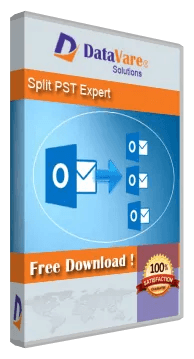
About this app
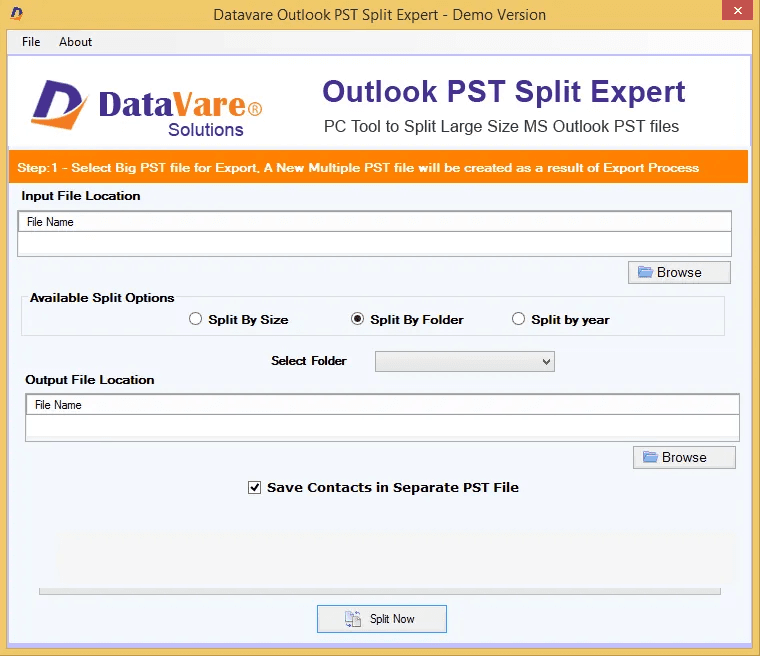
DataVare Outlook PST Split Expert is a reliable and simple-to-use tool for dividing huge Outlook PST files into smaller portions. It has important features that make PST file management easy without technical support. Users can split PST files of different sizes as per their demand, such as size, year, and folder. The program allows for safe processing with 0% data loss and maintains the mailbox's data integrity. Users don't need to have Outlook installed to utilize this application. Its elegant user interface makes the splitting procedure easy for both expert and non-technical users. The program supports ANSI and Unicode PST file formats and is very compatible with Outlook 2021 and prior versions. Works on Windows 11, 10, 8.1, 8, 7, and other compatible Windows systems. There is a free demo version, which allows users to try out the program before purchasing the complete version.
Key features
- 1Split PST files by size (MB/GB), by year range, or by folder (Inbox, Outbox, Notes, Messages).
- 2Supports both ANSI and Unicode PST formats; no Outlook installation required.
- 3Free demo version available; runs on Windows 11, 10, 8.1, 8, 7 and earlier.
Target customer profile
Drawn from the product itself, not from a survey.
Demographic
IT administrators in large enterprises
Pain points
Struggling with oversized PST files causing performance issues and corruption risks
Primary needs
Reliable, fast splitting of PST files without data loss
Demographic
Small business owners managing email archives
Pain points
Limited technical expertise to manually split PST files; risk of data corruption
Primary needs
User-friendly tool to split PST files by size or year
Demographic
Individual users with large personal email archives
Pain points
PST files exceeding size limits leading to Outlook errors
Primary needs
Affordable solution to split PST files safely and easily
Scout Review
Written by AI from measured evidence, scored out of 100.
DataVare Outlook PST Split Expert is a legacy Windows utility wrapped in a dated marketing site. The core promise — split oversized PST files by size, year, or folder without Outlook installed — is real and the free demo lowers the barrier. Speed is genuinely good (desktop 98, mobile 89). But the design is stuck in the Windows 7 era, the docs page is a placeholder, security headers are 3/13, and the category is crowded by SysTools and Stellar. It's a functional tool that hasn't been refreshed in years.
Measure by measure
Usability
58Clear hero CTAs, a free demo, and a four-question FAQ cover the basics, but the docs 'video' page is a heading with no steps or video, and the app UI is a cramped legacy wizard. Functional, not friendly.
Design
44Dated Windows-Forms-era app UI and a homepage with placeholder spec text ('Electronic Via Email', 'Minutes 15'), six near-identical feature cards, and a low-contrast warning banner. Hero CTA and 4.8/5 rating badge are the only polished elements.
Speed
72Lighthouse desktop 98/100 and mobile 89/100 with CLS 0.001 and TBT 0ms — genuinely snappy. Mobile LCP of 3.2s is the one soft spot, sitting above the 2.5s 'good' line.
Security
41HTTPS enforced and SPF present, but no HSTS, CSP, frame protection, X-Content-Type-Options, Referrer-Policy, Permissions-Policy, secure cookies, or DMARC — 3/13 checklist points. No SOC 2, ISO, or security page published.
Accessibility
70Lighthouse a11y 94/100 with two real failures: unnamed buttons and non-sequential headings. English-only, no a11y statement, but the cookie consent panel shows granular preference toggles.
Growth
52Real, specific problem (PST size limits corrupt mailboxes) with concrete differentiators — split by size/year/folder, ANSI+Unicode, no Outlook needed. But SysTools and Stellar already own this niche and Microsoft's auto-archive eats the low end.
Improvement areas
- Placeholder text in the Software Specifications panel ('Electronic Via Email', 'Minutes 15') undermines credibility.
- Docs 'video' page contains no steps or video — needs a real step-by-step guide.
- Security headers at 3/13 (no HSTS, CSP, DMARC, secure cookies) for a tool handling mailbox data.
- Dated Windows Forms UI and low-contrast warning banner on the homepage.
Design & Usability
The homepage is a competent but dated sales page: a purple gradient hero with a 3D box render, a 4.8/5 badge across 330 ratings, and a clear Windows/Mac download split. Below that it falls apart — six feature cards repeat the same idea, the Software Specifications panel ships placeholder text ('Electronic Via Email', 'Minutes 15'), and the app screenshot is a Windows Forms dialog from another era. Usability basics are present: free demo, four-question FAQ, Screens/Video/Docs tabs. But the Docs 'video' page is a heading with no steps and no video, and the wizard UI is cramped. It works; it just doesn't feel cared for.
Speed & Security
Speed is the strongest measured dimension: Lighthouse desktop 98/100, mobile 89/100, CLS 0.001, TBT 0ms. The only blemish is a 3.2s mobile LCP, above the 2.5s 'good' threshold. Security is the weakest: HTTPS is enforced and SPF is set, but the probe found no HSTS, CSP, frame protection, X-Content-Type-Options, Referrer-Policy, Permissions-Policy, secure cookies, or DMARC — 3 of 13 checklist points. No SOC 2, ISO, or security page is published. For a tool that handles entire corporate mailboxes, that's a thin posture, though the site does publish Privacy, Cookie, Legal, Refund, and Terms pages.
Accessibility & Growth
Accessibility scores 94/100 on Lighthouse, with two concrete failures: buttons without accessible names and headings that skip levels. Language support is English-only and there's no accessibility statement, but the cookie consent panel offers granular Necessary/Analytics/Marketing/Functional toggles. Growth is a judgement on the idea: the problem — PST files over 50GB (Unicode) or 2GB (ANSI) corrupting — is real and specific, and the differentiators (split by size, year, folder; ANSI+Unicode; no Outlook install) are concrete. But SysTools Split PST and Stellar Split PST have sold the same feature for years, and Microsoft's built-in auto-archive handles the low end for free. The wedge exists; it just isn't sharp.
Conclusion
If you have a bloated PST and need it split today, this will probably do the job — the demo lets you check before paying. If you're choosing fresh, compare against SysTools and Stellar on price and support, and don't expect a modern experience. The tool works; the polish doesn't.
Suggestions for improvement
- Fix the Software Specifications panel — 'Electronic Via Email' and 'Minutes 15' are placeholder text that should never have shipped.
- Replace the Windows 7-era app screenshot with a modern, high-DPI UI or at least a clean mockup.
- Add HSTS, CSP, X-Content-Type-Options, Referrer-Policy, and DMARC — 3/13 headers is a thin posture for mailbox data.
- Turn the Docs 'video' page into an actual step-by-step guide with screenshots; right now it's a heading and nothing else.
Alternatives comparison
Named competitors, point by point. Nobody paid to appear here or to be left out.
 Outlook PST Split Expert Outlook PST Split Expert |  SysTools Split PST SysTools Split PST |  Stellar Split PST Stellar Split PST | |
|---|---|---|---|
| Split PST by size | Yes — MB or GB | Yes | Yes |
| Split PST by year / date | Yes — year range | Yes | Yes |
| Split PST by folder | Yes | Yes | Yes |
| ANSI and Unicode PST support | Yes | Yes | Yes |
| Outlook installation required | No | No | No |
| Free demo / trial | Yes — free demo | Yes — trial | Yes — trial |
| Platform | Windows 11/10/8.1/8/7 | Windows | Windows |
SysTools Split PST
A popular tool to split large PST files into smaller ones by size, year, folder, or date.
Stellar Split PST
Professional software to split PST files without affecting original data integrity.
Comparing options? See Outlook PST Split Expert alternatives, scored side by side
More Productivity apps
View all Productivity
Qamarero
92An all-in-one hospitality software for restaurants and ba...

The Stack Newsletter
92A weekly newsletter delivering curated tech jobs, intervi...

EmbedMyReviews
92White-label reputation management software for agencies s...

StoryPad
92Privacy-first open source journal app with a continuous t...

Puzzly – B2B Lead Generation & Sales Intelligence Platform
92Puzzly is an all-in-one B2B lead generation platform that...

Notion
92All-in-one AI workspace for docs, projects, and knowledge...

Vibe Coding Agent Skills
92A free, open-source platform offering 110 AI agent skills...

CC Switch
91Open-source desktop app for switching AI coding providers...

username.md
90One verified handle for your online identity, readable by...

What the GIF
89Frame-perfect video-to-GIF maker that runs entirely in yo...

AuditCloser
89White-label website audits that close deals for digital a...

NudgeWin
89Automated quote follow-up for trades and service businesses.


A platform dedicated to providing unbiased reviews of newly launched applications, analyzing everything from their features to their full potential.
info@scoutforge.net© 2026 Scoutforge. All rights reserved.
