Cycling through all six. Tap any point to stop.
Measured on six things
Send a payment link and get paid in 6 minutes on average....
Growth
28Zero verifiable reviews, community mentions, or traction signals after targeted searches. Product exists with Stripe backend and trial offers but shows no measurable adoption.
Screenshots
1 / 1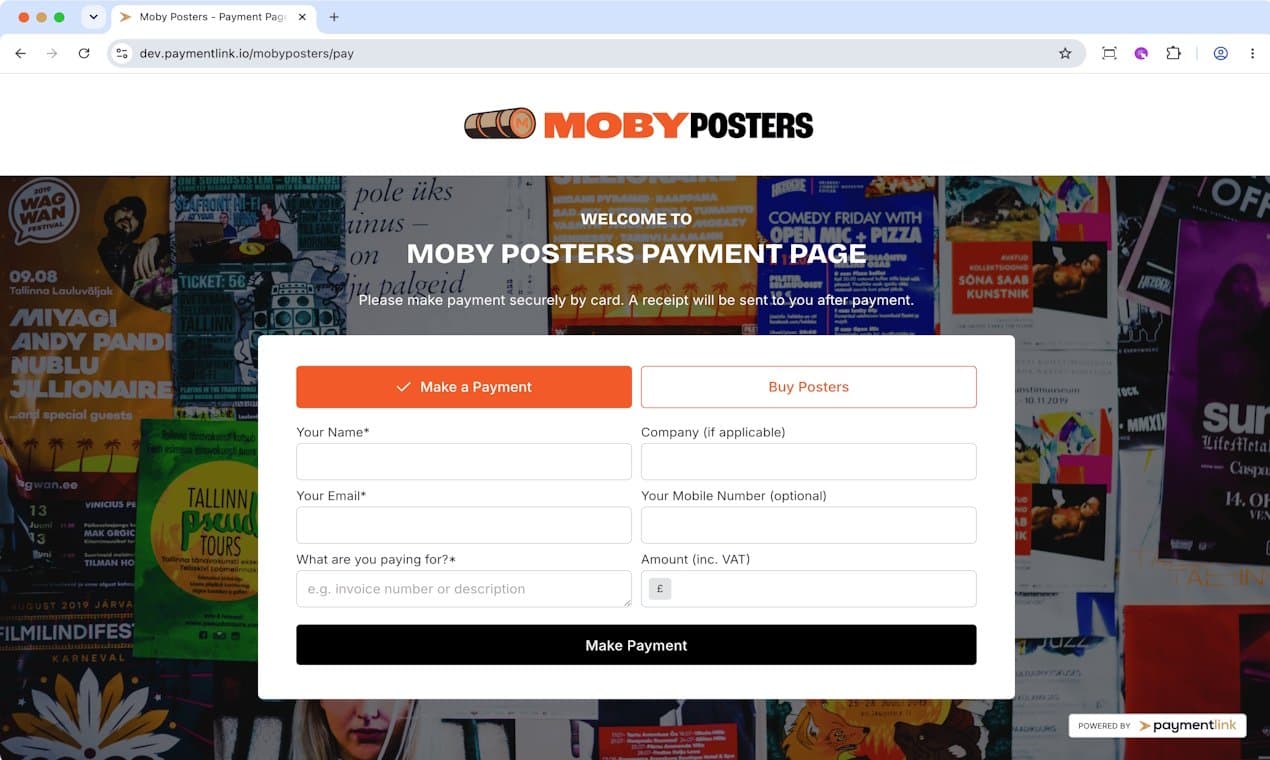
About this app
Payment Link is a game-changer for freelancers, small businesses, and service providers who hate chasing payments. Instead of waiting weeks for invoices to clear, you can now send a simple link via email, text, or WhatsApp, and get paid in minutes. The platform offers four ways to accept payments: a one-time payment request, a dedicated payment page, a micro e-commerce store, and QR codes for in-person transactions. It's built on Stripe, so it supports Apple Pay, Google Pay, and all major credit/debit cards. The setup is dead simple—no technical skills needed—and you get a 30-day free trial without requiring a credit card. I've been using it for my freelance design gigs, and it's dramatically reduced my payment stress. The ability to brand your payment page with your own logo and domain adds a professional touch that clients appreciate.
Key features
- 1Four payment methods: link requests, branded pages, micro e-commerce, QR codes
- 2Stripe-powered with Apple Pay, Google Pay, cards; 30-day trial no card required
- 3Branded URLs, emails, invoices and reporting on paid plans
Target customer profile
Drawn from the product itself, not from a survey.
Demographic
Freelancers (designers, photographers, tutors)
Pain points
Chasing payments, invoicing delays, awkward payment conversations
Primary needs
Get paid instantly, professional payment requests, no friction for clients
Demographic
Small business owners (tradespeople, retailers, agencies)
Pain points
Slow cash flow, outdated payment methods, high transaction friction
Primary needs
Fast and reliable payments, multiple payment options, brandable checkout pages
Demographic
Service providers (driving instructors, personal trainers, influencers)
Pain points
Need payment upfront or immediately after service, customers forget to pay
Primary needs
Easy payment request via link, QR code for in-person, instant settlement
Scout Review
Written by AI from measured evidence, scored out of 100.
Payment Link offers a simple Stripe-powered solution for freelancers and small businesses to request payments via links, pages, stores, or QR codes. The 30-day trial and transparent pricing are positives, but poor mobile speed, incomplete security headers, and zero independent reviews limit confidence. Design and usability are competent for the category yet unremarkable. The platform solves a real pain point around chasing payments but needs measurable improvements in performance, compliance, and social proof to stand out.
Measure by measure
Usability
60Clear 4-method breakdown with examples and videos on homepage; simple trial signup promoted. Pricing is transparent with feature lists. No independent onboarding feedback or help docs located.
Design
55Average visual execution with strong yellow CTA contrast on light purple hero but cluttered poster backgrounds and low-contrast form overlays. Small nav/footer text and disconnected stock photo reduce polish.
Speed
35Mobile Lighthouse 37/100 with 10.4s LCP and high TBT. Desktop 70/100. No user complaints or benchmarks found to contradict lab results.
Security
48HTTPS not enforced and multiple headers missing (HSTS, frame protection, referrer policy). SPF/DMARC present and CSP enabled. No compliance audits or security page found.
Accessibility
58Automated score 87/100 but multiple WCAG failures on buttons, contrast, links, and tables. No accessibility statement or multi-language support mentioned.
Growth
28Zero verifiable reviews, community mentions, or traction signals after targeted searches. Product exists with Stripe backend and trial offers but shows no measurable adoption.
Improvement areas
- Mobile performance (37/100 Lighthouse) and LCP over 10 seconds
- Security headers and HTTPS enforcement missing despite payments focus
- Zero independent reviews or community traction signals
Design & Usability
Payment Link presents a functional landing page with a prominent yellow CTA and clear four-method breakdown (Payment Request, Dedicated Page, Micro E-commerce, QR). The design mixes strong contrast elements with cluttered backgrounds and small navigation text. Usability benefits from straightforward trial signup and feature lists on pricing, yet the absence of any independent user feedback leaves the real onboarding experience unverified. The product positions itself well for freelancers needing quick branded links without technical setup.
Speed & Security
Performance is a clear weak point: mobile Lighthouse scores 37/100 with over 10-second LCP, which will frustrate users on slower connections. Security posture is incomplete—HTTPS is not enforced and several standard headers are missing despite using Stripe for payments. While SPF and DMARC are configured, the lack of published audits or a dedicated security page keeps the score modest. These areas lag behind even basic expectations for a payments tool.
Accessibility & Growth
Accessibility shows mixed signals with an 87/100 automated score undermined by specific failures around contrast, button naming, and table structure. No accessibility statement or language support is evident. Growth metrics are essentially absent—no reviews on major review sites, no community signals, and no visible traction after extensive searches. The product appears early-stage with placeholder trust elements rather than proven adoption.
Conclusion
For users already in the Stripe ecosystem who want quick branded payment options without building their own flows, Payment Link provides an accessible entry point. Stronger evidence of real-world usage and technical hardening would make the offering far more compelling.
Suggestions for improvement
- Add HTTPS enforcement and remaining security headers immediately
- Publish real customer case studies or collect verified reviews
- Optimize hero and form assets to improve mobile LCP below 4s
- Create an accessibility statement and fix contrast/button naming issues
Alternatives comparison
Named competitors, point by point. Nobody paid to appear here or to be left out.
 Payment Link Payment Link |  Square Square |  Stripe Payment Links Stripe Payment Links |  PayPal.Me PayPal.Me | |
|---|---|---|---|---|
| Payment links / requests | Yes - dedicated payment request flow | Yes - via Square Invoices and links | Yes - native Stripe Payment Links | Yes - PayPal.Me links |
| Branded payment pages & custom domain | Yes - pay.yourbusiness.com + logo/colors | Limited - basic branding on invoices | Limited - requires additional setup | No - PayPal branding only |
| QR code in-person payments | Yes - dedicated QR code feature | Yes - via Square POS hardware/app | No native QR | No |
| Micro e-commerce / product store | Yes - unlimited products on landing page | Yes - full Square Online store | No | No |
| Pricing model | $20–95/mo + Stripe fees; 30-day trial | Free + transaction fees; hardware extra | Free with Stripe account + fees | Free + PayPal fees |
Square
Offers payment links, invoicing, and POS systems. More hardware options but less specialized for link-based payments.
Stripe Payment Links
Directly from Stripe. Similar but requires more setup; Payment Link adds a user-friendly dashboard and branding.
PayPal.Me
Simple link-based payments but limited to PayPal accounts and less professional appearance.
Comparing options? See Payment Link alternatives, scored side by side
Sources
What the review was written against. A verdict with no sources is an opinion.
More Payment Methods apps
View all Payment Methods
Giftronaut
87.5gift card software, international gift card, international visa gift card, gift card API

Budy
83Cannabis dispensary POS and management software. Per-gram scale pricing, strain tracking, AI product scanner, compliance logs, full offline mode.

CryptoCardHub
82A comprehensive directory for comparing cryptocurrency debit and credit cards worldwide, simplifying fee and reward analysis.

Avenum
82Avenum is a self-checkout app that streamlines retail shopping with QR code scanning and payments.

Skins.cash
80Trade CS:GO skins instantly for cash or crypto.

NoDial
80NoDial combats appointment no-shows with refundable deposits, integrating Calendly and Stripe for seamless booking and automated refunds.

MatSync
79MatSync is martial arts club software from Poland, European Union: memberships, Stripe billing, class bookings, attendance and belt progression, with a free plan for up to 30 students and native iOS/Android member apps.

Bitcoin Loans Market
78Independent comparison of Bitcoin-backed loans and yield ...

Payflo
78Transformez vos devis BTP en signatures et paiements auto...

Ducat Protocol
74Borrow stablecoins against BTC on Bitcoin L1 with zero in...

SecurePutCalls
74Purpose-built options analytics for Wheel Strategy trader...

ConnectPay
71All-in-one embedded finance platform for online businesses.


A platform dedicated to providing unbiased reviews of newly launched applications, analyzing everything from their features to their full potential.
info@scoutforge.net© 2026 Scoutforge. All rights reserved.
