Cycling through all six. Tap any point to stop.
Measured on six things
Convert MBOX files to PST format in bulk, preserving data...
Design
58Long, dense marketing page with feature blocks and client logos. The Windows app UI is the real product; the site is functional but dated and cluttered, on par with typical converter-tool peers.
Screenshots
1 / 2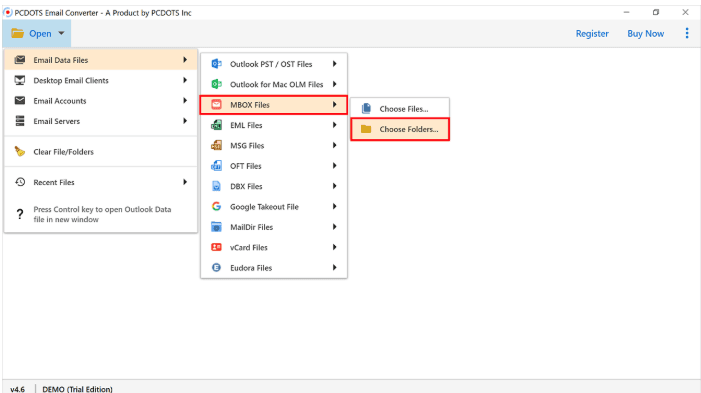
About this app
PCDOTS MBOX to PST Converter is a robust and user-friendly software designed to simplify the migration from MBOX-based email clients to Microsoft Outlook PST format. Whether you're switching from Thunderbird, Apple Mail, Eudora, or any other MBOX-compatible client, this tool ensures a seamless transition without the need for Outlook installation. It supports batch conversion, preserving folder hierarchy and all email metadata, including attachments, read/unread status, and timestamps. The intuitive interface makes it accessible even for non-technical users, while advanced features like email filtering and preview modes cater to power users. With compatibility across all Windows versions and a free trial, it's a reliable choice for individuals and businesses looking to consolidate their email data into Outlook. SEO keywords: MBOX to PST converter, email migration tool, Thunderbird to Outlook, batch conversion, PST file converter, email data preservation.
Key features
- 1Batch MBOX to PST conversion without requiring Outlook to be installed on the machine.
- 2Preserves folder hierarchy, attachments, headers (To/Cc/Bcc/From/Subject) and read/unread metadata.
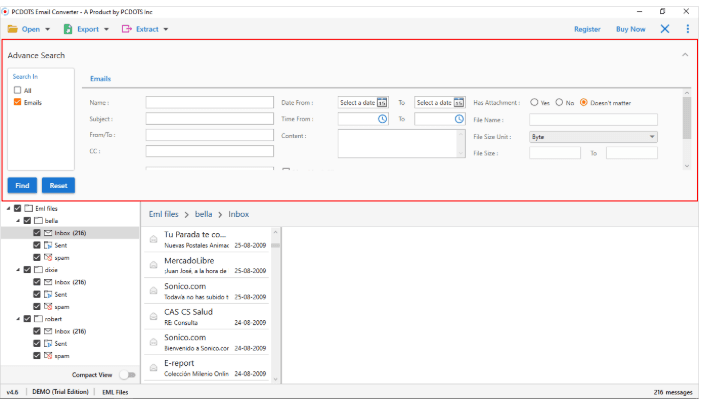
- 3Advanced filtering by keyword, date, and To/Cc/Bcc/Subject fields, plus five preview modes (Content, Properties, Header, Hex, Raw).
Target customer profile
Drawn from the product itself, not from a survey.
Demographic
IT professionals and system administrators
Pain points
Manual conversion is time-consuming and error-prone.
Primary needs
Efficient bulk conversion with data integrity.
Demographic
Small business owners
Pain points
Migrating email archives without technical expertise.
Primary needs
User-friendly tool with reliable support.
Demographic
Individuals switching from Thunderbird to Outlook
Pain points
Losing email metadata and folder structure.
Primary needs
Seamless conversion preserving all email elements.
Scout Review
Written by AI from measured evidence, scored out of 100.
PCDOTS MBOX to PST Converter is a Windows desktop utility for moving MBOX archives (Thunderbird, Apple Mail, Eudora, Google Takeout) into Outlook PST format without installing Outlook. The site is a dense, dated marketing page with a step-by-step guide that is genuinely better than the landing page deserves. Speed is the standout: 93 mobile / 99 desktop Lighthouse. Security is solid on headers (10/12) but unaudited. Accessibility has five real Lighthouse failures despite the 91 score. The idea is sound and the wedge — standalone, batch, metadata-preserving — is real, but the category is crowded with established paid tools. A competent, unremarkable entry in a niche where competence is the price of admission.
Measure by measure
Usability
68Publishes a genuine step-by-step guide covering four load paths and five preview modes, plus a video tutorial and free download. Onboarding is clearer than most peers in this niche.
Design
58Long, dense marketing page with feature blocks and client logos. The Windows app UI is the real product; the site is functional but dated and cluttered, on par with typical converter-tool peers.
Speed
78Lighthouse mobile 93/100 (LCP 3.2s, CLS 0, TBT 50ms) and desktop 99/100. LCP on mobile is the weak spot, but the site is otherwise fast and stable.
Security
72HTTPS enforced with HSTS, CSP, frame protection and Referrer-Policy (10/12 probe points). Permissions-Policy and DMARC are missing; no SOC 2 or audit claim published.
Accessibility
68Lighthouse a11y 91/100, but five real failures: unnamed progressbar, low contrast, no main landmark, SVG without alt text, mismatched labels. No WCAG statement published.
Growth
58Real, recurring migration pain with a specific wedge (standalone, no Outlook install, batch + metadata preservation). Niche is crowded with paid incumbents and the wedge is copyable.
Improvement areas
- No published security audit (SOC 2/ISO) or DMARC record despite handling email archives.
- Five Lighthouse accessibility failures: unnamed progressbar, low contrast, missing main landmark, SVG alt text, label mismatch.
- The '4.5 based on 1035 reviews' badge is unsourced, which undermines trust rather than building it.
Design & Usability
The site is a long-form converter landing page: feature blocks, supported-client logos, a '4.5 based on 1035 reviews' badge with no visible source, and a GUI screenshot showing a left sidebar plus a multi-mode preview panel. It is functional and on par with the niche, but visually dated and cluttered — the kind of page that assumes you already decided to buy. Usability is the stronger half: /guide.html is a genuine step-by-step walkthrough covering four ways to load data (files, desktop clients, accounts, servers) and five preview modes (Content, Properties, Header, Hex, Raw), plus a video tutorial and a free download. Onboarding is clearer than most peers here.
Speed & Security
Speed is a real strength. Lighthouse mobile performance lands at 93/100 with CLS 0, TBT 50ms and FCP 1.2s; desktop hits 99/100. The only soft spot is a 3.2s mobile LCP, which is fine for a marketing page of this weight. Security is solid-but-not-audited: the probe confirms HTTPS enforced with HSTS, CSP, frame protection, X-Content-Type-Options and Referrer-Policy — 10 of 12 checklist points. Missing are Permissions-Policy and a DMARC record, and no SOC 2, ISO or pen-test claim appears anywhere on the site. For a paid Windows utility handling email archives, that is table-stakes security without the paperwork.
Accessibility & Growth
Accessibility scores 91/100 on Lighthouse, but the failing audits are the interesting part: an ARIA progressbar with no accessible name, insufficient color contrast, no main landmark, SVG elements with an img role and no text alternative, and visible labels that do not match accessible names. No WCAG statement or multi-language support is published. Growth is a judgement on the idea: MBOX-to-PST migration is a real, recurring problem with a specific buyer (Thunderbird/Apple Mail/Eudora users moving to Outlook), and the product's wedge is standalone operation without an Outlook install plus batch conversion with metadata preservation. That is a genuine differentiator, but the niche already has paid incumbents — Aid4Mail, SysTools, Stellar — and the wedge is copyable. Room to grow, no moat.
Conclusion
If you need MBOX-to-PST conversion and you want a tool that does not require Outlook installed, this does the job and the guide will get you through it. If you want audits, an accessibility statement, or a reason to pick it over Aid4Mail or Stellar beyond price, keep looking. The product is fine. Fine is the whole review.
Suggestions for improvement
- Publish the source for the '4.5 based on 1035 reviews' badge — an unlinked rating is a trust liability, not a trust signal.
- Add a Permissions-Policy header and a DMARC record to close the two remaining security-probe gaps.
- Fix the five Lighthouse a11y failures: name the progressbar, add a main landmark, give SVGs alt text, and raise contrast.
- Add a comparison page against Aid4Mail, SysTools and Stellar that states the actual differentiator in one line.
Alternatives comparison
Named competitors, point by point. Nobody paid to appear here or to be left out.
 PCDOTS MBOX to PST Converter |  Aid4Mail |  SysTools MBOX to PST Converter |  Stellar Converter for MBOX | |
|---|---|---|---|---|
| MBOX to PST conversion | Yes — core function, batch supported | Yes — plus many other format pairs | Yes — core function | Yes — MBOX to PST, PDF and more |
| Requires Outlook installed | No — standalone per site claim | No — standalone | No — standalone | No — standalone |
| Batch conversion of multiple MBOX files | Yes — 'Choose Folder' batch mode | Yes — batch supported | Yes — batch supported | Yes — batch supported |
| Email filtering / search before conversion | Yes — keyword, date, To/Cc/Bcc/Subject filters | Yes — filtering options available | Yes — date and field filters | Yes — filter and preview options |
| Free trial available | Yes — free download offered | Yes — trial available | Yes — trial available | Yes — trial available |
| Platform support | Windows (all recent and older versions) | Windows and macOS | Windows | Windows and macOS |
Aid4Mail
A versatile email conversion tool that supports MBOX to PST along with many other formats.
SysTools MBOX to PST Converter
A popular tool for converting MBOX files to PST with support for multiple email clients.
Stellar Converter for MBOX
Professional software to convert MBOX files to PST, PDF, and other formats with advanced options.
Comparing options? See PCDOTS MBOX to PST Converter alternatives, scored side by side
More Productivity apps
View all Productivity
Puzzly – B2B Lead Generation & Sales Intelligence Platform
92Puzzly is an all-in-one B2B lead generation platform that...

Qamarero
92An all-in-one hospitality software for restaurants and ba...

EmbedMyReviews
92White-label reputation management software for agencies s...

StoryPad
92Privacy-first open source journal app with a continuous t...

Notion
92All-in-one AI workspace for docs, projects, and knowledge...

The Stack Newsletter
92A weekly newsletter delivering curated tech jobs, intervi...

Vibe Coding Agent Skills
92A free, open-source platform offering 110 AI agent skills...

QRBliss
91Branded QR codes with AI Brand Sync, 15 free dynamic code...

Gerty
91Private, local AI assistant for Mac that runs offline

Strukchad Property Management
91Property management for Kenyan letting agents: rent invoices raised every month, M-Pesa rent prompts to tenants, arrears tracking and landlord statements.

CC Switch
91Open-source desktop app for switching AI coding providers...

PitchWhip
90AI cold call scripts & direct dials from LinkedIn


A platform dedicated to providing unbiased reviews of newly launched applications, analyzing everything from their features to their full potential.
info@scoutforge.net© 2026 Scoutforge. All rights reserved.
