Cycling through all six. Tap any point to stop.
Measured on six things
AI-powered tool to create professional book indexes from ...
Design
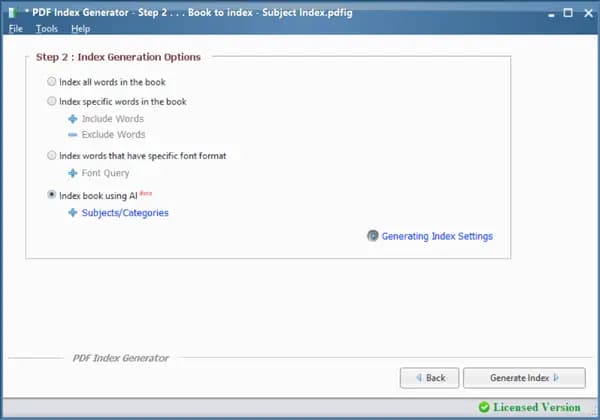
44Dated homepage with a rainbow paint-drip hero unrelated to indexing, five competing colours, a clipped logo strip and a wall-of-text intro. The desktop app's step panels are clearer than the marketing site.
Screenshots
1 / 6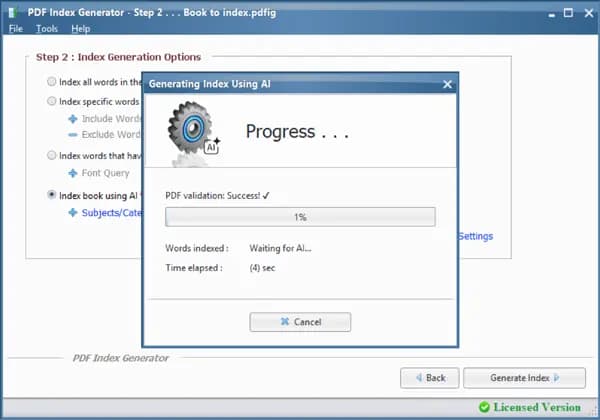
About this app
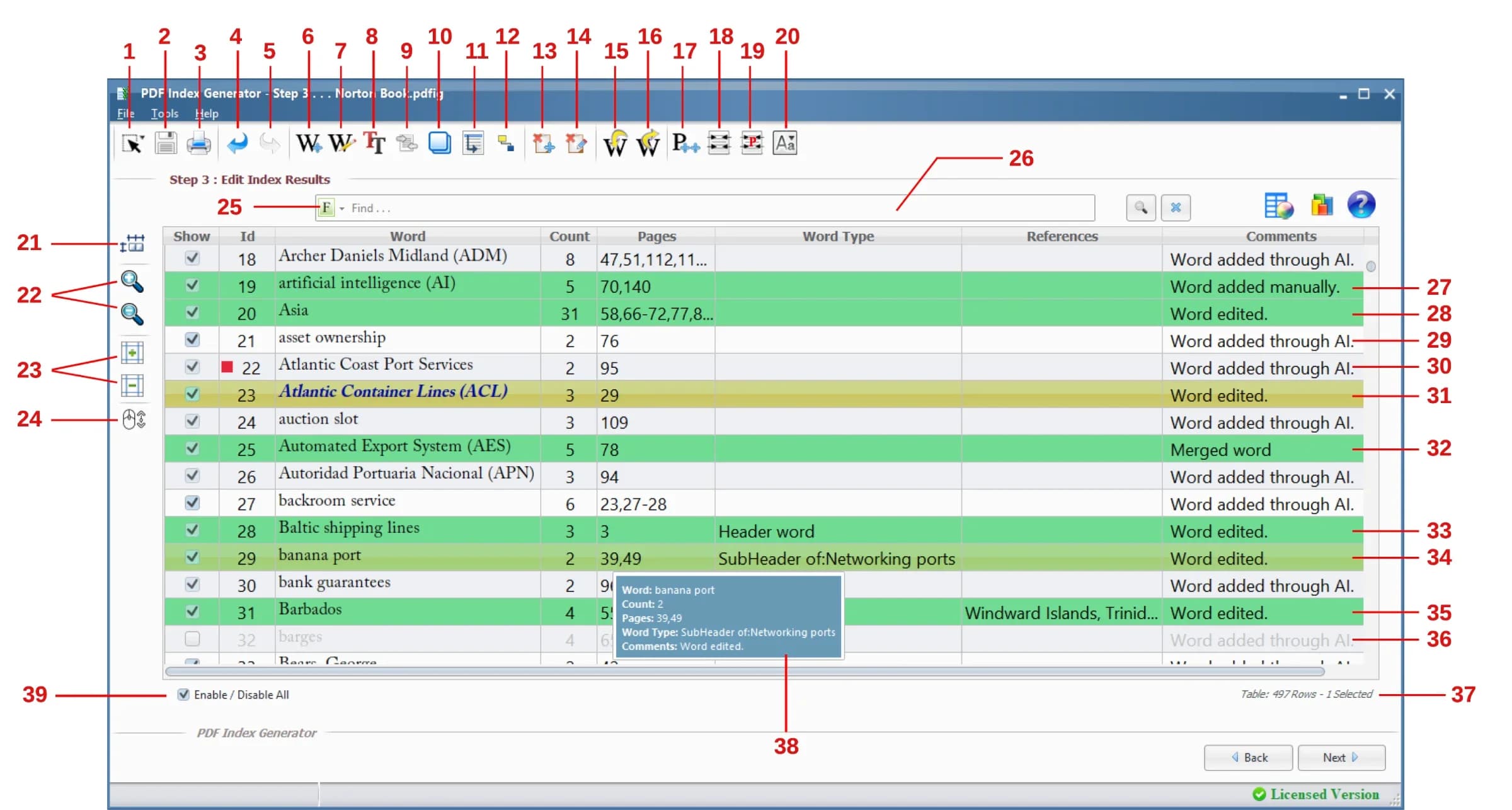
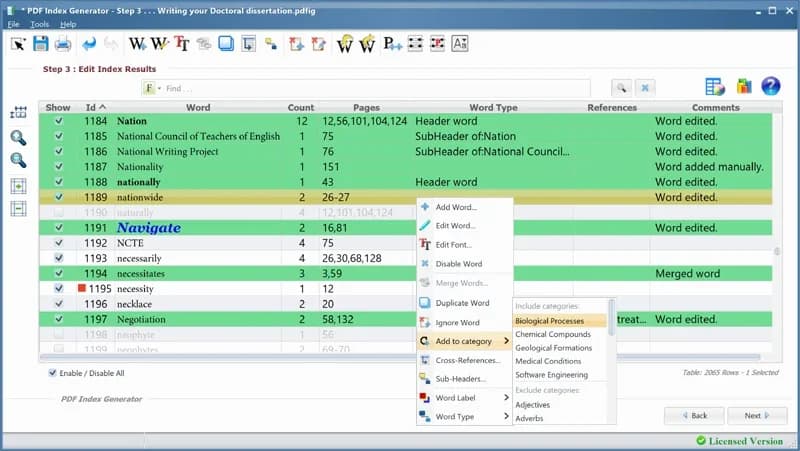
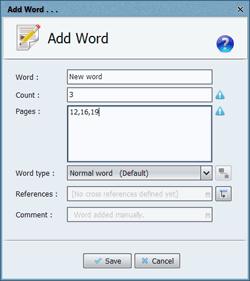
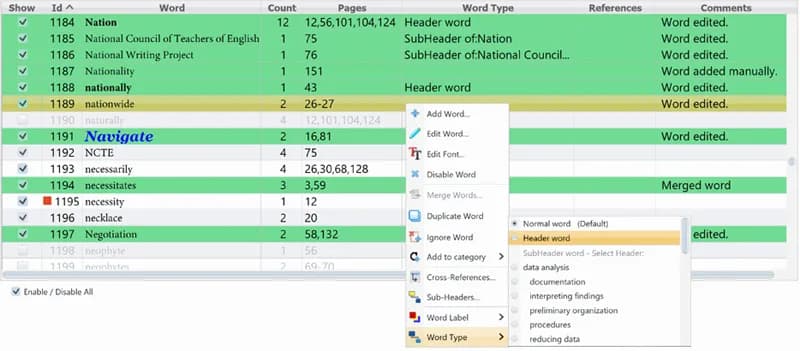
PDF Index Generator is a powerful AI-driven utility that automates the creation of back-of-book indexes. It parses your PDF, intelligently identifies index-worthy terms, and generates a formatted index in just four steps. With both Classic Mode (rule-based) and AI Mode (context-aware), it handles headers, sub-headers, cross-references, and custom fonts with ease. The tool outputs indexes to PDF or DOCX, offers multiple templates, and supports indexing via term lists, regular expressions, or font formats. Trusted by authors, publishers, and academics for over a decade, it also provides a professional indexing service for those who prefer expert help. Version 3.7 is now available, making indexing faster and more accurate than ever.
Key features
- 1AI Mode extracts index-worthy terms contextually; Classic Mode uses rule-based indexing.
- 2Index via term lists, regular expressions or font formats, with header/sub-header and cross-reference handling.
- 3Outputs formatted indexes to PDF or DOCX using multiple templates and custom fonts.
Target customer profile
Drawn from the product itself, not from a survey.
Demographic
Self-publishing authors
Pain points
Manual indexing is time-consuming and tedious; lack of professional indexing skills.
Primary needs
Affordable, automated solution to create professional indexes quickly.
Demographic
Academic and textbook publishers
Pain points
Large volumes of books require consistent, high-quality indexes; tight deadlines.
Primary needs
Scalable, AI-powered indexing that maintains accuracy and speed.
Demographic
Small publishing houses
Pain points
Limited budget for dedicated indexing staff; need for cost-effective tools.
Primary needs
User-friendly software with templates and customization options.
Scout Review
Written by AI from measured evidence, scored out of 100.
PDF Index Generator is a long-running, genuinely useful utility for a narrow job: turning a PDF into a formatted back-of-book index. The 4-step workflow is clear, the AI mode is a real differentiator against manual Cindex, and the trial-then-buy path is easy to find. What holds it back is presentation and trust signals: a dated, colour-cluttered homepage with a paint-drip hero, no documentation or help centre linked from the site, a progress dialog that gives no ETA, and a security posture missing most modern headers and any compliance certification. It works, but it looks and feels older than its AI claims.
Measure by measure
Usability
62Clear 4-step workflow, trial and buy CTAs above the fold, and a video overview. But the progress dialog shows '1%' with no ETA, and no help centre or docs are linked from the homepage.
Design
44Dated homepage with a rainbow paint-drip hero unrelated to indexing, five competing colours, a clipped logo strip and a wall-of-text intro. The desktop app's step panels are clearer than the marketing site.
Speed
57Lighthouse mobile 73/100 (LCP 2.1s, TBT 608ms) and desktop 82/100. LCP is fine but 608ms of main-thread blocking keeps mobile from feeling snappy.
Security
52HTTPS enforced, secure cookies, SPF and DMARC present, but no HSTS, CSP, frame protection or Referrer-Policy (5/13 checklist). No SOC 2, ISO or pen-test claims found.
Accessibility
70Lighthouse accessibility 92/100, but contrast failures, non-sequential headings and undersized touch targets remain. No WCAG statement or multi-language support visible on the site.
Growth
58A real, narrow problem (back-of-book indexing) with a genuine AI wedge over manual Cindex and basic Acrobat. Long-running domain and a services arm, but the market is niche and the positioning is dated.
Improvement areas
- Dated, colour-cluttered homepage with an unrelated hero image and clipped logo strip.
- No linked documentation or help centre; progress dialog gives no time estimate.
- Missing modern security headers and any compliance/security page.
Design & Usability
The homepage looks like it was last redesigned when the domain was registered in 2009. A full-width rainbow paint-drip graphic dominates the first screen and has nothing to do with indexing; below it, purple, green, red and blue compete for attention, and the customer logo strip is clipped at the right edge. The intro is one justified paragraph of eight lines. Usability is better than design: the 4-step workflow is spelled out, the trial and order buttons sit right under the hero, and a short video explains the product. But the app's progress dialog shows '1%' and 'Waiting for AI...' with no estimate, and the homepage links no help centre or documentation — only a Contact Us page and a refund policy.
Speed & Security
Measured Lighthouse performance is 73/100 on mobile (LCP 2.1s, TBT 608ms) and 82/100 on desktop. The largest contentful paint is acceptable, but 608ms of total blocking time means the mobile page stutters while scripts run. Security is the weak spot: HTTPS is enforced and cookies are secure, SPF and DMARC are present, but the site sends no HSTS, CSP, frame protection, X-Content-Type-Options, Referrer-Policy or Permissions-Policy — five of thirteen checklist items. No SOC 2, ISO 27001 or penetration-test claims appear anywhere on the site, and there is no dedicated privacy or security page beyond the license and refund policy.
Accessibility & Growth
Automated accessibility scores 92/100, but the audit still flags insufficient colour contrast, headings out of sequential order, and touch targets that are too small or too close together — consistent with the small grey caption text visible across the homepage and the app's status labels. No WCAG conformance statement or multi-language support is offered. Growth is a judgement on the idea: back-of-book indexing is a real, tedious problem, and the AI mode plus term-list, regex and font-format indexing give it a genuine edge over Cindex's manual entry and Acrobat's basic tools. The 17-year-old domain and 'hundreds of books' indexing service show staying power, but the market is narrow and the dated presentation limits how far the wedge can carry it.
Conclusion
If you index books for a living or self-publish regularly, the tool earns its keep — the AI mode and template system save real hours, and the professional indexing service is a sensible fallback. Go in expecting a functional desktop utility wrapped in a 2009-era website, not a polished SaaS. The trial is the right way to test whether the AI extraction matches your book's vocabulary before paying.
Suggestions for improvement
- Replace the rainbow paint-drip hero with a clear screenshot or sample index page that shows what the product actually produces.
- Add a help centre or documentation section with step-by-step guides and a sample output index for each template.
- Add HSTS, CSP, frame protection and Referrer-Policy headers, and publish a short security/privacy page.
- Give the progress dialog an estimated time remaining and a log of what the AI is doing, not just '1%'.
Alternatives comparison
Named competitors, point by point. Nobody paid to appear here or to be left out.
 PDF Index Generator |  Adobe Acrobat Pro | Cindex | |
|---|---|---|---|
| AI-powered automatic term extraction | Yes — AI Mode plus Classic rule-based mode | No — basic indexing, no AI automation | No — manual entry only |
| Index output formats | PDF and DOCX with multiple templates | PDF-centric, limited index formatting | Professional index formats, export options |
| Ease of use / learning curve | 4-step workflow, trial available | Familiar interface, indexing is basic | Steeper learning curve, manual entry |
| Pricing model | Paid license with free trial; AI credits for AI mode | Subscription | One-time license |
Adobe Acrobat Pro
Offers basic indexing features but lacks AI automation and advanced customization.
Cindex
Professional indexing software but requires manual entry and steeper learning curve, with no AI ability.
Comparing options? See PDF Index Generator alternatives, scored side by side
More Productivity apps
View all Productivity
Puzzly – B2B Lead Generation & Sales Intelligence Platform
92Puzzly is an all-in-one B2B lead generation platform that...

Qamarero
92An all-in-one hospitality software for restaurants and ba...

EmbedMyReviews
92White-label reputation management software for agencies s...

StoryPad
92Privacy-first open source journal app with a continuous t...

Notion
92All-in-one AI workspace for docs, projects, and knowledge...

The Stack Newsletter
92A weekly newsletter delivering curated tech jobs, intervi...

Vibe Coding Agent Skills
92A free, open-source platform offering 110 AI agent skills...

QRBliss
91Branded QR codes with AI Brand Sync, 15 free dynamic code...

Gerty
91Private, local AI assistant for Mac that runs offline

Strukchad Property Management
91Property management for Kenyan letting agents: rent invoices raised every month, M-Pesa rent prompts to tenants, arrears tracking and landlord statements.

CC Switch
91Open-source desktop app for switching AI coding providers...

PitchWhip
90AI cold call scripts & direct dials from LinkedIn


A platform dedicated to providing unbiased reviews of newly launched applications, analyzing everything from their features to their full potential.
info@scoutforge.net© 2026 Scoutforge. All rights reserved.
