Cycling through all six. Tap any point to stop.
Measured on six things
PDF2TEXT converts PDFs, scans and photos into editable text and structured data. For bank statements, review transactions beside the original, check balances and export to Excel, CSV, JSON or accounting formats. Preview the first page free, then choose pay-once or monthly options.
Growth
62Real, specific pain (PDF/scan/statement → editable text + accounting exports) with a pay-once wedge and QuickBooks/Xero/OFX exports. Differentiated but crowded category; headroom exists but no moat.
Screenshots
1 / 1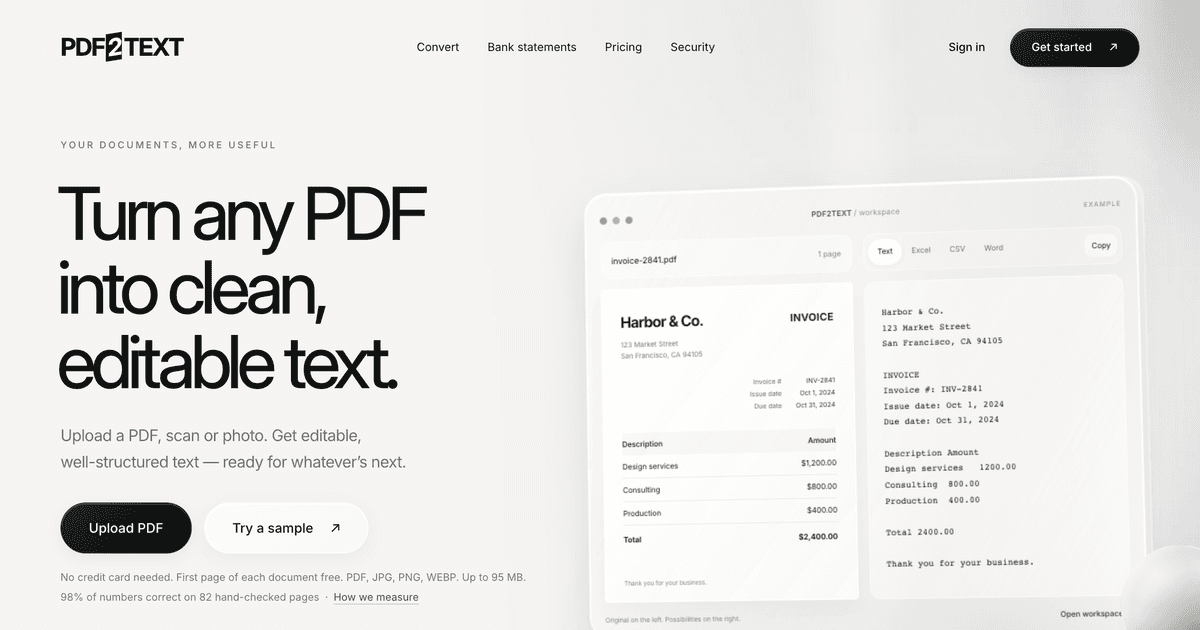
About this app
PDF2TEXT converts PDFs, scans and photos into editable text and structured data. For bank statements, review transactions beside the original, check balances and export to Excel, CSV, JSON or accounting formats. Preview the first page free, then choose pay-once or monthly options.
Key features
- 1Converts PDFs, scans and photos into editable text, Word, Excel, CSV and JSON.
- 2Bank-statement workflow with balance checks and QuickBooks, Xero and OFX exports.
- 3Pay-once page packs ($9 for 25 pages) alongside monthly plans from $19.
- 4First page free with no sign-up; interactive sample documents to try first.
Target customer profile
Drawn from the product itself, not from a survey.
Demographic
People converting PDFs, scans, photos and bank statements
Pain points
Information is stored in PDF documents, scans or photos.
Primary needs
Review transactions beside the original and export to Excel, CSV, JSON or accounting formats.
Scout Review
Written by AI from measured evidence, scored out of 100.
PDF2TEXT is a well-executed, clearly positioned PDF-and-statement converter. The landing page demonstrates the product instead of describing it, onboarding is genuinely low-friction (first page free, no sign-up, interactive samples), and the pay-once pricing plus accounting exports give it a real reason to exist next to DocuClipper and Docsumo. Speed is above average (86 mobile / 93 desktop), security is competent but unaudited (10/13 headers, no CSP, no SOC 2), and accessibility is good on the audit but has contrast and touch-target failures. Growth potential is solid but not spectacular — a specific wedge in a crowded category.
Measure by measure
Usability
68Low-friction onboarding: first page free with no sign-up, interactive sample documents, and a clear split between pay-once and monthly plans. Docs include a comparison page. Solid but not exceptional.
Design
71Polished, modern landing page with a hero mockup that actually demonstrates invoice-to-table output. Clear hierarchy and consistent cards; minor issues with thin mockup borders and lightweight pricing cards.
Speed
70Lighthouse mobile 86/100 (LCP 2.9s, CLS 0.027, TBT 243ms) and desktop 93/100. Layout is stable and loads quickly; some main-thread work but well within acceptable range.
Security
74HTTPS enforced with HSTS, frame protection, secure cookies, SPF and DMARC. Missing CSP and Permissions-Policy (10/13 header checks). Privacy claims are clear but no published audit or SOC 2 found.
Accessibility
70Lighthouse accessibility 93/100 with multi-language support and responsive layout. Failing audits on color contrast and touch target sizing keep it from the top of the band; no published a11y statement.
Growth
62Real, specific pain (PDF/scan/statement → editable text + accounting exports) with a pay-once wedge and QuickBooks/Xero/OFX exports. Differentiated but crowded category; headroom exists but no moat.
Improvement areas
- No CSP or Permissions-Policy header; no published SOC 2, ISO or pen-test report.
- Lighthouse accessibility failures on color contrast and touch target sizing.
- Pricing cards on the homepage lack visual weight compared to the rest of the page.
- Nav grouping ('Bank statements', 'Security' beside 'Pricing') is slightly confusing.
Design & Usability
PDF2TEXT's landing page is a cut above the average converter site: the hero mockup shows an invoice turning into a clean table, the copy is restrained, and the three-step flow and use-case rows keep density low. The visual audit flagged thin mockup borders and small UI text that degrade at narrow viewports, plus pricing cards that feel bolted on. Usability is the stronger story — first page free with no sign-up, interactive sample documents for invoices, bank statements and research notes, and a pricing page that clearly separates pay-once page packs from monthly plans. The nav grouping ('Bank statements' and 'Security' beside 'Pricing') is a small oddity, but the path from landing to first converted page is short and obvious.
Speed & Security
Measured Lighthouse scores are solid: 86/100 mobile (LCP 2.9s, CLS 0.027, TBT 243ms) and 93/100 desktop, with a very stable layout. That's above-average for a converter site and consistent with a lean front end. Security is competent but not audited: HTTPS with HSTS, frame protection, secure cookies, SPF and DMARC are all in place, but there's no CSP and no Permissions-Policy (10/13 header checks), and no published SOC 2, ISO or pen-test report was found. The site's privacy messaging ('Never sold. Deletion on request.') is clear, and first-party telemetry is disclosed with an opt-in for analytics cookies — good transparency, but the compliance paperwork isn't public.
Accessibility & Growth
Accessibility scores 93/100 on Lighthouse with multi-language support and a responsive layout, but the failing audits — insufficient color contrast and undersized touch targets — are the two most common real-world accessibility complaints, and no a11y statement was found. Growth is the more interesting question: PDF2TEXT targets a specific, real pain (converting PDFs, scans, photos and bank statements into editable text and accounting exports) and differentiates on pay-once page packs ($9 for 25 pages) plus QuickBooks, Xero and OFX exports — a genuine wedge against DocuClipper's subscription model and Docsumo's sales-call onboarding. The category is crowded and the moat is thin, but the positioning is specific enough to win a segment.
Conclusion
If you convert PDFs or bank statements regularly and don't want another subscription, PDF2TEXT is worth a try — the free first page and interactive samples make the decision cheap. If you need enterprise compliance paperwork or deep workflow automation, Docsumo is still the safer bet. For everyone in between, this is a competent, honest tool with a pricing model that respects your wallet.
Suggestions for improvement
- Add a Content-Security-Policy and Permissions-Policy header to close the two remaining security gaps.
- Fix the color-contrast and touch-target failures flagged by Lighthouse — they're the most common real-world a11y complaints.
- Publish an accessibility statement and, if possible, a security/compliance page (SOC 2 or pen-test summary).
- Give the pricing cards more visual weight on the homepage so they don't feel tacked on.
Alternatives comparison
Named competitors, point by point. Nobody paid to appear here or to be left out.
 PDF2TEXT PDF2TEXT |  DocuClipper DocuClipper | |
|---|---|---|
| Pricing model | Pay-once page packs ($9/25 pages) or monthly from $19 | Subscription-based plans |
| Free trial | First page free, no sign-up; 5 free pages weekly with account | Free trial available |
| Accounting exports | QuickBooks, Xero, OFX, Excel, CSV, JSON | Accounting exports supported |
| Bank statement workflow | Balance checks, saved mappings, validation, review workspace | Bank statement conversion |
| Setup required | None — upload and convert | Account setup required |
Comparing options? See PDF2TEXT alternatives, scored side by side
More Productivity apps
View all Productivity
Qamarero
92An all-in-one hospitality software for restaurants and ba...

The Stack Newsletter
92A weekly newsletter delivering curated tech jobs, intervi...

EmbedMyReviews
92White-label reputation management software for agencies s...

StoryPad
92Privacy-first open source journal app with a continuous t...

Puzzly – B2B Lead Generation & Sales Intelligence Platform
92Puzzly is an all-in-one B2B lead generation platform that...

Notion
92All-in-one AI workspace for docs, projects, and knowledge...

Vibe Coding Agent Skills
92A free, open-source platform offering 110 AI agent skills...

CC Switch
91Open-source desktop app for switching AI coding providers...

username.md
90One verified handle for your online identity, readable by...

What the GIF
89Frame-perfect video-to-GIF maker that runs entirely in yo...

AuditCloser
89White-label website audits that close deals for digital a...

NudgeWin
89Automated quote follow-up for trades and service businesses.


A platform dedicated to providing unbiased reviews of newly launched applications, analyzing everything from their features to their full potential.
info@scoutforge.net© 2026 Scoutforge. All rights reserved.
