Cycling through all six. Tap any point to stop.
Measured on six things
Free open-source PDF editor for Windows, Mac, Linux, and ...
Speed
58Lighthouse mobile 69/100 with a 5.0s LCP and 318ms TBT; desktop 82/100. The 13 MB WASM demo is a real first-load cost, though it caches afterward and CLS is a clean 0.
Screenshots
1 / 1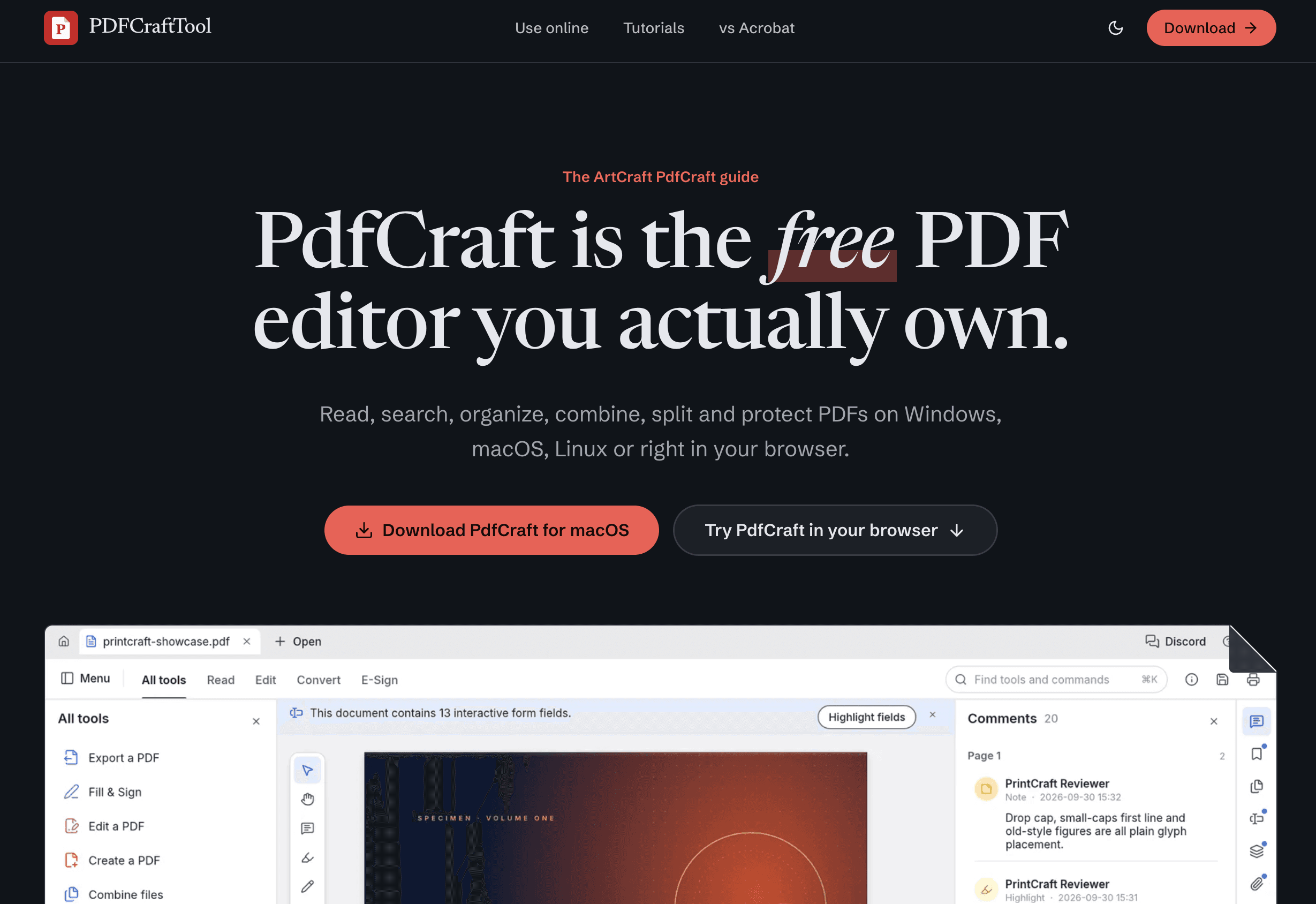
About this app
PdfCraft is a free, open-source PDF workbench built in Rust by the ArtCraft team. It runs natively on Windows, macOS, Linux, and FreeBSD, and also as a WebAssembly app in any modern browser. The app covers everyday PDF tasks: viewing, searching, commenting, filling forms, adding basic digital signatures, organizing pages, combining and splitting documents, opening password-protected files, and redacting sensitive content. Every save is incremental and atomic, so your original file bytes are never overwritten. PdfCraft is not yet a full Acrobat replacement—reliable text editing, Office conversion, and non-Latin OCR are still on the roadmap—but for reading, annotating, form filling, and page management it is already a capable alternative. The app is privacy-first: no account, no telemetry, no cloud, and the web version processes files entirely in your browser. Downloads are code-signed on Windows, notarized on Mac, and available via a separate guide site (PDFCraftTool.org).
Key features
- 1Native Rust PDF workbench for Windows, macOS, Linux, FreeBSD, plus a WebAssembly browser build.
- 2View, search, comment, fill forms, basic digital signatures, organize/merge/split pages, redact, open encrypted PDFs.
- 3Privacy-first: no account, no telemetry, no cloud; atomic incremental saves preserve original file bytes.
- 4Open source (MIT/Apache-2.0), code-signed Windows builds, notarized macOS builds, CLI and MCP server access.
Target customer profile
Drawn from the product itself, not from a survey.
Demographic
Students and home users
Pain points
Subscription fatigue for occasional PDF tasks
Primary needs
Free, no-account PDF reading, form filling, and merging
Demographic
Linux and FreeBSD desktop users
Pain points
Adobe Acrobat does not support their platform
Primary needs
A modern native PDF editor with proper packages
Demographic
Privacy-conscious teams (legal, healthcare, finance)
Pain points
Cloud PDF tools leak confidential files
Primary needs
Offline, no-telemetry editing with redaction and encryption
Demographic
Developers and AI agents
Pain points
Scripting PDF edits is tedious and error-prone
Primary needs
CLI and MCP server access to inspect, edit, and split PDFs
Scout Review
Written by AI from measured evidence, scored out of 100.
PdfCraft is an early-stage, open-source PDF workbench with a genuinely distinctive marketing site and a credible privacy-first pitch. The homepage shows the real app, offers a live WASM demo, and links downloads directly to signed GitHub releases with per-platform install guides. Measured performance is middling on mobile (69/100, 5.0s LCP) and accessibility sits at 90/100 with fixable markup failures. Security headers are solid but HTTPS isn't enforced and DMARC is missing. The product's real bet is platform coverage and offline, no-telemetry editing for users Adobe prices out or ignores — a specific, defensible niche rather than a full Acrobat replacement.
Measure by measure
Usability
68Strong path to value: prominent download CTA, direct GitHub release links, per-platform install guides, and a real in-browser WASM demo. Readability suffers from long grey body text and tiny captions.
Design
70Distinctive editorial homepage with serif headline, red accent, and a real app mockup in the hero. Undermined by uneven feature cards, tiny cropped screenshots, and a blurred demo that reads as locked.
Speed
58Lighthouse mobile 69/100 with a 5.0s LCP and 318ms TBT; desktop 82/100. The 13 MB WASM demo is a real first-load cost, though it caches afterward and CLS is a clean 0.
Security
76Solid header hygiene (HSTS, CSP, frame protection, Referrer/Permissions-Policy) and a privacy-first no-telemetry model, plus signed/notarized builds. Gaps: HTTPS not enforced, no DMARC, no published audit or security page.
Accessibility
70Lighthouse a11y 90/100 with real but fixable failures: unlabeled form elements and invalid list markup. No WCAG statement or a11y page published, though the app itself renders twelve writing systems.
Growth
62Real, specific wedge: Linux/FreeBSD coverage, offline no-telemetry editing, open-source Rust, and CLI/MCP for developers. Category is crowded and the editing depth lags Acrobat, capping how far it carries.
Improvement areas
- Enforce HTTPS and add DMARC; publish a security page or audit once out of alpha.
- Fix accessibility failures: labeled form inputs and valid list markup.
- Improve mobile performance (5.0s LCP) and reduce the 13 MB WASM first-load cost.
- Polish the feature grid: consistent card heights and legible screenshots; un-blur the live demo.
Design & Usability
PdfCraft's site has a real point of view: a high-contrast serif headline with an italic 'free' and a red highlight stroke, a coherent single-accent palette, and a hero that shows the actual desktop UI instead of an abstract blob. The download CTA is the loudest thing on the page and the browser alternative sits right beside it, with buttons linking straight to GitHub releases. Usability is carried by substance: per-platform install guides, a real WASM demo you can drop a PDF into, and a candid callout separating this project from an unrelated same-named tool. The cracks are execution-level — uneven feature cards with unreadably small cropped screenshots, long grey body text, and a blurred demo overlay that makes working software look locked.
Speed & Security
Speed is the weakest measured dimension. Lighthouse mobile lands at 69/100 with a 5.0s LCP and 318ms TBT; desktop is a healthier 82/100 and CLS is a clean 0. The 13 MB WASM demo is a genuine first-load cost, though it caches afterward. Security is stronger than most indie tools: HSTS, CSP, frame protection, Referrer-Policy and Permissions-Policy are all present, SPF is configured, and the privacy model (no account, no telemetry, no cloud) is backed by signed Windows builds and notarized macOS builds. The gaps are HTTPS not being enforced, no DMARC record, and no published audit, security page, or bug bounty — reasonable for alpha software, but worth closing as it matures.
Accessibility & Growth
Accessibility scores 90/100 on Lighthouse, which is above average, but the failing audits are concrete: form elements without associated labels and invalid list markup (li outside list parents, non-li children inside lists). No WCAG conformance statement or dedicated a11y page is published. On growth, the idea holds up better than most: it names specific underserved segments — Linux and FreeBSD desktop users Adobe ignores, privacy-conscious legal/healthcare/finance teams, and developers who want CLI/MCP access — and backs them with a native Rust clean-room build, offline editing, atomic incremental saves, and an MIT/Apache-2.0 license. The limit is depth: text editing, Office conversion, and non-Latin OCR are still roadmap items, so the wedge is platform coverage and privacy rather than capability. That is a real wedge, but a narrow one.
Conclusion
If you need to read, annotate, fill, merge, or redact PDFs on Linux, FreeBSD, or a machine that never touches the cloud, PdfCraft is already worth a download — it is free, open source, and the browser demo lets you test it in under a minute. If you need reliable text editing, Office conversion, or non-Latin OCR, wait: those are roadmap items, and the project itself labels the build alpha. The site's biggest self-inflicted wound is presentation — blurring the live demo and shrinking feature screenshots undersells a product that is more capable than its own marketing makes it look.
Suggestions for improvement
- Enforce HTTPS with a redirect and add a DMARC record to complete the email/transport security posture.
- Fix the failing a11y audits: associate labels with form inputs and correct the list markup on the homepage.
- Un-blur the in-browser demo or replace the overlay with a clear 'click to load' state so it doesn't read as locked.
- Standardize feature-card heights and use larger, legible screenshots instead of tiny cropped thumbnails.
Alternatives comparison
Named competitors, point by point. Nobody paid to appear here or to be left out.
 PdfCraft |  Adobe Acrobat |  PDFCraftTool/pdfcraft | |
|---|---|---|---|
| Price | Free, open source ($0 on every platform, no account) | $14.99–$24.99 per month subscription | Free, open-source browser tool collection |
| Platform support | Windows, macOS, Linux, FreeBSD, plus WebAssembly in browser | Windows, macOS, iOS, Android; no Linux desktop | Browser only (Next.js web app) |
| Text editing & Office conversion | Not yet — reliable text editing and Office conversion on roadmap | Advanced text editing and Office conversion included | Single-purpose tools (merge, split, convert); no full editor |
| Privacy / offline | Offline native app, no telemetry, no cloud; browser version processes locally | Cloud-connected with account; document cloud sync | Browser-based; processing depends on the specific tool |
| Open source | Yes — MIT / Apache-2.0, source on GitHub | No — proprietary | Yes — open-source Next.js project |
Adobe Acrobat
Industry-standard PDF editor with advanced text editing, Office conversion, and signature workflows, but costs $14.99–$24.99 per month and lacks Linux support.
PDFCraftTool/pdfcraft
A separate browser-based collection of single-purpose PDF tools built with Next.js by a different team; shares only a similar name with ArtCraft's PdfCraft.
Comparing options? See PdfCraft alternatives, scored side by side
More Productivity apps
View all Productivity
Puzzly – B2B Lead Generation & Sales Intelligence Platform
92Puzzly is an all-in-one B2B lead generation platform that...

Qamarero
92An all-in-one hospitality software for restaurants and ba...

EmbedMyReviews
92White-label reputation management software for agencies s...

StoryPad
92Privacy-first open source journal app with a continuous t...

Notion
92All-in-one AI workspace for docs, projects, and knowledge...

The Stack Newsletter
92A weekly newsletter delivering curated tech jobs, intervi...

Vibe Coding Agent Skills
92A free, open-source platform offering 110 AI agent skills...

QRBliss
91Branded QR codes with AI Brand Sync, 15 free dynamic code...

Gerty
91Private, local AI assistant for Mac that runs offline

Strukchad Property Management
91Property management for Kenyan letting agents: rent invoices raised every month, M-Pesa rent prompts to tenants, arrears tracking and landlord statements.

CC Switch
91Open-source desktop app for switching AI coding providers...

PitchWhip
90AI cold call scripts & direct dials from LinkedIn


A platform dedicated to providing unbiased reviews of newly launched applications, analyzing everything from their features to their full potential.
info@scoutforge.net© 2026 Scoutforge. All rights reserved.
