Cycling through all six. Tap any point to stop.
Measured on six things
Private on-device pickleball technique coach with honest ...
Security
52HTTPS enforced with HSTS and SPF, and on-device analysis is a real privacy win. But only 5/12 security headers present — no CSP, frame protection, or DMARC — and no SOC 2, pen-test, or bug bounty claims found.
Screenshots
1 / 3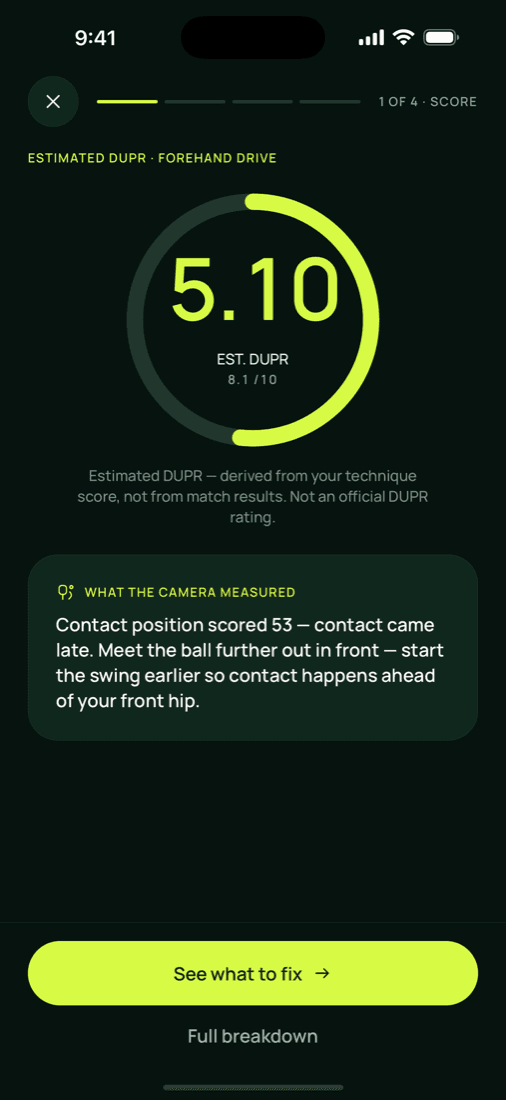
About this app
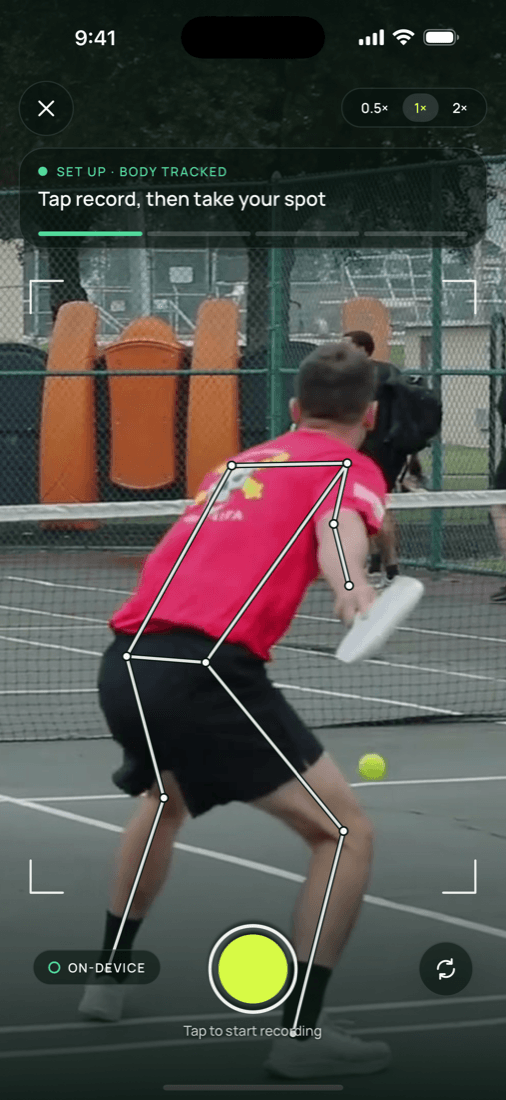
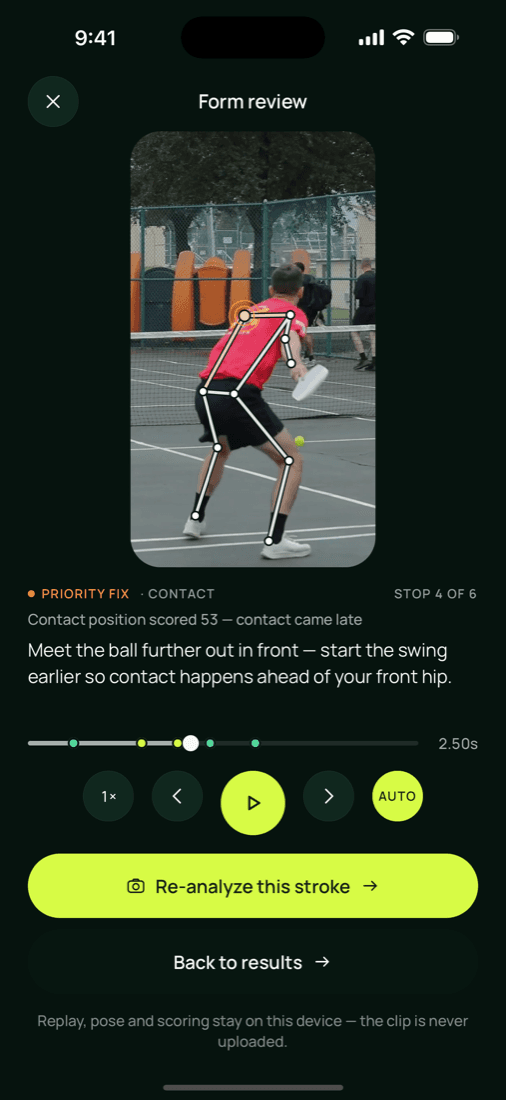
Pickle Sensei is a private, on-device pickleball technique coach that turns your phone into a personal stroke analyst. Instead of juggling a shot picker or timer, you simply set the phone down and play — pose-guided automatic capture handles the rest. The app analyzes either a single movement (Stroke Analysis) for deep feedback or full rallies (Session Analysis) stroke by stroke, then delivers one clear next step rather than a wall of confusing metrics. Every read is broken into honest, per-technique scores covering paddle preparation, contact point, follow-through, and recovery stance, and only validated analyses count toward your numbers, so unscored attempts never drag you down. A progression system lets you climb from Bronze to Diamond based on the genuine average of your validated reads, while a searchable drill library and Live Court checks (camera plus model availability) keep your practice focused. Best of all, everything runs on your device — no account is required to try i...
Key features
- 1On-device pose-guided automatic capture — set the phone down and play, no shot picker or timer required.
- 2Per-technique scoring for paddle preparation, contact point, follow-through, and recovery stance, with validated reads only.
- 3Bronze-to-Diamond player rank progression based on the honest average of validated analyses.
- 4Stroke Analysis (single movement) and Session Analysis (full rallies, stroke by stroke) modes.
- 5Searchable drill library plus Live Court checks for camera and model availability.
Target customer profile
Drawn from the product itself, not from a survey.
Demographic
Recreational pickleball players (30-60) who play weekly but never had formal coaching
Pain points
Unsure why shots keep failing; no coach to diagnose faults; generic YouTube tips don't fit their game
Primary needs
Clear, specific feedback on one stroke at a time and a simple next step to practice
Demographic
Competitive amateur players chasing a higher DUPR rating and tournament results
Pain points
Plateaued technique; inconsistent paddle prep and follow-through under pressure; no objective progress tracking
Primary needs
Honest per-technique scoring, player rank progression, and validated reads that reflect real improvement
Demographic
Privacy-conscious fitness and sports tech users who avoid cloud-based video apps
Pain points
Uncomfortable uploading personal video to servers; dislike accounts and data harvesting
Primary needs
On-device analysis, no-account trial, and opt-in reminders that never expose names or scores
Scout Review
Written by AI from measured evidence, scored out of 100.
Pickle Sensei is a private, on-device pickleball technique coach that turns your phone into a stroke analyst. The pitch is sharp and the execution on the marketing side is solid: a clean dark site, transparent pricing, a no-account trial with two free validated reads, and a genuinely differentiated privacy story — everything runs locally, videos never leave the phone. The scoring model is thoughtful too: per-technique breakdowns (paddle prep, contact, follow-through, recovery), validated-reads-only so failed attempts don't drag your average, and a Bronze-to-Diamond progression tied to your real mean. Speed is excellent (94 mobile / 99 desktop Lighthouse). The weak spots are back-of-house: security headers are half-configured with no DMARC or CSP, there's no published compliance or audit, no docs or help center, and no accessibility statement despite a perfect automated score. For an early-stage app, that's a normal profile — strong product idea, thin operational scaffolding.
Measure by measure
Usability
68No-account trial with two free validated reads and a set-phone-down flow keeps onboarding friction low. Pricing is on the homepage. No docs, help center, or live demo is linked, which limits self-serve support.
Design
72Clean dark single-page site with bold uppercase headlines and a clear mock scorecard (paddle prep 82, contact 74, follow-through 61, recovery 47). App UI itself isn't viewable from the site, so this judges the marketing surface.
Speed
82Lighthouse mobile 94/100 (LCP 2.5s, CLS 0, TBT 0ms) and desktop 99/100. The marketing site is light and snappy; no user complaints about lag found.
Security
52HTTPS enforced with HSTS and SPF, and on-device analysis is a real privacy win. But only 5/12 security headers present — no CSP, frame protection, or DMARC — and no SOC 2, pen-test, or bug bounty claims found.
Accessibility
78Lighthouse accessibility 100/100 with high-contrast dark theme and large type. No WCAG statement, a11y page, or multi-language support published, and automated audits only cover part of WCAG.
Growth
62Real, specific problem (no coach, generic YouTube tips) aimed at a fast-growing sport, with a clear privacy-first wedge vs. cloud video tools. Early stage, but the idea has room.
Improvement areas
- Security headers are half-configured (5/12) with no CSP, frame protection, or DMARC; no published audit or bug bounty.
- No docs, help center, or live demo linked from the site, leaving users without self-serve support.
- No accessibility statement or WCAG conformance claim despite a perfect automated Lighthouse score.
- Homepage shows a mock scorecard rather than real app screenshots or a demo of the capture flow.
Design & Usability
Pickle Sensei's marketing site is a tidy dark single-pager with punchy uppercase headlines and a mock scorecard that previews exactly what the app delivers: per-technique scores for paddle prep, contact point, follow-through, and recovery stance. It's a clean, confident surface, though it's marketing rather than the app UI itself, so the actual in-app design can't be judged from here. Usability is where the product's pitch shines: no account required to try, two free validated reads, and a flow that's literally 'set the phone down and play' — no shot picker, no timer. Pricing is transparent on the homepage ($7.99/mo, $59.99/yr, $159.99 lifetime). The gap is support: there's no linked docs, help center, or live demo, so a confused user has nowhere obvious to go beyond the app itself.
Speed & Security
Speed is a genuine strength. Google Lighthouse measured 94/100 on mobile (LCP 2.5s, CLS 0, TBT 0ms) and 99/100 on desktop — the marketing site is light, stable, and fast, with no user complaints about lag surfacing anywhere. Security is more mixed. The good: HTTPS is enforced with HSTS, SPF is configured, and the core product claim — analysis runs on-device, videos stay on your phone — is a meaningful privacy posture that most cloud video-analysis competitors can't match. The less good: the header probe found only 5 of 12 checklist items, with no CSP, no frame protection, no X-Content-Type-Options, no Referrer-Policy, no Permissions-Policy, and no DMARC. There's also no published SOC 2, ISO, pen-test, or bug bounty. For an early-stage consumer app that's not alarming, but the site's own hardening lags behind the privacy story it's selling.
Accessibility & Growth
Accessibility scores well on the automated side: Lighthouse returned a perfect 100/100, and the site's high-contrast dark theme with large headline type is easy to read. What's missing is the paper trail — no accessibility statement, no WCAG conformance claim, no multi-language support, and no published detail on keyboard or screen-reader behavior. Automated audits catch maybe a third of real WCAG issues, so 100/100 is encouraging, not conclusive. On growth, the idea holds up. Pickleball is one of the fastest-growing recreational sports, and the target — weekly players aged 30-60 who never had formal coaching and are tired of generic YouTube tips — is specific and underserved. The wedge against the listed alternatives (PB Vision, OnForm, Hudl Technique) is clear: those are cloud video-review tools, while Pickle Sensei is on-device, no-account, and auto-capturing. The honest limit is adoption friction: propping a phone on a fence and trusting an app's 'validated' score is a behavior change, and the category is getting crowded.
Conclusion
If you're a recreational player who's plateaued and doesn't want to upload sweaty rally footage to someone's cloud, Pickle Sensei is aimed squarely at you, and the free two-read trial costs nothing but a fence-propped phone. The on-device approach is the right call for a category full of video-upload tools, and the 'one clear next step' framing beats a dashboard of twelve metrics you'll never act on. Before paying $59.99/yr, though, test whether the automatic capture actually fires reliably in your court lighting and whether the validated-read gate feels honest or just stingy. The product's biggest risk isn't the idea — it's whether the app's real-world capture is as smooth as the landing page promises. Try the free reads, check the drill library, and see if the feedback changes a shot before you commit.
Suggestions for improvement
- Publish a help center or docs page — right now there's no linked support resource beyond the app itself.
- Add the missing security headers (CSP, X-Content-Type-Options, Referrer-Policy, Permissions-Policy) and configure DMARC.
- Post an accessibility statement and WCAG conformance level to back up the perfect Lighthouse score.
- Show real app screenshots or a short demo clip on the homepage so users can see the in-app experience before installing.
Alternatives comparison
Named competitors, point by point. Nobody paid to appear here or to be left out.
 Pickle Sensei |  PB Vision |  OnForm |  Hudl Technique | |
|---|---|---|---|---|
| Analysis location (on-device vs. cloud) | On-device; videos never leave the phone | Cloud-based AI analysis of uploaded recordings | Cloud video review and coach feedback | Cloud storage and frame-by-frame review |
| Account required to try | No account required; two free validated reads | Account/app install required | Account required | Account required |
| Automatic capture (no manual shot picking) | Pose-guided automatic capture; no shot picker or timer | Records play; manual review of swings | Manual recording and clip tagging | Manual recording and frame-by-frame scrubbing |
| Per-technique scoring and progression | Scores paddle prep, contact, follow-through, recovery; Bronze-to-Diamond rank | Swing feedback; no published rank progression | Coach feedback and side-by-side comparison; no rank system | Frame-by-frame technique breakdown; no scoring or rank |
| Pricing model | Free tier; Pro $7.99/mo, $59.99/yr, $159.99 lifetime | App Store pricing; subscription/free tier varies | Subscription-based; team/coach plans | Subscription-based; team pricing available |
PB Vision
An AI-powered pickleball stroke analysis app that records your play and provides swing feedback for technique improvement.
OnForm
A video analysis and coaching app used across sports, letting athletes record, review, and compare technique with coach feedback.
Hudl Technique
A slow-motion video analysis app for athletes and coaches to break down technique frame by frame across multiple sports.
Comparing options? See Pickle Sensei alternatives, scored side by side
More Health & Wellness apps
View all Health & Wellness
StoryPad
92Privacy-first open source journal app with a continuous t...

Pushup RPG: Fitness Quest
90Pushup RPG is a camera-based push-up counter and fitness RPG for home workouts. Real push-ups and squats become attacks as you defeat 48 foes across 8 biomes, earn XP and loot, join guilds, and battle in live 40-second duels. Free on iOS and Android.

Gryper
89Workout tracker with muscle heatmaps and volume landmarks

Snapkin: Photo Calorie Counter
88Snapkin is a calorie tracker you use by photographing your plate.

Innermost
87An AI-powered emotional support app that acts as a person...

Cat Years to Human Years
86Free cat age calculator converting cat years to human years.

Mantra Meditation Timer
85A minimalist, distraction-free meditation timer for mantr...

TDEE Calculator
84Free TDEE calculator that estimates maintenance calories, weight loss targets, muscle gain calories, and macro recommendations based on your body stats and activity level.

FitLifeBud
84AI meal plans for your week, with one aisle-sorted shopping list

WellWired
84AI explained simply for older adults, with safety lessons...

TheBean.ai
84Adaptive AI personal trainer that evolves with your progr...

SayLift
84Voice workout log and calorie counter for iPhone


A platform dedicated to providing unbiased reviews of newly launched applications, analyzing everything from their features to their full potential.
info@scoutforge.net© 2026 Scoutforge. All rights reserved.
