Cycling through all six. Tap any point to stop.
Measured on six things
A desktop Pomodoro timer app for Windows and Linux that boosts focus with customizable work-break intervals.
Accessibility
60Meets basic needs with large timer display but lacks screen reader support and advanced accessibility features
Screenshots
1 / 3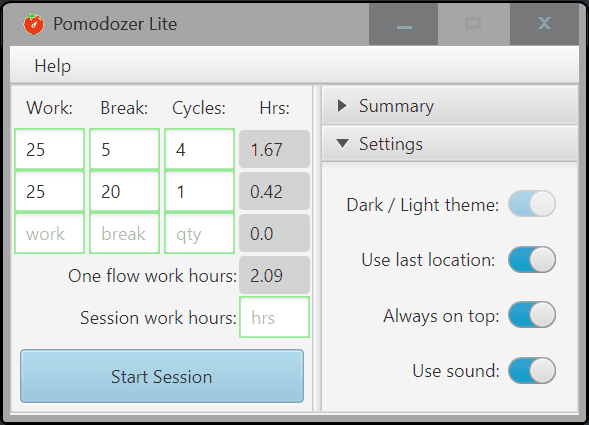
About this app
Pomodozer is a straightforward desktop application designed to implement the Pomodoro technique, helping users maintain productivity through structured work and break sessions. Available in both free (Lite) and premium (Plus) versions, it offers flexibility with customizable timing schemes, session tracking, and multi-device support without requiring an account. Developed by REMBASE.ORG, it's ideal for students, remote workers, and creatives seeking a distraction-free tool to enhance focus and manage time effectively. With features like statistics tracking and upcoming updates like a dark theme, Pomodozer delivers a reliable, secure, and user-friendly experience for anyone looking to improve their work habits.
Key features
- 1Customizable work-break intervals with multiple scheme support in Plus version
- 2Local desktop operation with no internet requirement or data collection
- 3Session tracking and statistics without mandatory account creation
Target customer profile
Drawn from the product itself, not from a survey.
Demographic
Students and academics
Pain points
Procrastination during study sessions, difficulty maintaining concentration for long periods
Primary needs
Structured timing method to break down study material into manageable chunks
Demographic
Remote workers and freelancers
Pain points
Self-discipline challenges when working alone, blurred lines between work and breaks
Primary needs
Customizable work intervals that adapt to different task types and energy levels
Demographic
Creative professionals
Pain points
Creative blocks, difficulty entering flow states consistently
Primary needs
Rhythmic work patterns that encourage deep focus without burnout
Scout Review
Written by AI from measured evidence, scored out of 100.
Pomodozer excels at its core function - providing a reliable, no-nonsense Pomodoro timer that helps users build better work habits without unnecessary complexity. The app's strength lies in its simplicity and performance, delivering exactly what it promises without the feature bloat that plagues many productivity tools. The tiered pricing model makes sense, with the free version offering substantial value and the premium upgrade providing meaningful enhancements for power users.
Measure by measure
Usability
90Extremely intuitive with zero learning curve - start being productive within seconds of installation
Design
70Clean minimalistic interface that prioritizes functionality over flashy aesthetics, though visual customization options are limited
Speed
90Lightning-fast performance as native desktop app with instant startup and no lag during timer operation
Security
80Inherently secure due to local operation with no data collection or internet dependencies
Accessibility
60Meets basic needs with large timer display but lacks screen reader support and advanced accessibility features
Growth
70Strong foundation with clear development roadmap, though mobile expansion would significantly increase reach
Improvement areas
- Limited visual customization and accessibility features
- No mobile version or cloud synchronization capabilities
- Basic alert system without advanced notification options
Design & Usability
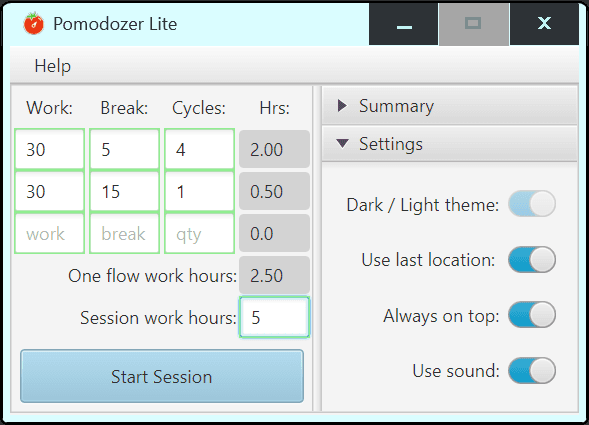
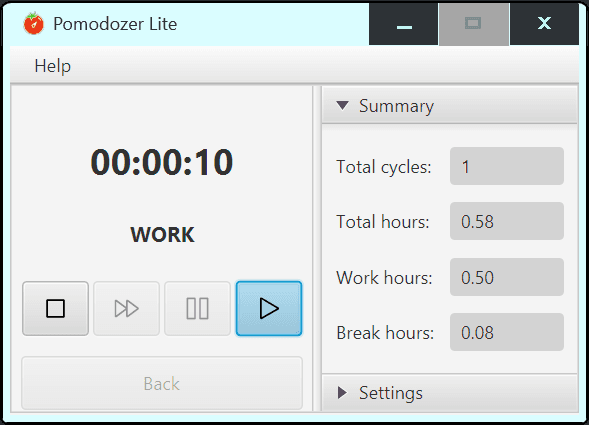
Pomodozer's design philosophy clearly prioritizes function over form, and it shows in the clean, distraction-free interface. The large timer display dominates the screen with clear, readable numbers that make checking your progress effortless. Navigation is straightforward with prominently placed start/pause buttons that require no explanation. While the minimalist aesthetic serves the app's purpose well, the visual experience feels somewhat utilitarian. The upcoming dark theme will address one of the most common user requests, but the overall design could benefit from more personality and customization options to make extended use more visually engaging.
Speed & Security
As a native desktop application, Pomodozer delivers exceptional performance that web-based alternatives simply can't match. The app launches instantly and the timer responds immediately to user inputs without any noticeable lag. Since it operates entirely locally without requiring internet connectivity, security concerns are minimal - there's no data transmission to external servers or account creation that could expose personal information. The application consumes negligible system resources, making it ideal for running alongside other productivity tools without impacting performance. This local-first approach ensures both speed and privacy, though it does limit some potential features like cloud synchronization.
Accessibility & Growth
Accessibility features in Pomodozer are functional but basic. The high-contrast text and large timer display make it usable for most people, but there's no mention of screen reader compatibility, keyboard navigation, or language options beyond English. The app would benefit significantly from customizable alert sounds, font size adjustments, and proper accessibility standards implementation. Growth potential appears solid with the developer actively working on Linux support and dark theme implementation. However, the lack of mobile versions and cloud synchronization capabilities limits its appeal in today's multi-device work environments. Expanding to mobile platforms and adding integration with popular productivity tools could significantly boost its market position.
Conclusion
If you're looking for a straightforward desktop Pomodoro timer that just works without demanding your attention, Pomodozer is an excellent choice. The free Lite version provides everything most users need to get started with the technique, while the $5 Plus upgrade offers valuable customization for those with variable daily rhythms. For students, remote workers, and anyone struggling with focus, this app delivers reliable performance without the distractions of more complex productivity systems.
Suggestions for improvement
- Develop mobile versions for iOS and Android to enable cross-device synchronization
- Add screen reader compatibility and keyboard navigation for better accessibility
- Implement multiple language support to reach international users
- Create integration options with popular task management applications
Alternatives comparison
Named competitors, point by point. Nobody paid to appear here or to be left out.
 Pomodozer Pomodozer |  Pomofocus.io Pomofocus.io |  Microsoft Store Pomodoro Timer Microsoft Store Pomodoro Timer | PowerPom - Pomodoro Timer | |
|---|---|---|---|---|
| Platform Availability | Windows, Linux (coming) | Web-based (any platform with browser) | Windows only | Windows only |
| Customization Options | Multiple custom schemes (Plus version) | Basic timing customization | Limited customization | Basic timing options |
| Internet Requirement | None (local desktop app) | Constant connection required | None after installation | None after installation |
Pomofocus.io
Web-based Pomodoro timer with similar functionality but requires constant internet connection and browser tab.
Microsoft Store Pomodoro Timer
Basic Windows store app with Pomodoro functionality but lacks the scheme customization and multi-device support of Pomodozer Plus.
PowerPom - Pomodoro Timer
Another Microsoft Store option with charming design but less flexibility in session customization compared to Pomodozer's offerings.
Comparing options? See Pomodozer alternatives, scored side by side
More Productivity apps
View all Productivity
Notion
92All-in-one AI workspace for docs, projects, and knowledge...

Qamarero
92An all-in-one hospitality software for restaurants and ba...

EmbedMyReviews
92White-label reputation management software for agencies s...

StoryPad
92Privacy-first open source journal app with a continuous t...

Puzzly – B2B Lead Generation & Sales Intelligence Platform
92Puzzly is an all-in-one B2B lead generation platform that...

The Stack Newsletter
92A weekly newsletter delivering curated tech jobs, intervi...

Vibe Coding Agent Skills
92A free, open-source platform offering 110 AI agent skills...

QRBliss
91Branded QR codes with AI Brand Sync, 15 free dynamic code...

Gerty
91Private, local AI assistant for Mac that runs offline

CC Switch
91Open-source desktop app for switching AI coding providers...

username.md
90One verified handle for your online identity, readable by...

PitchWhip
90AI cold call scripts & direct dials from LinkedIn


A platform dedicated to providing unbiased reviews of newly launched applications, analyzing everything from their features to their full potential.
info@scoutforge.net© 2026 Scoutforge. All rights reserved.
