Cycling through all six. Tap any point to stop.
Measured on six things
Check mouse, keyboard, display, webcam, microphone, audio and gamepad signals in your browser. Free, with no account or installation required.
Security
52HTTPS enforced, X-Content-Type-Options and Referrer-Policy set, SPF present. But no HSTS, no CSP, no frame protection, no Permissions-Policy, no DMARC — 5/12 checklist points. No audits published.
Screenshots
1 / 1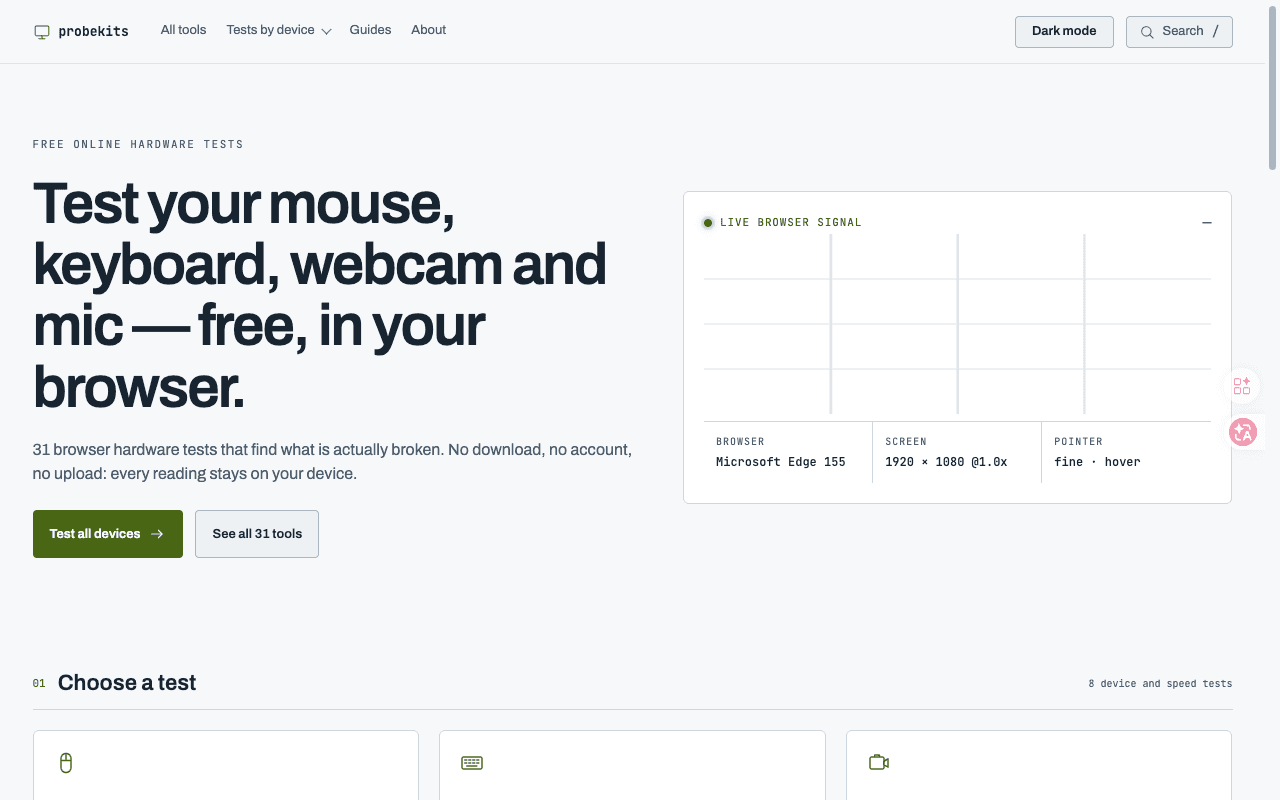
About this app
ProbeKits provides free browser-based checks for mouse, keyboard, display, webcam, microphone, audio and gamepad input. Use the tools without an account or installation. Camera and microphone checks require browser permission. Results describe signals the browser can observe; they are not repair advice, a warranty or proof that hardware is fault-free.
Key features
- 133 free browser-based hardware tests covering mouse, keyboard, webcam, mic, sound, screen and gamepad — no account or install required
- 283 troubleshooting guides mapped to specific tools, targeting long-tail queries like 'mouse double click test' and 'keyboard chatter test'
- 3Privacy-first model: no hardware stream, local recording or measured value is uploaded; bounded history stays in the browser
Target customer profile
Drawn from the product itself, not from a survey.
Scout Review
Written by AI from measured evidence, scored out of 100.
ProbeKits is a free, no-account browser hardware test suite — 33 tools covering mouse, keyboard, webcam, mic, sound, screen and gamepad, plus 83 troubleshooting guides. The homepage is well-structured, the onboarding is essentially nonexistent in the best way, and the privacy stance (nothing uploaded, everything stays local) is clearly stated. Desktop performance is perfect; mobile LCP of 4.5s is the main speed drag. Security headers are thin — 5/12 checklist points, no HSTS, no CSP, no DMARC, no published audits — though the no-upload data model is a genuine strength. Accessibility scores 100/100 on automated checks. The idea is sound and the execution is competent; the missing pieces are hardening, a conformance statement, and anything that makes the toolset hard to clone.
Measure by measure
Usability
74No account, no install, no setup flow — open a tool page and it runs. 83 guides map directly to specific tools, and the nav groups tests by device with search. FAQ accordion lacks an open-state cue.
Design
71Clean 3x3 test grid, numbered sections (01-05) and a live signal graph in the hero give the homepage real structure. The specialised diagnostics list and cramped guide cards drag it below the top of the band.
Speed
68Lighthouse desktop 100/100, mobile 75/100 with LCP 4.5s and TBT 162ms. CLS is a clean 0. Mobile LCP is the weak spot — nearly 2x the 2.5s good threshold.
Security
52HTTPS enforced, X-Content-Type-Options and Referrer-Policy set, SPF present. But no HSTS, no CSP, no frame protection, no Permissions-Policy, no DMARC — 5/12 checklist points. No audits published.
Accessibility
78Lighthouse accessibility 100/100 on automated axe-core checks, plus a light/dark toggle and documented mobile coverage for camera, mic, sound and display tests. No WCAG statement or multi-language support found.
Growth
58A real, recurring problem — 'is my hardware broken or is it the driver?' — solved free in-browser with no install. The 83 guides are a genuine SEO wedge. But the category is crowded and nothing here is defensible.
Improvement areas
- Security headers are thin — 5/12 checklist points, with no HSTS, CSP, frame protection, Permissions-Policy or DMARC
- Mobile Lighthouse performance is 75/100 with a 4.5s LCP, nearly double the 2.5s 'good' threshold
- No WCAG conformance statement, multi-language support, or published security audit to back the strong privacy claims
Design & Usability
ProbeKits' homepage is a competent piece of work: a 3x3 grid of test cards with green icons and one-line descriptions, numbered sections 01-05 that make the page scannable in a glance, and a live browser signal graph in the hero that shows the product working before you click anything. The nav groups tools by device and includes search and a dark mode toggle. Usability is where it earns its keep — there is no account, no installer, no setup flow. The site's own copy says 'opening a tool page is the whole setup', and the flow backs that up: camera and mic permissions are requested only after a deliberate start action. The /guides page lists 83 guides, each mapped to specific tools ('Mouse double click test', 'Keyboard chatter test'), which is unusually thorough for a free utility. The weak spots are the specialised diagnostics section, which collapses into a dense two-column plain-text list with no card separation or hover states, and the guide cards, whose small text and tight padding make titles harder to read than the main test cards. The footer FAQ accordion also lacks a visible open state.
Speed & Security
Speed is split cleanly by device. Lighthouse desktop scores a perfect 100/100. Mobile scores 75/100 with an LCP of 4.5s, FCP 2.7s and TBT 162ms — CLS is a clean 0, so nothing jumps, but the largest element takes nearly twice the 2.5s 'good' threshold to paint on a phone. For a tool people reach for when something feels broken, a 4.5s mobile wait is a real friction point. Security is the softer dimension. HTTPS is enforced, X-Content-Type-Options and Referrer-Policy are set, and SPF is present. But the probe found no HSTS, no CSP, no frame protection, no Permissions-Policy and no DMARC — 5 of 12 checklist points. No SOC 2, ISO, pen-test or bug bounty signals appear anywhere. The privacy posture is genuinely strong on paper: the site states no hardware stream, local recording or measured value is uploaded, and bounded history stays in the browser. That claim is the product's best security asset, and it deserves headers that match it.
Accessibility & Growth
Accessibility is the strongest measured dimension: Lighthouse scores 100/100 on automated axe-core checks, the site ships a light/dark mode toggle, and the FAQ documents which tests work on supported mobile browsers versus which state desktop input is required. What's missing is the human layer — no WCAG conformance statement, no multi-language support, and automated checks only cover part of WCAG. On growth: the problem is real and recurring. 'Is my mouse double-clicking or is it the driver?' is a question millions of people ask, and ProbeKits answers it free, in-browser, with no install and no account. The 83 guides are a legitimate SEO wedge — they target long-tail queries like 'mouse scroll direction reversed' and route readers back to a tool. The honest limit is defensibility: browser hardware testing is a crowded, low-moat category, the tools are trivially copyable, and the domain is only 0.1 years old. The wedge is real; the moat is not yet.
Conclusion
ProbeKits does the unglamorous thing well: it answers 'is my hardware actually broken?' without asking for an email, an installer or a credit card. That alone puts it ahead of most of the category. What it needs next is the boring stuff — HSTS, a CSP, a DMARC record, a WCAG statement, and a mobile LCP under 2.5s. None of those are exciting, and all of them are the difference between a useful free tool and one you'd recommend to someone who isn't already a power user. The 83 guides show the team understands the search intent behind the problem; the headers show they haven't yet treated the site itself with the same care. Fix the plumbing and this becomes genuinely easy to recommend.
Suggestions for improvement
- Add HSTS, a Content-Security-Policy, X-Frame-Options and a Permissions-Policy header — the probe found none of them.
- Publish a DMARC record; SPF alone leaves the domain open to spoofing.
- Cut mobile LCP from 4.5s toward the 2.5s threshold — preload the hero signal graph and defer non-critical JS.
- Add a WCAG 2.2 conformance statement and a keyboard-navigation note to back up the 100/100 automated score.
Alternatives comparison
Named competitors, point by point. Nobody paid to appear here or to be left out.
 ProbeKits ProbeKits |  | ||
|---|---|---|---|
| Pricing model | Free — all 33 tests and 83 guides, no account required | Not specified in provided data | Not specified in provided data |
| Account / installation required | No account, no download, no installer — runs in the browser tab | Not specified in provided data | Not specified in provided data |
| Hardware coverage | Mouse, keyboard, webcam, mic, sound, screen, gamepad plus specialised diagnostics | Not specified in provided data | Not specified in provided data |
| Data privacy / upload policy | No streams, recordings or measured values uploaded; history stays local | Not specified in provided data | Not specified in provided data |
| Documentation / guides | 83 guides mapped to specific tools, plus a 'how these measurements work' explainer | Not specified in provided data | Not specified in provided data |
Comparing options? See ProbeKits alternatives, scored side by side
More Productivity apps
View all Productivity
StoryPad
92Privacy-first open source journal app with a continuous t...

Puzzly – B2B Lead Generation & Sales Intelligence Platform
92Puzzly is an all-in-one B2B lead generation platform that...

Qamarero
92An all-in-one hospitality software for restaurants and ba...

Notion
92All-in-one AI workspace for docs, projects, and knowledge...

EmbedMyReviews
92White-label reputation management software for agencies s...

The Stack Newsletter
92A weekly newsletter delivering curated tech jobs, intervi...

Vibe Coding Agent Skills
92A free, open-source platform offering 110 AI agent skills...

CC Switch
91Open-source desktop app for switching AI coding providers...

username.md
90One verified handle for your online identity, readable by...

What the GIF
89Frame-perfect video-to-GIF maker that runs entirely in yo...

AuditCloser
89White-label website audits that close deals for digital a...

NudgeWin
89Automated quote follow-up for trades and service businesses.


A platform dedicated to providing unbiased reviews of newly launched applications, analyzing everything from their features to their full potential.
info@scoutforge.net© 2026 Scoutforge. All rights reserved.
