Cycling through all six. Tap any point to stop.
Measured on six things
Focused Markdown writing on web, Chrome, and Mac.
Security
41HTTPS enforced but only 2/12 security checklist points: no HSTS, CSP, frame protection, SPF, or DMARC. No SOC 2, ISO, or bug bounty claims found.
Screenshots
1 / 2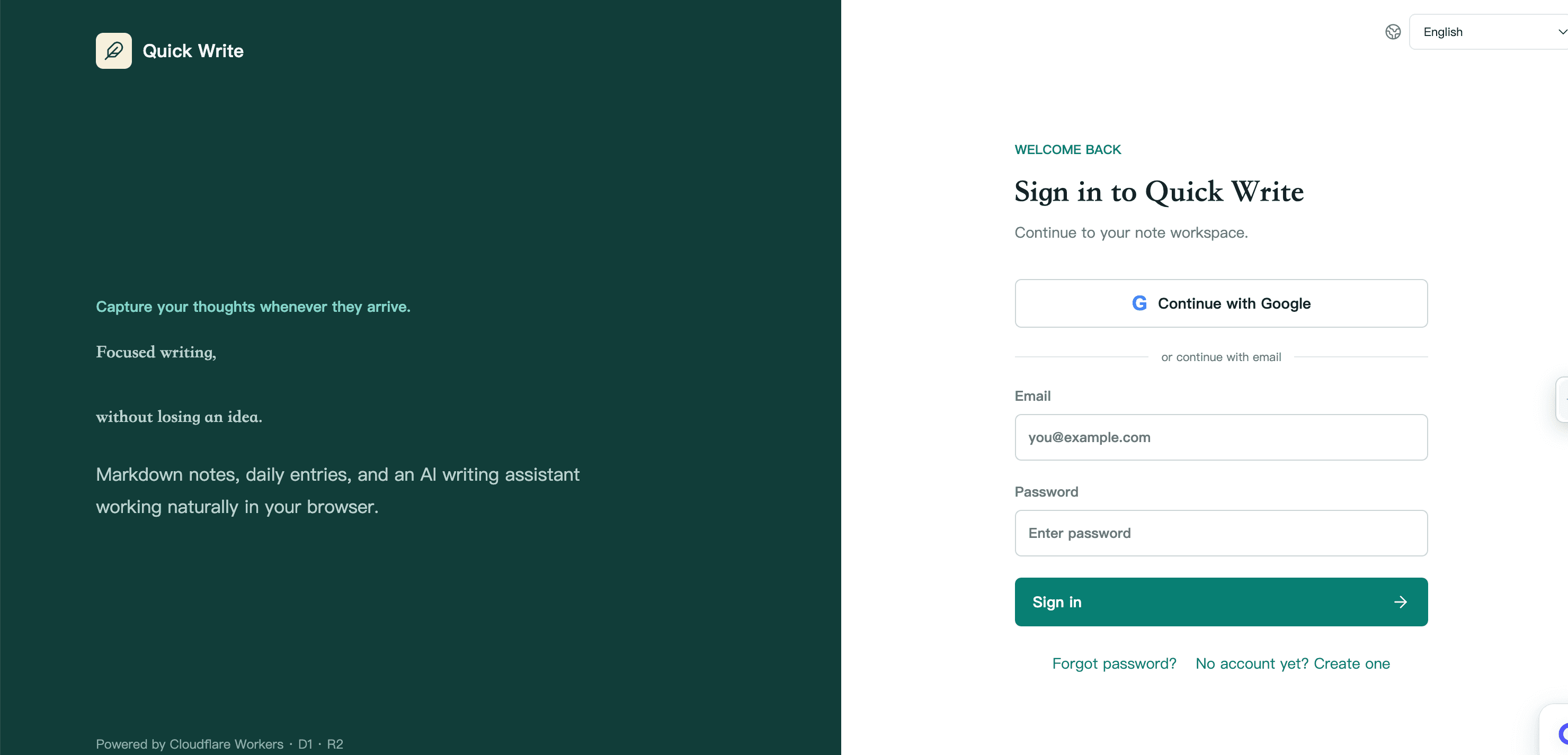
About this app
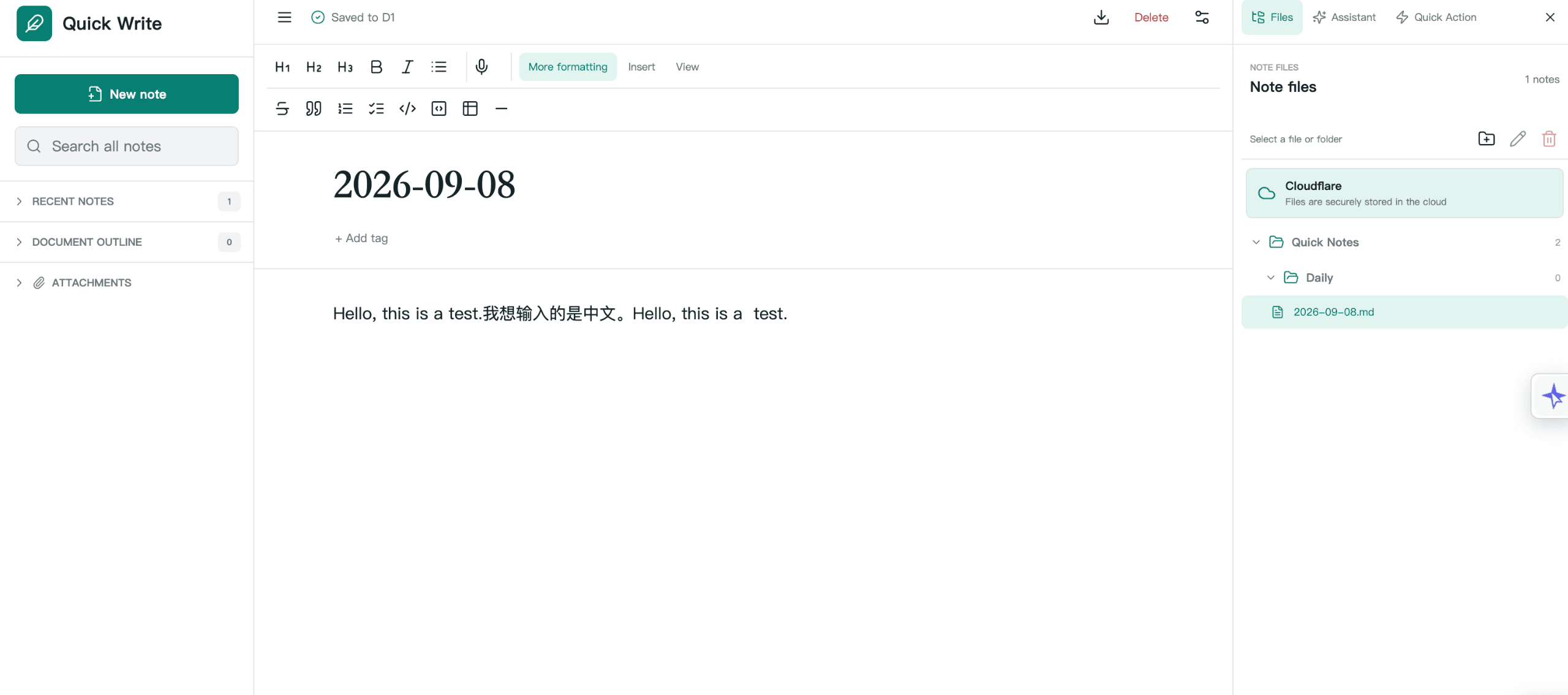
Quick Write is a minimalist Markdown editor that helps you write without distractions. Available as a web app, Chrome extension, and Mac application, it syncs seamlessly across devices so you can write anywhere. Capture notes, draft articles, or jot down ideas with a clean, focused interface. The Chrome extension lets you save web content directly as Markdown, while the Mac app works with local files. Perfect for writers, developers, and anyone who loves Markdown. Quick Write strips away clutter and lets you focus on what matters: your words.
Key features
- 1Local-first Markdown editor with Vault file explorer, autosave, conflict detection, and guided recovery.
- 2Chrome extension (v0.5.0) for capturing page title, URL, and selection as Markdown with QuickActions.
- 3Optional AI for voice-to-text, summarization, rewriting, and note chats with approval before writes.
Target customer profile
Drawn from the product itself, not from a survey.
Demographic
Writers and bloggers
Pain points
Distractions in complex writing apps, loss of formatting when copying from web.
Primary needs
A clean, focused writing environment that supports Markdown and easy publishing.
Demographic
Developers and technical writers
Pain points
Writing documentation in plain text editors feels clunky; need for Markdown preview.
Primary needs
A lightweight Markdown editor that integrates with their workflow and supports code snippets.
Demographic
Students and researchers
Pain points
Taking notes from online sources is messy; switching between apps breaks focus.
Primary needs
A tool to quickly capture web content as Markdown and organize notes across devices.
Scout Review
Written by AI from measured evidence, scored out of 100.
Quick Write is a minimalist Markdown editor with three surfaces: a web app, a Chrome extension, and a Mac app. It captures web content as Markdown, stores notes in local files you authorize, and offers optional AI for summarization, rewriting, and voice-to-text. The design is clean and consistent, speed is excellent (Lighthouse 94 mobile / 98 desktop), and accessibility scores 96/100 on automated checks. Security is the weak point: only 2/12 checklist items pass, with no HSTS, CSP, SPF, or DMARC, and no compliance certifications. Usability is solid but lacks public documentation. Growth potential is real but unproven — the local-first Markdown capture wedge is specific, but the product is very early and the Mac app is Apple-silicon-only. It's a competent tool with a clear focus, held back by a thin security posture and missing docs.
Measure by measure
Usability
64Three surfaces (web, Chrome, Mac) with clear feature lists and Google SSO first. No public docs or help center linked, and onboarding depth is unclear from the homepage alone.
Design
71Clean, disciplined app UI with consistent teal accent and clear three-pane layout. Hero 3D render clashes with the flat product aesthetic, and repeated card grids feel monotonous.
Speed
82Lighthouse mobile 94/100 (LCP 3.0s, CLS 0, TBT 33ms) and desktop 98/100. Lightweight marketing site with no heavy SPA overhead; no user complaints about lag found.
Security
41HTTPS enforced but only 2/12 security checklist points: no HSTS, CSP, frame protection, SPF, or DMARC. No SOC 2, ISO, or bug bounty claims found.
Accessibility
78Lighthouse accessibility 96/100 with one failing audit for insufficient color contrast. No WCAG statement or a11y docs found; language selector present but multi-language content unverified.
Growth
58Real problem (browser-to-vault Markdown capture) with a specific wedge: local-first files plus optional AI. Early stage (domain registered 2026) but the category has room.
Improvement areas
- Security headers are nearly absent (2/12 checklist points): no HSTS, CSP, frame protection, SPF, or DMARC.
- No public documentation, help center, or onboarding walkthrough linked from the homepage.
- Mac app is Apple-silicon-only (v0.2.0); no Intel/Universal build or clear compatibility notice.
Design & Usability
Quick Write's design is its strongest suit: the app UI is disciplined, the teal accent is consistent across marketing and product, and the three-pane editor layout is immediately legible. The homepage, however, leans on a 3D hero render that feels like it belongs to a different product, and the repeated card grids get monotonous fast. Usability is competent but incomplete: Google SSO is front and center, the three surfaces are clearly differentiated, and autosave/conflict recovery are listed. But there's no public documentation, no help center, and no onboarding walkthrough linked from the homepage. For a tool aimed at writers and developers, that's a gap. The product works, but the path from 'interested' to 'productive' is left to the user to figure out.
Speed & Security
Speed is a genuine strength. Lighthouse mobile performance sits at 94/100 with an LCP of 3.0s, CLS of 0, and TBT of 33ms; desktop hits 98/100. The marketing site is lightweight and snappy, and no user complaints about lag surfaced. Security is the weak spot. HTTPS is enforced, but the HTTP probe found only 2 of 12 checklist items: no HSTS, no CSP, no frame protection, no X-Content-Type-Options, no Referrer-Policy, no Permissions-Policy, no SPF, and no DMARC. There's no SOC 2, ISO 27001, pen-test report, or bug bounty mentioned anywhere. For a tool that handles local files and optional AI processing, that's a thin security posture. It's not broken, but it's not reassuring either.
Accessibility & Growth
Accessibility scores well on automated checks: Lighthouse gives 96/100, with the only failing audit being insufficient color contrast. That's a real, fixable issue. Beyond the automated score, there's no accessibility statement, no WCAG conformance claim, and no evidence of screen-reader testing or keyboard-navigation documentation. The language selector in the nav suggests multi-language intent, but no translated content was verified. Growth is a judgment call: the problem Quick Write names — capturing web content as Markdown and keeping it in local files — is real and underserved. The wedge is local-first storage plus optional AI, which differentiates it from Typora (no capture), Ulysses (subscription, no local files), and Markdown Here (email-only). But the product is very early (domain registered 2026), the Mac app is Apple-silicon-only, and there's no evidence of a moat beyond execution. The category has room, but Quick Write hasn't yet shown why it wins.
Conclusion
Quick Write gets the hard part right: it's fast, focused, and doesn't get in the way of writing. The three-surface approach (web, Chrome, Mac) is coherent, and the local-first storage model will appeal to anyone who's been burned by cloud-only note apps. But the security checklist is nearly empty, there's no public documentation, and the Mac app only runs on Apple silicon. For a tool that wants to be your writing home, those gaps matter. If you're a writer or developer who lives in Markdown and wants a lightweight capture-to-vault workflow, Quick Write is worth a look — just don't expect enterprise-grade compliance or a help center to bail you out. It's a promising early-stage tool that needs to mature on security and docs before it can compete with the Typoras and Ulysses of the world.
Suggestions for improvement
- Publish a security page with HSTS, CSP, and DMARC configured; add a bug bounty or responsible disclosure policy.
- Create a public docs/help center covering onboarding, Vault setup, AI privacy, and troubleshooting.
- Add an accessibility statement and fix the color contrast issue flagged by Lighthouse.
- Ship an Intel/Universal Mac build or clarify the Apple-silicon-only limitation on the download page.
Alternatives comparison
Named competitors, point by point. Nobody paid to appear here or to be left out.
 Quick Write Quick Write |  Typora Typora |  Ulysses Ulysses |  Markdown Here Markdown Here | |
|---|---|---|---|---|
| Platform availability | Web app, Chrome extension, Mac app (Apple silicon only) | Windows, Mac, Linux desktop apps | Mac, iPad, iPhone | Chrome extension (email formatting only) |
| Local file storage | Yes — Chrome and Mac write to authorized local Vault | Yes — opens and saves local Markdown files | No — library-based storage with export | No — renders in email compose window |
| Web content capture | Yes — Chrome extension captures title, URL, selection as Markdown | No — desktop editor only | No — writing app, not a capture tool | No — formats email, does not capture pages |
| AI assistance | Optional AI: voice-to-text, summarize, rewrite, note chats | No built-in AI | No built-in AI | No AI features |
| Pricing model | Not publicly listed on homepage; likely freemium with AI tier | One-time purchase (~$14.99) | Subscription (~$5.99/month or $49.99/year) | Free open-source extension |
Typora
A seamless Markdown editor with live preview and extensive customization options. It offers a distraction-free writing experience on Windows, Mac, and Linux.
Ulysses
A powerful writing app for Mac, iPad, and iPhone that supports Markdown and offers advanced organization features. Ideal for long-form writing and publishing.
Markdown Here
A Chrome extension that allows you to write emails in Markdown and render them before sending. It's not a full editor but useful for quick formatting.
Comparing options? See Quick Write alternatives, scored side by side
More Productivity apps
View all Productivity
Qamarero
92An all-in-one hospitality software for restaurants and ba...

The Stack Newsletter
92A weekly newsletter delivering curated tech jobs, intervi...

EmbedMyReviews
92White-label reputation management software for agencies s...

StoryPad
92Privacy-first open source journal app with a continuous t...

Puzzly – B2B Lead Generation & Sales Intelligence Platform
92Puzzly is an all-in-one B2B lead generation platform that...

Notion
92All-in-one AI workspace for docs, projects, and knowledge...

Vibe Coding Agent Skills
92A free, open-source platform offering 110 AI agent skills...

CC Switch
91Open-source desktop app for switching AI coding providers...

username.md
90One verified handle for your online identity, readable by...

What the GIF
89Frame-perfect video-to-GIF maker that runs entirely in yo...

AuditCloser
89White-label website audits that close deals for digital a...

NudgeWin
89Automated quote follow-up for trades and service businesses.


A platform dedicated to providing unbiased reviews of newly launched applications, analyzing everything from their features to their full potential.
info@scoutforge.net© 2026 Scoutforge. All rights reserved.
