Cycling through all six. Tap any point to stop.
Measured on six things
Pay-per-page online faxing without subscriptions or accou...
Security
52HTTPS enforced with HSTS, SPF and DMARC in place, and the site claims 256-bit AES at rest, TLS 1.2 in transit, and auto-deletion after delivery. But the header probe scores 6/12: no CSP, no frame protection, no X-Content-Type-Options, no Referrer-Policy. No SOC 2, ISO, or pen-test report published.
Screenshots
1 / 3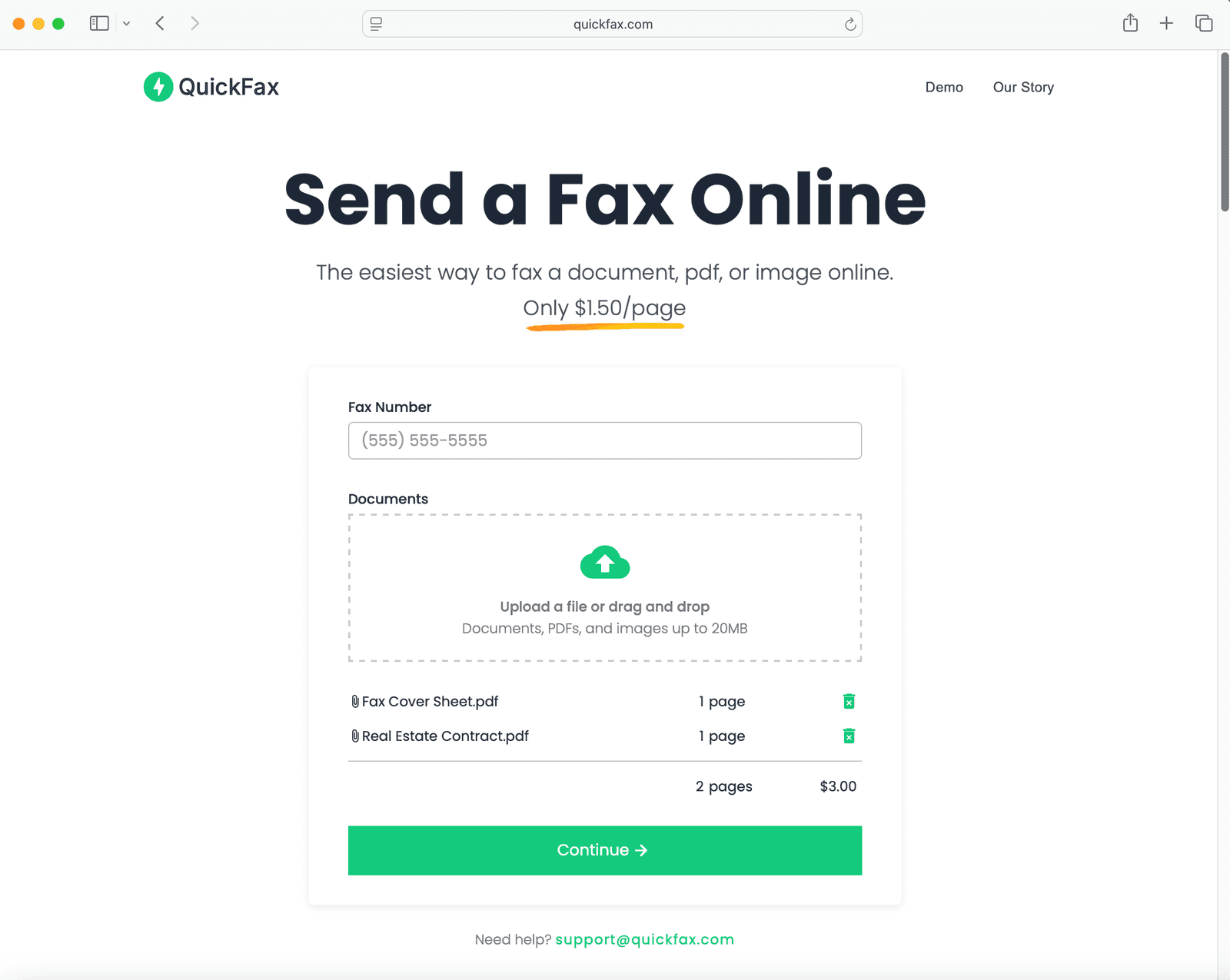
About this app
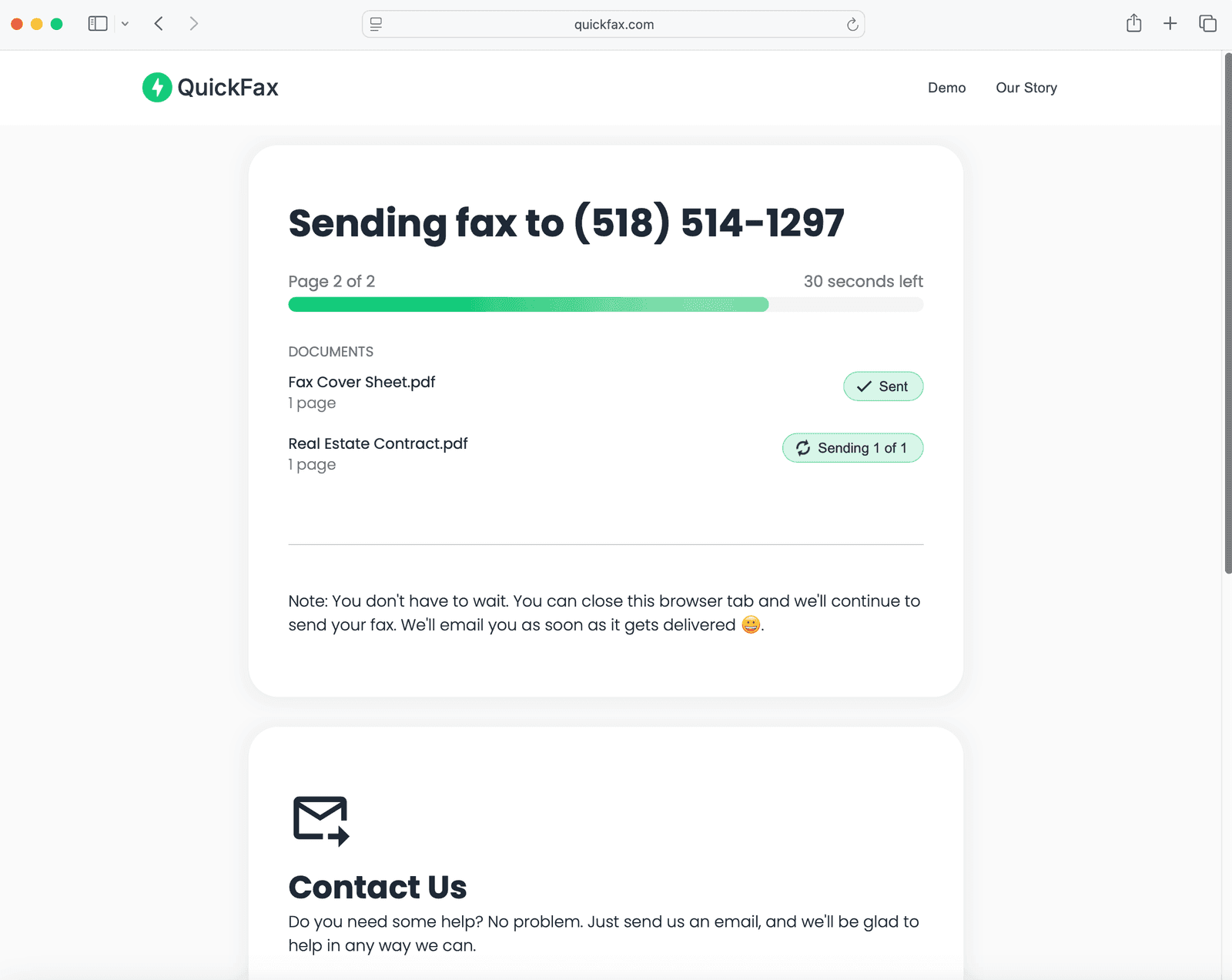
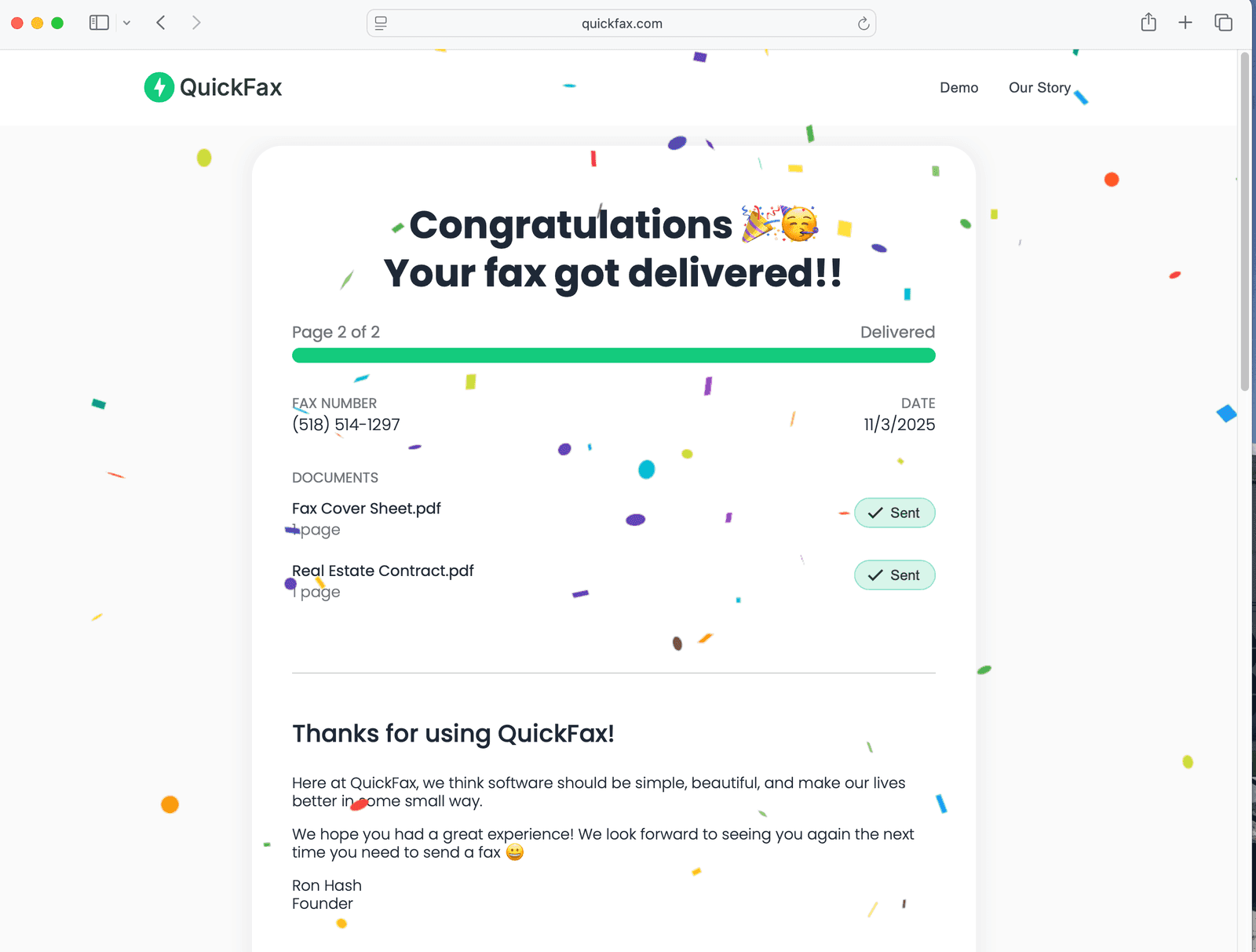
QuickFax is a no-frills online fax service that lets you send a PDF, document, or image directly from your browser for just $1.50 per page. Unlike traditional fax services that require account creation, monthly subscriptions, or free trials, QuickFax keeps things simple: upload your file, enter the recipient's fax number, pay, and send. It works on any device—computer, iPhone, Android, or tablet—and even lets you snap a photo of a document to fax it. You get instant delivery confirmation via email and can track your fax's status in real time. Security is solid: files are encrypted with 256-bit AES, transmitted via TLS 1.2, and automatically deleted after delivery. Founded by Ron Hash, QuickFax was built out of frustration with the hassle of other fax services, and it shows—the whole process takes minutes. It's ideal for occasional faxers who need to send documents to the IRS, SSA, legal offices, medical providers, or government agencies without committing to a monthly plan.
Key features
- 1Pay-per-page faxing at $1.50 with no account, no subscription, and no free trial required.
- 2Browser-based on any device — desktop, iPhone, Android, tablet — with camera capture to fax a photo of a document.
- 3Supports .pdf, .doc, .docx, .jpg, .png, .tiff, and .heic up to 20MB, with an optional cover sheet.
- 4Live fax status page plus an emailed delivery confirmation when the fax lands.
- 5Claims 256-bit AES encryption at upload, TLS 1.2 in transit, and automatic deletion after delivery.
Target customer profile
Drawn from the product itself, not from a survey.
Demographic
Occasional individual users (e.g., sending legal, medical, or government documents)
Pain points
Rarely need to fax but face subscription requirements and account setup
Primary needs
Quick, one-time fax without recurring costs or sign-up
Demographic
Small business owners and freelancers
Pain points
Limited fax needs but high subscription fees for traditional services
Primary needs
Affordable pay-per-use faxing with delivery confirmation
Demographic
Seniors or non-tech-savvy individuals
Pain points
Complicated online fax interfaces and lack of mobile support
Primary needs
Simple, browser-based faxing from any device
Scout Review
Written by AI from measured evidence, scored out of 100.
QuickFax is a narrow tool that does its narrow job well. The flow is the product — fax number, upload, cover sheet, pay $1.50, get an email confirmation — and there is no account wall, no trial, no subscription trap anywhere in it. The landing page reflects that discipline: form above the fold, price stated immediately, FAQ answering the four questions an occasional faxer actually has. Where it thins out is the layer around the transaction. Support is a single email address. The testimonials are first-name-and-state with a Trustpilot logo that carries no score. The security headers score 6/12 with no CSP or frame protection, and the security story rests on claims rather than audits. Accessibility is 93/100 with a contrast failure that specifically disadvantages the older users the product is pitched at. None of these are disqualifying for a $1.50 fax. All of them are the difference between a service you use once in an emergency and one you'd recommend without a caveat.
Measure by measure
Usability
71The flow is genuinely the product: enter number, drop file, add cover sheet, pay. No account wall, formats and 20MB limit documented on-page, and the FAQ answers the four questions an occasional faxer actually has. Support is one email address and nothing else.
Design
63Clean, single-purpose landing page that puts the fax number field and upload zone above the fold — correct prioritization for a transactional tool. Material Icons and text-only testimonials keep it feeling like a competent indie build rather than a polished brand.
Speed
72Lighthouse mobile 89/100 (LCP 1.5s, CLS 0.005) and desktop 98/100. The only real drag is 319ms of total blocking time on mobile — everything else is fast and visually stable, which is what you want from a page whose whole job is getting you to an upload button.
Security
52HTTPS enforced with HSTS, SPF and DMARC in place, and the site claims 256-bit AES at rest, TLS 1.2 in transit, and auto-deletion after delivery. But the header probe scores 6/12: no CSP, no frame protection, no X-Content-Type-Options, no Referrer-Policy. No SOC 2, ISO, or pen-test report published.
Accessibility
68Lighthouse accessibility 93/100, with three real failures: insufficient color contrast, headings out of sequential order, and no main landmark. No accessibility statement or WCAG claim anywhere on the site. Solid automated baseline, but the contrast failure hits exactly the older, less tech-savvy users this product targets.
Growth
58A real, specific wedge: $1.50/page, no account, no subscription, for the occasional IRS/SSA/legal faxer. eFax sells subscriptions and FaxZero sells ads and page limits — QuickFax sits in the gap. Ceiling is the shrinking fax category itself.
Improvement areas
- Security headers score 6/12 — no CSP, frame protection, X-Content-Type-Options, Referrer-Policy, or Permissions-Policy.
- Lighthouse contrast failure directly undercuts the stated senior/non-tech-savvy target audience.
- Trust signals are unverifiable: first-name-only testimonials and a Trustpilot logo with no score or count.
- Support is a single email address with no chat, help center, or documented response time.
Design & Usability
QuickFax's homepage does the one thing a transactional tool must do: it puts the fax number field and the upload zone above the fold, with the $1.50/page price stated in the same breath. There is no hero video, no feature grid, no 'trusted by' logo wall — just the form, a cover-sheet toggle, and a Continue button. That restraint is the design. The weak spots are the trust layer: testimonials are first-name-and-state only, and a Trustpilot wordmark appears with no score, count, or widget attached, which reads as decoration rather than proof. Usability is where the product actually earns its keep. No account, no login, no trial — enter a number, drop a file, pay, done. Accepted formats (.pdf, .doc, .docx, .jpg, .png, .tiff, .heic) and the 20MB cap are documented on-page, and the FAQ covers delivery confirmation, mobile use, and desktop use. The gap is support: one email address, no chat, no help center, no phone. For a $1.50 transaction that's probably fine; for a fax to the IRS the night before a deadline, it's thin.
Speed & Security
Speed is a genuine strength. Lighthouse mobile lands at 89/100 with an LCP of 1.5s and a CLS of 0.005 — the page is visually stable and paints fast, which matters because the whole conversion is 'get to the upload button.' Desktop scores 98/100. The one blemish is 319ms of total blocking time on mobile, which is odd for a page this simple but not enough to hurt the experience. Security is the weaker half. The good news: HTTPS is enforced, HSTS is on, and both SPF and DMARC are configured, so email spoofing of the domain is at least partially defended. The site claims 256-bit AES encryption at upload, enforced TLS 1.2 in transit, and automatic deletion after delivery — all reasonable and all unverifiable from outside. The bad news: the header probe scores 6/12. No Content-Security-Policy, no X-Frame-Options or frame-ancestors, no X-Content-Type-Options, no Referrer-Policy, no Permissions-Policy. For a service that handles legal, medical, and government documents, that's a thin defensive posture. There is also no SOC 2, no ISO 27001, no published pen-test, and no bug bounty — none of which is unusual for a small operator, but all of which means the security claims rest entirely on the founder's word.
Accessibility & Growth
Accessibility scores 93/100 on Lighthouse, which sounds better than it is. Three audits fail: insufficient color contrast between background and foreground, heading elements that don't descend sequentially, and a missing main landmark. The heading and landmark issues are cheap fixes. The contrast failure is the one that stings, because QuickFax explicitly targets 'seniors or non-tech-savvy individuals' — the exact population least served by low-contrast text. There's no accessibility statement and no WCAG conformance claim, so there's no stated commitment to fix it either. Growth is a judgment about the idea, not the traction. The idea is genuinely well-positioned: $1.50 per page, no account, no subscription, aimed at the occasional faxer sending to the IRS, SSA, legal offices, or medical providers. The two named alternatives define the gap precisely — eFax sells monthly subscriptions, FaxZero is free but ad-supported and page-limited. QuickFax sits between them on price and friction, and that's a real, defensible slot. The honest limit is the category: faxing is a shrinking need, sustained mainly by government and medical paperwork that hasn't digitized. That's a durable niche, not a growing one. The domain dates to 1995, which is context about the brand's history, not evidence of momentum — and 'trusted by thousands' appears on the page with no review count behind it.
Conclusion
The honest read: QuickFax solved the problem it set out to solve, and solved it more cleanly than either named competitor. If you need to fax one document to the IRS this quarter, this is the least annoying way to do it, and $1.50 is a fair price for not driving to Office Depot. The question is whether the surrounding product matures to match the core flow. Publish a real Trustpilot score instead of a logo. Fix the contrast. Add the four missing security headers — they're an afternoon of work. Publish a plain-language page explaining exactly what happens to a file after delivery, because 'we delete it' is a claim and a documented retention policy is a commitment. Do that and QuickFax stops being a clever one-off and starts being the default answer to 'how do I fax this.' The foundation is there. The finishing work isn't.
Suggestions for improvement
- Add the missing security headers — CSP, X-Frame-Options/frame-ancestors, X-Content-Type-Options, Referrer-Policy, Permissions-Policy — to move from 6/12 to a defensible posture.
- Fix the Lighthouse contrast failure; the product explicitly targets seniors, so low-contrast text undercuts the stated audience.
- Replace the bare Trustpilot wordmark with a live widget showing the actual score and review count, or remove it.
- Publish a short data-retention page stating exactly when and how uploaded files are deleted, with a timestamp policy.
Alternatives comparison
Named competitors, point by point. Nobody paid to appear here or to be left out.
 QuickFax | eFax |  FaxZero | |
|---|---|---|---|
| Pricing model | $1.50 per page, pay-as-you-go, no subscription | Monthly subscription plans | Free with ads, page limits per fax |
| Account required | No account, no login | Yes, account and plan required | Email address required per fax |
| Mobile support | Mobile browser, camera capture to fax a photo | Dedicated iOS and Android apps | Web-based, mobile browser |
| Delivery confirmation | Live status page plus emailed confirmation | Yes, included with subscription | Email confirmation on free tier |
| File types accepted | PDF, DOC, DOCX, JPG, PNG, TIFF, HEIC up to 20MB | Broad document and image support | PDF, DOC, and image uploads |
| Published security certifications | None published; claims AES-256 and TLS 1.2 | Enterprise compliance program advertised | Not prominently published |
eFax
A popular online fax service with monthly plans and a mobile app, but requires a subscription.
FaxZero
Free fax service with ads and limits on pages, but no pay-per-page option.
Comparing options? See QuickFax alternatives, scored side by side
More Productivity apps
View all Productivity
Notion
92All-in-one AI workspace for docs, projects, and knowledge...

Qamarero
92An all-in-one hospitality software for restaurants and ba...

EmbedMyReviews
92White-label reputation management software for agencies s...

StoryPad
92Privacy-first open source journal app with a continuous t...

Puzzly – B2B Lead Generation & Sales Intelligence Platform
92Puzzly is an all-in-one B2B lead generation platform that...

The Stack Newsletter
92A weekly newsletter delivering curated tech jobs, intervi...

Vibe Coding Agent Skills
92A free, open-source platform offering 110 AI agent skills...

QRBliss
91Branded QR codes with AI Brand Sync, 15 free dynamic code...

Gerty
91Private, local AI assistant for Mac that runs offline

CC Switch
91Open-source desktop app for switching AI coding providers...

username.md
90One verified handle for your online identity, readable by...

PitchWhip
90AI cold call scripts & direct dials from LinkedIn


A platform dedicated to providing unbiased reviews of newly launched applications, analyzing everything from their features to their full potential.
info@scoutforge.net© 2026 Scoutforge. All rights reserved.
